
DOWNLOAD THE APP


Customer Services
Copyright © 2025 Desertcart Holdings Limited
DOWNLOAD THE APP

🚀 Elevate your game and workspace with NexiGo’s powerhouse portable display!
The NexiGo 17.3" Portable Gaming Monitor combines a vibrant 1080p IPS panel with a blazing 144Hz refresh rate and 4ms response time, delivering smooth, tear-free visuals via FreeSync and G-SYNC compatibility. Its full-sized HDMI and USB-C ports ensure broad device compatibility, while the slim, lightweight design with eye-care technology and smart cover makes it the ultimate on-the-go display for gamers and professionals alike.

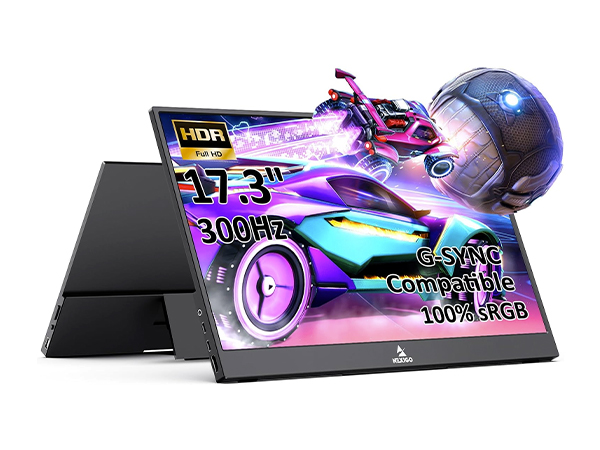


| ASIN | B08GPMZPYV |
| Adaptive Sync | G-Sync Compatible |
| Additional Features | Built-in Dual Speakers |
| Aspect Ratio | 16:9 |
| Best Sellers Rank | #104,060 in Electronics ( See Top 100 in Electronics ) #2,138 in Computer Monitors |
| Brand | NexiGo |
| Brightness | 350cd/m² |
| Built-In Media | 1 x HDMI Port, 1 x USB Type-C Port, Smart Cover |
| Color | 144Hz |
| Compatible Devices | Laptop, PC, Macs, Cameras, PlayStation 5, Switch, Xbox, Apple, Android |
| Connectivity Technology | HDMI, USB |
| Contrast Ratio | 1,000:1 |
| Customer Reviews | 4.2 out of 5 stars 187 Reviews |
| Display Resolution Maximum | 1920 x 1080 |
| Display Technology | LCD |
| Display Type | IPS |
| Hardware Connectivity | HDMI, USB |
| Has Color Screen | Yes |
| Image Contrast Ratio | 1,000:1 |
| Is Electric | No |
| Item Dimensions D x W x H | 9.25"D x 15.74"W x 0.39"H |
| Manufacturer | NexiGo |
| Model Name | NG17FG |
| Model Number | NexiGo-Portable M-WCS144-173-2 |
| Mounting Type | Desk Mount |
| Native Resolution | 1920x1080 |
| Number of Component Outputs | 1 |
| Picture Quality Enhancement Technology | Flicker-free Technology |
| Refresh Rate | 144 Hz |
| Resolution | FHD 1080p |
| Response Time | 4 Milliseconds |
| Screen Finish | Glossy |
| Screen Size | 17.3 Inches |
| Screen Surface Description | Glossy |
| Shape | Rectangular |
| Specific Uses For Product | Gaming |
| Total Number of HDMI Ports | 1 |
| Total USB 3.0 Ports | 1 |
| Total Usb Ports | 1 |
| UPC | 766214628279 |
| Viewing Angle | 85 Degrees |
L**E
The best portable monitor I have ever used.
I've tested a number of portable monitors and for the price, the NexiGo NG16UFG has been overall the best one by far, with only one caveat that may or may not break the purchase- to get full power (brightness, volume, and refresh rate), this monitor must be plugged into its own power adapter. Using a USB-C connection is very much a 'your mileage may vary' type of situation. On a gaming laptop I used, I was able to get enough power via just a USB-C connection, but when I hooked it up to a much lower-spec laptop that I use for work, it wouldn't function correctly until I plugged it into an outlet. When using USB-C only, maxmimum brightness can't go over 50%, the refresh rate won't go higher than 120hz, and the sound needs to be off (possibly might work on a low setting, but when I tested it didn't seem to work with speakers on), otherwise the monitor will not be able to handle the power and will stop working. That said, even at 50% brightness, this monitor is excellent, and when plugged in, it's easily the best portable monitor I have ever tried. The brightness at higher levels is insane, colors pop off the screen (particularly with the movie setting selected), ghosting is not noticeable, and the speakers, while nothing special, are decent and that alone makes them better than most other portable monitors. This monitor also comes with both a built-in kickstand (note that it will only work for landscape orientation) and a folio cover/stand, headphone jack, a full-size HDMI port (which seems to be rare on portable monitors), and solid menu buttons with no cheap dials that might break later on. (Note that to exit menu selections, you just need to hold down the volume down button for a second or two.) If you're not bothered by the limitations with USB-C power or plan to use this monitor plugged in, I highly recommend it. I have not come across any other portable monitors in this price range with screen quality this good.
G**D
Great portable monitor with full-sized HDMI input!
The was a purchased to support a portable work setup using a Macbook Air M1 primarily, with gaming via a console as a secondary function. As a productivity monitor, the monitor was excellent and came color calibrated from the factory. The monitor supports HiDPI modes automatically on MacOS and higher refresh rates. Colors match the built-in laptop screen (with a bit of correction) and viewing angles were solid. For gaming, Freesync worked fine for Xbox Series X at 1080p. Everything looked smooth with minimal tearing. Having a standard HDMI input was great, as i didn't have to worry about having a mini-HDMI to HDMI cable. Just plugged it in via a regular HDMI cable. This is a rare feature on these portable monitors, as most only support USB-C and mini-HDMI connectors. If you will be re-connecting to HDMI devices often, this feature alone might swing your decision to purchase this unit. Physically, the device is quite light and slim for a 16" monitor. The monitor can stand in landscape mode on a built in kickstand vs using a a cover that doubles as a stand. A cover does come with the unit, but it does not support the unit as a stand. So... unfortunately I decided to return it after a week or so of use. While the performance of the monitor was great, there were some annoying quality of life features that I could not get past. First, the monitor does not support VESA-style mounting. I have a VESA table stand that allows me to use portable monitors in a stacked configuration relative to my laptop screen. Because this monitor did not have these mounts, I had to come up with a different way to prop my monitor. There prob are table stands that support clamping vs VESA mount, but I didn't want to have to buy another stand. Second, settings for brightness, color, etc DID NOT SAVE between sessions if you unplug the power. This ultimately was the deal-breaker for me as my work depends on accurate color/brightness settings. Having to re calibrate this every time just got to be a PITA. I wish the maker would have just put a small battery to save the settings even when powered off, but I've noticed this is common with most portable monitors I've used. I would 100% recommend this monitor, but not for use cases that match mine. For portable gaming (because of that full sized HDMI) or general usage, it's really great. If you are able to get this for under $200, it's a great buy and you won't be disappointed with the picture quality and sharpness.
M**T
Great monitor for gaming and general sidecar display.
This monitor is exceptional. It is bright enough to hang with my Gigabyte Aero HDR 17" display. This laptop is awesome for graphics and such but the refresh isn't the greatest for gaming. That's where this monitor comes in with sweet 144hz. I have paired it with the Logitech K780 keyboard. When the cover is removed, this monitor fits right into the notch in the keyboard which balances it very well. This screen/keyboard become my interface and the laptop is off to the left as a secondary 4k display. I have a piece of paper over the laptop keyboard to keep it dust free and less susceptible to keyboard spills. Hate touchpads and laptop keyboards anyway, especially for gaming. Running on USB-C right out of the laptop on a short Anker cable is so easy and portable. The laptop has no trouble powering the display and providing video through the tiny cable. Word of warning- the supplied USB-C cable with this monitor doesn't appear to be shielded very well because my keyboard and mouse perform very poorly while that is connected. That's why I got the Anker cable which works much better. Not docking a star for that, the display is an insane setup.
J**K
Good display and performance, works with the Switch over USB-C
Nice matte display, fast response, not too blurry at high refresh rates, and supports FreeSync/G-Sync. When plugged into power, can power and get video from a Switch through just USB-C. Comes with a cover that magnetically attaches to the back and covers the face. Only small downside is that for vertical use, the included extra kickstand (the display itself has a built-in one that works great for horizontal use) is too flimsy to hold the display up vertically, so you'll need to buy a tablet holder. Otherwise, colours look fairly accurate (display comes with a factory calibration report that suggests average delta E of 1.6 and max of 2.8), brightness is good, and speakers, though relatively poor and rear-facing, is sufficient.
C**1
Excellent portable monitor, but serious quality control issues
This monitor does a lot of things right. It's thin, it's lightweight, it's great for portable gaming. However, I'm on my third one and I have yet to see a flawless one. Beware of quality control issues and prepare to live with some form of defect, because I've returned two of them and each new one that shows up at my doorstep has a different flaw. That said, I tried a competing monitor after the second flawed unit and it was a much worse experience. Gaming on this monitor is awesome if you ignore the flaws. Freesync works perfectly and the 2560x1600 16:10 resolution is great. Pros: * Excellent picture quality - the picture is bright, viewing angles are good, colors pop, and there is no noticeable ghosting with fast 144Hz motion in gaming. I didn't notice any significant backlight uniformity issues/bleed on the 3 units I had in my possession. Matte finish means no glare even in a brightly lit room. * Nice built-in stand. I tried a similar display from a different brand, but it had a folio case that doubled as the stand. The stand on this monitor is solid and is integrated into the back of the monitor, no dealing with fiddly folio cases. * Good set of inputs. USB-C (DisplayPort) and full size HDMI. You don't need an adapter to connect to an HDMI device like most other portable displays that use mini-HDMI or micro-HDMI. It works with a bidirectional DisplayPort to USB-C cable to connect to a desktop PC as well. Freesync over DisplayPort to USB-C works as intended at 144Hz, as does HDR. Can be powered off of a USB port on a desktop PC, so you can use it with your desktop without any extra AC power supply. Can be powered and driven off of a single USB-C port from a compatible port such as a laptop or handheld. * Built in speakers work well enough for gaming on the go, also there is a headphone jack if you want to redirect the audio elsewhere. * USB-A port for connecting external USB devices. I tested this with my Steam Deck. Deck plugged directly into monitor, monitor also plugged into a USB-C PD power supply, then plugged a wired controller into the USB-A port and was able to control the game just fine. However, the port appears to only be USB-2.0 speeds rather than the USB-3.0 that it seems to be by using a blue USB-3.0 connector. With a USB gigabit Ethernet adapter, could only get around 300mbps or so rather than the 700-900 that I expected. * Includes two USB-C cables (that support video mode), one USB-A to USB-C cable (for power), and one HDMI cable. * Includes folio style cover for protecting the monitor in your bag. Cons * Quality control issues galore. The first unit I received had a stuck (always lit on black screen) pixel in the top right corner and then developed a dead/stuck pixel (either black or sometimes bright green on any background) on the taskbar area at the bottom left of the screen. I then ordered a second one. This one had a stuck (always lit on black screen) pixel in the middle right of the screen. I returned that one. I have just received my third and it too has a pixel defect in the middle left of the screen but only visible on dark backgrounds. I then noticed that this third unit also has a slight scratch at the top left of the screen after I tried wiping it off with cleaning solution and discovered it wasn't just something that could wipe away. I don't really want to keep returning these to Amazon and risking getting my account shut down, so I will probably keep this third one, but seriously NexiGo, you make an amazing product but the QC is awful here. 3 out of 3 had some form of defect. Not acceptable. * The USB port is only USB 2.0, not 3.0 as the connector would indicate * The second USB-C port cannot be used for a USB dock/hub. I tried connecting my Steam Deck dock to the second USB-C port with the first connected directly to the Deck. This means the only way to use the monitor AND get USB-3.0 accessory support with a handheld PC that only has one USB-C port is to use a dock with HDMI/DisplayPort and connect to the monitor that way rather than directly over USB-C.
M**B
NexiGo 17.3" portable monitor is amazing and easy to use
I use this monitor for travel, and it is terrific and easy to set up and use remotely. With the need to have more monitoring of real estate to handle multiple windows open, this brings efficiency so I don't have to bounce back and forth while writing down notes. Having tried numerous auxiliary monitors, this is the best one we have used. One significant item is that it has a built-in cover to help save the monitor while traveling. I would recommend this monitor. It is big, sharp, and easy to set up. The downside is that the power cord may be a little short if needed, but it is easy to work with. The upside is that it includes all the necessary cords and a compact but sturdy stand.
B**B
An excellent monitor on the go
I can't really say much other than the fact that I really enjoy this monitor for everything it gives out. Not only is the monitor calibrated to an almost perfect level of accuracy, as any manufacturer should do, but it also harbors zero quality defects as well (backlight bleed, dead pixels, etc.); Something that many manufacturers seem to miss now a days. In addition, it can also be reasonably powered by just a USB 3.0 port on your computer; Although it should be stated that you will lose some functionality with the display IF you do decide to power it using said port. Some of the functionality you would lose is speakers and higher brightness levels other than 50 percent. Otherwise it works perfectly well without issue. Currently I am using this monitor with my Inspiron 7559 laptop, since the display that comes with the laptop is mediocre on almost all levels. So this in turn is a huge upgrade all around. Though I do wish we had the option to adjust response times within the displays OSD menu. It could use a few tweaks or two. Nevertheless, its still pretty good all around. Overall I highly recommend this monitor, especially if you have a 'gaming laptop' that comes with a mediocre display like mine. One thing to note when you first obtain this monitor. The display is technically a 'TV', at least when viewed in the GPU control panel. This means that you will need to adjust the 'color range' to either limited or full so as to get full range of colors. If you do not adjust this setting, then the display may come out very gray looking. Use "lagom's LCD monitor test images" website. It should help in adjusting the monitor to the right settings in the GPU control panel. Let this review also be a message to display manufacturers of all kinds. Always make sure to calibrate your display before sending them out into the public AND make sure that the display covers at least 95 percent if not 99 percent color coverage for sRGB compliance; NOT 60 PERCENT OR LOWER!
B**F
This thing is absolutely AMAZING
Forget the ASUS Xg17. This thing blew me away. G SYNC actually works. Freesync too. Panel is extremely bright and I believe their claim of 500 nits. I’m no expert on color accuracy but it looks very good. I have MAG274QTF-QD to compare to and this is pretty close if not on par. Mine had absolutely no backlight bleed, major black uniformity issues, or dead pixels. At $200, or even $250 this thing is a STEAL. none of the other portable monitors that advertise free sync and g sync will actually work with it. The included carrying folio is very nice too. Built in stand is sturdy and can’t complain about it. Only thing is speakers are pretty bad but they get loud and are OK for gaming. I will EQ them and see if they can be improved but don’t have high hopes. Overall 9.5/10, this is a big win in a market of uncertainty Chinese portable monitors. It delivers on every claim and it does it above expectations. EDIT: The device has a fairly substantial issue to me - when using Displayport to USB C for video signal, the monitor cuts out and power cycles if I have brightness all the way up and try to play the speakers at more than about 50% volume. This is NOT dependent on your video cable - it's because DP cannot transmit power. The NexiGo monitor seems to be unable to pull the necessary power (slightly over 15 watts with speakers up) thru only one powered port which in this case is plugged into the wall. Because it is not getting power (even a few watts) from the host, it is demanding more power than the one port utilizing the wall power can intake. There is a cap around 15.1 watts where it shuts off, and I believe the device needs about 16 watts to be stable. I have messaged their CS to see what can be done before I can recommend this monitor again
Trustpilot
2 weeks ago
1 month ago