Desertcart purchases this item on your behalf and handles shipping, customs, and support to Greece.
⌨️🧲 Elevate your iPad game—work smarter, anywhere, anytime!
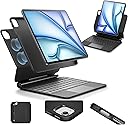
The ESR iPad Air 11/Pro 11 Inch Case Keyboard combines a detachable protective case with a multi-mode magnetic stand and a precision multi-touch trackpad. Compatible with multiple iPad Air and Pro 11-inch generations, it features a 64-key RGB backlit keyboard, ultra-strong magnets for secure attachment, and versatile viewing modes to enhance productivity and ergonomics on the go.
| ASIN | B0C246MHXK |
| Additional Features | Case, Portrait/Raised Modes, Quick Setup Magnetic Stand |
| Antenna Location | Office |
| Best Sellers Rank | #8 in Tablet Keyboards #11 in Tablet Keyboard Cases |
| Brand | ESR |
| Built-In Media | USB-C Charging Cable (1 m) ×1, iPad Keyboard ×1, iPad Case ×1, User Manual ×1, Quick Start Guide ×1, Packaging Box ×1 |
| Button Quantity | 64 |
| Color | Black |
| Compatible Devices | iPad Air 11" (M4/M3/M2), iPad Air 10.9" (5th/4th Gen), iPad Pro 11" (4th-1st Gen) |
| Compatible Operating System Family | iPadOS |
| Compatible Tablet Computer Models | Apple iPad Air (4th generation), Apple iPad Air (5th generation), Apple iPad Air 11-Inch (M3), Apple iPad Air 11-inch (M2), Apple iPad Pro 11-Inch (M4), Apple iPad Pro 11-inch (1st generation), Apple iPad Pro 11-inch (2nd generation), Apple iPad Pro 11-inch (3rd generation), Apple iPad Pro 11-inch (4th generation) |
| Connectivity Technology | Bluetooth |
| Customer Reviews | 4.2 out of 5 stars 3,074 Reviews |
| Enclosure Material | AG+AF Glass Trackpad (Anti-Glare & Anti-Fingerprint), Polyurethane (PU) |
| Generation | 4th Generation |
| Hand Orientation | Ambidextrous |
| Item Dimensions L x W x H | 11.02"L x 7.09"W x 0.98"H |
| Item Highlight | For iPad Air 5/4th, Secure Magnetic Lock, Detachable Back Case, Precision Multi-Touch Trackpad, Rebound 360 Series, Black |
| Item Weight | 1200 g |
| Keyboard Backlighting Color Support | RGB |
| Keyboard Description | Accessible Flexible Multi-Functional |
| Keyboard Layout | QWERTY |
| Language | English |
| Manufacturer | Electronic Silk Road Corp |
| Mechanical Keyboard Switch Model | Tactile |
| Mfr Part Number | 6B014 |
| Minimum Required Operating System Version | iPadOS 18 |
| Model Number | ESR for iPad Air 11 Inch Case Keyboard |
| Number of Batteries Required | 1 |
| Number of Items | 1 |
| Number of Keys | 64 |
| Number of Packs | 1 |
| Number of Sections | 1 |
| Power Source | Battery Powered |
| Recommended Uses For Product | Office |
| Series Number | 11 |
| Special Feature | Case, Portrait/Raised Modes, Quick Setup Magnetic Stand |
| Style Name | Classic |
| Switch Type | Linear |
| Theme | Productivity |
| Unit Count | 1 Count |
| Warranty Description | 1 year |
| Water Resistance Level | Not Water Resistant |
G**D
A VERY well made set!
Cons: - Heavier than Magic Keyboard and some of the other keyboard cases like this. - I’ve noticed a tiny bit of glitchiness with the trackpad. It seems that it’s sometimes detecting a 3-finger gesture when I use 2 fingers, and 2-finger gestures when I’m using 1 finger. I’m not sure if it’s just super sensitive or there’s another issue with the trackpad, but it’s been a minor issue for me thus far that doesn’t happen often. Pros: - Personally, I LOVE the color! I love LAVENDER, not orchid or lilac, or other pinkish light purples. It’s the right shade of pale purple without the extra pink. Perfect (for me)! :D - This comes with the matching iPad case that attaches to the keyboard as advertised. It’s nice to know that IF I drop it, there’ll be some protection against the sides getting damaged. - The keyboard case will connect automatically when the iPad is opened. Other cases will need you to touch a key or something, which, you’ll still need to do if the case went to sleep while the case wasn’t closed. - If you use the battery widget like I do, it will display the keyboard’s battery percentage! I LOVE that feature because there’s less worrying about how long I have before it runs out! - The function key options all work, and I haven’t had any problems in typing (and I type a lot!). - The iPad can be mounted in different heights and in portrait mode. One perk of the keyboard being Bluetooth instead of connected by pins (like the Magic Keyboard) is that you can still use the keyboard and trackpad in portrait mode and off-center mounted! - The case is soft and silky to the touch… I personally love that! - The skin for the iPad is thin where the stylus connects and doesn’t interfere with its charging. - The magnetic flap will magnetically stick to the back of the case and be securely out of the way. At first, it curls back over the front of the case, but sticking it magnetically to the back has made that flap less rigid and doesn’t curl forward anymore. All around, I personally love this case! The only con was that it is a bit heavier because of the added skin and that the keyboard has its own battery (versus the Magic Keyboard case which doesn’t). The trackpad’s glitchiness doesn’t occur often, but of course when it does I’m annoyed for a second. I’d highly recommend this case just for that extra iPad case on top of the keyboard. The color of the case and keyboard match each other which is another plus. On a personal note, the PERFECT case would have pins to connect and power the keyboard directly, as well as charge the iPad through the keyboard like the Magic Keyboard cases do. An innovation would be a second set of pins on the keyboard case to allow a portrait mode connection for charging and keyboard connection. That would make this the only case I’d ever need :p! But, in the meantime, this is perfect for my productivity and stylus uses with my iPad!
A**R
Impressive Quality and Performance , Highly recommended!!
I have the iPad Pro 11-inch (1st generation), and I’m honestly impressed with how well the case keyboard works with it. Everything works perfectly, and the keyboard connects seamlessly with my iPad. The typing experience is excellent, the trackpad is smooth and responsive, and the overall design feels premium and sturdy. It also makes the iPad feel much more like a laptop while still keeping the convenience and portability of a tablet. I’m very happy with the quality and performance of the case keyboard. If you have an iPad, I definitely recommend giving it a try. It’s a great accessory that makes the iPad much more useful for everyday work, browsing, and productivity.
C**M
Quality Case at a Much Better Value, with Much Better Protection
[One-Year Update] I've owned this keyboard for a full year, and I'd like to impart my thoughts for anyone on the fence about it. I'm going to be placing more consideration against the Magic Keyboard, as I recently caved and purchased it from a local computer store to try it out. While I did like it, I returned it in favor of using this one for a while longer. 1) Durability & Battery This keyboard has held up well over time, minus some smudging and staining that has made me regret not purchasing the black model, on occassion. The keyboard surface is smooth and more or less unblemished, with no peeling in the silicone material around any of the buttons/trackpad. The keys are also all still intact. I cannot comment as to whether the keyboard of the first-party cases are susceptible to damage in this way, but I am pleasantly surprised as to how this one has held up. Also, the battery has not once failed me while using it. I charge it when I remember, and that is more than enough. 2) Typical Use Minus the lack of the escape key, this does everything that I need a keyboard to do while using my iPad. The layout makes sense, there is no sticking of the keys, and the print on the keys have held up even to my oily fingers. (I am a chronic hair-toucher, so this is saying something I feel.) I've modified the Trackpad on the software side for a) tap-to-click, and b) to increase the speed of the cursor. I did find after a while that I need to make a lot of repeated clicks with the trackpad, when it came to pressing it in, hence the former change. I will ding this justs lightly on part of the ESR, as I do not think it is an iPadOS issue - but, it is adequately addressed by adjusting the behavior in Settings. Not worth complaining about. 3) Value for Money Especially when considering the durability of the materials, I think this is more than worth considering for your money. The only major drawback I noticed between it and its first-party counterpart, is the inability to instantly begin typing when you "open" the iPad. The magnetic pass-through charging is also a nice touch on the other case. However, neither of those things make up the additional value that the first-party cases asks for, when this one exists. If the first party ever approaches the cost of the ESR, maybe within a range of 80 USD or more, then I would say to go for that one vs. this. In reality though, the ESR win's blow for blow vs the First Party iPad case. -- [OG Review, Shortened a Little] I am going to compare how I feel about this case to the product it is likely duping, the Magic Keyboard. I have never owned the product*, but I have owned numerous Apple products, and I got some thoughts... The ESR case is wickedly good quality. The case has a satisfying, velvety smooth finish, and the keys are responsive and nicely spaced. I usually make lots of typos with other bluetooth keyboards, but this one is designed very nicely, at least for the way that I type. The inclusion of a silicone case is a MASSIVE boon, and the main reason I chose the ESR over other cantilever cases. Since I hate leaving the edges of the iPad unprotected in my bag, no other case would satisfy my desire for protection like this one does. One con I can mention is that the weight of the iPad is greatly increased when using both parts of the case. If you were, say, also carrying a laptop or a lot of books with you, I would recommend picking between the silicone case or the keyboard, and leaving the other behind. Individually they aren't so bad -- it's when they are together that you will sweat, a little. As an artist, I also appreciate that this case is magnetically compatible with my 2025 iPad Air. The magnet array of previous cases I have used seem to not play nicely with the Apple Pencil Pro, causing jittery or chopped up lines. Some sources mention these issues to be software related, but I can attest that they immediately went away when I put my iPad into this case. I am so stoked to be able to stop looking for a case that will work for my needs. In my experience, the value is unmatched.
V**O
Better than I expected. Pleased with my purchase!
The ESR Magnetic Keyboard Case 360 is a versatile, protective, and budget-friendly iPad keyboard case with excellent viewing flexibility and a solid trackpad, though it’s a bit heavier and the typing feel isn’t top-tier. Pros • Quick & easy setup • 360° stand with multiple angles • Detachable case for tablet-only use • Large trackpad with smooth gestures • Strong protection at a lower price Cons-ish (Hardly could consider them deal breakers!) • Typing feel is good, not great • Slightly heavier than premium options If you want flexibility and value, it’s one of the strongest non‑Apple keyboard cases available.
B**T
returned magic keyboard, bought this instead, don't regret it
I got my first ipad recently (an ipad air from Costco), and I also bought the magic keyboard. I'm coming from a place of using a PC laptop, but my laptop is dying. Backlit keys are a must for me. I thought the magic keyboard had them, but alas. No longer. I also didn't like the way my Apple pencil was constantly popping off. I considered other alternatives, but the ESR won because A) I wanted to be able to type on my lap, (which you can do decently with the magic keyboard), and B) I wanted a flap or something for my Apple pencil, and C) I wanted the case to feel a bit more protective because I am not always super careful with my things. After a few weeks of using the ESR, I am not disappointed in my purchase. I was a little nervous about the bluetooth connection. Thought that was going to be a drag, but I haven't had problems with it. It does put itself to sleep, so sometimes it takes a second to wake the keyboard up, but you just hit a key, and a second later it's responding again. You must charge the keyboard separately, but it lasts a long time and also seems to recharge quickly. The backlit keys are great, which was basically my biggest deal-breaker with the magic keyboard. Typing on my lap works. Yes, the ipad is top-heavy in this case. It was also top-heavy with the magic keyboard, but I do think the ESR seems a little worse. Not a deal-breaker for me. The pencil flap: great when not using the ipad, but when you're using it, you have to open the flap, so the pencil is still just only attached by the magnet. This seems ok, though. I'm not really worried about it going flying while I'm using the ipad, it's more like when I'm not using it. I would still prefer a case with a slot for the pencil or something, not sure why that's not possible, but out of the keyboard cases available for ipad air, this one is the best bet for me. Again, my highlights: Backlit keys Apple Pencil Security Ipad protection Bluetooth hasn't been a problem I got the blue. It looks fine. I wish it came in more colors. Ipad went in the case without too much struggle. I do sometimes (rarely) pull the ipad off to use it without the keyboard, and I don't have to have a completely naked ipad like I did with the magic keyboard. And it goes back on easily enough. I really like this feature. I also have turned the ipad to vertical to type with on certain apps. It becomes even more top-heavy, but you can make it work if you are careful. If a problem arises or something stops working, I will update my review. (I did buy the protection plan thing.)
A**R
Less and less impressed
***Returned*** between the lack of help over something that should have nee simple to it being heavy and bulky clumsy to carry much less try to lug in a purse or carry bag There are better options out there I put it back to a 1 the backlight on the keyboard os so _____Annoying and there os no stopping it ...and none of the suggestions are making it go away and stay away The backlight making the keyboard very hard to see took me going to Claude AI to figure out how tonstop the annoying battery draining lights to stop. I had an app issue with ProPresenter Remote and the inabilty to advance slides and the lack of controlling some features was confusing I have to remind myself I didnt pay the apple keyboard price so still would expect to see a few more basic controls like an esc key and an enter key Having a hard time giving this a higher score being limited to only 1 to 5 stars Note about how much The case and 11 inch Ipad weighs, it is literally weighs more then my 17" Lenovo Laptop I dont have a scale but its close to almost a pound. So keep that in mind when looking it is not purse friendly. It is that substantially heavy if you arent mentally prepared for it you might accidentally drop it. I almost did that this morning (EDITED TO ADD) After the day..one thing is for sure it is stout and heavy a bit bulky. I am still leaving it at a 3 as they did not bevel the touch power button so I literally had to redo the finger print as it prevents an easy fingerprint read lets just leave it at that part was not well thought out. The price is the winning factor The flap help keep the pencil secured when not in use ... This out of the box review. Does it work yes BUT it seriously restricts the finger reading abilites as the very button you have to touch to turn on and get finger reading has been deeply recessed making the touch not read as well even rereading the finger it keeps asking me to touch the entire button surface which the case makes it hard. AS for hooking up that was the redeeming factor as it did seamlessly hook up Color option I went with purple the lettering on the keyboard could stand for some more contrast as the letters and numbers appear pretty faded Taking a picture makes the lettering stand out better next the screen doesn’t open up enough and you feel like you need to tilt the ipad up to get a more direct view at least you can take the Ipad off and put it how you need it if you do not want to keep it attached to the base So that is my literal out of the box review as I have had it less then 15 minutes and that is what I am seeing so far. So can hardly give it anything higher but definetly better then a 1 or a 2 seeing we only have 5 stars to work with
G**Z
AWSM solution ...
It's very well made - good build quality. Its a lot heavier than I expected, but solid. The separate iPad case is a great inclusion - so I can pop the iPad off the stand to draw with it on my lap and know that the iPad is still protected - very nice. And then it snaps back onto the stand. the keyboard is great ... backlit keys (U can choose the colour) makes it great to use at night. Overall very happy with the purchase :D
R**N
Overall Excellent Alternative to Apple Keyboard - but too darned heavy!
Wonderful case. I did a lot of research before purchasing this ESR M4 case. This really gets the best reviews and it lives up to its reputation. Overall functionality is a 5, but overall ergonomics a 3. However, I had to return it because it was just too darn heavy making portability an issue. Nice feel on the keyboard - typing is a breeze. Love the multiple ways the iPad can be attached, both horizontally or vertically. And it is also protected, in its own case that can be easily removed, making it extremely versatile. It is easy to use on either a desk or on the lap. It is definitely a great and less expensive alternative to the overpriced Apple Magic Keyboard. Love the overall feel and functionality and the backlighting is very nice and I like that the overall brightness and choice of colors. I would have given it a 5 if two things were a bit better. 1. This baby is really heavy!!! This is okay but one really cannot enjoy the lightness of the new iPad unless it is not on the stand. Too, too heavy. Had to return it. 2. Setup - How about some keyboard shortcut instructions somewhere???? There should be some easier instructions that either were available online or in the box. Just a simple handout will do. It has been too time consuming to hunt and peck to find out which function keys do what. I don’t mind that I don’t have separate function keys, just give me a guide or an easier way to figure them out.
W**A
Perfeito
Ótimo produto
A**K
Gran compra
La verdad es un gran producto para el precio, compite fabuloso con los de Apple mismo.
H**Y
Great keyboard case that helped me get much more out of my iPad
I’ve been trying out this ESR keyboard case with my iPad Air 11”, and it’s honestly changed how I use my iPad. I originally bought it because I wanted something that would let me type comfortably and use my iPad more like a laptop, and it definitely delivers. The floating magnetic stand looks really nice and makes the screen feel like it’s hovering above the keyboard. It’s easy to attach and remove the iPad, and the magnets are strong so it feels secure. I also really like that the iPad sits in a removable protective case, so if I want to take it off the keyboard and use it as a tablet, it’s still protected. One feature I didn’t expect to appreciate as much as I do is the Apple Pencil holder. It keeps the pencil secure, but what’s really nice is that the holder can flip neatly onto the back of the case, so it stays out of the way and gives the iPad a clean look on both sides when you’re using it. It’s a small design detail, but it makes the whole setup feel more polished. The keyboard itself is comfortable to type on, and the backlit keys are a great feature. I discovered you can change the backlight colours, which is kind of fun — I set mine to purple. The trackpad was also a big learning moment for me. I hadn’t used a trackpad with my iPad before, but once I started learning the gestures and how to scroll and copy/paste with it, it made navigating iPadOS much easier. I’ve seen some reviews mention that the trackpad click requires a fair amount of pressure, but I realized you can adjust the trackpad settings on the iPad to enable “tap to click.” Once I turned that on, it felt much more natural and I rarely need to physically press the trackpad anymore. Some reviewers mention the weight, and yes, it is a little heavier than a simple case. But that’s partly because strong magnets add weight, and better-quality magnets tend to be heavier. Personally, I don’t find it to be much of an issue. Even with the keyboard attached, the whole setup is still lighter than my Lenovo ThinkPad, so it still feels very portable. One thing I did notice is that when the keyboard is sitting on your lap without your hands on it, the floating design can make it feel a bit top-heavy. But when you’re actually typing or using it on a desk, it feels stable and works great. Overall, this case has helped me discover a lot more functionality on my iPad, especially with the trackpad and keyboard shortcuts. For the price, it’s a really solid alternative to Apple’s Magic Keyboard and adds a lot of versatility to the iPad. Definitely recommend if you want to turn your iPad into more of a mini laptop.
Y**D
amazing worth it
great product all the Apple features were perfectly and there’s perfect compatibility. It’s comfortable tap works properly and it’s smooth no problems so far.
R**O
A great alternative
I really like this keyboard. I recently got a new 13 inch iPad Air and was looking to get a Magic Keyboard like I had for my previous 11 inch iPad Air. Seeing as it was almost $400 Canadian dollars, I figured i would try this one for a 1/3 of the price. This keyboard is by far just as good if not better than apples Magic Keyboard. The keys are more satisfying to type with. Full function row keys that work great. Bright backlight keyboard that can be dimmed or turned off and can be changed to multiple different colours. The magnets that hold the keyboard is very strong and offers more protection with the added case that goes around the whole iPad. It’s great if I want to get some work done to be able to use my iPad as a laptop and when I’m done to be able to remove the iPad from the keyboard when I’m going to use it as a tablet and still having that case protection. I would even say it is a lot more stable than the new Magic Keyboard models. I can tap the screen and it still stays firmly planted to my table or lap. I would highly recommend this keyboard case over apples Magic Keyboard any day of the week
Trustpilot
3 weeks ago
1 week ago