


๐ Elevate your screen gameโwireless, flawless, and future-ready!
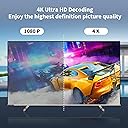
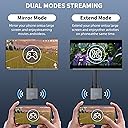
The Wireless HDMI Display Dongle Adapter 4K by BRAIDOL delivers ultra-high-definition 4K video streaming with plug-and-play simplicity. Featuring dual-band 2.4/5GHz antennas, it ensures stable, low-latency wireless transmission up to 16 feet. Compatible with a wide range of devices including laptops, PCs, and smartphones, itโs ideal for professional presentations and home entertainment alike. Its compact design supports both landscape and portrait modes, making it a versatile tool for modern multitaskers seeking cable-free convenience.




| ASIN | B0C1NH3MRP |
| Best Sellers Rank | #119,819 in Electronics ( See Top 100 in Electronics ) #433 in Streaming Media Players |
| Brand | BRAIDOL |
| Built-In Media | Wireless HDMI |
| Color | Sliver |
| Connectivity Technology | HDMI |
| Connector Type | HDMI |
| Controller Type | App Control |
| Customer Reviews | 4.1 out of 5 stars 319 Reviews |
| Form Factor | TV Stick |
| Item Dimensions L x W x H | 1"L x 1"W x 1"H |
| Manufacturer | BRAIDOL |
| Mfr Part Number | 1 |
| Model Name | Q3 |
| Model Number | Q3 |
| Number of Items | 1 |
| Other Special Features of the Product | Portable |
| Resolution | 4k |
| Special Feature | Portable |
| Supported Internet Services | Amazon Prime, Netflix |
| UPC | 850040753332 |
| Unit Count | 1 Count |
| Video Codec | H.264, H.265/HEVC |
| Video Output Resolution | 3840x2160, 1920x1080 |
| Warranty Description | 3 months |
L**A
The Wireless HDMI Display Dongle Adapter 4K is an excellent choice for streaming any media
The Wireless HDMI Display Dongle Adapter 4K is an excellent choice for streaming media video, audio, and files from your laptop, PC, or smartphone to your HDTV, projector, or monitor. It offers a convenient and hassle-free way to display your content on a larger screen without the need for cables or wires. One of the standout features of this wireless HDMI adapter is its 4K resolution support. With this device, you can enjoy stunning visuals in Ultra HD resolution, providing you with crisp and clear images. Whether you're watching movies, playing games, or giving presentations, the high-definition output ensures a top-notch viewing experience. Setting up the adapter is incredibly easy. It's a plug-and-play device, so you simply connect the HDMI dongle to your display device and connect it to the power source. Then, using Wi-Fi connectivity, you can wirelessly mirror your laptop, PC, or smartphone screen onto the larger display. This makes it ideal for both personal and professional use, as you can easily share content with colleagues, friends, or family. The wireless range of this HDMI adapter is impressive, allowing you to connect your devices from a distance without any loss in signal quality. You can comfortably move around the room while wirelessly streaming your content, without worrying about interruptions or signal drops. Another advantage of this adapter is its compatibility with various devices and operating systems. Whether you have a Windows laptop, Mac computer, Android smartphone, or iOS device, you can seamlessly connect and mirror your screen using this wireless HDMI adapter. In terms of performance, the Wireless HDMI Display Dongle Adapter delivers smooth and lag-free streaming. You can stream videos, play games, or browse the internet without experiencing any noticeable delay or latency. This is crucial for applications that require real-time interaction, such as gaming or video conferencing. Overall, the Wireless HDMI Display Dongle Adapter 4K is a reliable and feature-packed device that offers seamless wireless streaming of media content. Its 4K resolution support, easy setup, wide compatibility, and reliable performance make it an excellent choice for anyone looking to extend their laptop, PC, or smartphone display to a larger screen.
V**O
Great device works perfect quality on top
Very happy with this wireless dongle! Setup is very easy, quality and value is great! All the accessories are included and i have no issues or problems so far, recommend to anyone who wants no cables in the room! Thanks
C**L
You want this for presentations! No network needed.
This wireless HDMI display adapter was so easy to set up. It had all the cords needed. It has a hard button on it to switch from iOS or android/PC. When you switch to either you have directions on the screen of your TV or display. It fits in a standard HDMI. There is no need to hook anything to any wireless router whatsoever. Itโs able to cast directly to the adapter with no in between or hub. It uses the Wi-Fi on your device similarly to how headphones use a Bluetooth. I was very impressed with using Google slides from my phone and casting a presentation and getting the speaker notes on my phone. It was pretty amazing. I was also able to mirror my laptop or extend it. It is definitely an option for those that donโt have an HDMI out on their laptop or that want to cast to something that is too long for a cord. It worked exactly as described. ****Be aware that any paid sub subscription HDCP services like Netflix or HBO or YouTube TV will not work.
A**R
Simply put, it doesn't work.
I was excited to try this product, because it seemed like a good way to project onto my smart TV from my Windows 11 computer. After trying every part of the manual, restarting my computer, wifi, TV and the device itself, searching on the internet for hours and troubleshooting anything associated with it, it still isn't working. My computer indefinitely states that no displays are available. Save yourself from going through what I just did, and buy an HDMI cable. I will happily put up with a cord running across my floor in lieu of this. Absolutely disgusted.
A**R
Works as advertised but has limited range.
I am using this in Android mode and can not comment on how it may work for iPhones or Windows, which it say it will. I was able to connect it to my Smasung S10 Tablet after reading the simple instructions to get me started in the right direction. It has a couple of settings that can be adjusted for different applications, if needed. With the signal dropout at about 25 feet, the range was about half of what a standard Bluetooth device would get but the bandwidth the video signal must demand is probably why and typical. It does not like walls or doors of any type except glass. There did not seem to be much of any noticable A/V delay from my Tablet to the TV. It is only 1080P @ 60ips but that suits almost everything I do and this will prove to be a big problem solver when going into a new venue and needing to connect to someone else's TV with just a HDMI input available and no compatable "Mirroring" or "Screen Casting" features to figure out or try to make work at last minute. I deducted one star because the 25 foot range may be not enough in some of my situations.
J**K
Quick and simple connection
This wireless display adapter is perfect for my needs. Very quick and simple to hook up, your display connect might be called something different than what's in the manual. Mine was called multi screen connect, so just take a look around when connecting. Popped up real quick on the network and connected almost instantly. Video and audio is perfect, works great vertically or horizontally on the TV. Range is awesome and picked up anywhere in the house. Anyone looking to push something from a phone or laptop this is what you need. This would be perfect for an office setting, no more having to keep your laptop right next to the screen/TV and no more wires. Kit comes with everything you need.
S**V
Every function works as described
Simple setup and easy to use, functionality as described and definitely worth the price, everything else like cables, performance, speeds is on high level, no issues so far! Happy
P**L
very easy to use
Good : Works quite easily and quickly Bad Cannot stream HDCP media I tested this with Windows 11 and Windows 10 and was able to get a reasonable throughput whilst streaming a 1080p source. Attached photo does show my laptop connected at 867mbit link speed whilst the device was linked at 65mbits. This link speed did vary a bit, but not enough to be affecting the frame rate. As long as you are not trying to use this to stream HDCP content, this is a good product. Note that on Windows 10 and Windows 11 you can press Windows+K to jump to the connection screen instead of via the project screen windows+P or through ... System -> Display -> Multiple Displays -> Connect to a wireless display -> Connect
O**S
Excelente
He comprado varios, pero este es el mejor para cualquier plataforma
M**N
Works perfect on my Win 11 PC
Perfect, does exactly what I need it to do, which is cast from my Windows 11 PC. Instructions are a bit lacking, but everything is there if you take the time to really read them. The blue button on the top of the box switches between IOS and Android/PC; that initially threw me when only IOS information came up on screen when I attached it; then I realized pressing the button switched it to the screen I needed. Next problem was my PC was detecting it, but when I tried to connect nothing happened. As per instructions, I then moved the USB cable from my TV input to a separate plug (power bar + the enclosed adapter), and bingo!! Success, I am now able to wirelessly stream from my PC to a non-smart TV.
W**M
Easy to operate. Works
L**A
Extremely easy to install
Works amazing.
T**T
For this price itโs already very good.
Still having too many sweet dreams, Still you get what you pay for. Not really good, but itโs enough. You know what I mean.
Trustpilot
5 days ago
1 week ago