We remain fully operational. Our teams are working around the clock to ensure your deliveries continue safely.

DOWNLOAD THE APP


Customer Services
Copyright © 2025 Desertcart Holdings Limited
DOWNLOAD THE APP
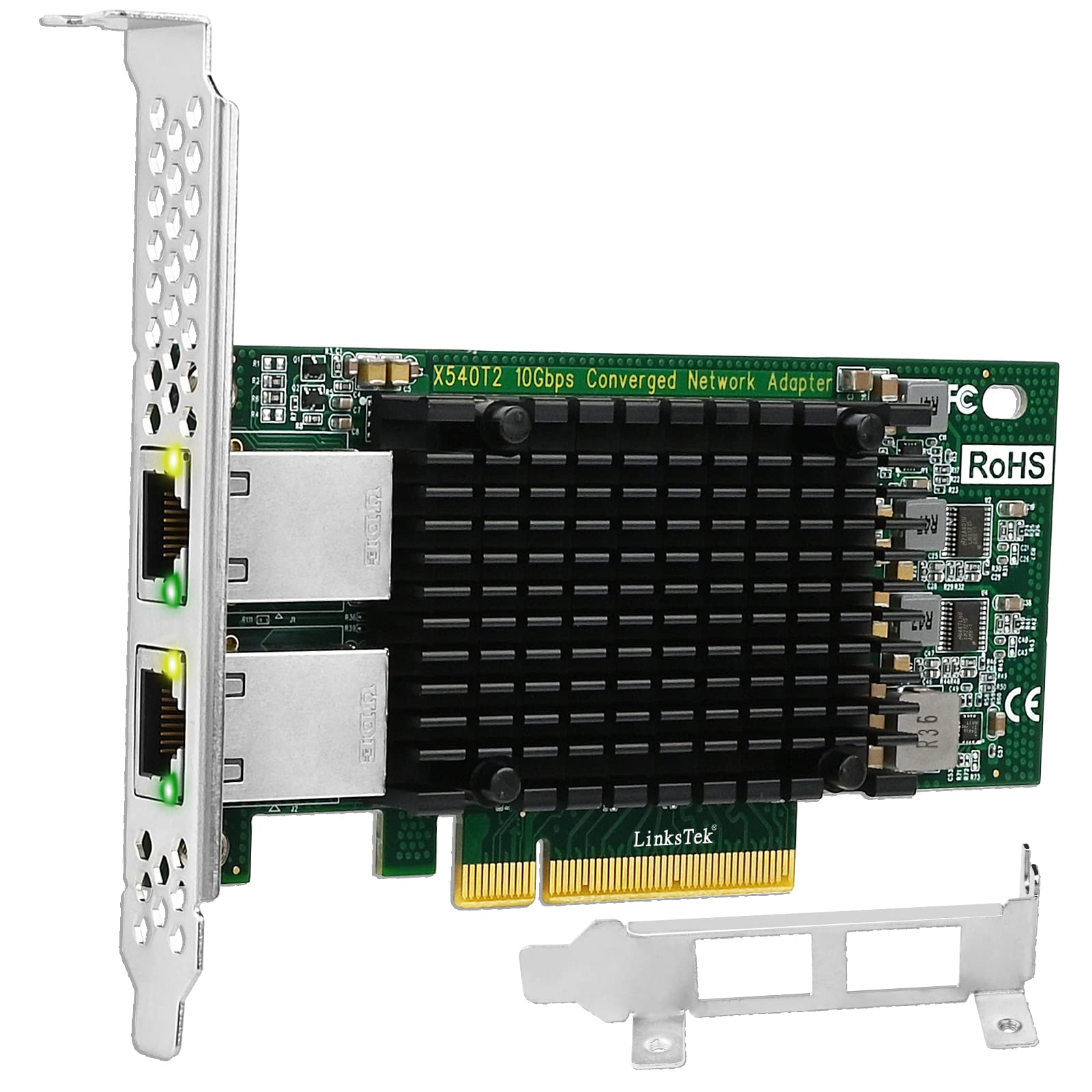


🚀 Upgrade Your Network, Upgrade Your Game
The LinksTek X540T2 is a high-performance dual 10GbE RJ45 converged Ethernet adapter featuring the Intel X540AT2 controller. Designed for servers and desktop PCs, it supports advanced virtualization technologies, on-chip QoS, and flexible port partitioning. Compatible with Windows Server and major Linux distributions, it enables seamless migration to 10GbE networking for storage, gaming, and 8K video streaming with CAT-6A cable support up to 100 meters.


| ASIN | B0BZ598W8N |
| Best Sellers Rank | #169 in Internal Computer Networking Cards |
| Brand | LinksTek |
| Color | Matte Black |
| Customer Reviews | 3.8 3.8 out of 5 stars (90) |
| Date First Available | February 1, 2017 |
| Item Dimensions LxWxH | 4.72 x 2.7 x 0.7 inches |
| Item Weight | 5.5 ounces |
| Item model number | X540T2 |
| Manufacturer | LinksTek Co,Ltd |
| Operating System | Windows 11 10 8.x 7 32/64bit, Windows Server 2022 2019 2016 2012R2 2012 |
| Product Dimensions | 4.72 x 2.7 x 0.7 inches |
| Series | X540T2 |
A**7
Plug and play in linux
My realtek based 1Gbps adapter keeled over in my home linux routing machine so I needed something pretty quick to get our network back up and running before my kiddos revolted and started plotting my demise. It had been a while since I'd had to buy a stand alone NIC so I went looking for what would probably work out of the box in linux. I read good things about this chipset and this was one of the more affordable NICs available featuring the chipset. It's been in service a little over 3 weeks now with some heavier than normal usage (I'm retrieving some collections from The Internet Archive) and it's working fantastically. No problem with bandying about 1Gbps across my home network.
S**0
Great Product
I have bought two of these cards. I'm currently using it in 1GB Ethernet mode due to eventually upgrading to 10GB networking. Once you download the driver's from Intel for X520-T2. It worked perfectly. The price is also good for when I bought it. I would highly suggest this.
A**S
corrupted EEPROM/firmware — unusable
bought the LinksTek X540-T2 Dual 10GbE RJ45 card for my Proxmox/Linux server. Unfortunately, it is completely unusable. The system detects the card as an Intel X540-AT2, not as a LinksTek product. See attached screenshot (lspci -nn | grep -i ethernet). The driver (ixgbe) fails to load due to firmware/EEPROM errors (“EEPROM Checksum Is Not Valid,” “Adapter removed, error -5”). corrupted EEPROM/firmware. No usable interfaces ever appear (ip -br link show only lists my onboard NICs). Even after BIOS adjustments, rescans, and driver reloads, the card cannot initialize. This suggests the card has faulty firmware or is a rebranded/resold unit that doesn’t function properly. I’ve attached screenshots of the PCI output and driver errors as proof. Returning for a refund.
J**Y
Easy install
Quick drop in for improved LAN speed on a PC / server.
B**N
Not meant to last
Only lasted eight months, but it was cheap
C**O
Super easy to install and worked like a charm
I just turned off my pc, put it in an open slot, turned it back on and it worked! No drivers to install on windows 11. Let’s see how long it lasts ….
M**L
Personally the I225V Rev 3 is the best 2.5GbE chipset, but it really needs a heatsink.
I have done quite a bit of testing of boards based on the Intel 2.5GbE chipset over the last few months and I am using several of them in an OpnSense based router/firewall. Generally speaking, I have had very good luck with them and no issues. Based on a quick examination of this specific board, I verified that it is the SLMNG 3rd revision of the Intel 225V chipset, which is the one that actually works (Rev 1 and Rev 2 had a lot of problems). Doing a bit of testing, I put this board into my bench PC running Windows 11 and it was immediately recognized and configured. Once connected to my Netgear switch (GS110MX), it immediately detected it, and synced up at 2.5Gb with no problems. Running a quick LAN speedtest to back my main PC, I was able to get sustained throughputs of around 2300Mb/s, which is about what I would expect with typical overhead. Another good thing about the Intel chipset, which was obvious during my testing, especially as compared to a Realtek 8125B based board, is that it uses about half as much CPU overhead as the Realtek chips do. Essentially, this card worked well and performed pretty much identically to every other Intel 225V R3 based board I have tested. That was the good news, now for the bad. While I did not have any problems during my testing, this board runs way hotter than I like, which has been a common theme among all the 225V boards I have seen that don't include a heatsink. After about 30 minutes of sustained transfers, the chip itself was hitting surface temps of around 89C, which is HOT. This is actually hotter than the max temperature I have gotten on most other I225V boards I have tested, which is likely due to this board appearing to have less of a ground plane exposed on the rear of the board to serve with heat dissipation. Basically, any I225V board really needs a heatsink, especially if it is going to be under heavy usage or in a constrained case without much airflow. And, if you look at the board, it even includes the mounting holes that typically would be used for one. So, it was a conscious decision on the board manufacturers part to not include one. Overall though, while it does run hot, it seems to work well and I had no problems due to the heat, but it still gives me pause with regards to long term reliability. Unless I am able to locate some push pin mount heatsinks that are designed to fit this specific board layout, I likely will do what I have done on a couple of my other boards and just mount a Raspberry Pi 4 heatsink on it using thermal epoxy. In any case, this board performs well and the price is quite reasonable, just be aware it runs hot and I would be a lot happier if it came with a heatsink on it.
G**I
worked with SYNOLOGY DS1817+
Plug and play operation. both interfaces are recognized and working
K**O
This card just arrived in the mail, and I'm immediately returning it. I installed the card and attempted to boot and my PC won't even POST, CPU fan spins for a second then goes dead - installed my old card again and PC works fine... Was attempting to install with pfsense which already has the ixgbe driver installed, so no reason for my PC not to boot after simply installing the card in the motherboard.
L**S
Card was recognized but not working. After some digging I found in dmesg | grep lxbge that there was a firmware fault during initialization. I just gave up and bought a similar intel 10G card instead of trying to flash firmware. The other card I bought went in and worked perfectly right away. I would look else ware for a linux server application.
Trustpilot
1 month ago
3 weeks ago