Desertcart purchases this item on your behalf and handles shipping, customs, and support to Greece.
🚀 Elevate your creative studio with the speed and silence of all-flash NAS power!
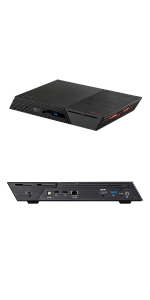
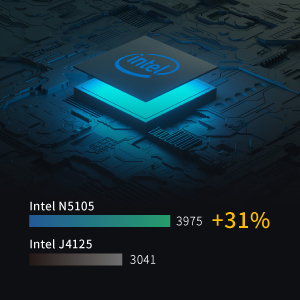
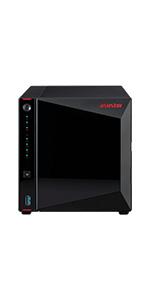
The Asustor Flashstor 6 FS6706T is a compact, diskless 6-bay NAS featuring six M.2 NVMe SSD slots, an Intel Celeron N5105 quad-core 2.0GHz processor, dual 2.5GbE ports, and 4GB DDR4 RAM. Designed for professional creators and media workflows, it delivers ultra-fast all-flash storage, quiet operation, and 4K media streaming with hardware transcoding, making it an ideal centerpiece for high-speed, collaborative environments.


| ASIN | B0BZCM22WD |
| Best Sellers Rank | #27 in Network Attached Storage (NAS) Devices #35 in Network Attached Storage (NAS) Enclosures |
| Brand | Asustor |
| Built-In Media | 1 package |
| Color | FS6706T |
| Compatible Devices | Desktop |
| Connectivity Technology | Ethernet, HDMI , USB |
| Customer Reviews | 4.1 out of 5 stars 316 Reviews |
| Data Transfer Rate | 295 megabytes_per_second |
| EU Spare Part Availability Duration | 3 years |
| Global Trade Identification Number | 04710474831470 |
| Hardware Connectivity | Ethernet, HDMI |
| Included Components | 1 package |
| Item Weight | 2 kg |
| Manufacturer | Asustor |
| Mfr Part Number | FS6706T |
| Model Name | FS6706T |
| Model Number | FS6706T |
| Number of Items | 1 |
| Unit Count | 1 Count |
W**L
A Fantastic SSD NAS
Configuration: Flashstor 12 5x TEAMGROUP MP34 4TB (yields 14.77 TB in RAID 5) Crucial 16GB DDR3 memory upgrade First, the configuration I have above works. The Asustor compatibility website is pretty limited on which ssds they confirm will work, but I saw a youtube video where someone had used the teamgroup mp34s without issue and another one where they used the crucial memory up to 16GB. There are also some reports of problems upgrading the memory to 34, so I stayed with just 16 which is what it officially supports. Second, installation and setup was super simple. You remove just a handful of screws and slide the top and bottom off easily. The ssd installation is as simple as they should all be with this style, and the memory installation was completely uneventful. Getting everything setup without connecting any kind of monitor or keyboard also worked flawlessly. I did use some Asustor 'Control Center' program on my computer to discover it on the network, but honestly I don't think this is needed, but if you did go that way it works just fine. Finally, the NAS itself has been performing perfectly. Despite being hidden in a fairly cramped cabinet, drive temperatures have been steady in the low 40s C with the system temperature reported in the low 50s C. I've had no issues with speed and everything has been running non-stop with no issues. I suppose all of that is expected, but what is great about this NAS in particular is that it is almost completely silent, and it is small and sleek disappear into a cabinet. I opted for the 12 over the 6 primarily for future disk expansion as/when SSDs drop in price even further. I've seen others say that CPU is a bit under-powered, but I've had no issues with transcoding which is about as demanding as I've thrown at it. My own, mild, complaint would be ADM, the NAS OS, which is a bit less seamless in a few cases. For instance, I found it actually easier to setup some apps directly through docker-compose (using portainer's version of that) than to install them through their app 'store'. Interacting with it through the browser is also not as smooth as with a local OS or even a remote desktop experience. But I would consider these super negligible issues compared with how much I like the rest of the product. Would I buy it again? Instantly!
A**N
Fast, Small, Quiet and Really Impressive - Saturate 10Gbe R/W + Fast Seek!
I'm able to consistently saturate the 10Gbe both R/W with 6x TeamGroup MP34 4TB NVMe drives on BTRFS Raid5. ADM works fine and easy to use. All services (SMB, NFS, AFP, etc.) are perfectly working with 0 downtime. I have it placed in my rack in a high-ambient temp area and drives never go over 42C. I purchased the heat sink kit from Asustor separately to make it easier to manage heat under load while manually setting the fan speed to High in ADM. It's been rock solid the past few weeks and consistently giving me top speeds and I haven't filled the array yet. Definitely enjoying the low power consumption as well. What really impresses me is the random seek being so fast as you would expect from NVMe. This is a pretty unique product that I passed over at first glance, but after more research and actual use I'm finding it being a centerpiece of the homelab giving me fast IO for a pretty good price. NVMe speeds, 10Gbe, low-power consumption, small form factor, intel processor, upgradable ram and quiet all at a pretty good price point with the added benefits of better random seek. I struggle to compare to any commodity gear that has all these features for that price. Really excited to see what other devices this inspires with the NVMe prices falling, but for now this is a solid & fast NAS.
P**D
Mostly love and slightly dislike this NAS
Asustor's new all M.2 RAID NAS units are in short, where things should start going as SSD and M.2 drive prices have made them accessible to most of the public. However, while the price seems reasonable, the unit itself is surprisingly cheap and all plastic for the most part. Plastic has advantages in some instances but something of this sort might have been better served with some parts being metal. Perhaps one of the most annoying yet trivial facets is the series of screws that must be removed to access RAM and drive areas of the internal board. Having to go through a few phillips screwdrivers to find one that would fit and do the job was well, annoying. I never ran into this with other NAS units or similar Once the cover panels are removed, upgrading RAM and also placing drives in is a snap. It is very straight forward and as much as I complain about the screws above, drive install is latch style so no screws are required. RAM is installed in a traditional manner. These 6 drive able units come with 1 stick of 4 gig RAM. I would recommend to replace and use 2 x 8gig to get 16 gigs of RAM to match the M.2. Of the good - Well this is a NAS with M.2 drives capable of 16 gigs of RAM and introduces for many Ethernet ports that are 2.5 gigs capable (backwards compatible to traditional 1 gig Ethernet etc.). If your computer setup allows for 2.5 gig throughput, you will notice advantage over 1 gig immediately. While I don't believe the 2.5 gig Ethernet is fully realized, it will still be fast enough for most save for those trying to edit media files directly off the NAS. Just remember, drives often promote themselves as being a particular size and often fall short. The degree of how short can be minimal or enough to disappoint. I have in another NAS some 16 TB drives that show as 14.55 TB usable. About 1.5 TB loss. The M.2 drives I bought were to be 4 TB drives yet show 3.73 in size once put into this unit. Having put 4 drives in to start, I only have just over 11 TB accessible in RAID 5. That is about 1 TB difference than the advertised 4 TB. Lesson - while this device may suggest you can get up to 24 TB capacity with all drives populated, it will be less and you should calculate for the difference. If I haven't scared you away, good. The use of this unit is a pleasure as it is very very quiet, doesn't seem to heat up nearly as much as a typical NAS with mechanical drives. The look of the unit will appeal to many and I guess one advantage of being plastic is it is a very light unit and could be carried around with some ease and far less likely to have issues in transport than say a NAS with traditional drives. LAST - I am used to system interfaces for NAS that are a bit more polished than Asustor's. Asustor provides an easy to use interface and various options/choices for custuming and managing your NAS. I'll have to get used to it having come from QNAP and Synology. IF you use an Apple Mac computer and Safari browser, you may have trouble logging into the management console which is related to security. However, another browser such as Firefox will not have this issue. I believe this issue is addressable but haven't taken the time to fully realize a solution. Package and shipping - packaging was sufficient and the actual unit comes in a nice box with all parts stored within with good design. The actual unit was shipped from overseas and arrive much earlier than published by Amazon. I was pleasantly surprised.
A**R
An Easy to use NAS Appliance!
Just received this NAS appliance on May 3rd. First impressions are very good. Populated it with 6 sticks 2TB of MVMe SSDs. Net of 10TB in a RAID 5. Install of SSDs was super easy. Once connected to my router via supplied ethernet cable, came up right away. Use case is primarily as shared storage for music and video files. I may at a future date also try running ROON right on the NAS itself, but not right now. Will update this review in the future as I get more experience with the unit. So far it meets my expectations! Update on 7/17/2023 - Solid and silent. About once per week I fire up the control software for a health check. Never an issue! Have installed DLNA software - simple and fast to do. Also plugged in an external USB SSD for automatic backups of my music library. Flawless! Couldn't be happier! If you are considering this as a replacement or your FIRST NAS, this is simple, quiet, reliable, and totally non-intrusive! Go ahead and buy one! Update 2 years on in May of 2025. Has been running flawlessly and continuously. All of my music is stored on it approaching 13000 tracks. Love it!
S**R
Great perf until it isn't
I purchased this early on and overall, I've enjoyed it. I have 6 4TB NVMe drives installed in RAID 5. The setup was simple. I find the utilities are not quite as polished as their Synology competitor, for example the USB backup capability is primitive compared to Synology for easily backing up the NAS ot an external USB attached drive. Of bigger concern, is the issue that when copying large files from my PC (Win10 and now Win11) the Asustor FS6706T has a chance of suddenly dropping off the network in the middle of the copy. Network shares fail, URL fails. Ping fails. I at first was pushing power button to restart. Later I found I can just detach and re-plug in ethernet (2.5GBiti). Looked online. Many other users have this issue. It is believed it is somehow the RAM or a cache overflowing and resulting in the network crashing on the NAS. I have a recommendation on how to update the cache size ( I had upgraded from 4GB to 16GB) so I have a lot more RAM. Alas, I can't find instructions on how to do that. I've contacted Asustor support. Responses are bleak. First, they "had not heard of this before". I give them a URL to their own forum where people are complaining on this issue from day one. Sigh. I then am told "I don't know how to help you, contact the person in the forum for instructions.". This is support help? No thanks. I guess I need Synology to get off their but and offer a NVME NAS with 2.5GBit connectivity.
N**O
Great NAS Device for Flash Memory!
So I ran 2x MD1200's at home for 60tb or so in RAID0, however power was becoming an issue with all the power outages in my area. Was able to purchase this with 12x 4tb NVME drives (156$ each). I also purchased the additional RAM to bump it from 4gb to 16gb. Currently running an Emby Server, PiHole and Torrent app on them without any issues. Seems like the CPU in there can handle it, at least single 4K streams that it needs to re-encode because of audio or subtitles adds a little lag. I highly recommend just installing TrueNas Scale on this machine and running it to it's full potential. I didn't use much of the original interface, and according to tech support it's supported to do. The only down side is you're running TrueNas Scale off the USB bootable drive so YMMV. I get close to 10gb speeds when sending files over to it in a ZFS0 or Raid0 configuration. I'm not worried about the data on there as I can easily re-download what's on there and it's not a primary back up device. Using an APC 1500VA battery backup it stays up for about 1-2 hours so I can still stream from it during a power outage and it puts off less heat. The only thing I wish was that NVME SSD's at 8tb came down in price.
D**.
Does not work with iSCSI
This is a great NAS, it’s fast. It has a 10GB network port. I wish it was SFP+. My complaint, iSCSI does not work even though it’s offered as a service. For this reason alone, I have to give it 3 stars. I have a ticket opened with Asus and hopefully they will fix this. I created several datastores via iSCSI and while everything initially appears to work, over time files become corrupt and disk errors occur. I have replicated this with multiple memory and drive configurations. Typically corruption occurs overnight and I have confirmed with sfc /scannow which is successful on the first run and then fails repeatedly after time. Also system logs show continual disk errors occur for no reason. The workaround for me is I am using NFS shares which are fine. I would prefer iSCSI but for now the speed of this NAS makes it usable enough to keep it at this point. So buyer beware, if you plan to use iSCSI it is not working for now. That is the sole reason I purchased this NAS, to use with VMware. I will update my score if Asus fixes iSCSI.
A**N
The NAS perfected.
Update: Virtual Box is included and works great, just got Windows Server 2022 installed as a VM without issue. Upgraded to 5 stars Absolutely silent, and works as intended with all of the 8 Samsung 980 Pro NVME drives and 4 990 Pro drives/modules. The ASUSTOR software is very nice, I was able to replace my Plex, Docker, and several other applications PC installs with the ASUSTOR-based versions. ESXi 8.0u2 had no issues using the ASUSTOR as an iSCSI NAS datastore. The entire device weighs a little bit more than 1 typical hard drive so it's easy to take along while traveling for conventions. For me, it's the perfect NAS, highly recommended
R**O
Perfecto
Es caro paro es justo lo que buscaba.
D**L
Procédure de retour à mettre au point
Appareil défectueux expédié (à mes frais !) en Hongrie il y a un semaine. Aucun nouvelle depuis ! Instructions de retour contradictoires. Le colis se trouve à présent à Budapest où, bien entendu, ils ne savent qu'en faire ! Pour un matériel de plus de 1000 euros + frais d'achat de NVME et de mémoire, c'est très, très décevant ! La solution la plus simple à ce problème serait de m'envoyer un nouvel appareil QUI FONCTIONNE !
C**N
Ancora da valutare
Articolo come da descrizione, è arrivato nei tempi previsti ben imballato e il venditore è stato molto comunicativo e premuroso, non ho ancora avuto il tempo di attivare il Flashtor 6 ma ho già inserito un paio di memorie, mi riservo di aggiornare fra qualche mese.
H**K
Whisper quiet and great little product
Don't let the weird PS4 shape put you off, also the rather plasticky build. The device itself is super easy to use, from the installations of the NVME drives (toolless), and upgrading the memory. I upgraded mine to 16gb using some Crucial (https://www.amazon.co.uk/dp/B08C4WV6FT?ref=ppx_yo2ov_dt_b_fed_asin_title&th=1). The downloadable ASUSTOR Control Center app made installation of the NAS a breeze. The interface is snappy and quick on 16gb. The official heatsinks are a little overpriced (https://www.amazon.co.uk/dp/B0CFTYRK3J?ref=ppx_yo2ov_dt_b_fed_asin_title) and should really have been included. I would recommend some sort of heatsinks for keep things cool. Just be careful if you intend to add NVME drives with existing heatsinks as they might too tall and may obstruct the cooling fan or worse still prevent you from putting the fixture plate back on. Across a 2.5gb link, I've managed to saturate the available bandwidth reliably and consistently. The app store although not the same level as QNAP or Synology, has some of the most common apps available, so not felt as though I missed out using ASUSTOR ADM. Overall, pleased with the device and as a Flash NAS is makes a compelling reason to ditch the mechanical equivalents, although it will be far more expensive to populate.
A**O
Si funciona
Funciono como debe Le puse 2 diferentes marcas diferentes de nvme Kingston Acer Al principio le puse 6 nvme de la marca kingston en raid 5 le transferi mi información de otro almacenamiento que tengo a los pocos días compré 5 nvme acer y ya tenía un nvme acer así que le agregué los otros 6 más y en el administrador del raid lo actualicé y ahora tengo 40 tb de almacenamiento disponible Precaución cuando hagas el raid espérate hasta que esté creado ya que lo tengas creado ahora si instalas las aplicaciones que vas a usar Crea los usuarios Crea tus carpeta Transfiere tus datos Si estoy considerando comprar más ram y los disipadores para los nvme 4 gb de ram no es suficiente Amazon deberia de darte el combo de memoria y disipadores pero bueno es algo para el futuro
Trustpilot
4 days ago
3 weeks ago