

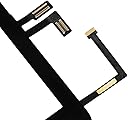


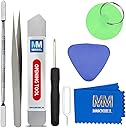

MMOBIEL Digitizer compatible with iPad Air (Black) 9.7 Inch Touchscreen Front Display Assembly
Product ID: 51934801
📦Complete kit with adhesive & manual
🔧Pre-installed Home Button & Camera Bracket
🖥️9.7-inch Retina-compatible touchscreen
Desertcart purchases this item on your behalf and handles shipping, customs, and support to Greece.
⚡ Upgrade your iPad Air’s touch game—seamless, sleek, and ready to impress!
The MMOBIEL Digitizer is a fully assembled 9.7-inch touchscreen front display replacement designed exclusively for iPad Air models A1474, A1475, and A1476. It features a pre-installed Home Button, Camera Bracket Holder, and adhesive stickers, making installation straightforward with no need to transfer components. Backed by a detailed manual and a strong user rating, this black digitizer offers a professional upgrade solution for restoring your iPad Air’s touch functionality.

| ASIN | B01LYNC3F9 |
| Are Batteries Included | No |
| Best Sellers Rank | 112,020 in Computers & Accessories ( See Top 100 in Computers & Accessories ) 420 in Computer Tablet Components & Replacement Parts |
| Brand | MMOBIEL |
| Colour | black |
| Customer Reviews | 4.2 4.2 out of 5 stars (1,790) |
| Date First Available | 10 Oct. 2016 |
| Guaranteed software updates until | unknown |
| Item Weight | 310 g |
| Item model number | iPad Air A1474 A1475 A1476 |
| Manufacturer | MMOBIEL |
| Package Dimensions | 28 x 22.6 x 1.9 cm; 310 g |
M**N
Great product, comes with well needed tools and very well packaged.
Product is fantastic very good quality has all the tools you need so make it easier and the adhesive tape very well packed. The product itself is fantastic. The tricky part is to take the old screen it broke into pieces and then pieces of glass where everywhere, but I did it carefully and without going too hard and managed to take it all. After that then is pretty easy to take the screws and disconnect/ reconnect everything. My advice is take a good hair dryer to open and to remove all the little glass left overs, careful with the finger prints everywhere, don’t rush, clean everything at the end before closing, meaning make sure the surround of the iPad where the glass will go is clean as well from any glass residues. Is not particularly hard job it just takes time and care to prevent breaking something else. Btw there is a piece of tape that connects to the button. Keep that and can be reused so you don’t have to get that special tape that costs about £9 again for a tiny piece. Just saved a few quid spend a couple hours but in general all good. Great product overall, having the right tools makes you easier.
J**L
Excellent product
Tools are perfect for the job Worked first time, and if like me your iPad is on its 3rd or 4th repair, the adhesive on this screen is awesome stuck down assuringly well on first press and didn’t slowly prize back up like other products on the market Recommend
C**L
Perfect!
The screen was a lot easier to fix than I expected having followed a video tutorial online rather than using the manufacturers instructions. The screen came with ALL the bits required and the added bonus of a new home button made things a lot easier when replacing the screen. All in all a great product that's helped restore my ipad to "functioning" once again.
B**N
Perfect replacement and a very good price!
Installed in less than 30minutes and a perfect fit. Followed instructions on YouTube and was relatively easy even never have done one before. The screen and tools are of excellent quality, my only gripe was that the adhesive wasn’t very good, basically just double sided tape, so I had to apply my own sealant in some places. The screen seems touch and is just as responsive as the original apple screen. Highly recommended from me.
S**L
OK product but instructions could be much better
The glass looks good and fits well. The home button is loose compared to the original however. The instructions although descriptive, due to the small size of the images they are basically useless. Tiny images showing microscopic connectors which if you damage your ipad is basically gone. Watch online videos and dont depend on the enclosed instructions. Adhesion is also not great. Had to reapply pressure at several occasions in during the next few days. The tools provided are of very poor quality. Using a magnetic screwdriver for example will make your life much easier.
A**R
Worked great for two months... then failed. Basically it's rubbish.
To start with I thought this was a great touchscreen replacement. Assembly went smoothly and the screen seemed to be of reasonable quality. I have fitted a fair number of iPad and iPhone screens for friends and family over the year so know how to do it properly taking care of connectors and cables. Initially everything seemed fine and I was happy with the screen. However, now two months in the problems abound. The iPad is unusable as the screen has taken on a life of its own with false touches and dead spots. I've inspected and reassembled but its still broken. Amazon say the return window is now closed but they seem to be unaware of UK consumer rights to a twelve month guarantee. You try getting that right here! Shame on Amazon!
G**M
Working 100% OK
I took my time installing this as i wanted to get it right first time, in total it took me 3 hours. Removing the old screen was the most difficult bit. The trick for me was to make sure I got the pry-lever underneath the sticky adhesive strip, which helps to remove a screen thats in pieces as it helps lift the glass. I used a hair dryer on its second / middle setting which was perfectly adequate. Keep applying the heat if / when it becomes hard to slide the lever along. I kept my finger on the lever to maintain a set depth but misjudged it along the ‘hinge’ side and cut through the ribbon connectors. It didn't matter though as they are attached to the broken screen anyway. The one for the home button was okay, which is handy if you need to re-use it, which I didnt. The adhesive strip on the hinge side is very thin, only 1-2mm. The adhesive around the camera and home button was also along the edge of the clear area of the screen but care is needed not to damage any components as the lever is inserted deeper to reach it. With the glass breaking off at the corners it aided what I could see. Clean the adhesive off the surface of the iPad carefully. Remove all broken bits of glass and I used Isopropyl Alcohol with cotton pads to remove the remaining adhesive. I cleaned until it was smooth and shiny. When fitting the new screen there is an adhesive strip on the back of the ribbon for the home button, remove the plastic by pulling the protruding blue tabs and stick it down to the screen, working from the home button to leave any spare at the hinge position. I gave the LCD screen a clean with lint free pads and just dry wiped it. With the screen in place I put several books on it to apply some pressure for about half an hour. It’s not glue so it doesn't need to set but I wanted to give it every chance I could, as I said I only wanted to do it once. Switched it on and all was working fine, the screen even looks brighter. Having everything already installed in the new screen was good, I would not have wanted to apply the adhesive tape myself. Very pleased with the end result, it went better than I expected and I now have a £600 iPad back in action for a cost of £20, awesome.
C**L
Great product!
Item arrived in perfect condition. I managed to replace the digitizer on my iPad Air without any problems! Instructions were spot on, a small grammar mistake here and there but still made sense. Tools supplied were good and fit for purpose. Digitzer works and has restored by ipad air - and all for a great price! Very happy!
S**C
Lo recomiendo
Tengo que decir que los cables de conexión es un poco más largo que los de pantalla original, ayuda a la fácil y comodidad de instalación, pero ha la hora de poner la pantalla molesta y hace que sobresalga un poco, pero calidad y precio lo recomiendo, hago la reseña después de varios meses y sigue funcionando bien.
D**O
Supernöjd
Ordentlig förpackning, innehållet stämmer med beskrivningen. Skärmen fungerar klockrent, supernöjd. Stark rekommenderar
C**N
C'est de bonne qualité et pas hyper compliqué avec un tuto vidéo
J'ai acheté cet écran pour changer l'écran de mon Ipad cassé dans un coin. Avant de commencer j'ai suivi un tuto vidéo pour bien voir ce qu'il fallait faire et pas faire. Comme j'avais un angle cassé, l'écran a mit un peu plus de temps a s'enlever car il se cassait en petit morceau mais j'ai réussi avec de la patience. Ensuite j'ai pu enlever les fiches branchées très facilement, faut juste faire attention aux vis, elles sont minuscules ! J'ai ensuite enlevé et bien nettoyé la colle avec de l'alcool a brûler. J'ai tout fait propre, mit le nouvel écran, et quand j'ai fermé, tout ne marchait pas correctement. La raison, le chassis de l'Ipad était tordu. Bien entendu, ça a cassé la nouvelle vitre, donc j'ai redémonté, nettoyer, j'ai redresser le chassis du mieux que je pouvais pour que la vitre rentre parfaitement sans forcer. Et j'ai commandé une nouvelle vitre, et c'est tout bon. Il faut bien faire attention à ce que la nouvelle vitre soit parfaitement a fleur du chassis, parce que sinon le tactile ne marche pas à certains endroits. Pour ma part c'était un angle en haut, et du coup le bouton slide pour éteindre ne marchait pas par exemple. Voilà j'espère que mon commentaire vous aidera si vous voulez vous lancer !
E**L
Great product. Reviewed a second time after a second purchase.
Kindly read the update posted below the initial review. Initial review:( First purchase)Good digitizer screen. Caution: the home button module is poorly engineered and does not fit neatly into the zif connector on the iPad. I had to reuse the old connector. Likewise, the home button was a poor fit. I used the old here as well. The screen however is very good. Update: after buying again a second time a few years later. The above review was posted a few years ago. I purchased this a second time and found the connectors and home button to be perfectly fitting. Working well. I initially thought I'd reuse the home button and connectors but this time the product was good and all connectors and home button fit perfectly. I'd rate this a 5 on 5. I'm not sure if the initial product was faulty and this second purchase was the "normal" product or if they've corrected their product. Nevertheless, I found it quite satisfactory. Even though the initial product had a faulty connector, the digitizer was fully functional. My advice to anyone purchasing this is to preserve the home button and its connector from the original iPad so you'll be able to use that if the replacement mmobiel connector is a poor fit.
C**N
S'adapte parfaitement
Il faut choisir un moment où on est détendu, ne pas regarder sa montre et y aller pas à pas. La notice est en anglais, cela aurait été bien de l'avoir en français. Pour ma part, je l'ai fait sans vidéo et sans m'appuyer sur la notice d'utilisation, juste en observant. Au final, cela fonctionne, le rendu est impeccable. Voir le résultat sur une longue période, le tactile fonctionne vraiment. Après avoir fini le remplacement, je l'ai laissé reposé 10-15 minutes sous deux gros livres. Je suis très contente du résultat. Il n'est pas 100 pourcent égal à l'orignal, mais le rendu est très bon. Bémol : il faut avoir de bons yeux, ne pas perdre les visses minuscules, de la patience, et un minimum de dextérité. Tout est une question de doigté et de patience. Il faut compter une heure, une heure et demi, pour un novice. Je n'ai utilisé que le petit tournevis et l'outil plat qui sert à décoller. J'ai chauffé le contour avec un sèche cheveux, pas trop, de 30 secondes à 30 secondes. Maximum 1 minute. Pour enlever la colle de tout le contour, avant la pose définitive, j'ai utilisé des "alcohol preps", contenant 70 pourcent Isopropyl Alcohol, avantage, les préps sont déjà imbibées d'alcool et pas trop, cela facilite le travail et ce n'est pas cher à l'achat.
Trustpilot
1 month ago
2 weeks ago