Desertcart purchases this item on your behalf and handles shipping, customs, and support to Greece.
🚀 Elevate your home network to pro-level speed and coverage — don’t get left buffering!
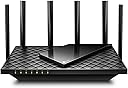
The TP-Link Archer AX72 Pro is a WiFi 6 dual-band router delivering ultra-fast speeds up to 5400 Mbps, powered by 6 high-gain antennas and Beamforming technology for extensive home coverage. Featuring a 2.5 Gbps multi-gig Ethernet port and four additional gigabit LAN ports, it supports high-demand gaming, 8K streaming, and multiple device connections simultaneously. Enhanced with TP-Link HomeShield security and voice assistant compatibility, it offers a secure, smart, and future-proof networking solution for modern homes.


| ASIN | B0BTT3F159 |
| Antenna Location | Gaming, Home |
| Antenna Type | Fixed |
| Best Sellers Rank | #317 in Computers & Accessories ( See Top 100 in Computers & Accessories ) #29 in Computer Routers |
| Brand | TP-Link |
| Built-In Media | Power Adapter, Quick Installation Guide, RJ45 Ethernet Cable, Wi-Fi Router Archer AX72 Pro |
| Color | Black |
| Compatible Devices | Personal Computer |
| Connectivity Protocol | Wi-Fi, Ethernet, IPv4, IPv6 |
| Connectivity Technology | Ethernet, USB, Wi-Fi |
| Control Method | App |
| Controller Type | App Control |
| Coverage | Extensive coverage |
| Customer Reviews | 4.3 out of 5 stars 541 Reviews |
| Data Transfer Rate | 1 gigabits_per_second |
| Frequency | 5 |
| Frequency Band Class | Dual-Band |
| Global Trade Identification Number | 00840030706776 |
| Item Highlight | Multi Gigabit Wireless Internet Router, 2.5 Gbps Port, VPN Support, MU-MIMO, USB 3.0 Port, WPA3, Compatible with Alexa |
| Item Type Name | WiFi 6 Router |
| Item Weight | 1.5 pounds |
| LAN Port Bandwidth | 10/100/1000 Mbps |
| Manufacturer | TP-Link |
| Maximum Upstream Data Transfer Rate | 2500 megabits_per_second |
| Mfr Part Number | Archer AX72 Pro |
| Model Name | Archer AX72 Pro |
| Model Number | Archer AX72 Pro |
| Number of Antennas | 6 |
| Number of Items | 1 |
| Number of Ports | 5 |
| Operating System | TP-Link Custom OS |
| Other Special Features of the Product | WPS |
| Router Firewall Security Level | High |
| Router Network Type | dual |
| Security Protocol | WPA, WPA2, WPA3 |
| Special Feature | WPS |
| UPC | 840030706776 |
| Unit Count | 1 Count |
| Warranty Description | 2 year manufacturer |
| Wi-Fi Generation | Wi-Fi 6 |
| Wireless Communication Standard | 802.11ax |
| Wireless Compability | 802.11ax |
E**C
Excellent Product, Record of Outstanding Build Quality plus Solid Performance and Strong Signal !!
The Tp-Link AX74 Pro (AX5400 class) Router is an excellent improvement over any slower, shorter-range product you can find at a reasonable price, and beats many higher price higher power routers in the market for quality, range, and dependability record. Key components in its construction have been beefed up and effectively over engineered to provide better stability and stronger, longer dependability than it brand-mates and competition alike. The extended warranty on this product gives strong evidence that its track record has been an outstanding feature and accomplishment for the maker and for buyers.
D**H
Other than the goofy Tether app, Awesome router!
Great WiFi 6 router that has been a dramatic improvement over the older (8+ years) router it replaced. An older MacBook Pro is getting WiFi connect speeds of 172Mbps to the router. Multiple antennas mean more simultaneous connections and signal range has been great. Setup was a mixed bag; I tried using the Tether mobile app (it's supposed to be easier) to setup and configure--I couldn't get it to "see" the router. Switched to the very capable old-school web admin portal on the router itself and easily configured everything. (After that I am able to use the Tether app which does offer some remote administration capability that's probably worthwhile). So far the performance and reliability have been rock solid. Great value for the performance, range and reliability it offers.
R**E
This was the right pick
After a year of use, it's going strong. I used this as part of my first network rack and found the set up to be really easy. My old router seemed to need to be reset every couple of months, but this one never has been. Also, I wish I had tested this before I set up access points-- the coverage is so good that some of my access points are, well, pointless.
M**.
Some setup specifics, works great for good price
Works great now that I got it set up. At first it wasn't connecting properly but it was no fault of the device. I had to work around the Tether app and also I didn't see /realize there was a tiny black button to turn on "wifi." Francis Gail from their customer service helped me get it straightened out. Has been going strong for a few weeks now, no issues, good speed, happy with the product , service and price.
G**P
It is highly likely this will eventually work....and so it did
Attempting to ignore the hand holding setup process does not make this unit user friendly. I need to setup this router without a modem connected and change the base IP address plus make other changes before it gets plugged into modem. The included instructions are poor and the unit seems quite warm for something that is basically idling and not pushing data. It also appears to have been setup prior to delivery as the initial setup screen had no resemblance to the installation manual i found at TPLINK website. This is my first TPLINK product and likely last and this one may be going back.. ** Update ** After an hour plus of fighting this thing I swapped the vendor supplied patch cable for one of my own and it came to life. One star off for crapppy cable
W**G
China-made Junk!
I was delighted with this router. It worked fine and was very powerful…until it suddenly and mysteriously died after only eight months of use. I bought a new power cord and power adapter for it, hoping the problem might just be a power adapter that went bad, but that wasn’t the problem. The problem is that TP-Link is China-made junk. I’ll never go anywhere near the brand again. This TP-Link router was a replacement for a hopelessly obsolete ASUS router I had used for nearly eight years — which still worked when I replaced it. I’m going back to ASUS for my routers.
M**.
Perfect for everyday needs
This router has been a great upgrade for our home network. Setup was straightforward and the connection has been very stable since installing it. WiFi speeds are fast throughout the house, and it handles multiple devices streaming, working, and gaming at the same time without any issues. Coverage has been solid with no major dead spots, and the performance has been consistent day to day. I like that it offers modern WiFi 6 features without being overly complicated to manage. Overall, it’s a reliable, well-performing router that works great for typical household use and daily internet needs.
K**Y
port forwarding bug found
I have been using this as an access point for a week or two, but power blinked today and had to mess with computers and drive arrays, so finally made the jump to having just this router today. (I didn't feel like duplicating all the port forwards, so it was easier to use it as access point for a testing period first.) Everything went fine, and I got the usual speed-ups you get from going from Wifi5 to Wifi6. My servers are hard-wired downstairs on a switch, and I connect upstairs using Wifi. My speeds to the web went from 60-80mpbs to around 400. Definitely faster now, but I ran into a weird issue. After turning on a port forward for a file server (using an unusual port), I couldn't reach the server from the WAN. Inside the LAN was fine, and the machine had internet without issue. The box used a static IP and even though I didn't see that IP address in the client list, once I put the IP reservation in, the router interface populated the name of the server, so it was aware of its presence. Having tried everything else, I rebooted the server and edited the port forward rule, but instead of typing in the IP address, I used the "connected devices" button, which now contained the server due to its recent reboot. The field was re-populated with the EXACT SAME STRING, and I deleted the optional inside port number before saving, and saved the rule. Suddenly, the server was reachable. The one-line summary in the list of port forwarding rules was identical to what it was before. Moral of the story : if you create a port forward rule, make sure you reboot the box first and use the connected devices button, because typing in the exact same thing manually didn't work for me.
Trustpilot
1 month ago
2 weeks ago