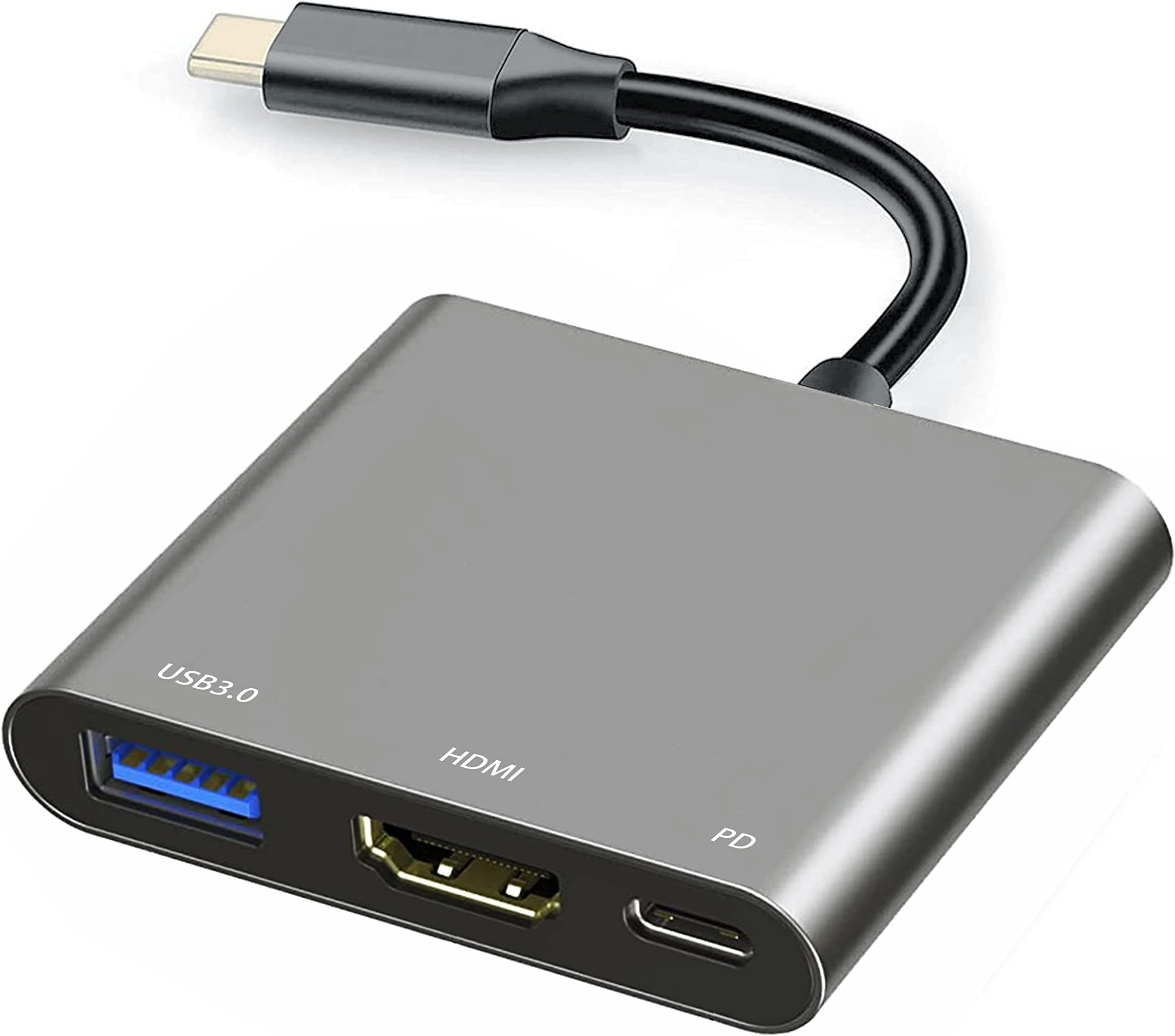
Highlights All-in-One USB-C Hub — One Compact Adapter Replaces Multiple Cables The Mindorlen USB-C to HDMI Multiport Adapter combines video output, charging, and data connectivity in a single mini aluminum device (2.3" × 2.1" × 0.4") with a 130mm cable. No need for separate HDMI, USB, and charging adapters — everything connects through one plug. 4K Video Output — Professional-Grade Display Quality Supports HDMI 2.1 standard with output resolutions up to 4K (backward compatible with 2K, 1080p, 720p). Delivers clear, sharp video to external monitors or TVs without requiring a dedicated graphics card. Fast Charging While Using Peripherals USB-C Power Delivery (PD) up to 27W allows you to charge your laptop, tablet, or smartphone simultaneously while using the HDMI, USB 3.0, and USB 2.0 ports — no power drain on your device battery. Two USB Ports for Peripherals — Keyboards, Mice, Drives Includes USB 3.0 (10 Gbps data transfer) and USB 2.0 ports for connecting keyboards, mice, flash drives, external hard drives, card readers, and printers. USB 3.0 supports high-speed file transfers without slowing down video output. Universal Compatibility — Mac, Windows, Chromebook, iPad Works with any device that has a USB-C port — MacBook Pro/Air, iPad Pro, Chromebooks, Surface Book, Samsung Galaxy phones, and more. Thunderbolt 3 and Thunderbolt 4 ports are also compatible. Gray Aluminum Alloy Construction Durable aluminum shell dissipates heat, resists corrosion, and feels premium compared to plastic hubs. Matches professional setups and MacBook aesthetics. Specifications Brand: Mindorlen Model: NXA009-L9_NEW ASIN: B0BVHSNF3G Color: Gray Dimensions: 2.3" L × 2.1" W × 0.4" H Weight: 0.04 kg (0.88 oz) Cable Length: 130mm (0.5 inch extension) Number of Ports: 4 total • 1 × HDMI 2.1 (video output) • 1 × USB-C PD (charging) • 1 × USB 3.0 / USB 3.1 Gen 1 (10 Gbps data transfer) • 1 × USB 2.0 (backward compatible data transfer) Video Output: 4K resolution (supported); backward compatible with 2K, 1080p, 720p Data Transfer Rate (USB 3.0): 10 gigabits per second Charging Power Delivery: 27W maximum via USB-C Enclosure Material: Aluminum alloy Hardware Interface: USB Type-C, HDMI, USB 3.0, USB 2.0, Thunderbolt Compatible Operating Systems: macOS 10.12 Sierra and later, Chrome OS 134+, Windows 10+, iPadOS 14+ Compatibility (Devices): USB-C equipped laptops, tablets, smartphones (MacBook, iPad Pro, Chromebook, Surface Book, Samsung Galaxy S21/S20/S10, etc.) Unit Count: 1 adapter Date First Available: December 7, 2022 Price: $9.99 Warranty: 1-year return, 3-year manufacturer warranty Delivery: FREE same-day delivery (5 PM – 10 PM on qualifying items) Included in Box: 1 × USB-C to HDMI adapter, 1 × USB-A to USB-C converter cable, 1 × user manual How to Use It Step 1 — Connect the Adapter to Your Device Plug the USB-C connector directly into the USB-C port on your laptop, tablet, or smartphone. The adapter sits flush with your device — the 130mm cable gives a short extension if needed to avoid cable strain. Step 2 — Connect Your HDMI Display Plug a standard HDMI cable into the HDMI 2.1 port on the adapter and connect the other end to your external monitor or TV. The adapter will detect and automatically initialize the display connection within 1–2 seconds. Step 3 — Add Peripherals (Optional) • USB 3.0 port: Connect a keyboard, mouse, or external hard drive for data transfer at 10 Gbps speeds • USB 2.0 port: Connect additional peripherals like printers, card readers, or webcams • Both USB ports work simultaneously with HDMI output — no switching needed Step 4 — Plug In Your Charger (Optional) Connect a USB-C power adapter (27W maximum PD rated) to the USB-C charging port on the adapter. Your device will charge while you're using the HDMI, USB 3.0, and USB 2.0 ports without any power loss or performance reduction. Step 5 — Arrange Your Workspace Position the connected monitor, keyboard, mouse, and charger around your work area. The adapter's compact size means it won't interfere with other cables or create a cluttered desk. Step 6 — Power Down and Disconnect When finished, simply unplug the HDMI cable and peripherals, then disconnect the adapter from your device. No driver installation or software needed — it's completely plug-and-play. Common Usage Scenarios • Remote Work: Laptop + external monitor + keyboard + mouse + charger all connected through one adapter • Content Creation: iPad Pro + monitor for video editing, while charging the iPad and transferring files to external drive • Travel: Ultra-portable — entire hub fits in a laptop bag alongside your device • Presentations: Instant connection to projector or conference room TV in hotels, offices, or client meetings • Gaming/Streaming: Connect Nintendo Switch or Android phone to TV and charge simultaneously What Else Should Potential Buyers Want to Know About This Product Reliability Is Mixed — Critical Consideration Customer reviews reveal significant reliability concerns despite the low price. While 52% of buyers report the adapter works perfectly, the other 48% report failures: • Video cuts out randomly after minutes of use • Adapter stops working after 3–4 weeks of regular use • HDMI connection fails to initialize or drops intermittently • Glue separates between internal components, causing disconnection This is not a minor issue — customers describe it as unreliable or "a pile of crap" after early failure. For mission-critical setups (work presentations, important calls), the risk is real. Compatibility Is Device-Specific, Not Universal While the spec sheet claims broad compatibility, actual success depends on your specific device's USB-C implementation: • Works well: MacBooks (2018+), iPad Pro, some Android phones with proper USB-C display protocols • Doesn't work with HDMI: Samsung Galaxy A-series phones, ZTE A7 Prime, some Chromebooks — USB port and charging work, but no video output • Problematic: Pixel 6 Pro (users report it doesn't work despite listed support), some Macs fail to recognize the HDMI connection • Not compatible: Amazon Fire Stick, devices without USB-C display mode capability Before purchasing, verify that your exact device model has been confirmed by other buyers to work — not just that it has a USB-C port. 30Hz Refresh Rate Limitation — Movies Fine, Gaming Not Ideal The HDMI 2.1 port supports 4K output but at a 30Hz refresh rate, not 60Hz. This means: • Suitable for: Video playback, office work, presentations, web browsing • Not suitable for: Fast-paced gaming, high-refresh-rate work (CAD design, 3D modeling) One reviewer noted: "If you plan on watching movies/TV, it's fine. Just wish I had seen it was only 30Hz." For casual use, 30Hz is invisible; for gaming or professional graphics work, it will feel sluggish. Power Delivery Charging Works, but Shared Bandwidth When you charge your device through the USB-C PD port AND use the HDMI + USB ports simultaneously, all data and power flow through the same USB-C connection. This means bandwidth is shared — you're not getting independent charging and data throughput. Charging will be slower than using a dedicated charger, though still functional. Durability Concerns — Glue Separation and Early Failure 40 of 300+ reliability mentions specifically cite durability problems: • Glue separating between the aluminum shell and internal connections • Ports becoming loose after weeks of use • Cable connection degrading (connects and disconnects repeatedly) The low price ($9.99) likely reflects cost-cutting in internal construction. Competitors at $20–$30 price points typically report better durability. For occasional travel use, this may be acceptable; for daily desk use, durability risk is higher. Three-Year Warranty Provides Some Recourse Despite reliability concerns, the product includes a 1-year return policy and 3-year manufacturer warranty. If your adapter fails, you can return or request a replacement. However, the warranty replacement process for international sellers can be slow. macOS Compatibility Note — Some Users Report Issues A small but notable group of macOS users report: • HDMI port not recognized after connecting to Mac • Apps crashing (Safari, Preview) after adapter connection • Sync breaking between Mac and monitor This appears to be a hardware/driver compatibility issue with specific Mac configurations, not universal. Most MacBook users report it works fine. 4K Output Resolution — Practical Caveat While the adapter supports 4K, achieving stable 4K playback depends on: • Your USB-C port's bandwidth (older devices may bottleneck) • The monitor's HDMI port being HDMI 2.1 capable • Cable quality and connection stability Most users successfully run 1080p or 2K without issues; 4K is achievable but may require short HDMI cable runs and clean connections. No Audio Out Mentioned The adapter focuses on video (HDMI) and USB connectivity but does not include a separate 3.5mm audio jack. Audio is embedded in the HDMI signal, which works with monitors that have speakers or when routing through your external monitor's audio output. If your monitor has no speakers, you'll need USB headphones or Bluetooth audio. Thermal Performance The aluminum shell dissipates heat, but sustained use (charging + video output + USB data transfer simultaneously) may cause the adapter to warm slightly. This is normal and not a failure mode, but users in hot environments should be aware. Price Volatility and Third-Party Sellers At $9.99, this is one of the cheapest USB-C to HDMI adapters on Amazon. Be cautious of listings from non-verified sellers, as counterfeits and refurbished units may exist at this price point. Verify the seller is Mindorlen or a recognized authorized distributor. Final Thoughts The Mindorlen USB-C to HDMI Multiport Adapter is a budget-conscious, feature-rich hub that does exactly what it claims for users who fall within its narrow compatibility window and accept the durability risk. At $9.99, the price is genuinely hard to beat — you get HDMI video output, dual USB ports, and charging capability for the price of a single USB-C hub from premium brands. The value proposition is strong IF your device works with it. The aluminum construction, compact form factor, and 3-year warranty all signal reasonable build quality for the price. The honest limitation is reliability. Nearly half of reviews report failures ranging from intermittent video dropouts to complete device death within weeks. This is not a freak occurrence — it's a consistent pattern. For a device you'll rely on daily for work calls, presentations, or content creation, this risk is non-trivial. For occasional travel or backup use, the low cost makes the risk acceptable. Best for: • Budget-conscious buyers who need occasional USB-C to HDMI conversion (travel, presentations) • Users with compatible devices (MacBooks 2018+, iPad Pro, certain Android phones) verified by other buyers • Casual video playback or office work (the 30Hz limitation is irrelevant for these tasks) • Backup adapter to keep in a travel bag • Buyers who value lowest possible price and accept replacement risk Think twice if: • You rely on this adapter daily for work — reliability risk is too high • Your device is not explicitly confirmed by other buyers to work with this model • You need 60Hz refresh rate for gaming or professional graphics work • You require proven long-term durability — invest in a $25–$40 option from established brands • You need same-day support — Mindorlen support response times are variable Bottom line: Solid specs, genuinely affordable, but reliability is the trade-off for the price. Works great for some users, fails for others. Verify your exact device compatibility from real reviews before buying. If your device is confirmed to work, it's an unbeatable value; if it's on the "doesn't work" list, no price discount is worth the frustration.