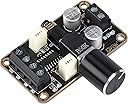
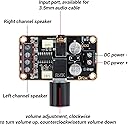
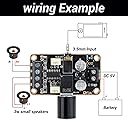
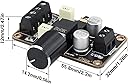
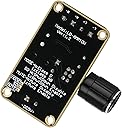
This audio board looked interesting because I wanted a small test speaker system that would be powered by my Raspberry Pi's 5 volt GPIO pins and, receive output through the existing headphone jack.This board looked like I could easily connect it to my Rpi B4 by cantilevering it out one end of the R pi. See photo:Used a few in stock pin connectors for power lines. Purchased some 2 inch speakers and connected them up for bench testing: See photo.Had a 12 inch audio cable in stock and used it for bench testing. I later purchased a 6 in audio cables, pkg of two straight male ends and, a pkg of two: 6 in: each having one straight male and one right angle male. I chose to use the 6 in straight and right angle ends: the other three went into stock.The right angle end of the audio cable went into the R pi and the straight went into the audio board.Note:the R pi audio alsa chip is factory set low volume: you need to enter the terminal to change it : See photos:Open the terminal: enter: sudo alsamixerthis brings up the main screen: you will see the word master under the column: use the keyboard up arrow to raise the column to 100:next press f6 and a window will open: use the keyboard down arrow:choose the headphone option a column will appear with the word headphone under it: raise the column to 100 and press exit.Check your screen speaker control slider which can be used to control the output volume to your audio board.Your new board volume control now has output control of what you set on your on your screen speaker slider. If you set your slider at 50% your small board will take that 50% as it’s 100%. Play around with it.I built a wood speaker case: sat my R pi on top: sandwiched with high density black foam