🖨️ Print smarter, live better — your home office MVP awaits!
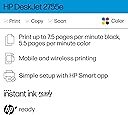
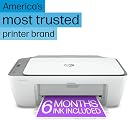
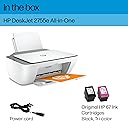
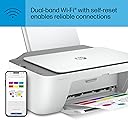
The HP DeskJet 2755e is a compact, wireless color inkjet printer designed for home use. It delivers up to 5.5 pages per minute in color, supports mobile printing through the HP Smart app, and includes 3 months of Instant Ink for hassle-free ink management. With dual-band Wi-Fi and HP+ smart features, it offers seamless connectivity, easy setup, and automatic updates to keep your printing efficient and secure.


| ASIN | B08XYP6BJV |
| Additional Printer Functions | Copy, Scan |
| B&W Pages per Minute | 7.5 ppm |
| Best Sellers Rank | #35,874 in Computers ( See Top 100 in Computers ) #63 in Ink Cartridge Printers |
| Brand | HP |
| Built-In Media | DeskJet |
| Color | white |
| Color Depth | 24 bpp |
| Color Pages per Minute | 5.5 ppm |
| Colour | white |
| Compatible Cartridge | HP cartridges with original HP chips or circuitry |
| Compatible Devices | Laptops, PC, Smartphones |
| Connectivity technology | USB, Wireless |
| Control Method | Touch |
| Controller Type | iOS |
| Customer Reviews | 4.0 out of 5 stars 51,724 Reviews |
| Display Type | Either 'LCD' or 'LED' |
| Dual-sided printing | No |
| Duplex | simplex |
| Global Trade Identification Number | 00195161617966 |
| Hardware Interface | USB 2.0 |
| Ink Color | Color |
| Is Electric | Yes |
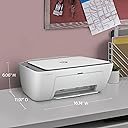
| Item Dimensions D x W x H | 30.4D x 42.5W x 15.2H centimeters |
| Item Type Name | Inkjet Printer |
| Item Weight | 7.55 Pounds |
| Manufacturer | HP Printers |
| Maximum Copies Per Run | 60 |
| Maximum Copy Resolution Black and White | 1200 dpi |
| Maximum Copy Resolution Color | 1200 x 1200 dpi |
| Maximum Copy Speed Black and White | 7.5 ppm |
| Maximum Media Size | 8.5 x 14 inch |
| Maximum Print Resolution Black and White | 1200 dpi |
| Maximum Sheet Capacity | 60 |
| Maximum print Resolution Color | 1200 dpi |
| Model Name | 2755e |
| Model Number | DJ 2755e |
| Model Series | 2700 |
| Model name | 2755e |
| Number of Drivers | 2 |
| Number of Trays | 1 |
| Other Special Features of the Product | Energy Star |
| Paper Size | 3 x 5 to 8.5 x 14 |
| Power Consumption | 2.5 Watts |
| Print media | Envelopes, Glossy photo paper, Labels, Paper (plain) |
| Printer Connectivity Type | USB, Wireless |
| Printer Output Type | Color |
| Printer Type | Inkjet |
| Printing technology | Inkjet |
| Processor Count | 1 |
| Resolution | 1000 x 1000 |
| Scanner Type | Flatbed |
| Series Number | 2700 |
| Special features | Energy Star |
| Specific Uses For Product | Home use, basic document printing |
| Total USB 2.0 Ports | 1 |
| Total Usb Ports | 1 |
| UPC | 195161617966 |
| Unit Count | 1 Count |
| Wattage | 2.5 watts |
S**Z
Sad
Ink finished only after 10 prints
B**A
Excelente compra
Me gustó mucho, impresión de excelente calidad, muy nítida y las que imprimí a color para mi proyecto quedaron geniales la mejor compra que hice, la recomiendo mucho
K**N
Tips easy
Quick delivery! Very easy installation, and connection to the printer (has a wizard for just that)! It is the second purchase of an HP all in one, (the first one lasted me 10 yrs, wired). This is an upgrade for me, to wireless. I was a little nervous I was going to have trouble with the connections to wifi use, but it was so easy. Recommend if you are looking for a reasonable cost for a printer/scanner/copier. It's very light not as heavy as the first one, and has a new feature for the paper tray. The previous models had one that had very breakable tabs holding the paper tray feeder in place. The new version, this one... has one that slides into the printer when not in use, no more tabs! Recommend.
D**L
Would not buy again
Not good
J**Z
Bien, hasta el momento
Hasta ahorita ha salido muy bien. Ha cumplido su trabajo.
I**O
Works with Eero mesh system
TLDR: good printer, works with eero wifi mesh system, set up in less than 10 minutes - great step-by-step instructions via HP Smart app. If you need a basic printer for occasional printing that's super easy to setup, get this. I initially bought the Canon Pixma MG3620. Downloaded their app to get things setup and what a nightmare. I have an eero wifi and the PIXMA printer would not show up on initial scan. I would select scan again after clicking a series of buttons on the printers and then it would popup only to show my wireless network listed 4 times with me being left to determine which one I connected to. I assumed it didn't matter but it did given after selecting 1 and inputting the password, it wouldn't connect. I would click the series of buttons on the printer again to begin the process again only to have all the wifi networks show up (mine + other networks it found) but in a totally different order. This meant I couldn't even weed out each of my 4 networks to find which one was right. Also, the one time I did manage to get it to connect, I had to set my eero wifi in legacy mode for it to connect. As soon as I removed it from legacy mode, the printer began failing again only for me to begin attempting to get it connected again. I looked on many forums but eventually couldn't find a solution as many other people had issues as well. Why do I mention the printer above? Because I then bought THIS hp printer and simply downloaded the app, plugged in the printer, turned it on, and followed the step-by-step instructions (with animations) and it immediately found my network and connected. No duplicate entries, no hassle, it just worked. I was printing within minutes. I then tested printing on my mac, my downstairs PC, and my phone with AirPrint and it all just worked. I spent almost 2 hours on the canon printer troubleshooting and it was just a huge headache. As for print quality between the two, I couldn't tell you, but if you just need a basic occasional printer, you can't beat this for the price and simplicity. Hope this helps.
Trustpilot
1 week ago
3 days ago