Desertcart purchases this item on your behalf and handles shipping, customs, and support to Greece.
🖨️ Print smarter, save bigger — the MegaTank revolution your workspace deserves!
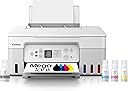
The Canon MegaTank G3270 is a wireless all-in-one inkjet printer designed for home and office use, offering high-capacity refillable ink tanks that print up to 7,700 color pages or 6,000 black & white pages per refill. Featuring seamless Wi-Fi connectivity, a user-friendly LCD display, and Energy Star certification, it delivers professional-quality prints, scans, and copies while saving you up to $1,000 on ink over time.


| ASIN | B0BSMPHC93 |
| Additional Printer Functions | All In One |
| B&W Pages per Minute | 11 |
| Best Sellers Rank | #1,654 in Office Products ( See Top 100 in Office Products ) #588 in Computer Printer Ink & Toner |
| Brand | Canon |
| Built-In Media | PIXMA MegaTank G3270 Wireless All-in-One Printer, Set of Ink Bottles (GI-21: PGBK, C, M, Y), Print Heads, Documentation, Power Cord |
| Color | White |
| Color Pages per Minute | 6 |
| Compatible Cartridge | PG-245, CL-246 |
| Compatible Devices | PC, Smartphones |
| Connectivity Technology | USB, Wi-Fi |
| Control Method | App |
| Controller Type | iOS |
| Customer Reviews | 4.2 out of 5 stars 856 Reviews |
| Display Type | LCD |
| Duplex | Simplex |
| EU Spare Part Availability Duration | 2 years |
| Hardware Interface | Ethernet |
| Ink Color | Black, Cyan, Magenta, Yellow |
| Item Dimensions D x W x H | 21.9"D x 16.4"W x 10.6"H |
| Item Type Name | Inkjet Printer |
| Item Weight | 13.2 pounds |
| Manufacturer | Canon |
| Maximum Copy Resolution Black and White | 600 dots_per_inch |
| Maximum Copy Resolution Color | 4800 x 1200 dots_per_inch |
| Maximum Media Size | 8.5 x 14 inch |
| Maximum Print Resolution Black and White | 600 x 600 dots_per_inch |
| Maximum Sheet Capacity | 100 |
| Maximum print Resolution Color | 4800x1200 dots_per_inch |
| Model Name | PIXMA G3270 WH |
| Model Number | 5805C022 |
| Model Series | PIXMA |
| Number of Ethernet Ports | 1 |
| Number of Trays | 1 |
| Other Special Features of the Product | Borderless Printing, Display Screen, Energy Star, Epeat Qualified, Network-Ready, Refillable Ink Tank |
| Output sheet capacity | 100 |
| Paper Size | 3.5” x 3.5” (Square), 4” x 6”, 5” x 5” (Square), 5” x 7”, 7” x 10”, 8” x 10”, Letter (8.5” x 11”), A4, A5, A6, B5, Legal (8.5” x 14”), U.S. #10 Envelopes, Card Size (91 mm x 55 mm), Custom size (width 2.1–8.5 in, length 3.5–47.2 in) |
| Power Consumption | 16 watts |
| Print media | Envelopes, Labels, Paper (plain) |
| Printer Connectivity Type | USB, Wi-Fi |
| Printer Output Type | Color |
| Printer Type | Inkjet |
| Printing Technology | Inkjet |
| Resolution | 600 x 600 |
| Scanner Type | Flatbed |
| Special Feature | Borderless Printing, Display Screen, Energy Star, Epeat Qualified, Network-Ready, Refillable Ink Tank Special Feature Borderless Printing, Display Screen, Energy Star, Epeat Qualified, Network-Ready, Refillable Ink Tank See more |
| Specific Uses For Product | Home, Office |
| Total Usb Ports | 1 |
| UPC | 013803351538 |
| Unit Count | 1 Count |
| Warranty Description | 1 year |
| Warranty Type | Limited |
| Wattage | 16 watts |
D**R
I love my Canon
If you are looking for a budget friendly all in one printer. This Canon is perfect. I like the refillable ink tanks (the ink is cheap to get) I don't have to break the bank just on ink cartridges alone. The ink tanks are large capacity & will last you a while, of you do light to moderate printing. Seamless connect to my laptop & phone. The desktop app makes scanning, copying & printing so much more efficient. My last HP kept losing connect, but I haven't had that issue with my Canon. Best of all there's no mandatory subscription fees for it to fully function. Definitely happy with this purchase & printer. It prints a tad bit slower, but I'm in no rush.
A**Z
Canon Mega tank printer
Love the ease of printer connection. Machine did all the work. I didn't have to search for codes, wifi. Too impressed. Did not cut off any margins. Ease of setting up printer for use.
J**H
Really enjoy this printer
I have had an Epson for many years and it just stopped wanting to print the yellow color no matter how much we cleaned the print head and such. I did a lot of research on different printers and decided on this one. The main reason is because we are able to fix ourselves if something is wrong with the print head. I don't have to find someone to help fix it. the quality of printing is great too. Ive already made stickers and business cards for a family member. Having the eco tank is going to save us so much money. As much as ive printed since this purchase, the ink has barely went down!
J**.
Prints Great Initially But Print Heads Deteriorate Quickly
I own a small business where I'm printing a lot of paper and I've been using these for 3ish months. First, I bought two of these from BHPhoto. I ended up returning them because I thought the print heads were defective and got streaky within a week. I bought two more from Amazon and the print heads did the SAME THING within a week of usage. The nozzle check would be streaky and would remain that way no matter how many cleanings, deep cleanings or print head alignments I would do. So I bought the product protection plan in case the printers become so low quality or break that I'm forced to return them again. I've printed over 2000+ sheets on each printer. Keep in mind, I've had the Epson Ecotank for 7 years (they finally broke after SEVEN years) and switched to Canon Megatank because I thought it was more affordable. Big mistake and just not worth it. The print heads being streaky wouldn't be as big of a deal if they sold print head replacements. They highlight that the print heads are replaceable but have *not* been in stock ever since I bought the printers. I've never seen them in stock, I have email notifications on. It's been over 3 months. So if you have any issues, you basically have to return the printer. The paper feeder is at too steep of an angle, so if you have humidity issues in your office, your paper is going to fall over and feed with the paper slumped over, it effects the print quality. Even if you're using this as a casual home printer, I wouldn't recommend. They have it on an automatic "energy saving" setting, which turns off your printer when not in use, but that causes the print heads to dry out. You have to turn that off. I thought Canon was known for their print quality but not for these printers. (Small pro): The inks are individually separated so you don't have to worry about the colors mixing when you refill them.
S**E
Color is good with correct settings, wireless connectivity is worthless (get a USB cable)
For context, I bought this printer primarily so I could print photos for photo albums and scrapbooking. It's hard to say how I feel about this printer. The worst part about this printer is trying to connect to it to another device wirelessly. The first time I set it up on my computer and phone, it worked like a dream. But every time after that when I would go to print from my computer, I got the error, "Printer is Offline." However, both the printer and my computer were connected to the same wi-fi, and still it would refuse to actually connect. I spent hours turning things off and back on, troubleshooting and diagnosing, reading online forums, forgetting and re-adding the printer back in my settings, and redownloading the printer drivers (which took a while and was the only thing I found that would actually get them to connect again). But who wants to do that every single time they want to print something? It is honestly unacceptable. So if you want to purchase this printer, just go ahead and buy a USB-B to USB-A cable and save yourself time and sanity. I would have a much more positive experience had I just bought the USB cable to begin with. As for print quality, by default, it prints photos very faded, but this can be fixed by changing the settings: For plain paper color printing, go into the Canon 3270's Printing Preferences from the settings app, click on Media/Quality tab, click Color/Intensity, click Set..., and set Brightness slider to dark. For photo paper, set paper type to matte photo paper regardless of paper type to get the most saturated ink and only adjust color settings as needed. When this is fixed, it prints nice photos with good colors. I will say, the black is not as dark as I wish it was on photos. I read that this is because the black ink is pigment-based while the colored inks are dye-based. The black pigment-based ink works well on plain paper, but the pigments can't be absorbed by photo paper. As a result, the "black" color on the photo paper is made up of the colored dye-based inks, which can be absorbed by the photo paper, so the black isn't super dark black on photo paper. See photos for reference. Scan quality is very good. No complaints. Overall, I like this printer and its print quality (if you know the correct settings). And I truly cannot express this enough: DO NOT WASTE TIME TRYING TO CONNECT WIRELESSLY WHEN IT SAYS PRINTER IS OFFLINE. It's not going to work. Just get the USB cable mentioned earlier, and it will work immediately. I really mean it! I hope this helps.
M**J
Don’t hesitate to buy
This printer is the best I’ve ever owned. Easy setup. Connects to all our phones, tablets, laptops via WiFi. Our other printer would lose connection all the time. I’ve had this a few months works great. Love that no more cartridges and ink lasts.
N**N
Solid & economical printer.
Gets the job done at a fraction of the cost. Was able to print 500+ borderless 5x7 invitations and only ate up half the tank.. only drawback is that the printer is much slower than other brands, also, for whatever reason ink drags on envelope prints, out of a set of 100 I had to toss 10 on average.. I tried EPSON, but there were either inconsistencies with borderless print or the cartridges were vastly overpriced. Print quality was solid for the price point.
T**R
Okay if you don't want hi res images
I bought this because it said the ink last a very long time; which it does. However, the print quality is kind of meh. It looks washed out, and I only use the name-brand ink so it is not due to off brand ink. All the features work great, and it is a fine everyday printer for rough drafts, and text, but if you want a photo , sticker, or artwork printer this is not it.
Trustpilot
2 weeks ago
1 day ago