💻 Cool your core, light your lore.
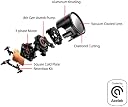
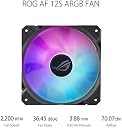
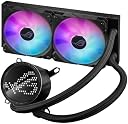
The ASUSROG RYUO III 240 ARGB is a premium all-in-one liquid CPU cooler featuring an advanced 8th generation Asetek pump for superior thermal performance, a customizable Anime Matrix™ LED display for unique visual flair, and high-efficiency ROG ARGB fans that balance powerful airflow with quiet operation. Crafted with aluminum and vacuum-coated lens for a sleek, flagship look, it supports a wide range of AMD and Intel sockets, making it the ultimate cooling solution for high-performance desktop and server builds.

| Product Dimensions | 14.17"L x 12.28"W x 6.65"H |
| Brand | ASUS |
| Power Connector Type | 3-Pin |
| Voltage | 12 Volts |
| Wattage | 3 watts |
| Cooling Method | Liquid and Fan |
| Compatible Devices | Desktop, Server |
| Noise Level | 36.45 dB |
| Material | Aluminum |
| Maximum Rotational Speed | 1.2E+3 RPM |
| UPC | 195553927628 |
| Manufacturer | ASUS |
| Number of Items | 1 |
| Series | ROG RYUO III 240 ARGB |
| Item model number | ROG RYUO III 240 ARGB |
| Item Weight | 7.1 ounces |
| Item Dimensions LxWxH | 14.17 x 12.28 x 6.65 inches |
| Color | 240mm|ARGB|Black |
| Language | Spanish |
| ASIN | B0BTRXVCRV |
| Country of Origin | China |
| Date First Available | February 3, 2023 |
G**U
Great cooler! Looks awesome, effective, easy to install
This is a great AIO cooler. I have this on an unlocked 12th gen i9 processor running at a solid 5.2 GHz no issues. Swapped thermal paste for Noctua non-conductive. Fans are really quiet, pump is basically inaudible compared to the fans even running consistently at 100%. I have overclocked and ran in to memory issues before the CPU ever reached any sort of alarming point.I love the aesthetic of the cooler block. The circle with glass looks like a camera lens so it feels very retro futuristic.Pros across the board!...except one...The lighting effects. Asus' Armoury Crate software is only ok when it finally works. I had to uninstall and reinstall all the Asus software a few times in a very specific order before I eventually got everything working (mostly issues with audio drivers and RGB for ram modules interfering). Took sifting through many reddit posts and forum complaints. I have all effects off for the most part except a VU meter on the anime matrix screen that responds to computer audio which was really cool, but be aware it doesn't support super high resolution audio outputs and the motherboard driver apparently messed things up... even though I have an Asus motherboard... so you'd think they would test basic compatibility within their own products... apparently not?Built-in lighting patterns are really cheesy and you basically end up with a very specific aesthetic or nothing. Luckily it looks really good without the matrix screen doing anything, so I am not going to knock off any stars.Oh yeah, and the default pattern or animation you set is what displays on the matrix screen when the system is powered off... so unless you disable the USB lead entirely in BIIOS at power-off state, it'll always be showing something stupid even if you don't want it to.The RGB on the fans is also not super accurate... whites are always leaning more blue/purple than even some cheap LED strips you can get. If you keep it on a specific color, just be prepared to tweak the tint on the fans a bit.
E**D
Excellent Cooling system
This item performs very well for my i9 13900k.Easy to install. The fan profiles are good to go out of the box. If you're wondering what cooling system to get and you only have room for two fans like me. This is the one.
A**S
Worth the price...
I am loving this little AIO, maybe smell but its fierce. Bringing down my temps dramatically, had a deepcool radiator before but I needed something a little more beefy when I am playing Monster Hunter Wilds. Definitely worth the price also it fits pretty damn nicely in my Corsair 4000D.
L**T
Noisy pump
Great cooling, taking a star away due to pump noise
G**
Give Armoury crate and PC a restart or two, be patient for the magic.
The media could not be loaded. Was having a spot of trouble keeping the overclocked 7600X temps down under load. After installing the Ryuo III, high temps are a thing of the past. My most cpu-heating apps now only push it to the low 50s, and it mostly hovers around 30 celsius doing basic, non-demanding tasks.The AC-enabled matrix (screenshot included) can take some experimentation to get used to, but it is well worth the effort if you are willing to play with it for a minute.Finally, installation was a breeze (NOTE: the radiator is THICK, so you may want to measure your clearances where RAM and motherboard heatsinks are involved). I appreciate the eco-friendly aspect of using your existing AMD brackets and screws to easily mount using ASUS' included hardware (screws straight in; no nightmare buckles to deal with). Looks clean too.
D**L
A great example of a good water cooler
This cooler works great with the am5 9800x3d in keeping the temps at bay.
L**T
Lives up to the brand
Why did you pick this product vs others?:It's an Asus ROG product and I like the brand.Noise level:As a liquid cooler, it keeps the CPU cool without over-revving the fans. It's as good as I hoped it would be.
B**I
Just Buy The Arctic Freezer #
Wish I would have waited for the new Arctic or DeepCool AIO's. Does not cool very well and I even swapped the fans with Noctua fans.4/3/24: I really wish I bought something else. The Aura software has caused for issues than I know what to do with. A lot of error codes on my MB. Seriously, buy another cooler - I'm going to order the new Arctic. Im done with this POS cooler and the hardware.
Trustpilot
1 month ago
5 days ago