Desertcart purchases this item on your behalf and handles shipping, customs, and support to Greece.
🖤 Lock in peak performance with Thermalright’s sleek anti-bend bracket!
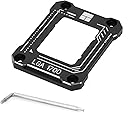
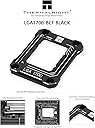
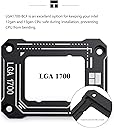
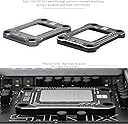
The Thermalright LGA1700-BCF is a CNC-machined, anodized aluminum anti-bending fastener designed specifically for Intel 12th to 14th generation CPUs. It features Lotes insulation foot pads for even pressure distribution, reducing CPU temperatures by up to 6°C. Compatible with LGA1700 motherboards (H610, B660, Z690), it offers a secure, easy-to-install solution that protects your CPU and enhances cooling efficiency.


| ASIN | B0BQF13FK1 |
| Best Sellers Rank | #737 in Computer CPU Cooling Fans |
| Brand | Thermalright |
| Brand Name | Thermalright |
| Compatible Devices | Desktop |
| Cooling Method | forced air |
| Customer Reviews | 4.8 out of 5 stars 316 Reviews |
| Included Components | BCF |
| Item Dimensions L x W x H | 2.13"L x 2.76"W x 0.24"H |
| Item Weight | 9.07 g |
| Manufacturer | Thermalright |
| Material Type | Aluminum |
| Model | LGA17XX-BCF-BLACK-D6 |
| Noise Level | 14 db |
| Number of Items | 1 |
| Part Number | LGA17XX-BCF-BLACK-D6 |
| Power Connector Type | 3-Pin |
| Product Dimensions | 2.13"L x 2.76"W x 0.24"H |
| UPC | 772168567229 |
| Unit Count | 1 Count |
L**E
Great for Peace of Mind and Slightly Lower Temps
Summary: It looks good, works well for the price, and installation is not hard (though you should "walk" the bracket down to avoid uneven mounting" "Why is it cheaper than the other listing?" - It only comes with the bracket, instructions, and the hex key you need for the ILM screws, while some of the other listings also include thermal paste. Installation: Gamer's Nexus has a good video on this thing on YouTube that I recommend watching. The box comes with basic instructions since the whole process is pretty straightforward, but I recommend slowly screwing in each screw (about a quarter turn at a time) to ensure even mounting pressure. I torqued mine down until I felt pressure and then gave it a little more after that to make sure it was good. Make sure you go corner to corner diagonally when you are screwing it in. Results: I saw my idle temps come down to as low as 23 Celsius (about ambient), and an average idle temp reduction of about 2 degrees. While web browsing I actually saw a temperature reduction of 5-6 degrees (31 Celsius before, 25 after) which was interesting. It also seems to cool down faster. As for gaming, I never saw it go above 60 Celsius, and usually peaked at about 55 degrees in matches which was a reduction of about 5 degrees for both. As a disclaimer, I also changed my thermal paste from Artic Silver to Arctic MX-4. I made other changes to my system, such as going from 1080p to 1440p but I maintained the same FPS so that shouldn't affect CPU utilization much. Overall I definitely recommend this bracket, especially if you're worried about temps. It is definitely helping my cooler reduce my CPU temps and feels much more secure/even than the stock ILM bracket. I feel like this thing would be crucial in an ITX build or any small/low airflow builds in general.
A**S
Great
it’s good not bad at all, does help cpu temps go down. fits perfectly fine with my intel cpu core i5 13600k. really simple to install. function great
J**Y
Just buy it
Cheap, effective, and easy to install. There is absolutely no reason to build an LGA-1700 computer without a contact frame to prevent IHS bending
R**N
Best budget upgrade for your pc!
It’s great there’s no downsides. Lower temps- around 5-7c cooler for me Prevents bending and makes sure your cooler will always have direct contact with the cpu. The quality is also very nice and feels very reliable, fit perfectly.
I**N
Works the way it was designed
I purchased 3 of these for various LGA 1700 motherboards. I have not seen any issues with motherboard warping or heat sink issues. No problem with using my Corsair all in one Liquid CPU cooler.
J**N
good quality
worked good easy to install just what i ordered
D**E
Works
Thermalright LGA1700 Plate – Tested with i7‑13700K + Corsair 360 Titan AIO I installed the Thermalright LGA1700 plate on my i7‑13700K, cooled with a Corsair 360 Titan AIO. To test its effectiveness, I ran the CPU under exactly the same conditions and environment as before, so the comparison is direct. The results were impressive: Package temps: Avg 56 °C → 43 °C P‑Cores: Avg 61 °C → 46 °C E‑Cores: Avg 44 °C → 38 °C Max temps had minor spikes, but the average temps dropped significantly. Minimum temps became more consistent, giving a more stable thermal profile under load. What this means: The plate clearly improves CPU-to-cooler contact, letting the Corsair 360 Titan AIO perform closer to its full potential. P‑Core temps dropped ~15 °C on average, which is a big improvement for heavy workloads. E‑Cores and package temps also benefited, though less dramatically, showing overall better heat transfer. Bottom line: If you’re running an i7‑13700K (or similar CPU) with a high-end AIO like the Corsair 360 Titan, this plate is a simple upgrade that noticeably lowers temps and improves stability under the exact same operating conditions.
E**S
I love it, thought it was dumb, definitely makes a difference
it looks cool, surprisingly better quality than initially thought, super easy to install and I can confirm lower temps by 5 -10 degrees. it was fantastic all around, no complaints here
V**.
Détérioré
Produit arrivé détérioré inadmissible !
I**A
Buena calidad me funciono bien
Baja unos grados la temperatura
M**L
No Improvement in Temps
I received the product advertised, but it has does nothing to improve my temps. I was hoping for a few degrees, but its still the same. I'm hoping it will at least stop my cpu from bending.
M**D
ممتازه
تأدي الغرض
Y**A
مافي اي فرق او يمكن درجة او درجتين شيء لا يُذكر
بصراحه شريته وماستفدت كثيرا او ماحسيت بالفرق خاصة واني استخدم معالج قوي مثل اي ناين الجيل الاخير
Trustpilot
1 month ago
2 weeks ago