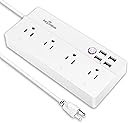
โก Power up your smart lifeโcontrol, protect, and automate with style!
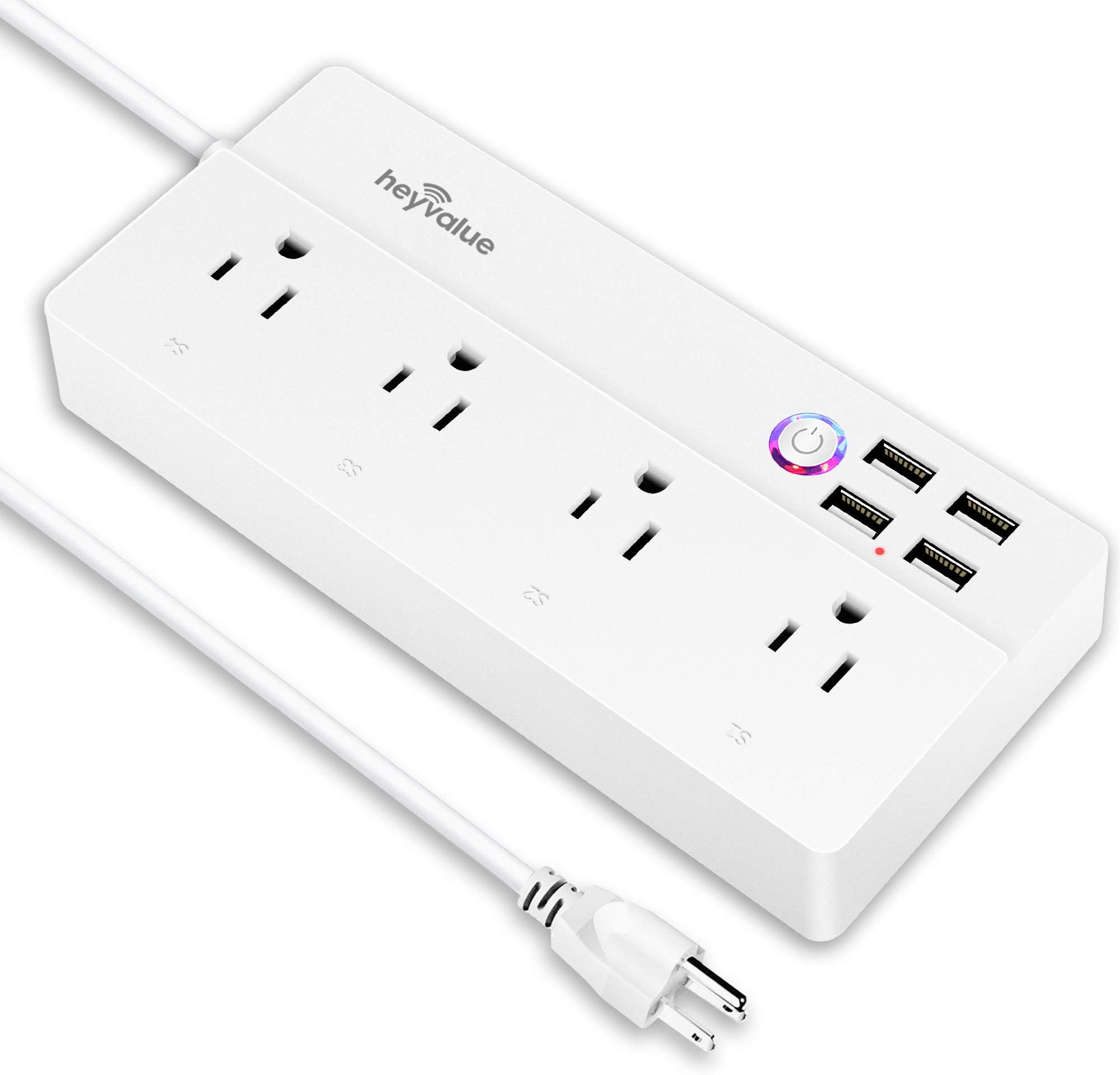
The Smart Power Strip by HEYVALUE combines 4 individually controllable AC outlets and 4 USB ports with WiFi connectivity, enabling app and voice control via Alexa and Google Home. Featuring UL-certified surge protection, customizable scheduling, and no hub requirement, it offers a sleek, energy-efficient solution for modern smart homes and offices.


| ASIN | B076VRH9WP |
| Brand | HEYVALUE |
| Color | White |
| Compatible Devices | Air Conditioner |
| Customer Reviews | 4.2 out of 5 stars 2,423 Reviews |
| Enclosure Material | Acrylonitrile Butadiene Styrene |
| Item Weight | 11.4 Ounces |
| Manufacturer | HEYVALUE |
| Maximum Current | 5.21 Amps |
| Mfr Part Number | Smart Power Strip-002 |
| Model Number | HLT-331 |
| Number of Outlets | 4 |
| Number of Ports | 4 |
| Plug Type | Type B |
| Power Plug Type | Type B - 3 pin (North American) |
| Total Power Outlets | 4 |
| Total USB Ports | 4 |
| Total Usb Ports | 4 |
| UPC | 685646488629 |
| Voltage | 240 Volts |
S**A
Great power strips.
These power strips are great. I needed 7 total, so I decided to be patient and use Amazon's Subscribe & Save to get the price even lower. I've been using them for over 2 months now, and I have not had an issue with connectivity or malfunctions. For reference, I have a UniFi AP providing my wireless, and I have split the 2.4ghz and 5ghz radio SSIDs (wifi switches (any brand) and many other devices do not like combined 2.4/5ghz wifi with the same SSIDs). It takes only a few seconds to pair with the Smart Life App, and a few more seconds to name each output. Scheduling and setting up automation for outputs is easy in the Smart Life App. You can base activation or deactivation of any output based upon weather, humidity, temperature (all internet based), sunrise/sunset, a different switch or output activation or deactivation, time schedule, or based on some energy management information on outputs that have those features (these don't, but they're much cheaper). As an example: I have a dehumidifier that I needed to schedule to run during off-peak times when power is cheaper and turn off at all other times. The unit itself doesn't have a clock (it can do 1hr on, 1hr off, etc, but not a true schedule). I hooked it up to one of the outputs on these (it draws ~450watts) and set it to follow a custom schedule. I had to modify the power board so it would actually turn on when powered up, which may be too involved for most people. Another example: I have a large ceiling mounted projector, and at the media cabinet I have a powered subwoofer and phase-coupled activator. I have another brand's single outlet (also uses Smart Life App) at the projector, and one of these Pinlo power strips in the media cabinet. When I ask Google to turn on the projector, I have a Smart Automation set up to follow that output and turn on the Subwoofer and Phase-Coupled Activator outputs. I could have set up a Routine in Google Home, but it's actually easier in the Smart Life App. Another example: I have a dual smart switch installed by the kitchen, and I have a lamp on one of these outputs in the media room. One of the smart switches controls the kitchen light, and the other is just an output with nothing wired to the output side. I have 2 Automations set up: the first is to turn on the lamp output when the switch is activated, and the second to turn off the lamp output when the switch is deactivated. Now I can turn the media room lamp on and off from a non-physically-connected switch by the kitchen, as well as voice commands. Pairing Smart Life to Google is easy, the only issue I have (and the issue is between Google and Smart Life, nothing to do with Pinlo) is that you basically have to add the devices a second time in the Home App (you don't need to pair them again, just "include" them to the Home/Room that you want). First world problems, am I right? I use these to reduce some vampire drain on many of my electronics when I'm not using them. These use ~1/2 watt total when not activated, and ~1.5 watts with all outlets turned on, which is less than any one of the things I would plug into it. The outlets are spaced well enough apart that you can get at least a couple of wall-warts plugged into it no problem, depending on the size, orientation, and whether they all have ground pins (mostly an issue with sideways type transformers) you might even get 4. I'm very happy with the performance, design, and functionality of these, I plan to get several more.
C**T
Amazing smart power strip for the price
Because smart home devices are clearly here and here to stay, it was amazing to buy a product that just works. And it works with the ecosystem I use. Setting up is easy to a little frustrating. The mobile app is fine - could use a little tweaking- but I'm not complaining because you really ever need to open the JinVoo app when setting up or changing the names of your devices (you don't really need to do this if you change it in Google Home). Each outlet works individually. There are multiple USB ports that work individually of the outlets but not of each other. I purchased this item when it was on sale and I have kept it in my cart's "save for later" section in case it ever goes on sale again. The white version looks sharp, the black version looks even better. There hasn't been one time (and I mean this) in the last 8 months of owning and using this device that it didn't work on the first voice command. That isn't something I can say for some MAJOR company's products. I have purchased three so far. - one for myself and two for my sister. As soon as this device falls under $25 USD again I am going to purchase another one. Just as an aside - the reason I keep this item in my saved for later section is so that I can purchase the same JinVoo smart power strip I did before. If you do a search for smart power strip there are MANY MANY MANY options and if you accidentally purchase two products that look exactly the same but from two different companies you will then have to install two different apps on your device. I don't know about the other company's products because I bought JinVoo first and then stayed with it because it worked.
G**4
Awesome strip - CAREFUL what you name your sockets
I bought 2 of these so that we would have adequate outlets for each side of the bed - The main reason for wanting this SMART item is because her fan freezes me almost to death at night, so I named one of her outlets "the fan". Now when I wake up with icicles coming from my nose I can just say - HEY GOOGLE - TURN THE FAN OFF and voila! It's off. So the warning: on my side of the bed I have a desk lamp that has outlets included which I plug my alarm clock into. Well, the smart item sees "desk lamp" as a light and lumps it in with my smart bulbs in the room and was turning the desk lamp off when I would tell it to "turn the lights off". This didn't work for me because I REALLY need my alarm clock to work 24/7. So I renamed the socket to "night stand outlet" and now it does not interfere with the lighting and the possibility of missing my alarms. BE CAREFUL what you name it, but name them...this way you don't have to remember which socket number you chose for certain devices. I named one on mine and one on my wife's "phone charger" so we would never turn those off. There is a red led indicator for which sockets are active. If the light is red - you can plug something into it and it will work. If that led is not lit at all at each socket, you need to turn those sockets on through the app (the smart life app works well for this and the google home app also works well for this and immediately recognized it.) My set up was simple - the 1st protector didn't want to read, so I unplugged it, held the button for 5 more seconds and the next time I tried, it worked right away. The 2nd surge protector went in and with no issues. I have named each surge protector differently due to needing to control them based on what's plugged in. I also named all my sockets so that it is simple to figure out which ones I need to use or not - otherwise you have a big list of "outlets" in google home and the smart life app. I have been feeling it for temperature based on others' reviews and have so far not felt heat at all, let alone overheating. I am happy with these currently. Most likely will buy more as needed throughout the house. The extension cord on these is what sold it for me so now, I can plug something in beside my bed vs. moving the entire bed to get to the outlet on the wall - that is OVER now! I am happy with my purchases.
W**S
This is basically 4 smart plugs in 1!!
If you're looking for a multi smart plug solution GET THIS ONE!!! I purchased this smart power strip to have more versatility with my smart home. Before this I was using an alexa smart plug connected to a powerstip. The alexa plug worked great but if I only wanted to power on 1 device from the strip it was not possible until I purchased this wifi enabled smart power strip... I have tried other products like this but I always ran into the problem of connecting it to a 2.4Ghz network. I have internet thru Comcast xfinity and the problem with the router provided is that it uses both 2.4GHz and 5GHz (automatically, you can't choose which one to use). Smart devices use the 2.4 connection and other powerstrips was a headache trying connect to the 2.4 connection. This worked out for my situation! (: When I tried to connect this wifi I was having problems but What separates this powerstrip is I was able to connect it in "AP mode" which lets you connect directly to the wifi of the smart life app device and connect. I have been using this for a few weeks and it works great with alexa! I named all of the plugs in the smart life app first, then enabled the smart skill in alexa and the devices were automatically updated in the alexa app. Now I can ask alexa to turn on 4 different devices separately or just have 2 plugs on and 2 off. The 4 USBs works as 1 switch... You can also control all ports with one button. I did not try the Smart life app features because I can schedule on and off and routines thru alexa with this device which works excellent!! Pros: Works with alexa (4 power devices independently) Easy to connect saves space in a plug socket (instead of bulkier smart plugs. cough cough.. Alexa lol) The spacing on the plug makes it easy to plug in bulkier power bricks easy to use. The price for 25 bucks you basically get 5 smart plugs in one!! Cons: The 4 USB ports is one switch Took a little longer to connect since it did not automatically detect the 2.4Ghz connection in wifi.. I took off a star due to getting connected.. But once you figure it out and it works it WORKS!! Besides that I am happy with my purchase and FINALLY a smart powerstrip that can connect easily and works with Alexa! I will differently be ordering a few more of these strips to replace the 1 alexa plug that goes into my other powerstrips (
H**O
Well worth the money
These are well worth the money and I wouldn't bother with the more expensive WiFi powerstrips from companies like TP-Link that charge much more. You can set these up very easily and use the Go Smart app that works with MANY different WiFi lights and plugs. There is one quirk to this device. If you decide you don't need it as a WiFi controlled powerstrip and try to use it as a powerstrip only by emoving it from the list of WiFi controlled devices, then if you lose power the powerstrip will NOT power back on until you manually turn it back on. The easy solution is to set it up again in the Go Smart app and just leave it. Once setup it appears to know to turn itself back on and work normally after a power outage. The power LED or red/purple can be a bit bright in a dark room, but this is easily fixed with a bit of the tacky putty used to stick things to walls or a tiny piece of duct tape.
M**R
Stopped working, no response from seller
UPDATE 02-26-20 Yesterday all of the USB ports on the power strip went out, then the rest of it followed today. I have tried everything, including resetting the strip, to no avail. I had to dig out converters to plug in my phone and tablet this morning, after I woke up late to my phone being dead. I have just messaged the company to seek warranty service โ it's only 9 months old! I'll update about what type of service I receive from the Hey Value company. UPDATE 3/02/20 HeyValue appears to be a bogus company. They have a 1-pg website, and don't respond to emails. Their phone number is disconnected, and their address shows an empty small warehouse space that is for lease. Although my Amazon purchase details show HeyValue as the brand and Seller, their records show a different seller, with HeyValue as the brand. They gave me the link to message the seller, which I did a week ago. No response from them either. I wouldn't buy another one of these things - and I'll certainly steer clear of both the brand AND seller. Purchased May, 2019 I've intended to buy an Alexa-compatible power strip for quite a while now, but they're pricey. However, I'm not sorry I decided to splurge on something I really wanted. This power strip works well, and the connection to our home wi-fi was easy enough. However - I found the setup to Alexa to be cumbersome and fraught with peril (cue dramatic music). Seriously, I followed all the instructions to the letter... SEVERAL TIMES. And this isn't my first rodeo. I connect electronics all the time. After pulling my hair out for over an hour, I sent an irritated email to their tech support, then went to bed still having to get up to turn the fan off. The problem came when I tried to log into my account in Alexa's (you have to set up your account on the app first) skill. It kept telling my I didn't have an account (or login). When I got up the next morning, it worked! Like magic! I didn't even try to hook it up again, just giving the order to Alexa. The company did respond to me in the night (I'm guessing they're in China), but I just told them it had finally connected. Overall, I would buy another one if the price was right. If I had paid a lot more, I would definitely have given a low review.
T**Y
Setup could be easier for mesh router users
Had to disable 5G temporarily to setup WiFi with phone app. After reading disclosure I decided to limit permissions for the phone app; too many discovered with ApOps on Android. As others have noted, the electrical outlets have loose contacts. My power blocks aren't very secure; there's no holes to mount this perpendicular to floor, if it were, these adapters would fall out. There's no UL sticker on the product to show it's tested and approved. Once setup with outlets named in the phone app and linked with Alexa, there's the power strip (all off/on) and the 4 electrical outlets on/off. The USB cannot be individual port controlled; all or nothing. I did not enable location to use away feature but used Alexa routines and individual commands. These are all I wanted. I chose this configuration because the previous 6 in line power strip with raised edges on each end wouldn't allow but 3 devices to plugged in at a time. This might be quite small but the ends will allow power adapters (2) to be placed pointing away from center, leaving the the middle outlets open for standard cords. I named 3 that are used by their easy to recall names for Alexa. The other I named simply "extra" and renamed USB to "charger" just so it's easier to recall for voice assistant. If it lasts, I'll use it daily with voice. I'm also using this with an uninterruptible power backup (UPC) to hopefully add the extra protection and longevity to this and components powered by it. If its life is short, I'll knock off 2 stars. Knowing what I've discovered, not sure I would buy again unless this product was improved.
G**E
Works great with Google Home Mini!
I love the Smart Power Strip that I received. I use my Google Home Mini to control my TV, desk lamp, printer, and computer monitor (I live in a dorm room, so a 4 plug smart plug has automated my entire living space). Setup was simple, just use the Smart Life app. When setting it up in the Google Home app, make sure to select that you're using the Smart Life app and not the Jinvoo app or whatever it tells you to do. The Jinvoo app is not compatible with the Google Home Mini (at least at the time of writing this review). You CAN use that app to control the plugs, but I recommend using the Smart Life app because you can controls the plugs with the app AND your Google Home, Google Home Mini, or Google Max. Works as advertised, makes my life way easier than trying to fidget behind my desk trying to find the switch to turn my lamp off. If you have a smart home speaker from Google, I can't recommend this enough.
Trustpilot
3 days ago
2 weeks ago