Desertcart purchases this item on your behalf and handles shipping, customs, and support to Greece.
๐ฅ Compact Powerhouse for Next-Level Ryzen Builds
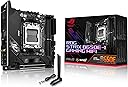
The ASUS ROG Strix B650E-I Gaming WiFi is a mini-ITX motherboard designed for AMD Ryzen 7000, 8000, and 9000 series processors. It features a robust 10+2 power stage VRM, supports DDR5 memory up to 64GB, and offers dual M.2 slots with PCIe 5.0 and 4.0 for ultra-fast storage. Equipped with WiFi 6E, Bluetooth 5.2, and Intel 2.5G LAN, it ensures top-tier connectivity. Its compact form factor is ideal for small form factor builds, complemented by customizable Aura Sync RGB lighting for a personalized gaming setup.
| ASIN | B0BP9LJBP8 |
| Best Sellers Rank | #321 in Computer Motherboards |
| Brand | ASUS |
| CPU Model | Ryzen 7 |
| CPU Socket | Socket AM5 |
| Chipset Type | AMD B650 |
| Compatible Devices | Personal Computer |
| Compatible Processors | AMD Ryzenโข 7000 Series |
| Customer Reviews | 4.1 out of 5 stars 313 Reviews |
| Graphics Card Interface | PCI Express |
| Item Dimensions L x W x H | 7.17"L x 3.62"W x 8.74"H |
| Item Weight | 1 pounds |
| Main Power Connector Type | 8-pin or 4+4 pin EPS12V |
| Manufacturer | ASUS |
| Memory Clock Speed | 2133 MHz |
| Memory Slots Available | 2 |
| Memory Storage Capacity | 64 GB |
| Mfr Part Number | ROG STRIX B650E-I GAMING WIFI |
| Model Name | ROG STRIX B650E-I GAMING WIFI |
| Model Number | ROG STRIX B650E-I GAMING WIFI |
| Number of Ethernet Ports | 1 |
| Number of Items | 1 |
| Number of Packs | 1 |
| Number of Ports | 11 |
| Platform | Windows 10 |
| Processor Socket | Socket AM5 |
| RAM Memory Technology | DDR5 |
| Ram Memory Maximum Size | 64 GB |
| S/PDIF Connector Type | Optical |
| System Bus Standard Supported | SATA 3 |
| Total PCIe Ports | 1 |
| Total SATA Ports | 4 |
| Total Usb Ports | 8 |
| UPC | 195553957885 |
| USB 2.0 | 2 |
| Unit Count | 1 Count |
| Warranty Description | 3 Years |
C**G
Reliable
Full of features for a small motherboard, been running two 4tb m.2 ssdโs, 64gb of ddr5 ram, 4080 super and a ryzen 7900 in my fractal ridge build with no issues, I donโt even have the wifi antenna connected and the wifi is always fast
J**Y
Boot Problems with TPM using M.2 Drive from another computer, works fine after
Installs great in S300 itx case. Used ID cooling 57MM cooler perfect fit only one way with the cpu cooler over the ram. could not fit over the motherboard outputs as this is too big but it works. Installed 9700X. Only problem was I was moving a m.2 SSD from an AM4 5700G gigabyte 870? motherboard and boot problems. Reinstalled windows 11 too and still had problems. Changed the PCie riser still had problems. Disabled TPM in BIOS this worked. Still a great board and value.
L**S
One of the best AM5 motherboards that is worth its pricetag
One of the best AM5 motherboards. Great VRMs to power any AM5 processor, nice selection of ports including 2 USB-C ports. Booted right away without having to do a BIOS flashback and its been running perfectly fine with my previous components. BIOS UI is easy to follow and allows for PBO/Overclock and Undervolt. Read about coil whine issues but after 2 weeks of use mine stays completely silent. Great value.
R**N
Horrible Product from an equally horrible company
I wonโt go into detail about ASUS the company, there is more than enough details online, but I will go into detail in regards to the B650E-I. The first problem that I got was the fact that there are no Internet drivers preinstalled onto the motherboard meaning that you have to save your Internet drivers onto a separate USB before you actually get even LAN working. This is a problem because if you are like most people, you will be reusing part from your previous build and will not have a computer to actually download the drivers until it is already too late. I was fortunate enough to have actually done this however it shouldnโt even be a problem, yet it is. The second issue is the boot times last substantially longer than any other motherboard that Iโve used before. The third issue is going to be the fact that there is coil wine on my unit. Itโs not entirely audible, only noticeable if I have my fans at a low speed and the case panels off, however, based on previous reviews, it is likely that this will get worse overtime and I have purchased motherboards for 1/3 of the price that had no coil line. The fourth and final problem, which is the most important for me is that the audio solution on this motherboard is absolutely horrible. For whatever reason the audio signal that comes out of the rear is incredibly loud, it distorts my headphones even at 50% system volume on windows. There is a lot of distortion and the audio sounds tinny, installing the drivers from the ASUS website does not help. This is not an issue that I have seen substantially covered at all except for one Reddit thread, this in my opinion, makes the board unusable and even though you can compensate by reducing your system volume it is common for volume to reset on startup and it shouldnโt even be an issue in the first place. Yes, the motherboard does have many good features and the rear Io is best in class and there are no extra daughter boards that you have to use to get full features like other manufacturers, but it is not worth the price nor the quality. EDIT: Some extra info. - Coil whine can be โsolvedโ by keeping your CPU above 1.2V at all times. Should not have to do this for $300. - Long boot times are a problem with AM5 in general apparently. Go into your BIOS and turn on BOTH Memory Context Restore AND Memory Power Down. ASUS BIOS should do both automatically when one is enabled. Fast boot helps as well, 13second boot times. - Audio is done by Realtek ALC4080 which does audio over USB and has โimpedance detectionโ. This does not work. It detects 80ohm headphones as over 1000ohms, massively over amplifying the signal. Realtek audio drivers (not Microsoft defaults) and Realtek Audio Console must be installed to manually change amplifying level, but ohm detection is still wrong. This fixes sound level, but ALC4080 implementation and noise isolation is still bad. Get constant crackles during any bass notes above 50% volume. Especially when CPU utilization or Ethernet utilization is high due to bad isolation. Stick to motherboards that use ALC 800/1200. I will be returning this when the ASRock B850 boards come out.
N**9
Seems like a good board but...
I just spent about 4 hours meticulously building a new PC. Corsair RAM Corsair NVMe M.2, GTX 4070, Ryzen 9, water cooling, etc.. Built the entire thing, cable routing and the like. Tried to fire it up an no NVMe present. I verified the M.2 stick works in another PC so it's not the problem. I spent about another hour dismantling everything to see if something else was the problem but no luck, the board just wouldn't see any M.2 drive I put in it. My box did a have an 'Amazon Second Chance' product sticker on it. Perhaps someone previously returned for the same issue. I'm giving it two stars just because Amazon is going to replace the defect. I'll re-rate when I get the new board. Update: turns out the first board I got was an 'amazon second chance' board and it was faulty. Randomly crash, randomly not detect M.2, sometimes wouldnt even boot. I would not recommend a 'second chance' motherboard for anyone due to the nature of complex electronics. I have no idea who had the board before me and why they returned it. Anyways I got a new board (new from factory) and haven't had issues.
M**A
Stability
If you are looking for a stable chipset and feature packed mini-itx board, this motherboard is the way to go. Easily one of the best AM5 motherboards. Plenty of high speed USB ports, easy to update the BIOS via flash back, and PCIe 5.0 slot!
A**W
Fast and reliable
Exactly what I ordered and arrived before expected
R**Y
Coil Whine...
The board I got ended up having coil whine. I thought I could live with it... yeah definitely a huge regret. I ended up doing ASUS Advanced RMA and they were actually pretty cooperative (it just took a while), but the replacement board had the same defect, so I sent the replacement back. If you get a unit without coil whine, the board is okay. The standout feature to me is the 2 good USB Cs on the back. Not sure why Mobo manufacturers in the big '25 still have so many USB A ports and no USB Cs. No issues with audio quality either. I swapped the wifi card to an Intel one so I can't speak on the default Wifi card's quality. The board is pretty slow at booting up as well. Also, the M.2 on the front has a really weird mechanism & ends up bending the SSD if you screw it in all the way. Hasn't caused any issues or permanent damage but definitely jarring to say the least.
R**D
Amazing product
Amazing product. No complaints at all.
N**I
Perfect
-
C**S
Poor quality control
Just received this morning. The guys at ASUS didn't bother to install the cpu socket cover, so it was delivered to me with bent pins. Sending back for RMA this afternoon....will see how that goes.
J**C
Premium high quality ITX motherboard
Fit this in a Coolermaster NR200 case easily. Great thermal rating, high quality additions, and aesthetically pleasing. Can recommend for only premium builds as its still an expensive motherboard even on sale.
D**Z
ETHERNET
Despues de 3 meses de haberla comprado me sale un problema con el driver de internet de intel i225v, pierde conexion de internet conectado con el rj45 y es muy molesto mientras juego videojuegos, pero por la antena wifi funciona correctamente, aunque actualizara la bios de la placa sigue igual con el problema
Trustpilot
2 weeks ago
5 days ago