Desertcart purchases this item on your behalf and handles shipping, customs, and support to Greece.
🎧 Elevate your stereo game — stream smarter, sound better, and never miss a beat!
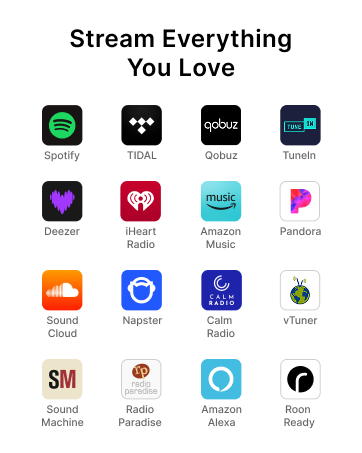
The WiiM Pro AirPlay 2 Receiver is a compact, high-fidelity WiFi audio streamer that transforms any stereo system into a smart, multiroom powerhouse. Supporting 24-bit/192kHz hi-res audio, it integrates seamlessly with Apple AirPlay 2, Google Cast, and voice assistants like Alexa, Google Assistant, and Siri. With native support for premium streaming services including Spotify, TIDAL, and desertcart Music, it delivers superior sound quality and effortless control, making it the ultimate upgrade for audiophiles and tech-savvy professionals alike.


| ASIN | B0BJDY6D1W |
| Best Sellers Rank | #1,301 in Electronics ( See Top 100 in Electronics ) #1 in Audio Component Receivers #4 in Wireless Audio Receivers & Adapters |
| Brand | WiiM |
| Built-In Media | Digital Optical Audio Toslink Cable x1, RCA to RCA stereo cable x1, USB Power Adapter x1, USB Type-C Cable x1, User Guide x1 |
| Color | Black |
| Compatible Devices | Speaker, DAC, Amplifier, Mobile phone, Tablet, HomePod, Apple TV, Echo, Google Home |
| Connectivity Technology | Bluetooth, Ethernet, Wi-Fi |
| Connector Type | USB Type-C, RCA, SPDIF (TOSLINK), COAX, ETHERNET |
| Controller Type | Google Assistant, Amazon Alexa, App Control |
| Customer Reviews | 4.4 out of 5 stars 3,686 Reviews |
| EU Spare Part Availability Duration | 2 years |
| Form Factor | Streaming Media Player (Box or Dongle) |
| Global Trade Identification Number | 00196852149827 |
| Item Dimensions L x W x H | 5.5"L x 5.5"W x 1.6"H |
| Item Part Number | 795847057293 |
| Item Weight | 11.6 ounces |
| Manufacturer | Linkplay Technology Inc. |
| Mfr Part Number | WiiM Pro |
| Model Name | WiiM Pro |
| Model Number | ASR002 |
| Other Special Features of the Product | Spotify Connect, Works with Alexa, Google Voice and Siri, AirPlay 2, Google Cast Audio, TIDAL Connect, Qobuz Connect, Roon Ready, NAS, DLNA, Home Media Server |
| Resolution | 1080p |
| Special Feature | Spotify Connect, Works with Alexa, Google Voice and Siri, AirPlay 2, Google Cast Audio, TIDAL Connect, Qobuz Connect, Roon Ready, NAS, DLNA, Home Media Server Special Feature Spotify Connect, Works with Alexa, Google Voice and Siri, AirPlay 2, Google Cast Audio, TIDAL Connect, Qobuz Connect, Roon Ready, NAS, DLNA, Home Media Server See more |
| Supported Internet Services | Amazon Music, BBC Radio, Calm Radio, Deezer, iHeartRadio, Napster, Pandora, Qobuz, Radio Paradise, SoundCloud, SoundMachine, TIDAL, TuneIn, vTuner Supported Internet Services Amazon Music, BBC Radio, Calm Radio, Deezer, iHeartRadio, Napster, Pandora, Qobuz, Radio Paradise, SoundCloud, SoundMachine, TIDAL, TuneIn, vTuner See more |
| UPC | 196852149827 |
| Unit Count | 1 Count |
| Warranty Description | 12 months |
D**E
Does what it's supposed to do! Very easy to set up & use!
**UPDATE #2 (2025) - Still super happy with my WiiM Pro. So much so that I just purchased a WiiM Pro Plus to replace the original WiiM Pro, which I've just relocated to another room where it's plugged into a Fosi ZD3 via the Coax port. Reasons for getting a Pro Plus this time around is that I wanted the well-regarded AKM DAC, as it the Pro plugs directly into a 20+ year old Sony receiver via line-out. The regular Pro's lesser DAC is now taking an extended vacation as it's digital stream being decoded by the ESS 9038Q2M on the Fosi pre-amp. Will I hear a difference between the Pro and Pro Plus as channeled through the Sony? Probably not with any of my usual source material. But given that I'm still very happy with my original WiiM Pro after a full year using it to stream tunes (PC -> WiiM via Airplay2 (TuneBlade)) daily in my home office, I thought I'd give the Pro Plus with the AKM and included remote, a chance to impress me further. **UPDATE #1 (2024) So, one super cool feature that the manufacturer added to the Wiim is Room Correction. My Wiim had been boxed up for a few months during & after a move. First, I want to note that it was really easy to reconfigure it for my new home wireless network via the Wiim phone app WITHOUT having to RESET the Wiim itself. I just had to hold the 'play' button on the Wiim until it blinked while I was holding my phone nearby and then I was able to update the Wiim's wireless network info to get it back online. Room correction worked as expected, which is to say the same way it works on other home AV receivers I've owned/used. This is a really cool feature to be added to the Wiim for free as part of a free firmware update. Thank you, Wiim! I should also note that in the 14 months I've owned my Wiim, minus the 4 months it was stashed in a moving box, it's worked fantastically. I mostly use it to stream music via Airplay to a 22 year old Sony AV 5.1 receiver powering a small bookshelf speaker/subwoofer setup. I do occasionally use the built in media player and it works well too - no problems. Wiim updates apply seamlessly, and it's been 100% reliable. Very happy with this purchase and would recommend to anyone thinking about getting one. ORIGINAL REVIEW Got this to replace a Bluetooth receiver that I had plugged into my 20+ year old Sony STR-DE845 AV receiver. The BT receiver works great, but it has a couple limitations: 1 - One is that it when it's powered up, it automatically pairs with whichever device it was last paired with. Because I normally stream to it using an iPad, I can only stream using my iPhone if I go to the iPad and unpair it from the BT receiver, and then I have to the same thing with the phone when I want to use the iPad to stream again. I've been living with this for 4 years, so it's not unworkable, but that I have other streaming targets at home that don't require this has raised the bar a bit as far as my expectations go. 2 - The BT receiver supports AptX and LDAC over Bluetooth, but since I am only streaming from Apple wireless devices I can only do AAC over Bluetooth since Apple doesn't support AptX or LDAC (and probably never will). The quality of AAC over Bluetooth is pretty good, but it's not CD-level quality playback which is what you get with a WiFi streaming protocol like Apple Airplay. The ability to play CD quality music streams from my iPad or my iPhone was the main reason for my purchase, and the WiiM Pro does this perfectly as an Airplay 2 receiver. Also, re: Airplay I figure that the protocol spec & implementation for Airplay isn't likely to change (there may be enhancements, but the existing spec should remain the same), so Airplay should always be available for streaming music to the Sony receiver. And that brings me to another great feature of the WiiM Pro, which is its ability to act as a standalone network streamer with native support for several streaming music services including Amazon Music, which is what I use. Initially, I thought I might find the WiiM's software UI (as installed on my iPhone & iPad) to be less than polished, but so far the software seems to work well. The biggest advantage to using the native streaming apps on the WiiM is that the stream quality can be much higher than 'just' CD quality that Airplay 2 supports (16-bit/44.1kHz - Amazon Music HD supports up to 24-bit/96kHz for some tracks, IIRC). The WiiM Pro app seems to work fine for streaming Amazon Music, and the menu looks the same as the one I use for streaming Amazon Music to to some modern Yamaha AV receivers MusicMatch app. Overall, this seems like a good device. The only open question is whether and how well WiiM will support it with necessary fixes/updates when needed!
E**G
Great audio streamer at super price! ***Update***
To begin, I'm an ancient audiophile albeit considerably out of touch. I've been using a Squeezebox streaming device linked to an AudioLogic 34 tube DAC for streaming files over my local network. Since 1966 I've been collecting and enjoying high-end gear and over the years have had plenty of it: my speakers are a 1980 HQD, I've owned Levinson CD decks, my home is cabled with Mitchell Cotter custom cabling he built for me in the early 80s, I've owned as many as 10 Marantz Model 9s at one time. I toss this out to say that I've owned pretty lavish equipment and have the playback equipment to discriminate between a good item and outright junk. I bought this cute little gadget because my Squeezebox and Audiologic won't decode the latest high-definition audio streams from something new-to-me called Tidal.com with which I am probably the last person in the audio universe to be familiar. Anyway, I wanted to fool around with a more up-to-date streaming system and the price of this little guy was somewhere between 1/10 to 1/20th of the alternatives I found in scanning the high-end boutiques. Initially I found this gadget at once easy to set up and a pain in the neck. I didn't encounter any issues in the initial network setup and it streamed over WiFi perfectly well. I hooked it up to my AudioLogic DAC and it detected the resolutions supported and produced an excellent feed at 16 bits. Fed directly through its internal DAC it decoded higher resolution content WHEN ACTUALLY AVAILABLE and I was pretty happy with the output. But...I discovered two issues which will drive you nuts unless you address them. For all I know they will change something or other going forward as this outfit seems really committed to seeking feedback from owners and actually responds to any feedback one troubles to send them. But as of today: (1) There is a setting (on the phone/tablet app) for device settings. This is a bit tricky to find because there is a separate "settings" menu items elsewhere that relates to app settings. Anyway if you go to the device screen you will find a small "settings" gear-icon in the right hand side of the screen. Look for "standby mode" and turn it off. If you don't you will constantly find that your app will not "find" this device andwill drive you completely insane troubleshooting your network, wondering if you need to hook it up to hard-wired ethernet and whatever. There's no good setting except "Never". (2) This gadget is shipped with a 2.4a USB C charger. Leave it in the box and use one with a higher capacity. I found that using the factory charger very hi-def streams would break up/distort or what have you, in other words, not play correctly. Once I repowered this gizmo on heaver-duty charger it works like a champ. If you follow these guidelines you will find the WiiM Pro AirPlay 2 Receiver a great value and an enhancement to any level of stereo playback gear. I did not test it with Roon although it is said to be Roon-Ready but using it for a vasriety of streaming content I remain completely happy with my modest little investment and glad to keep the other $2900.00 or whatever I saved by trying this thing first. ***Update 1/20/24: (1) I purchased another one for my guest cottage. That’s about as good an endorsement as anyone can give. (2) I decided to use a pair of TPLINK Powerline Ethernet over power line to see if my original unit would show any improvement if it had a wired connection. This was more of a test than a necessity, I have excellent 5ghz in my listening room. The pair I used was easily ten years old so far from the latest or fastest present-day tech. I consider it a big improvement. The cost of a pair of these is around $50 on Amazon and a good investment as a feed for the Wiim pro.
S**A
I am glad I purchased
I have had a Sonos streaming device for years. This is easier to set up, comes with optical, rca, and streaming is great. We had problems with family trying to connect to Sonos with their individual Spotify accounts. This product solved that because you can stream straight from app. I use in living room and backyard and sound quality is great. Great price too and I should mention I tried chromecast and that was a bust. Choose this.
K**T
WiiM Pro and Roku sharing same DAC: UPDATE 5/5
Final Thoughts… (updated 1/29/25) Call it a 4.5. Particularly for someone building an introductory system, I think it is more advantageous to think of the WiiM Pro [Plus] as a *preamp* with streaming capabilities. Besides a quality, networkable source, you are getting… ☑️ Digital and analog inputs ☑️ Digital and analog outputs ☑️ DAC (go Plus if you need it) ☑️ ADC (avoid, but available) ☑️ DDC (?? word is the clock is poor, avoid) ☑️ Input/Output selection ☑️ Volume control ☑️ EQ ☑️ Room Correction (I don’t use, but impressive to see) ☑️ Balance control 👂 ☑️ Remote control (save your money and use the app, still counts as remote) Add a Class D amp, speakers and some cables, and you are off to the races with no deep commitment to separates or an integrated system. Let your curiosities lead you from there… In any event you’ll still have a killer streamer. The caveats… 1) This is an affordable work in progress - It has bugs. Be patient and utilize their customer service. 2) For all its bells and whistles, maintaining a digital signal from source to output is how this thing truly shines. Optical out to a dedicated DAC is perceptibly noise and jitter free. Don’t worry about reclocking until you see a USB out. I’m not sure this generation will ever be *perfect,* but WiiM is regularly updating the firmware, and I enjoy this thing most days. The rest of my noob-journey is logged below. Happy hunting ✌️ Original review: I’m new to this game, but I am thoroughly pleased with the Pro. In addition to learning not to rely on the TV’s DAC, I realized using the TV as a streamer was a narrowed experience as well (poor interface, gaps, re-sampling, etc). I now have the Pro “daisy-chained” between my TV and a Schiit Modi 3 via the SPDIF ports (effectively doubling as a preamp). The TV is now strictly for video and the Pro for music, with no additional DAC’s or sacrifice to the experience 🥳 The digital EQ is also handy. I’m looking to eventually add an analog component for the whole system (which includes a turntable), but for the time being it’s been great for addressing standing waves and brightening the speakers. As expressed in other reviews, this has been an eye opening experience with respects to what I feel I need[ed] to buy on vinyl. Update1/5: I’ve run into some issues and I feel it’s only fair to lower the rating from 5 to 4 stars. As a streamer, this works great, but I opted for the Pro over the Mini specifically for the optical input to connect my TV. I had it working, but a few days ago it stopped and I have been unable to get it back up and running. To be clear, everything “downstream” from WiFi works wonderfully, but I suspect there is a physical issue w the SPDIF-in. I’m in the middle of ironing this out with WiiM. I’ll update a second time with an end to this story - I hope I won’t have to, but the rating could drop further. Update 2/5: After a process-of-elimination with WiiM support, they sent me a new device which arrived promptly. Thankfully, it works as intended (thrilled!). In retrospect / having gained familiarity with the app, there were some warning signs the original device was faulty during configuration (no sound was heard for the mic test, and the resolution test was inconsistent). I simply had no frame of reference to know what I was listening for. That said, I heard the clapping and piano on the new device and it works as advertised. In case anyone looking at the Pro has the same gear, as seen in the photo, I’m running the TV into the Pro > Schiit Modi 3 > Schiit Saga S and can confirm this works fine at full resolution and bit depth. I’ve also incorporated the Schiit Lokius for all sources since my original review, so I’m no longer using digital eq in WiiM Home (as useful as it was). Though the new device works as advertised and my interaction with WiiM was positive, I’m leaving the rating as 4/5 to reflect the journey… feels fair to me. Update 3/5: I would lower this rating to a 3.5 if I could, but I will round-up to 4 stars because I have faith that the updates will eventually iron all this out... "All this" being, this device is inconsistent. I do not have the connectivity issues described in other posts, but it does behave oddly during operation. The indicator light will change from green to white (or vise versa) with not changes to the input (it *has* changed inputs too, but thats only happened only once... I have it set to auto-sense, but there was/is no activity that I'm aware of that would trigger the switch... I'll turn this setting off and see if that helps). The BIGGEST issue: Last night I temporarily lost my latency setting (the sound was no longer syncing with the video). I attempted to recalibrate through the app, but it produced no clapping sound [red flag]. The app set the latency to 0ms (was previously ~30) and then... I lost sound. I switched input to Wifi, which thankfully worked fine and I got the sound back once I returned to SPDIF-in, but I was worried I was back to square-one (see Update 1/5), at which point I would have dropped the product altogether. Lastly, it now pops my speakers when I turn off the TV-source. This is not the biggest deal (I just mute the preamp before turning off the TV), but it didn't do that before, and it didn't happen when I had the TV going straight into the DAC. [EDIT 7/13/23: I’ve since realized there is a Sample Rate Switch Latency under Audio Output to alleviate this - Sometimes it works, sometimes it doesn’t]. All that said, I still cannot get the clapping sample when attempting to sync the sound, the setting remains at 0ms, but the output seems fine 🤷♂️ ... To give you a sense of the timeframe, I'm posing this on Tuesday, July 6 (the original device was delivered June 8). I will write a fourth update if this gets any worse. This product has a LOT of potential, my fingers are crossed, but buyer be warned... Thar be bugs 🗺️ 🐞 Update 4/5: Writing this on Aug 16, 2023. The good news... WiiM is keeping up with the updates, which is promising. The bad news... The Pro switched inputs in the middle of watching TV again, with no app activity that I'm aware of that would trigger a switch to Wifi. I got it back with little issue, and it's not common, but that's a drag. The Sample Rate Switch Latency continues to have zero effect on the popping that occurs when turning on off the TV with the SPDIF input selected. It's possible I'm not using it correctly, but I've set it to all different ms' with no luck. I'm also getting soft popping between "Master" and "HiFi" songs on Tidal. There is some chatter on the forums to alleviate this, but I'm not interested in forcing a resample through volume or EQ. Some of the latest updates seem to have addressed something similar for Amazon users, so perhaps a fix is coming soon. I plan to write WiiM about it. Other than that... as usual, when this thing works... [these-hills-sing meme]. Update 5/5 [See "Final Thoughts" at top]
J**H
Review of WiiM Mini, Pro, and Vibelink Amp
Review of WiiM Mini, Pro, and Vibelink Amp WiiM is a new addition to the list of companies offering hardware streaming components. Up until recently, the pricing made using a dedicate streamer not cost-effective for me. WiiM changed all of that with their offerings of high quality streamers at decent prices which are far below their competitors. After reading reviews about their offerings, I purchased a WiiM mini to try out in our living room. Found it very easy to set up using their free app for IOS and Android (Note, a HUGE plus that their Android app does NOT require google play services as I am running a de-googled phone and tablet). Liked that it had optical out so I could take advantage of my Topping DAC (which was superior to the one in the Mini, though that one is fine for most people). Loved being able to stream low res (Pandora), high res (Amazon) and ultra high res (Qobuz) from one device using their well thought out and very useful app. WiiM Mini: Pros: price, decent DAC, Optical output, seamless connection to main streaming services. Cons: no support for Squeezelite (for connection to local ripped music using LMS (Lyrion Music Server)). The lack of Squeezelite support on the Mini was not a deal breaker in the location where I had it installed (living room) as the streaming options more than took care of our music requirements there. But my office / family room was another matter. I have hundreds of ripped CDs (to FLAC) on my LMS server and up until then, had been using a Raspberry Pi 4 running moOde audio player as the Squeezelite end point to connect to LMS.This has worked well but I was hoping to find a single solution for streaming and using my local audio on LMS. The WiiM Pro, the Mini's big brother, looked to be the solution I was looking for. Since I would be using a Topping DAC, I didn't feel the need to spring for the Pro Plus (which has a better DAC). I purchased the WiiM Pro and as with the Mini, set up was a breeze. I enabled Squeezelite from the setting and it immediately found and connected to my LMS server. I then had access to streaming and my LMS music collection form within the WiiM app. Very sweet! And even better, I love the material skin that was created for the old/outdated LMS interface and can control the playing of my local music from there (which I prefer) or use the WiiM app. Both work flawlessly. WiiM Pro: Pros: price, decent DAC, optical and RCA analog inputs, optical, coax, RCA analog outputs. Gigabit Ethernet as well as WiFi. Cons: None Time went by and then I saw that WiiM released an amp called the Vibelink. Read a number of reviews including those on Audio Science Review, and all praised the build, specs and capabilities of this $300 amp. I thought my current receivers/amps (Yamaha) were decent but the Vibelink sure was enticing. It checked all the boxes of what I needed: Inputs: Optical, Coax, RCA. Superior DAC, Analog pass-thru w/o ADC processing. Banana plug speaker connectors. Not a lot of extras in the box that impacted the sound quality. I bit the bullet and placed an order. Installation was easy and the WiiM app detected it and downloaded/installed the firmware update. Connected my turntable (RCA input), CD player (optical digital in) and WiiM Pro (digital coax in). Turned it on and WOW. I thought my Yamaha receiver was decent so didn't expect to hear much or any difference. Was I wrong. Sound was much fuller and clearer. It had more "presence and clarity" is how I think I would describe it. Connected to Qobuz and streamed some jazz and rock @ 24/96 and it sounded incredible. Streamed some typical HD rock from Amazon 16/44.1 and it too sounded excellent. Played a CD and it was clearer than I had ever heard before. Spun up a jazz LP, and wow, could not believe how clean and clear an old Vinyl album could sound. Even low res Pandora streaming sounded good (though no where near HD or UHD streaming from Qobuz). I knew right away this was money well spent. WiiM Vibelink Amp Pros: Amazing sound, banana speaker connectors, digital and analog inputs, 12v trigger for auto-on when WiiM Pro streamer starts streaming music. 60 min standby / off when music stops. Cons: No remote so to adjust your volume you use the streaming app and/or manually adjust on the Amp. Not a big deal to me but this may be an issue for some if their amp is in a cabinet or not easily accessible. ditto for the power button on the back (though that does make the front much cleaner and elegant looking). I hope this review is helpful. I'm really impressed with the WiiM products I've used so far.
T**P
Nice packaging, simple set up, good design, great features like latency control/ adjustment.
As soon as you begin unpacking this device it will be clear to you that this company has their act together. The attention to detail is top tier — like what you would expect from Apple. Like most Mac products, the Wiim Pro is simple, effective and requires very minimal set up or technical knowledge. There are several ways that the Wiim Pro can be used, for us, it replaced an Airport Express which was no longer compatible with some newer software/ WiFi systems in our house. As we use the Wiim, its function is to allow us to stream the AUDIO FEED of a video to our Sonos system, so we can hear the audio in any room in the house while watching the video on a phone or tablet. I imagine it could be used to listen to a podcast (no video content) as well. The set-up VERY simple and straightforward and the app is equally simple and seems to work as you would expect. Best feature ever: this device allows you to tweak the latency so you can sync the audio with the video. Great product; well executed.
V**D
Amazing streamer - how I hooked up a turntable in a multiroom setup with two WiiM Pros
I love the WiiM Pro. Until I got the WiiM, I was sitting on the sidelines with streaming, other than having a Spotify account for playing music in the car or on my iPhone when I'm on the go. It seemed too complicated and expensive to me to buy any complicated streaming hardware for my home system. This year I decided to look again at the home streaming options to see if I should get onboard. I read about the WiiM Pro and decided to try it. I'm glad I did. When combined with a high-rez music streaming service, it's amazing how good streaming music can sound, and the cost barrier to entry is now incredibly low with the WiiM Mini and Pro. Assuming you already have some kind of music system, that's all you need (along with a streaming service). I got the Pro over the Mini because of the extra inputs and outputs, and especially the wired Ethernet cable option. I don't have a whole lot to add to other reviews, but in my review I want to explain how I hooked up my turntable to one WiiM Pro so I could broadcast that signal to my other WiiM Pro in a different room using WiiM's multiroom functionality. I have a ton of old records that aren't on any streaming service and I thought it would be nice to be able to listen to them in different rooms, since I only have one turntable. Buying two WiiMs made this possible! I connect my turntable to a vintage stereo preamp with a phono stage in the conventional way through the preamp's phono inputs. My preamp has "tape out" output jacks and I run a stereo RCA interconnect cable from the preamp "tape out" into the WiiM Pro's "line in" RCA inputs. The setup would be similar if you have an integrated amplifier (preamplifier + amplifier combined in one component) or a receiver. For that WiiM Pro, in the WiiM Home app, set the "audio input source" to "Line in". (Remember to set it back to WiFi or Ethernet when want to switch back to streaming from a music service). Play a record, and on your preamp set the "source" to phono. If your preamp has "tape out" outputs like mine (it might also be called something like "record out") then the preamp will send the music signal into the WiiM. You want to use the preamp's "tape out" outputs and not the "line out" outputs that you would send into an amplifier. This is because the "tape out" occurs after the phono equalization stage in the circuit, but before any volume, tone or balance controls; it's basically the pure unprocessed music signal. Next, in the WiiM Home app, follow the instructions in the online manual to configure multiroom audio. The included paper manual in my box was very basic and didn't explain this. As of my writing this review (Feb 2023) the way to do this is in the WiiM Home app (iOS) is to first make sure you have both WiiM's already setup. Next, start with the WiiM that's connected to your turntable. In the "device" setup area, you should see both your WiiMs. Tap the WiiM that's connected to your turntable to select it then press the nearby "link" icon (looks like two connected chain links) for that WiiM. This open a little chooser where you can see the other connected WiiM's in your network. Press the checkmark next to the other WiiM(s) that you want to play the same signal being broadcast from the first WiiM. Now go listen to your music. A few more notes and details: * With a setup like this you can plug any source, not just a turntable, into a WiiM (via a preamp or possibly directly) and play it on your other WiiM. For example, a CD player. FM tuner. Cassettes. Your beloved 8-track tapes. R2R tapes. Maybe a 78 rpm turntable? * In my configuration, playing a record, sending the signal through a ADC, into the first WiiM, streaming it over AirPlay 2 (I think that's how it goes?) into the other WiiM, and then decoding it back through the DAC in the other WiiM (or your own external DAC) is undoubtedly losing resolution compared to playing that same record through an all analog system. But it still sounds pretty darn good. I haven't compared playing a record this way vs playing the same album via a streaming service (like TIDAL, Amazon Music, etc.) but I would guess they are fairly similar in resolution and quality. If that album is in HD (like 24/92 or higher) on the streaming service, the steamed album might beat the vinyl album once it's downsampled over AirPlay. But my old albums are either not on a streaming service or if they are, they are probably in 16/44.1 or lower so it may be a wash. * One benefit of multi-room audio is to be able to play the same song in multiple systems and be able to go room to room and hear the same song seamlessly. With my configuration, I wasn't able to play the record in my main system (turntable -> preamp -> amp -> speakers), while also broadcasting it to the other WiiM, without unacceptable latency. The downstream WiiM was around 1 second behind my analog system. If you think about it, the main system is playing the signal instantaneously while the other WiiM is getting a slightly delayed broadcast. So I'm not criticizing WiiM for this, there is nothing they can do about it. By contrast, if you use both WiiM's to stream music as receivers, they are able to stay in sync because both WiiM's can "work together" to sync the music, but not when one of the two systems it not even playing through the WiiM. If the systems are close enough that you can hear the speakers from both systems at the same time, then it will be unlistenable because of the delay. But if they are far apart then you might be OK. * Earlier in this review I wrote that I am outputting my stereo preamp directly into the WiiM. Later, I placed an external analog-to-digital converter (ADC, not to be confused with a DAC which does the reverse) between the preamp and the WiiM. I ran an interconnect from the preamp "tape out" into the ADC, then connect the ADC from its digital SPDIF (optical) output into the WiiM's SPDIF input, and in the WiiM Home app, I changed the "audio input source" to SPDIF. This is purely optional but I'm putting it out there as an option for anyone who has a ADC. * I haven't done any critical listening to see if my external ADC is better than the WiiM's own internal ADC but If I get around to that, I may update my review. My ADC is a cheap Hdiwousp $17 device I got on Amazon.com which claims to convert to digital up to 96 kHz. I can't confirm that. * Finally, I left this out of my review above, but before I got the WiiM, I bought a Bluesound Node. I regret that. The WiiM is just as good. The only advantage the Node has is the HDMI input and subwoofer output which personally I'm not using. Maybe the Node app is better. The DAC in the Node might be better but I have an external DAC anyway. But you pay $450 more for the Node. I am selling my used Node on an online auction site now.
Z**C
Works for what i need
The WiiM Pro works well, after a few setup hiccups that i don’t recall with the WiiM mini. That device was as easy as pie, easier than the old Chromecast Audio, and the Nexum TunBox devices i still have. With the Pro i didn’t read anything, which was impossible anyways, since my included documentation left out English. It’s all in the WiiM app. I have good Wifi but paid the extra for the Ethernet connection, which in my imagination is a superior signal than Wifi. Truth is i can’t say i hear a difference, though that may be system related. For the Ethernet Andy system versatility. My TV is near my cable-connected modem / router, and i’ve a small system consisting of a BlueRay player, a Sabaj A10d DAC, Sabaj A10a amp, both bang for the buck (but now either not offered or different, and they’re not that old) a Schiit Heresy for late night HP listening, and Sony SSCS5 speakers. Good enough sounding stuff, but heretical speaker placement, on the floor with maybe a half-inch wedge so they’re not dead flat. OK for background sounds, and unobtrusive. I have a better system, but don’t want/need any changes there. I hooked up everything, including the Ethernet, before plugging it in. The WiiM app had no specific Ethernet setup option, so i proceeded with Wifi, it didn’t recognize it. I unplugged the WiiM Mini, it still didn’t recognize it. I pressed one of the buttons on front until the LED flashed, ultimately it recognized it. Later i had to get into the user Forums within the WiiM app, and found someone with the the same question. The answer “If you go into the device settings wifi status page it will just show the IP, MAC, and DNS info. If it was wifi connection you’d get a full page of info, signal strength etc.” So there, confirmation that after Wifi setup the device automatically deferred to the Ethernet. Originally i envisioned a more complex arrangement, in part because i like the Burr-Brown DACs (and players i have that use them), so i wanted to hear it’s internal DAC. I had the Pro’s analog output to the amp, the coaxial output and the optical output to the DAC, the DAC’s analog output to the Heresy. The TV is older with two HDMI inputs only, one from the cable box, the other from an HDMI-Audio splitter. Into that splitter, which is also a switcher, is the BlueRay player, a Roku, an original Apple TV, and a Chromecast. That splitter’s optical out went to the WiiM pro, and the Pro’s optical out to the DAC (in addition to coaxial - both worked). Music is my main love. Prior to the WiiM Pro i had to turn on the TV, change to HDMI 2, reach around for the correct device on the switcher, fire up the Roku typically, select Spotify (which then could at least be controlled via the phone or Pad) - you get the picture. With the WiiM pro just turn on the amp and the app from the phone and music. One does have to go into the WiiM app and choose outputs, one at a time. At first i used the WiiM’s internal DAC and Line Out to the amp. Simple, good enough. Anything from anywhere else has to go through the DAC, which meant switching the WiiM’s input and output within the app, and matching that with the DAC. Or else - nothing. Once correctly configured both optical and coaxial from the WiiM sounded good. I put a concert DVD, it sounded very good. I decided that since music streaming is my main use i would skip the WiiM’s Line Out, and always use it’s coaxial. That simplified operation. I added a Schiit SYS to switch between the speaker and HP amp, as the SYS can either switch between two outputs from one input, like I did, or two inputs into one output (it’s intended use). I did not, so far, sync the sound, as i just tested for it’s presence, and so far haven’t enough exposure to ascertain a latency problem with the video. Nor have i used the voice connection, I generally search within Spotify connect for music and often don’t know what i’ll listen to until I’m involved. It’s never just “play some Bowie,” or “play some Baroque.” I haven’t tried the multi-room stream to the Mini, as that’s in the same room, though I may switch things up to check on that function, though don’t need it. Good to know that this has more than what I need. Of note the USB-C cable I received was not as long as the 1 meter or 3 ft advertised. My power strip was within range with what was provided, for others it may be a frustrating thing to have to purchase a longer one for their needs. Hence the star off for ease of use, that and the input/output switching within the app, but that’s a minor nuisance. The package I received was slightly dented at the corners but contents all OK. The unit is super light for its relative size, but where I have it configured, close to the floor, the cables don’t pull it around. Some RCA or coaxial cables may not insert well as the WiiM’s tolerances are close. Pic shows extreme cable chaos, but they function and I’ve learned not to see, but listen.
P**S
Good
Good
J**B
Fantastic streaming interface to your own DAC
WiiM PRO offers great connectivity and value to get your streaming content into existing audiophile systems. I considered the whole wim range, but opted for pro with my already high end dac
A**N
Perfection (for my use-case)
A few months ago I purchased a pair of Kanto YU4 speakers for my bedroom, replacing a muddy sounding Roku Streambar. I was so taken with the stereo sound of the Kanto that I added a Shield Pro (mostly because it works with my Harmony 665 remote with the addition of a $10 IR receiver) and an SMSL PL100 CD Player to the Samsung TV and Telus TV box. I would play music from my Plex server through the Kodi app on the Shield and that worked very well EXCEPT I chaffed under the need to leave my TV on for it to work. It simply annoyed me, but could not be helped with my current setup; the audio chain went from the Shield to the TV to the Kanto speakers via optical. The Kanto has two optical inputs, which is awesome, and I used the second for the CD player. Still, the limitation bugged me so I went searching for a stand alone device that could stream DLNA and, not surprisingly, ended up in the Wiim ecosystem. At first I thought the Wiim Mini would be the ticket, I would connect the CD player using its built-in DAC and RCA outs to the Kanto. But then I saw that the Wiim Pro has an Optical in that could pass-through bit-perfect digital audio up to 24bit 192kHz (The Kanto can only handle up to 24bit 96 kHz FYI) and I knew I had found my Huckleberry. Even better, it included an ethernet port! Setting up should have been easy, and it was mostly, but I hit a snag. More on that later. I connected the Wim Pro optical output to my Kanto speakers, the input from my CD, attached the ethernet cable and power. Then I downloaded the Wiim Home app to my phone and opened it. It took less that 15 seconds to detect the Wiim Pro and guide me through the set up. There you can choose which output to use (coaxial, optical or RCA) and adjust the output resolution as well as whether you want the output to be fixed, or variable (fixed in my case). There are a ton of streaming services built right into the Wiim Home app including all the major ones and plenty of minor ones as well. I was pleased to see that Plex is baked right in. I had expected to use DLNA to access my server, which I tested and it works, but the Plex one is a touch more streamlined. The only streaming app I use is Amazon Music, I would just rather play my own music files, especially at home. Occasionally, however, Amazon is handy. I also set up GoogleCast, TuneIn for local Station, and the mostly terrible YouTube music, which I never use, but is included with my YouTube subscription. This is where I ran into issues. I could not sign into Amazon Music from within the Wiim Home app no matter how many times I tried. And in a presumably related problem, the Wiim Pro would not show up in the Alexa App even though it gave every indication of being linked properly. The support from Wiim was responsive, always getting back to me within a day after every attempt with questions and suggestions. While, ultimately I solved it on my own after several days, I appreciate their willingness to provide help. In my case, there was something funky going on with my Amazon log-ins and I ended up deleting everything, reinstalling, and logging in with my phone number instead of my email address. I have no idea why that worked, but everything is working as it should now. I can access Amazon Music from within the Wiim Home app, or I can AlexaCast (or GoogleCast) to the Wiim Pro from within the Amazon Music app, and I can tell Alexa to play something using the Wiim Pro and it works as well. One caveat; my Alexa HATES the Name "Wiim Pro". No matter how I pronounce it, it cannot seem to find a device with that name. I ended up renaming it in the Alexa App (Kanto in my case) and now it works every time. Things I love: How well the app works to control the Wiim Pro. It even has basic room correction and when I want to play a CD, I just have to change the input to Optical in the Wiim Home app and it passes the signal through. It will also convert a signal from the RCA inputs to 16bit 48kHz if you want to connect an analog device and have it sent through the Optical or Coaxial outs. Things I don't love: These are basically irrelevant to me, but I thought I should mention them. There is no remote included with the base unit, although you can order one included or separately, but it is only Bluetooth, not IR. Also, the functions are fairly basic, which is to be expected, so in my opinion you are better off just using the app. The DAC in this device is reportedly not great, but I have no intention of ever using the RCA outputs so it is meaningless to me. If you want a better DAC, step up the the Wiim Pro Plus which is reported to have a much better DAC. The Plus also includes a better ADC which will convert analog signals to 24bit 192 kHz before passing them out the digital outs. Finally, the Plus includes the remote, if that is important to you. Things that sound cool, but I am not sure if I will every use them: The Wiim sounds like an easy and perfect way to set up multi-room audio. Every Wiim device you add can send music to every other device, as you choose, and even have controls to synchronize the audio between rooms. It will even coordinate with Google Home and Alexa devices so you don't necessarily need an actual Wiim device in each room. I am not in the Apple ecosystem, but it seems like AirPlay is a key feature for those who are and this Wiim has it. Once I worked out the glitches, this device is everything I hoped for and more. It seems like an especially good idea for anyone who wants to add streaming options to a vintage system or powered speakers. I cannot recommend it highly enough.
C**N
Rapport qualité prix imbattable
Très bon produit avec un soft de qualité. Et Roon Ready. Tout ça pour moins de 180€. Remarquable
A**O
WiiM Pro: L'Upgrade Definitivo per l'Audio Hi-Fi Tradizionale
Nome Prodotto: WiiM Pro AirPlay 2 Ricevitore, Bluetooth, WiFi Multiroom Streamer, Funziona con Alexa, Siri e l'assistente Google, Streaming Audio Hi-Res da Spotify, Amazon Music, TIDAL Il WiiM Pro si posiziona non solo come un semplice ricevitore, ma come un vero e proprio hub di streaming audio multiroom che colma il divario tra i sistemi Hi-Fi tradizionali e il moderno mondo dell'audio digitale ad alta risoluzione. Se possedete un ottimo amplificatore o una coppia di diffusori attivi che meritano di accedere ai servizi di streaming moderni con la massima qualità, il WiiM Pro è la risposta più convincente oggi sul mercato, soprattutto considerando il suo eccellente rapporto qualità-prezzo. Punti di Forza Principali 1. Connettività Completa e Flessibile Il punto di forza è la sua incredibile versatilità. Offre supporto nativo per: AirPlay 2: Integrazione impeccabile nell'ecosistema Apple, permettendo lo streaming sincrono e multiroom con altri dispositivi compatibili. Chromecast Built-in: Essenziale per gli utenti Android e per lo streaming da migliaia di app compatibili. Bluetooth: Per le situazioni in cui è necessario uno streaming diretto e rapido. WiFi: La spina dorsale del multiroom e dello streaming Hi-Res. 2. Qualità Audio Hi-Res e Supporto ai Servizi Premium Il WiiM Pro supporta lo streaming audio fino a 24-bit/192 kHz, garantendo che la musica venga riprodotta nella sua forma più fedele. La compatibilità nativa con servizi come Spotify Connect, Amazon Music, TIDAL Connect e Qobuz permette di bypassare la compressione Bluetooth, utilizzando la banda larga WiFi per un trasferimento dati senza perdite. 3. Funzionalità Multiroom Avanzata Grazie all'integrazione di AirPlay 2 e Chromecast, e al proprio sistema multiroom proprietario WiiM, è possibile creare zone audio sincronizzate in tutta la casa, gestendo tutto in modo intuitivo tramite l'app WiiM Home. 4. Integrazione con gli Assistenti Vocali La compatibilità con Alexa, Siri e l'Assistente Google (tramite AirPlay 2 o Chromecast) offre un controllo vocale completo, rendendo l'esperienza d'uso estremamente comoda. 5. Interfacce Audio Essenziali Il dispositivo offre una gamma completa di uscite, permettendo la massima flessibilità: Uscita Digitale Ottica (TOSLINK) Uscita Digitale Coassiale Uscita Analogica RCA Queste opzioni consentono di scegliere se utilizzare il DAC (Convertitore Digitale-Analogico) interno del WiiM Pro o di collegarlo a un DAC esterno di fascia alta già presente nel proprio sistema. Da Migliorare (Note a Margine) App WiiM Home: L'applicazione è potente e in costante miglioramento, ma per i neofiti potrebbe richiedere qualche minuto per familiarizzare con tutte le impostazioni e le opzioni. Design: Il design è compatto e funzionale, ma essenziale. Chi cerca un'estetica premium potrebbe trovarlo un po' troppo "plasticoso", sebbene la sua missione sia la funzionalità prima dell'apparenza. Verdetto Professionale Il WiiM Pro è una delle migliori aggiunte al panorama dello streaming audio degli ultimi anni. Offre un pacchetto di funzionalità che, fino a poco tempo fa, si trovavano solo in dispositivi di fascia di prezzo nettamente superiore. È l'acquisto indispensabile per chi vuole modernizzare il proprio impianto stereo, godere di audio Hi-Res e integrare il proprio sistema in una rete multiroom intelligente e flessibile. Consigliato per: Appassionati di musica, audiofili con un sistema Hi-Fi legacy e chiunque cerchi la massima flessibilità di streaming senza compromessi sulla qualità audio.
Trustpilot
1 month ago
2 weeks ago