Buy anything from 5,000+ international stores. One checkout price. No surprise fees. Join 2M+ shoppers on Desertcart.
Desertcart purchases this item on your behalf and handles shipping, customs, and support to Greece.
🚀 Elevate your home network to pro-level speed and security — don’t get left buffering!
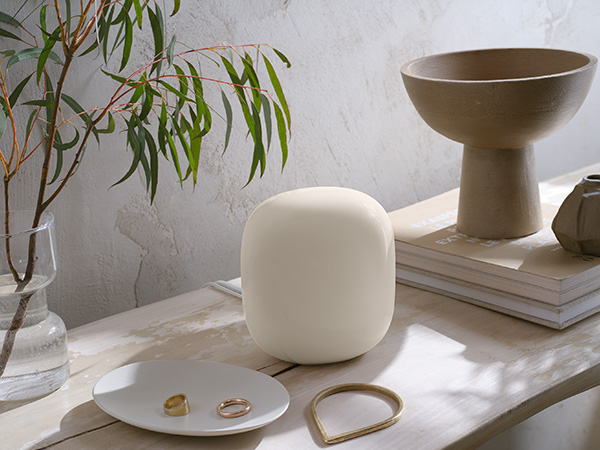
Google Nest Wifi 6 Pro is a dual-router mesh system delivering ultra-fast Wi-Fi 6E speeds across up to 4400 square feet. It intelligently optimizes network performance, prioritizes critical tasks like video calls, and self-diagnoses connectivity issues. With tri-band support (2.4 GHz, 5 GHz, 6 GHz) and advanced security features including secure boot and WPA3, it ensures a reliable, secure connection for all your devices in a sleek, modern design.


| ASIN | B0BCQS8M3L |
| Antenna Location | Home |
| Antenna Type | Internal |
| Best Sellers Rank | #21,536 in Computers ( See Top 100 in Computers ) #392 in Routers |
| Brand | |
| Built-In Media | Wifi router/extender |
| Color | Snow |
| Compatible Devices | Works with devices you have today (laptops, phones, etc.), it also has the tech to make the most out of the next generation of phones, laptops, and more |
| Connectivity Protocol | Wi-Fi |
| Connectivity Range | 4400 Square Feet |
| Connectivity Technology | Wi-Fi |
| Control Method | App |
| Controller Type | App Control |
| Coverage | up to 4400 square feet |
| Customer Reviews | 4.1 4.1 out of 5 stars (578) |
| Data Transfer Rate | 5.4 Gigabits Per Second |
| Frequency | 6 GHz |
| Frequency Band Class | Tri-Band |
| Has Internet Connectivity | Yes |
| Has Security Updates | Yes |
| Is Modem Compatible | Yes |
| Item Dimensions L x W x H | 13.1L x 11.8W x 8.5H centimeters |
| Item Weight | 1.93 Kilograms |
| LAN Port Bandwidth | 1 Gbps |
| Manufacturer | |
| Maximum Upstream Data Transfer Rate | 5.4 Gigabits Per Second |
| Mfr Part Number | G6ZUC |
| Model Name | G6ZUC |
| Model Number | G6ZUC |
| Number of Antennas | 3 |
| Operating System | Linux |
| Other Special Features of the Product | WPS |
| Router Network Type | mesh |
| Security Protocol | WPS, WPA2-PSK, WPA3 |
| UPC | 193575031408 |
| Wi-Fi Generation | Wi-Fi 6 |
| Wireless Compability | 802.11ax |
P**I
Would not connect to my modem
L**O
Muy buena cobertura, que optimiza los dispositivos de Google
R**L
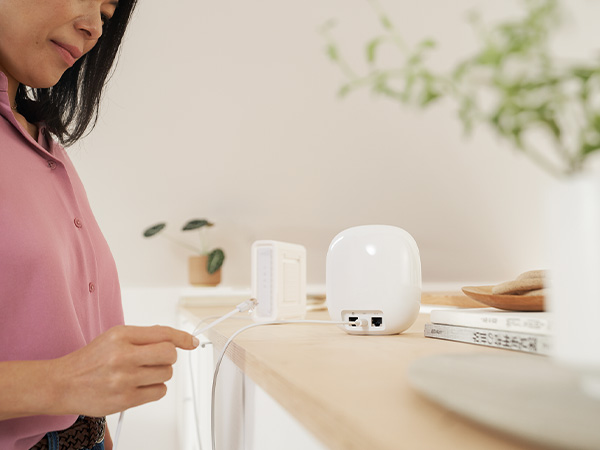
I had a little trouble using the Google app for set up. I ended up deleting and re-installing the app to get it to work. Once I got it done though, this is a big improvement in my internet speed and how well my T.V. functions.
L**A
Excelente cumplió las expectativas: Fácil instalación, Mejoró la conexión y la velocidad de Internet en las diferentes habitaciones y estéticamente es muy sobrio y discreto
G**Z
I've been a Google mesh system user since the original Google Mesh WiFi, which I was still using up until a couple of weeks ago. We recently switched ISP's from Spectrum to a local company that brings fiber directly to the house and provides faster speeds for less money. When they installed the fiber we were able to configure the old Google WiFi mesh to work, but at slower speeds than we should be getting. The installer tried one of his new routers and the speed was where it should be, so that pointed to my old system as not being able to keep up. So, having had a great experience with my existing Google router I ordered the new Google Nest WiFi Pro 6E 2-pack. The new Nest Pro 6E arrived a couple of days later and I figured it would be a quick install. Which it was until I ran into a fatal problem. My new ISP provides service over PPPoE, rather than DHCP, which Spectrum used. Shouldn't be a problem since the Nest Pro 6E supports PPPoE. Except that it was a problem. The Nest Pro 6E would let me configure the PPPoE setting and credentials but simply refused to save and activate the configuration. Press "Save" and you would get a spinning circle that never quit spinning. After over 2 hours on the phone with Google support, doing multiple resets and trying multiple options, we finally raised the white flag and surrendered. So, while I really love the Google mesh routers, and I am quite sad that the Nest Pro 6E would not let me save the PPPoE settings, I had to move on. I returned the Nest Pro 6E and purchased a TP-Link XE75 Pro 6E mesh 2-pack which I had up and running in 15-20 minutes. The Google suspport tech said that he would log this as an issue, so hopefully there will soon be a firmware fix that resolves the issue. After all, it does say that it supports PPPoE so I'm sure they will provide a fix. And probably by the time that you buy yours you won't run into this problem. I just couldnl't wait around for a fix.

Trustpilot
1 month ago
2 weeks ago