Desertcart purchases this item on your behalf and handles shipping, customs, and support to Greece.
🚀 Elevate your home network to pro-level speed and stability — don’t get left buffering!
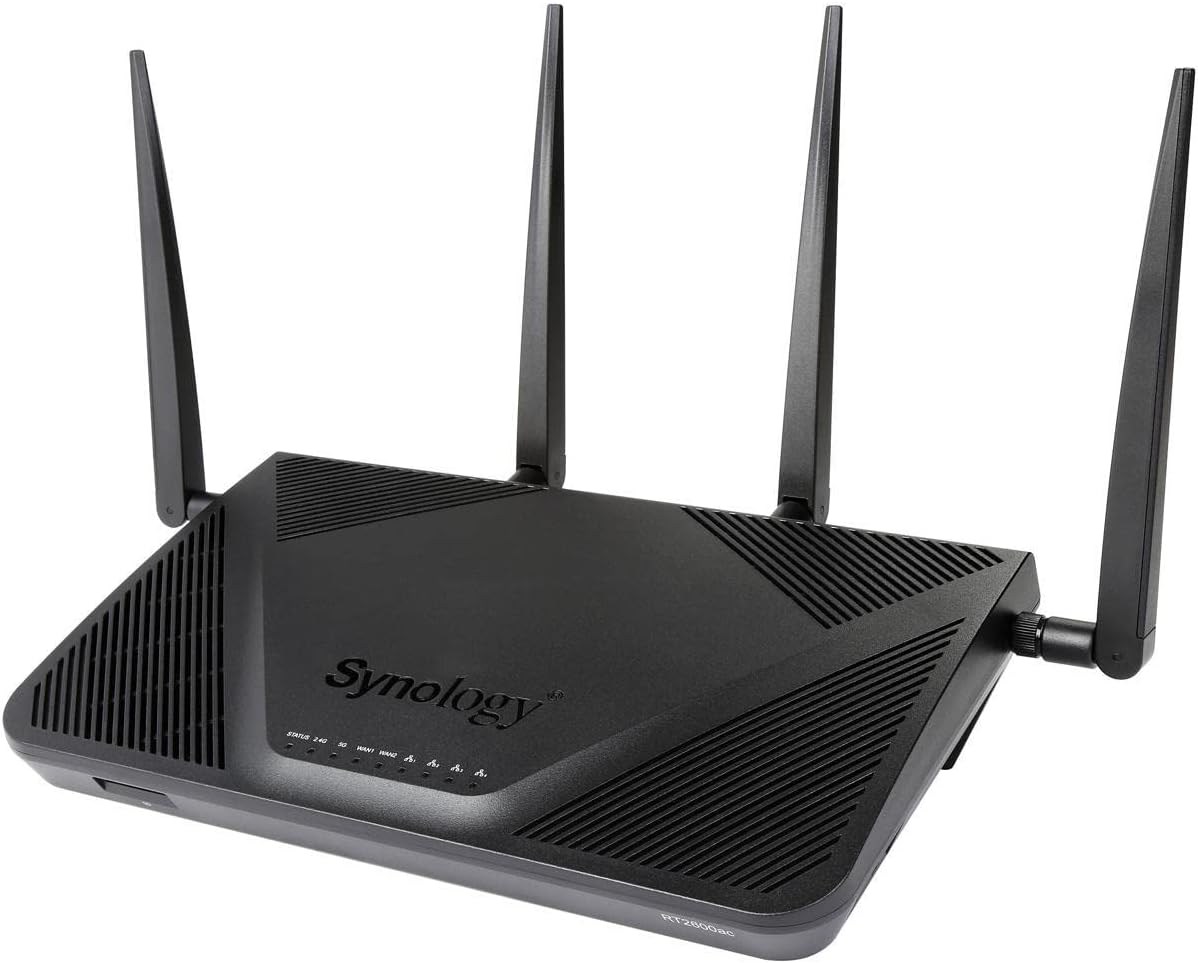
The Synology RT2600ac is a powerhouse dual-band Wi-Fi 5 router featuring a 1.7GHz dual-core CPU, 4x4 MU-MIMO wave 2 radios delivering up to 2.53Gbps, and dual WAN ports for load balancing and failover. It offers advanced traffic control, seamless device connectivity, and robust security with regular updates. Ideal for professionals and families craving stable, high-speed internet with extensive coverage and smart management.


| ASIN | B01MU50C41 |
| Antenna Location | Home |
| Antenna Type | Internal |
| Best Sellers Rank | 40,330 in Computers & Accessories ( See Top 100 in Computers & Accessories ) 326 in Routers |
| Box Contents | Keyboard |
| Brand | Synology |
| Brand Name | Synology |
| Colour | Black |
| Compatible Devices | Personal Computer, Smartphone, Tablet, Game Console, Smart TV, Printer, Security Camera, Smart Thermostat, Streaming Device |
| Compatible devices | Personal Computer, Smartphone, Tablet, Game Console, Smart TV, Printer, Security Camera, Smart Thermostat, Streaming Device Compatible devices Personal Computer, Smartphone, Tablet, Game Console, Smart TV, Printer, Security Camera, Smart Thermostat, Streaming Device See more |
| Connectivity Protocol | Other |
| Connectivity Range | 1615 Square Feet |
| Connectivity Technology | Wi-Fi |
| Control Method | App |
| Controller Type | iOS |
| Country of Origin | Taiwan |
| Coverage | Home/Small Office |
| Customer Reviews | 4.5 out of 5 stars 311 Reviews |
| Data Transfer Rate | 1 Gigabits Per Second |
| EU Spare Part Availability Duration | 2 Years |
| Frequency | 2.4 GHz |
| Frequency Band Class | Dual-Band |
| Frequency band class | Dual-Band |
| Global Trade Identification Number | 00846504002498 |
| Has Internet Connectivity | Yes |
| Has Security Updates | Yes |
| Is Modem Compatible | No |
| Item Weight | 699 g |
| LAN Port Bandwidth | 1000 Mbps |
| Manufacturer | Synology |
| Manufacturer Part Number | RT2600AC |
| Maximum Upstream Data Transfer Rate | 1000 Megabits Per Second |
| Model Name | RT2600AC |
| Model Number | RT2600AC |
| Model name | RT2600AC |
| Number of Antennas | 4 |
| Number of Ports | 7 |
| Operating System | Windows 11 |
| Other Special Features of the Product | WPS |
| Product Warranty | 24 months |
| RAM Memory Installed | 8 GB |
| Router Network Type | Multi-Network |
| Security Protocol | WEP, WPA-PSK, WPA2-Enterprise, WPA2-PSK, WPS, WPS2 |
| Special feature | WPS |
| UPC | 846504002498 |
| Unit Count | 1.0 count |
| Voltage | 120240 Volts |
| Wi-Fi Generation | Wi-Fi 5 |
| Wireless Compability | 802.11ac |
| Wireless communication standard | 802.11ac |
Y**.
Best router as of H1 2017
I have been fighting against Wi-Fi dead spots at home for a long time, and this is my first time victory. Previously I have been a long term Linksys user since the golden ages of WRT54GL. I have also used Linksys EA6700, and even flagship like the EA9500. I have also tried various Wi-Fi repeaters (range extenders) of various brands, but they all shared a common issue: any device in the area where signal strength is about the same from two signal sources (one router and one repeater, or two repeaters) would intermittently drop package because the device decides to switch signal source, even when it is not moving. This is a pain because it results in dropped video calls and stuttering live streams. The so-called "seamless roaming" is totally useless and cannot avoid periodical and temporary disconnections. The lesson learnt here is that only a single router without any additional add-ons like repeaters can be the most reliable, robust and consistent solution. When it comes down to fighting against the Wi-Fi dead spots at home, the options narrow down to a single router with the best 2.4GHz range. I have done my research online for many days, and eventually found a tech geek doing tests and reviews at smallnetbuilder. The measurement data seem legit to me from a prospective of engineering, at least not biased/subjective as other reviews with merely vague descriptions. It appears that by looking into the "Throughput vs Attenuation" charts, this Synology RT2600ac holds best against signal loss, i.e. it will penetrate most walls among all routers they tested. Further looking into their routing performance spreadsheets, I have noticed that this Synology RT2600ac has least number of retries for TCP and least number of lost packages for UDP under stress tests, and beats the flagships of other brands (e.g. Linksys, Netgear, ASUS, TP-Link etc) by several orders of magnitude. I decided to give it a try by myself and see whether it is really that good. As a long term user of Synology NAS, I like the consistent UI offered by this RT2600ac. The initial setup procedure has been very smooth and I updated the OS to SRM 1.1.4-6509 straight away. The result is very satisfying: I can confirm that the dead spots in my bedroom are now gone finally, and the signal strength bar has been obviously improved with stable connections compared against the bulky EA9500 with 8 antennas! It just proves that the measurement data from smallnetbuilder are telling some truth. My devices also no longer intermittently drop connections! I have tried to stress test with multiple computers downloading from the internet and at the same time uploading to my Synology NAS, and everything went smooth and stable! The router has been up and running for a week now and I have never had to restart anything. Pros: State-of-the-art hardware specs: 1.7GHz quad-core + 512MB RAM Best 2.4GHz range as of H1 2017 Extremely stable connections without maintenance Synology's SRM router OS with next generation UI and functions Very fast and easy to set up out of the box Cons: Maybe a little bit pricy?
T**M
Synology RT2600ac WiFi Router = Peace in the home and LOTS of Internet for everyone
My experience with Synology RT2600ac WiFi Router, Sep - Oct 2019. I bought this to have better Networking & WiFi at home where I was using a Virgin SuperHub 3 and 100mbps fibre connection. The SH3 gave poor performance, and the widely documented path forward is to put it into Modem mode and buy a real WiFi Router. I first bought an ASUS AC88U which failed after two days and went back to Amazon. I bought the Synology RT2600ac about a week later after reading a lot more reviews. It was easy to install in a bedroom wardrobe and setup, very flexible. We got good speeds downstairs and upstairs with great coverage from the WiFi, enabling me to abandon my Powerline adaptors and local WiFi hotspots completely. Everyone happy. No more sluggish network, dropouts, intermittent freezes, bad coverage areas from the Virgin SH3. I updated the firmware and set it to auto update, which it did a few times over the next couple of days. The user interface is very clean, well designed, complete, easy to use and really helpful. I mean it gives clear guidance at each step instead of just a cryptic statement. I set everything up in two hours and it is all still fine three weeks later. Nothing changed on me, nothing unusual happened, updated itself fine. - No dropouts of any users / clients. Everyone reconnects when they get home without issues. - No internet disconnections, no WiFi fades. - Clean, correct, up to date Client list. - Clients are - iPads, iPhones, Macs, Epson printer, Android phones, Windows 10 PCs and Surface Gos, Ubuntu Laptop, Kindles, Raspberry Pi. All connected immediately and still are. Other reviewers said this router was worth the money and I fully agree. Everyone happy. Peace at last !!
M**R
Excellent router with no wifi drop out
At last a router which doesn't drop wifi in the house. My Plusnet branded free router was dropping the wifi signal in the house regularly, or only distributing a poor signal of limited speed. My previous wifi router from Plusnet did the same. This one is maintaining the wifi signal and never drops out. It does not have any greater reach than the Plusnet, so it still has low signal upstairs in the corners of the house as the other one did, which surprised me as I thought it would be more powerful. It is a dream to set up, however it does require a modem, unlike the Plusnet router which had a built in router.
K**K
Really Impressed. Fast, Easy to use, Lots of Control.
The good: - Very easy to set up. - Excellent wireless range, especially at 5GHz - Lots of control over settings, though you can pretty much leave well alone and it will work well. - Can be used as a 'light' storage server, handy if you want to transfer the odd file between your devices on the network - The excellent Synology app/package store which really gives lots of control over your network. The bad: - Only 4 LAN ports, one or two more would have been nice - Quite expensive. I have had the RT2600ac running for just under two weeks and so far, it has worked flawlessly. I have only used ISP bundled routers before, but after my last one (The dreadful BT smart hub / HH6 and its terrible wireless connections problems) I decided to try some third party hardware. I have been amazed at the significant improvement in wireless range and speed performance over anything I have had in the past. I have been able to stream HD TV and media with my plex server throughout my home and (small) garden without the need for wireless repeaters for the first time ever. I have also multiple devices connected through the LAN ports via switches and have noticed increased file transfer rates since I installed the RT2600ac. The router was very easy to set up. If your familiar with Synology NAS devices, then you will know how simple the software is to use. If you are not familiar, then I recommend looking up the reviews on this device or its older brother (the RT1900ac) on youtube as they use the same synology o/s . The software gives you lots of control over your network such as, limiting traffic to specific devices and giving priority to others. You can see what each devices throughput is in near real time as well. You can set up DNS server, a ‘light’ storage server, a media server and there are cloud storage options as well. What I will say though is do not confuse this device with a full blown NAS. It is not that at all. You can add a HDD or in my case an SD card which us useful for light file transfer. The amount of internal space in the router is limited, if you want to add apps from the store you will need some sort of storage. (I use an 8GB SD card.) There are also VPN options, and intrusion protection as well. The only negatives so far are the low number of LAN ports. While a switch is a simple relativity cheap solution to this, 4 does seem a bit tight. Today 5 should be the minimum. The only other negative is the price. This is expensive, but I cannot fault the performance. What put me off the RT1900ac was many reviewers stated it was a little underpowered, so considering this was going to be my router for the next 4 - 5 years, I paid the extra and so far, I am glad I did.
W**Y
Superb router
With more and more devices becoming internet-connected, most ISP routers are just not set up to get the most out of them nowadays. As an EE broadband customer, I have had no real complaints with the routers they supply, other than the fact the control over devices is a little poor - for example, the EE SmartHub does not really allow you to manage DHCP reservation based on MAC addresses any more, but their older BrightBox 2 did. As I have a number of IoT / smart home devices at home, I have started to become a little more security conscious over what is connected to my home network. Also, as media streaming is becoming the norm, I started to notice a few issues with performance between my EE SmartHub and my NVIDIA Shield Pro, even over 5GHz WiFi. I started to look for a new router, and this kept cropping up but seemed a little pricey. As a Synology NAS user myself, I was attracted by the OS that Synology uses, and it is a fantastic improvement on the standard late 90's stuff most ISP routers seem to ship with nowadays. I decided to get the RT2600ac router over the MR220ac because I wanted to ensure I had the best available for my money, plus the extra horsepower is always a good thing in my eyes. Whilst the RT2600ac is a little on the big side, our router sits above our fridge in the kitchen so it's not a huge issue for me. Setup and installation was a breeze, thanks for Synology's well thought out OS, and I was up and running in no time. There are so many security features on this router, it really makes a difference. I opted to create a separate 2.4GHz network for my Chinese IoT devices and kept that isolated from other devices on my 5GHz / ethernet network - something you can easily do with the RT2600ac. I also decided to install some network cable in the form of Cat6 ethernet, and thanks for the various ports on the RT2600ac, this was straight forward. I only recently purchased the MR2200ac to add to my network to make it a mesh network, which has also significantly improved connectivity issues for devices on the edge of WiFi transmission - even setting that up was as simple as clicking a few buttons in the OS! Whilst it's a relatively ugly router thanks for the 4 antenna, it performs amazingly well. If you want a nice looking mesh router, then go for something else, but if you want performance and affordability, the RT2600ac from Synology is a must have.
Z**N
Synology Router RT2600AC a quality product
Bought this after doing some research and reading some of the reviews. Much bigger than the BT Hub 5 (Plusnet one) it replaced, Also linked to a Synology NAS and works perfectly. Lots of menus for control with an excellent interface. Guided set up in about 10 minutes (plusnet fibre provider) with software updates at the same time. Just know your provider login details etc. SD card slot (useful for the app downloads) and 2 USP 3 ports. Wifi off and SD eject switches on the side. Only 4 ethernet ports, but I dont find that a problem - you can always expand this with a switch. You need a modem with this unit and I am using the original unit supplied by Plusnet from 2012. This has made such a difference through ethernet and wifi range. Expensive but worth the money. Very happy with the quality product of the product.
D**N
Signal is weaker than my isp provided router. how I don't know.
I had high hopes for this router, after reading many positive reviews I was confident I was buying a decent product. First of the router has some great added extras the srm operating system works great and even tho its cpu usage is high most of the time it never seems to struggle. Has some nice added security options and allows you to keep track of your devices connected to the network. It handles multiple devices pretty well. Unfortunately this is where it all stops. This was purchased to replace my virgin super hub 3, let me tell you the super hubs WiFi sucks as it is. what I can't understand is why a £200 + router that has all these great reviews has signal strength weaker than the hub 3. For example in my bedroom my android phone would get 0 bars but my hub 3 was able to get 2 bars out of 4. This goes for all devices in all rooms outside of the living room. Constant wifi drop outs and even my sky q box which is 2 meters away drops connection. My other sky q box in the bedroom that used to get a connection all beit a weak one can no longer receive a connection with out a booster, luckily supplied by sky. Synology online chat was mediocre don't get me wrong the guy was pleasant and tried to help but straight away I could tell he wasn't trained for there routers. He didnt even understand basic options about the router. I will acknowledge that it's quite possible I have a defective device. maybe that's why I have a weak signal, in my oppinion I think the device was fine and just didn't have the minerals to get that signal sent around my small home. Due to the signal alone I wouldn't recommend this router especially with the fact that if you want to add mesh/ap you have to spend another 100+ otherwise would of been great.
E**B
More flexibility and better security than most competitors - but poor WiFi range.
*** Update July 2020 - I initially rated the RT2600ac as 5 stars but have now dropped it to 3 stars because of poor WiFi performance *** After 5 years of reliable service, my Netgear R7000 router started to become a bit "flaky" and finally failed at the beginning of November so I needed a replacement. My key requirements were strong security, good WiFi coverage and full access to all the routers features - and based on quite a bit of research the Synology RT2600ac seemed to be the best solution as far as I could see - a view which was confirmed once I'd bought the router and set it up. In terms of hardware features, the RT2600ac offers the full range of WiFi-5 (802.11a/b/c/n/ac) capabilities (complete with MU-MIMO if you have adapters that can exploit it), dual-WAN (in addition to the dedicated WAN port, LAN port 1 can also act as a WAN port which can be used for load balancing or fail over if required), a USB 2 port on the rear, a USB 3 port on the side (complete with eject button) and an SD Card port on the front. The setup of the router was very easy as it is controlled by a wizard, but there is only a single-sheet getting started guide in the box and this missed out a crucial bit of information. For good security, it would be best not to use a standard administrator name but this is not an option on most routers. It is an option with the RT2600ac, but the getting started guide and setup wizard don't make this clear and the wizard offers "admin" as the administrator name. If you do use a different name, however, then the router uses this as the administrator account and disables the default "admin" account (as can be confirmed in the User section of the Control Panel). Of course, it wouldn't be much good if all the router capabilities were difficult to manage, and this is where the Synology Router Manager (SRM) user interface comes into its own and puts all the other routers I've used (Draytek, Asus, Netgear, various ISP supplied) in the shade. It's not that the other routers were bad exactly, it's just that they tended to be a bit limited and there was little or no ability to add functionality. In contrast to the usual form-based user interface that most routers offer, SRM offers an interface that looks more like a windowed environment - i.e. a desktop with application icons where each application opens in its own window. The "out-of-the-box" functionality is pretty good already, but Synology offer a Package Center (app store) from which additional packages can be installed - although it should be noted that some form of external storage has to be added in order to install additional packages. In my case, I chose to use a 64GB SD card for this since I wanted to have something that felt like an integral part of the router (I could have used a "nano" sized USB flash drive, but I felt there was more chance that the USB drive might be removed by accident and also that I might want to use the USB for mass storage at a later point). So far, I've installed the Safe Access, Threat Prevention and Download Station packages, but there are others such as VPN Server or Media Server that I may well install later. The other great feature of the RT2600ac is the level of security on offer. Through the Security tab in the built-in Network Center package, I can access all the normal router security features (including setting up additional firewall rules and controlling whether packages are enabled and/or can access the internet ), but in addition to this there is the Security Advisor that scans the router for malware or vulnerabilities such as poor configuration or weak passwords and the Threat Prevention package that scans for network threats. Unfortunately, after several months I've found the WiFi range of the RT2600ac to be a real disappointment since it is significantly weaker than my Netgear R7000 was (I didn't initially realise how bad it was because when the R7000 failed I had reverted to an old BT Home Hub 3 and the RT2600ac was better than the HH3). The RT2600ac does offer some other neat WiFi capabilities such as allowing the 2.4 and 5 GHz bands to use the same SSID so that the router can automatically switch each client to the best band and automatically select the least congested channel for each WiFi band to use. At first, I thought the WiFi range was only slightly poorer than the R7000 and that the trade-off of a small drop in range for better features was worth it. However, I recently changed ISP and initially used the ISP provided router which is an all-in-one WiFi router with just . To my dismay I found that the ISP router located in exactly the same place as the RT2600ac actually provided slightly better WiFi coverage with it's 2 small fixed internal on-pcb antennas than the RT2600ac did with its 4 large external adjustable antennas. After some further research I discovered many posts complaining about poor WiFi range with the RT2600ac (particularly following a firmware upgrade to SRM 1.2.3). I did contact Synology support about this but they weren't really any help - mainly just providing some standard information about re-orienting the antennas and even suggesting switching the WiFi power to Low at one point (which of course just made the problem worse). Following an update to SRM 1.2.4 and a lot more tries at re-orienting the antennas, I eventually managed to find a configuration that almost matched the coverage of the ISP router (typically 1 dBm lower at any given location) so I've left the RT2600ac in place - but its WiFi performance is very poor considering its cost, technical specifications and advertised capabilities. I was initially happy with the RT2600ac, but I hadn't realised how bad the WiFi performance was and given that it's an expensive router, I can no longer recommend the product.
D**D
Router potente y versátil. Excelente!
Compré este router para sustituir al que te pone la operadora, y para que hiciera "compañía" a un NAS de la misma marca. Está gestionando una conexión FTTH de 300Mb simétricos sin ningún problema, gracias a su procesador de doble núcleo y a sus 512MB de RAM. Cuenta con switch de cuatro puertos gigabit más un puerto WAN, además de WiFi de doble banda. Gracias a las cuatro antenas la cobertura del WiFi llega correctamente a todo el piso (de unos 100m2), alcanzando el máximo de la velocidad de la conexión a internet en dispositivos con WiFI 5Ghz (como un iPhone X o un MacBook Pro). Cuenta con puertos USB en los que se pueden conectar, entre otras cosas, discos duros o pendrives para compartir el contenido en la red, o usarlos par almacenar lo que descargues gracias al gestor integrado. Además, estos puertos USB permiten conectar un módem 3G/4G para usarlo en caso de que la conexión principal falle, o usarlo simultáneamente con un balanceador de carga (también integrado en el software). También cuenta con lector de tarjetas SD que se puede usar igualmente para almacenar o compartir datos en red. Pero sin duda, una de sus mejores cualidades es el software, SRM, muy similar al DSM que llevan los NAS de la misma marca. Este software es un sistema operativo reducido que permite una facilísima gestión visual de las tareas propias del router (configuración del proveedor, apertura de puertos, gestión de servicios), y que además permite la instalación de aplicaciones que aumentan las capacidades del router. Aplicaciones como un gestor de descargas (tanto para descargas directas de los servicios más populares, como eMule, BitTorrent...), o como un servidor VPN. Por supuesto, el software es actualizable y Synology se encarga de mantenerlo al día para ir tapando posibles vulnerabilidades, corregir errores o añadir características. Aunque, por poner algún punto negativo, las actualizaciones no siempre llegan todo lo rápido que a uno le gustaría.
O**R
Excellentes performances, fonctionnalités étendues
Très satisfait de mon achat. 1/Couverture wifi: En pavillon, mon ancien routeur wifi couvrait le rdc et une petite partie du 1er étage. J'avais du installer un répeteur pour étendre la couverture au reste de la maison et le jardin. Avec ce routeur, la couverture est partout, j'ai pu supprimer mon répéteur. 2/Performances : à 3m du routeur, je passe de 50MB/50MB de débit (downlink/uplink) avec mon ancien routeur à 177/108MB (downlink/uplink) avec ce RT2600AC! 3/Fonctionnalités au top: - controle parental efficace et très facile à mettre en oeuvre - en connectant un disque dur via USB (j'ai connecté un disque de 4TB), ce routeur fait aussi office de NAS, accessible en DLNA. A tel point que je n'utilise plus mon NAS Synology... - interface utilisateur au top (Synology, similaire à l'interface de leurs NAS) permettant de configurer facilement le routeur, accèder à l'historique par device, etc... 4/ mises à jours fréquentes et suivi au top de la part de Synology
M**O
Sehr guter Router mit vielen Konfigurationsmöglichkeiten
Ich habe den Synology RT-2600ac seit kurzem im Einsatz. Er ersetzt damit meine alte Fritzbox 7490, die aufgrund der schwankenden WLAN-Verbindung durch mehrere Räume hindurch nicht immer Spaß gemacht hat. Versand und Abwicklung -------------------------------- Die Ware kam wie immer pünktlich an. Allerdings wurde von Amazon die UK-Version (falscher Stecker) geliefert. Der Kontakt mit Amazon war sehr gut und es wurde mir eine schnelle Lösung vorgeschlagen. Verpackung & Inhalt --------------------------- Die Verpackung ist Synology-typisch. Eine schlichte Verpackung ohne viel Füllstoff. Mehr braucht man aber in meinen Augen auch nicht. In der Verpackung sind enthalten: Router, CAT5e Kabel, Netzteil, Schnellstartanleitung und vier Antennen. Im Router ist kein Modem verbaut, dieses wird separat benötigt. Ersteinrichtung -------------------- Die Ersteinrichtung war gewohnt einfach. Der DHCP-Server ist bereits aktiv. Sobald man den Browser öffnet, wird man automatisch auf den Router weitergeleitet. Sollte das nicht der Fall sein bitte 192.168.1.1 im Browser eingeben. Man wird mit einem Wizzard durch die Grundkonfiguration geführt. Dabei wird ein Passwort für den Router Zugang, sowie WLAN-Kennwörter angelegt. Im Anschluss ist die Installation bereits abgeschlossen und man wird auf die Oberfläche weitergeleitet Interface ------------ Die Oberfläche ist, vorausgesetzt man kenn Synology bereits von einem NAS-System, sehr vertraut. Sie ist wie eine Desktopoberfläche aufgebaut. Die einzelnen Fenster können geöffnet werden, in der Größe angepasst oder auch minimiert. Das Interface ist in mehreren Sprachen verfügbar. Darunter auch Deutsch. Es reagiert schnell und läuft sehr stabil. Features und Konfigurationen ---------------------------------------- WLAN: Der Router hat zwei Frequenzbänder (2,5GHz & 5GHz). Damit deckt er so ziemlich alles ab was heute auf dem Markt verfügbar ist. Gefunkt wird in allen gängigen Standards (802.11 b/g/n/ac). Es besteht die Möglichkeit beide Frequenzbänder als eigene AP’s zu konfigurieren oder als sogenanntes SmartConnect. Dabei wird eine SSID vergeben. Der Router entscheidet selbst, in welches der beiden Frequenzbänder er welches WLAN-Gerät setzt. Als grobe Faustregel kann man sagen: Desto näher am Router umso eher ist man im 5GHZ Netz und damit normalerweise schneller. Die Aussage ist jetzt schon sehr grob, sollte aber nur als kleine Erklärung dienen. Geräte die „nur“ im 2,4 GHz Netzt funken können, werden automatisch und problemlos im Netz registriert und funktionieren einwandfrei. Ich konnte all meine Geräte ohne Probleme am Router mit aktiviertem SmartConnect anbinden. LAN: Der Router verfügt über einen WAN-Port und 4 LAN-Ports. Der WAN-Port muss mit einem Modem verbunden werden. Die vier LAN-Ports sind Gigabitfähig. Einer davon kann ebenfalls als zweiter WAN-Port genutzt werden. Damit lässt sich entweder eine Failover-Leitung oder eine Lastvertreilung realisieren wenn zwei Internetanschlüsse vorhanden sind. USB: Der Router verfügt über zwei USB Anschlüsse. Einmal USB 2.0 und einmal USB 3.0. Daran können sowohl Speichermedien als auch z.B. LTE-Sticks angeschlossen werden. Wenn ein LTE-Stick angeschlossen wird, kann dieser in gleicher Weise genutzt werden, wie ein zweiter Internetanschluss. Den LTE-Stick hab ich selbst nicht getestet. Zusätzlich bietet der Router noch die Möglichkeit eine SD-Karte zu verbinden. Ich finde die Idee gut, kann allerdings aktuell nicht beurteilen wie gut es funktioniert. Konfiguration: Die Konfiguration des Systems werde ich an dieser Stelle nur kurz ansprechen, da diese ansonsten den Rahmen komplett sprengen würde. Zu den Möglichkeiten die mir sehr gut gefallen gehören unter anderem: - Verbindung zu einem VPN-Server - VPN-Server mit Möglichkeit einer Anmeldung über den Browser - Sehr gute Reports - Sehr umfangreiche Steuerung von Datenpaketen (pro Client, pro Anwendung) - Grundfunktionen über eine Mobile-App verfügbar - Garantierte Mindestbandbreite pro Client Mir sind auch ein paar Dinge aufgefallen, die in meinen Augen verbessert werden sollten. Diese sind allerdings Softwarethemen, von daher in der Umsetzung eigentlich nicht wild. - VPN-Verbindungen nicht über die Mobile-App möglich - VPN-Verbindungen können auf der Oberfläche nicht auf den Desktop verschoben werden sondern müssen im Menü abgefragt werden. - Native Verbindung zwischen mehreren Synology Geräten. Z.B. Router und NAS. Zusammenfassend muss ich sagen, dass der Router ein durchweg sehr gutes und durchdachtes Gerät ist, das keine großen Schwächen aufweist. Ich hatte mir zuvor einen Asus-Router gekauft, bei dem ich allerdings die Software miserabel fand. Der ging auch nach einem Tag zurück. Trotz der an sich noch geringen Erfahrung von Synology mit Routern haben sie hier mehr richtig gemacht als die meisten etablierten Firmen.
S**M
Excellent
Amazing I like it, specially for kids parental control
S**O
Ottimo software, ottimo router.
La qualità Synology non si discute. Il prodotto è davvero stabile e personalizzabilissimo con il DSM installato a bordo. Unica pecca, è arrivato con spina UK e non italiana, ho dovuto comprare un adattatore, ma non cambio il parere, 5 stelle.
Trustpilot
2 months ago
5 days ago