🚀 Stay connected, stay ahead — the future of fast Wi-Fi is here!
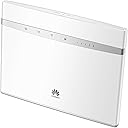
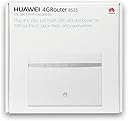
The HUAWEI B525 2017 is a versatile, unlocked 4G CAT6 mobile WiFi router delivering up to 300 Mbps download speeds. It supports dual-band Wi-Fi (2.4G & 5G) and can connect up to 64 devices simultaneously, making it ideal for busy homes or small offices. Its sleek, compact design fits seamlessly into any environment, while compatibility with all network SIM cards ensures maximum flexibility.
| ASIN | B06ZZL966Q |
| Antenna Location | Business, Home |
| Antenna Type | Fixed |
| Best Sellers Rank | 215,963 in Computers & Accessories ( See Top 100 in Computers & Accessories ) 322 in Mobile Broadband Devices |
| Box Contents | B525 |
| Brand | HUAWEI |
| Brand Name | HUAWEI |
| Colour | White |
| Compatible Devices | Personal computer, laptop, tablet, smartphone, game console |
| Compatible devices | Personal computer, laptop, tablet, smartphone, game console |
| Connectivity Protocol | 4G LTE |
| Connectivity Technology | Wi-Fi |
| Control Method | App |
| Controller Type | Web Interface, WPS |
| Coverage | Multi-room/Multi-area |
| Customer Reviews | 4.4 out of 5 stars 325 Reviews |
| Data Transfer Rate | 300 Megabits Per Second |
| Frequency | 5 GHz |
| Frequency Band Class | Dual-Band |
| Frequency band class | Dual-Band |
| Global Trade Identification Number | 06901443173747 |
| Has Internet Connectivity | Yes |
| Is Modem Compatible | No |
| Item Weight | 0.4 Kilograms |
| LAN Port Bandwidth | 1000 Mbps |
| Manufacturer | Huawei |
| Manufacturer Part Number | HB525WHITE |
| Maximum Upstream Data Transfer Rate | 300 Megabits Per Second |
| Model Name | HB525 |
| Model Number | HB525WHITE |
| Model name | HB525 |
| Number of Antennas | 2 |
| Number of Items | 1 |
| Number of Packs | 1 |
| Number of Ports | 5 |
| Operating System | Huawei LiteOS |
| Other Special Features of the Product | Internet Security |
| Product Warranty | 1 year |
| Router Network Type | Hybrid |
| Security Protocol | WPS |
| Special feature | Internet Security |
| Wi-Fi Generation | Wi-Fi 4 |
| Wireless Compability | 802.11n |
| Wireless communication standard | 802.11n |
J**R
Simple and reliable
Very simple and intuitive setup. Doesn’t require extensive networking knowledge to get up and running but does have advanced options if you like to tinker. Using this with Three Unlimited SIM and getting consistent 40mbps download speeds. Handles multiple wireless connections without any dramas. Wireless range covers similar range as my old Asus MIMO wireless router so no need for extenders in my case. I have a couple of fixed Ethernet connections via a Netgear switch and these are trouble free. For better 4G coverage, there are a pair of TS9 antenna connecters that allow you to add an external antenna. I haven’t tried this out yet as my 4G coverage is already consistently good in my area. Aesthetically the router is not too obtrusive and just blends in with it’s fairly bland white case. This router is an excellent option if you have decent 3G/4G coverage in your area and you would like to get rid of your fixed line broadband.
J**N
Fast mobile broadband
We live in a rural area where fixed line broadband runs at a snail-pace 200Kbps. On receipt of the B525, and within about 60 seconds (put EE SIM card in, switch on, connect to WiFi), we now have download speeds of around 70Mbps - that's fibre optics speed! We're also getting upload speeds of 25Mbps. The B525 is a very good router, and the CAT6 protocol is currently the fastest available. Huawei makes professional communication equipment for most of the mobile network providers, and their expertise is evident in their consumer products. The 4G reception is excellent (compared to my iPhone), and the dual WiFi frequencies give you the choice of reach or speed. One great feature of the B525, is the ability to reboot itself should the network provider disconnects the device. 3G and 4G mobile broadband services are an "always available service" and not an "always on service". This means that any permanently connected 3G/4G device will get disconnected by the mobile network. This normally require the router be turned off and on again to reconnect to the network. So far, I'm very happy with the purchase.
M**N
Reliable, Stable signal, great purchase.
Purchased this to replace my Huawei B311 which came with my three mobile broadband plan. The two reasons for the upgrade were to have more ethernet ports on the back of the device as the B311 only had 1 and secondly to try out the 5ghz WiFi as the B311 only has the 2.4ghz. Out of the box this router looks the same but with the added ports. Fire it up though and it's a world away from the B311. Firstly between the 2.4 and 5 ghz I notice no difference. The signal strength is the same, but I'm not saying its bad even the previous box I was getting 70-80mbps download over a WiFi speedchecker. However the new box that speed is more stable at all times of the day. I guess this is the benefit of working off of two frequencies. The other thing I notice is the ping speed. The previous router ranged between 30 and 50 and mostly towards the latter. The new router I've seen as low as 20 and mostly hit the mid 30's. As for upload a solid 30mbps. This new router can connect upto 64 devices and the ones I have connected Ring, Swann CCTV, Alexa show, Dot and Nest all react instantly with little to no delay. Being greedy I may purchase the external aerials for the back, or even an outdoor aerial to see what I can get from this, but more than satisfied with this purchase.
G**D
Excellent piece of kit
I bought this item because I wanted to upload to the Cloud faster than the paltry 1Mbit/s provided by my ADSL line. Where I live, the smartphone only occasionally shows a 4G signal outside, but not for long enough to use it, and never a 4G signal inside the house. The Huawei B525, when placed at a window facing the nearest 4G mast (about 8 miles away) locks on to the 4G network with a steady 2 bars out of 5, just using its internal antenna. This gives a download speed of around 12 Mbit/s and, far more importantly for me, an upload speed of around 6-7 Mbit/s. An external antenna would no doubt improve those speeds considerably, but my monthly allowance total of 100GB would be used up in an instant, so I may not bother to get one, as the unit is fast enough for my needs as is. Update: after the router updated its firmware, the received signal is better optimised, with 3 bars now instead of 2. Upload speed a solid 1MByte/s (8Mbit/s) Update Dec '18: I did try it with an external outdoor antenna, a well-reviewed one costing nearly £100 on here, but the received signal level DROPPED, no matter how I positioned it. So I would urge caution if you are thinking that investing in a pricy outdoor antenna will always improve the signal received. The router on its own is the best solution for me.
M**C
Strong, stable signal, easy setup.
This is the router for me, simple and easy to setup and it just works with minimal user input/setup required, granted, my requirements are for a secure basic sim router but hey it does exactly what I need it to do so it gets 5 stars from me. I get a very good strong signal all around my house and that's just using the internal antenna only! also this has improved my network stability over a 4g sim. Getting 40/50 MB down and 20-25 MB up. I have to say I am very impressed with the seller Livewire Telecom Limited as I had an initial issue which they resolved in record time! honestly within 30 mins of my email to them they had replied and provided a solution which worked for me, very impressive customer service which is unusual these days so thank you Livewire for that.
W**K
Huge improvement over BT broadband
My BT broadband is capped at 13mb because of line distance to cabinet and aluminium wiring. It also regular drops connection but never when I raise a fault call. I'd already tried a small Huawei mobile wifi router with, ironically, a BT SIM and knew I could get circa 50mb, so went for this after the latest BT drop out. Very impressed - regularly get a constant 60mb download and between 15 and 30mb upload. I found that turning roaming on auto switched to an EE mast and gives me 5 bars but as others have said, you do need to search for the sweet spot when positioning the device. I have an ethernet port on the router plugged into my home-plug network to service my Sky box and Sonos system. It does eat moibile data allowances though, so the "3" all you can eat deal will be my next option when the BT data sim contract ends. Tried the antenna but that actually halved performance so if you can get 4 to 5 bars using your smartphone's Personal Hotspot, I wouldn't bother with the antennas
M**U
Good all round performer
I bought this router to use with a 3 sim card I bought, I manage to get the deal of £10 a month for unlimited everything :) It was a glitch on their system which they honoured. After reading other reviews I knew that this would allow me to add external antenna's and also you can connect up to 64 devices and it promises good WiFi coverage. For me the router gives varying speeds during the day and from checking how many masts 3 has in Spennymoor where I live I have only a choice of 1 mast. That means also that everyone else on 3 uses the same mast so I would have expected the speeds to go up and down as more or less people login and use their data allowance. I have added a few photo's to show the router and how many bars I'm getting off 3, the interface and the results of an average speed test. You will see that I have got four bars so the signal is quite good but my download speed is 17Mbps and upload speed is 14.4Mbps. This is about 1/3 of my current download speed I have on my BT internet broadband but as there is normally only me on the internet streaming then I don't see this as being a problem as I have been doing tests where I have use the WiFi router for my streaming and downloading and it has performed well, the WiFi signal is strong and when it get later on a night the speeds go up as most people have gone to bed. I did buy a Cross Polarised 4G Omni LTE Antenna for the router and I got no increase is speed and only a minimal increase in signal strength, not enough to warrant the price of the antenna. With the router being unlocked on all networks it means that I can plug in the home telephone in the RJ11 socket and use the mobile calls using the router. When calling out the router takes about 10 seconds before it dials the number you punch in on the keypad, I read somewhere that this is due to the router dropping down to 3G to make the call but I cannot confirm this. This router will save me lots of money and do more than my original router I got from my current broadband supplier. Very happy with the purchase and price.
H**6
Drops connection and can't use 3g/4g as the backup connection
I primarily wanted to connect several devices via NORDVPN which I was able to set up but it drops the connection every day or so which makes it pretty much useless as I have to log back in and navigate through the clunky menu to reconnect it. Even when not using the VPN it would randomly stop working and need to be rebooted. I also can't see any way to use the 3g/4g as the backup connection and not the default connection. If you only want to use this for connecting devices to 3g/4g it probably works fine but not reliable otherwise.
J**R
excellent routeur
J'utilise ce routeur avec une carte sim Free mobile et forfait illimité, j'ai une antenne 4G à proximité de chez moi. Etant à la campagne nous somme très peu à passer par cette antenne. Mais un speedtest vaut mieux que des mots. C'est simple, c'est la meilleur connexion que j'ai eu jusqu'ici. Pour ma part, j'héberge un serveur chez moi, j'ai donc besoin d'avoir une adresse IP publique pour m'y connecter depuis l'extérieur. Les IP des téléphone mobile étant sur un réseau privé propre à chaque FAI, il est obligatoire de passer par une passerelle ou un vpn et rediriger les flux entrant. J'ai configurer le client directement dans ce routeur, tout fonctionne parfaitement (serveur configuré en DMZ).
R**.
Router eccellente!
Router eccellente, buona accoglienza in una vecchia casa colonica con pareti spesse. Ora posso sbarazzarmi di TIM e del loro terribile telefono fisso molto costoso che dà solo 0,3-6 MB! Il router è stato installato in un negozio Tre, tuttavia, provandolo a casa, non ha funzionato. Dopo aver verificato la connessione online al router, ho scoperto che nella sezione Gestione dei profili mancava la parola "admin". Aggiungendo quella parola e tutto ha funzionato perfettamente. Ho provato uno SpeedTest e sono stati raggiunti anche 41 Mb. Incredibile! Non ho ancora provato a collegare un telefono al router o alla porta USB.
M**E
MUY UTIL SI NO LLEGA LA FIBRA A TU CASA
Como muchos españoles yo no tengo acceso a la fibra óptica y el adsl que me llega es una vergüenza. me he pillado una tarifa con datos infinitos y gracias a este router disfruto de un buen internet. Puedo ver netflix, navegar por internet etc.... a la vez, aunque si es verdad que a veces le cuesta y hay discusiones. estoy en un zona entre 4G y 4G+. Puedo confirmar que me va mejor que el teórico ADSL 7megas. PROS; Bonito diseño. El rango de señal es más amplio que los routers de "regalo" de la telefónicas. aun si si te quedas corto tiene dos tomas para poner antenas. Tienen un puerto USB por si quieres hacer una red local enchufando un disco duro. tienen toma de teléfono fijo por si te da por poner uno. Ya sabes si tienes tarifa infinita de navegación suelen tener llamadas gratis también. Como funciona con SIM te lo puedes llevar de vacaciones. CONTRAS, El enchufe que viene es un enchufe ingles y no tienen ni siquiera el detalle de regalarte un adaptador para enchufe europeo. Un consejo, aunque parezca tonto, el router es fácil de configurar enchufar y listo, pero la tarjeta SIM suele llevar un código de desbloqueo por defecto, antes de meter la tarjeta en el router y quitar el código de desbloqueo.
H**R
Das Gerät ist so nicht zu benutzen
Ich habe den Router nach Erhalt versucht, in Betrieb zu nehmen. Leider ohne Erfolg. Jetzt hat mein Sohn das gleiche von Deutschland mit Fernwartung versucht und dabei festgestellt, das Passwort ist verändert und ohne Passwort ist keine Inbetribnahme möglich. Mein Sohn hat bei der Telekom gelernt und istComputer Fachmann. Es handelt sich um ein gebrauchtes Gerät, deshalb passt das Passwort nicht, es wurde wohl vom Vorbesitzer geändert.
G**O
Ottimo Router, veloce e con uscita per telefono analogico
Ottimo acquisto, router perfetto, l'ho preso per sfruttare il telefono analogico di casa in quanto è provvisto di uscita RJ11 a differenza degli altri modelli inferiori della stessa marca che riportavano i commenti di questo modello e che ho dovuto restituire indietro. Per il momento sono soddisfatto
Trustpilot
2 weeks ago
3 weeks ago