Desertcart purchases this item on your behalf and handles shipping, customs, and support to Greece.
🚀 Elevate your screen game—mirror smarter, not harder!
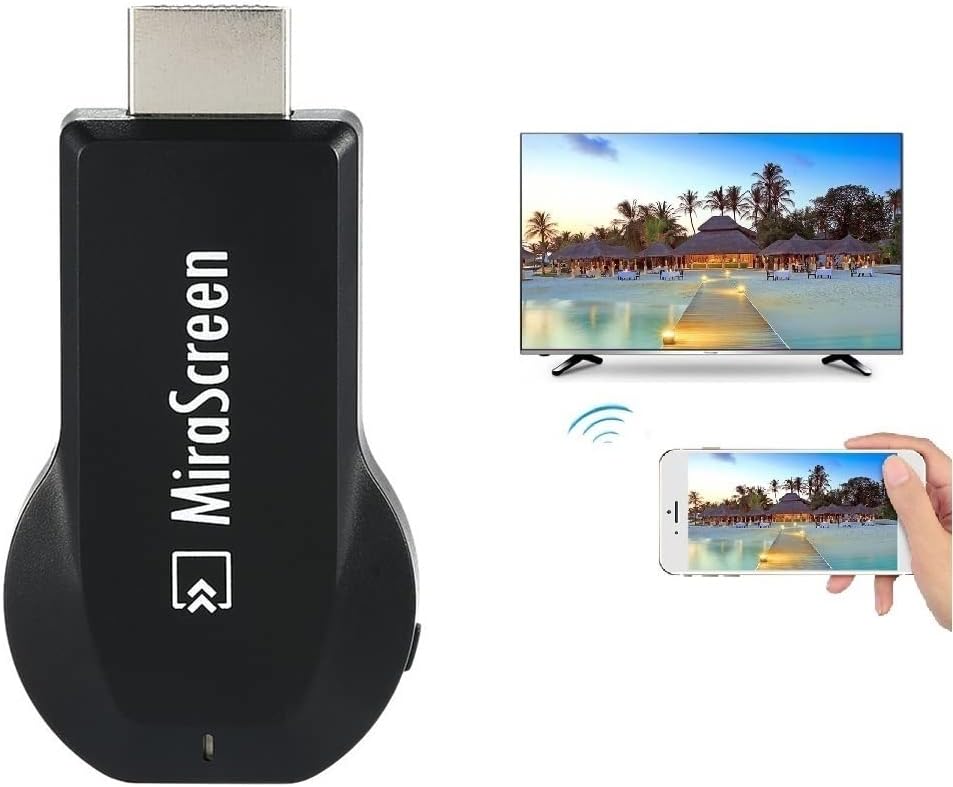
The SmartSee MiraScreen Wireless Display Adapter is a compact dongle that wirelessly mirrors your smartphone, tablet, or laptop screen to any HDTV or projector in stunning 1080P HD. Supporting Miracast, Airplay, and DLNA protocols, it offers broad compatibility across iOS, Android, and Windows devices. With easy plug-and-play setup, one-button mode switching, and automatic firmware updates, it’s designed for seamless presentations, entertainment, and on-the-go media sharing.


| ASIN | B073PCG77G |
| Best Sellers Rank | #50,357 in Electronics ( See Top 100 in Electronics ) #208 in Streaming Media Players |
| Brand | SmartSee |
| Color | Black |
| Compatible Devices | Television |
| Connectivity Technology | Wi-Fi |
| Connector Type | High Definition |
| Controller Type | Button Control |
| Customer Reviews | 3.4 out of 5 stars 1,353 Reviews |
| Form Factor | Wireless HD Display Adapter Dongle |
| Item Dimensions L x W x H | 2.56"L x 1.38"W x 0.59"H |
| Manufacturer | lijunkeji |
| Mfr Part Number | STCD0003 |
| Model Name | STCD0003 |
| Model Number | STCD0003 |
| Other Special Features of the Product | Compact,Wireless,Wireless Display |
| Resolution | 1080p |
| Special Feature | Compact,Wireless,Wireless Display |
| Supported Internet Services | Browser, Daily Motion, Free Sat/Free View, YouTube |
| UPC | 612068894455 |
| Video Codec | H.264, H.265/HEVC |
| Video Output Resolution | 1920x1080 pixels |
L**J
Quick and Easy
One of my smart TV's lacks the ability to let me stream my phone to it. I plugged this in and in about 5 minutes, I was streaming. The hookup is easy, but you do have to make sure that you have a USB plug for the power source nearby. The picture is good quality and the streaming is fast with a good wi-fi setup.
G**Y
Terrible product does not work
Junk. Not user friendly. I finally got it to cast using my wifi network. But that's not the reason I got it. An even then it drops connection and a noticeable lag. I wanted to connect at my parents house and they do not have internet. Says it needs no wifi. Well thats funny because that is the only way it would connect for me, and only then after spending signifigant time fiddling with it. I never could get my phone to see the device on a non wifi network. How in the world does anyone give this device more than 1 star is beyond me.
F**Z
It works
works great!
D**S
Used on 2 TVs with 2 computers & Phone, all hate mice.
I ordered this device wanting a nice easy way to transmit my videos from phone and pc to a larger TV for my students to review and watch. I am a IT Network Admin during the day, and avid computer gamer at night, so technology isn't a stranger. To start, it was a little confusing to figure out how to set it up at first, but was eventually figured out that I needed to download a program for my PCs to work with the device. It is in the little booklet they provide, but there are also some "graphical" on screen directions which made me not look to the book and stare at it... wondering what the strange hieroglyphics meant and which stargate it was going to open. Joking a side, initial setup is fairly easy. Plug into HDMI slot, power with a USB slot. Good to go. For my case, I used both a fast charging Cell phone brick, a 5A power puck, and the TV's own USB... all worked equally well. Download, install and run the EzMira software on your windows machine and ... nothing happens... OH THERE IT IS... yea it opens a small hidden icon on the Taskbar, next to your clock in the lower right hand corner... which if you use default settings, immediately hides in the little up arrow where no one looks. Click that Icon and then you are given the option to look for the device... but what setup are you on with the Device? Go back to the TV and determine which setting you have active... MiraCast or Network. There is a small button on the device that will switch modes to be used with Cell phones and streaming devices OR with PC and network devices. I was using the PC/Network method. Got that setup. Used my wireless to connect to the device directly, configured it to connect to my network wireless and confirmed changes, restarting the device. Reconnect computer to my network and then use the taskbar icon to search... THERE IT IS! OK, this is great... seems to work with no issues as an extend or mirrored desktop... just like a wireless monitor. This was working perfectly, for 15 minutes, then it just went back to setup screen. Searched for it again, had some issues... eventually got it working again, either by unplugging the device and plugging back in, or simple brute force (remember, multiple computers and multiple times...). After that, it seemed to work pretty dang good. The Biggest hang up... don't think you can use this as an "interactive movie" setup. I had a video testing, and it looked pretty good, right up until I moved the mouse and everything got real jerky, slowed to a crawl, and data video artifacts. Stop moving mouse, video gui interface disappears, GOOD to go again. Everytime I tried to move to a time index or pause the video and start it up again, or even just POINT with the mouse on the video... everything got slow and jerky. If you are trying to point with the mouse, you always over shoot and have to try 2-3 times. But once it is setup and ready, runs decent enough. Quality... That first run before the unknown shutdown... smooth... looks really good. After the device shuts down, and it does it every time... a little grainy, but still decent. I even ran it off of my Cellphone as a mobile hotspot for the computer and the TV and it did ok, but don't steam that way... never had enough data to even show an image. Was only successful using cell phone hotspot when I used it as an extension of the desktop. So if you need a cheap solution for a simple tv display option... yeah, this will work... but don't expect 40k, epic movie theater or game level graphics. You are going to take a hit on the display quality. but it will definitely work for presentations or power points or even just showing old family videos.
T**X
It works but....
Reading the reviews many said how easy setup was. I did not find it to be so easy but I got it to work. One annoying thing is that when it powers off (turn off the tv can do this) and when it comes back on and you want to use this device you will see it has switched to Iphone when powered back. You have to press a little tiny button on the device to put it into Android mode or it won't work with Android and I have Android phones. The TV powers the device so any time I want to use this I must go to the tv and press that little button. The hardest part of m my setup was not seeing the device showing up to be able to select it for use. I watched several videos and no one mentioned this. In the screen that is supposed to show you the device that is wirelessly available but the device was not there to pick until I found a button to press on the screen that said Show Non Visible devices and when I clicked it this device showed up. BUT you have to do that each and every time I use this thing. I hope I can remember how when I need it next time since I don't use it daily. It does work but it should be easier to setup and you should not have to set it up each time you use it.
Y**A
100% recomendado
Esto es una Marbilla sobre todo para sus familia en Cuba yo lo mande y están encantados
T**.
Does not work with Windows 10 Laptop.
No matter what I do I cannot get my Windows 10 Laptop to connect to the Dongle. The included instructions are not very helpful. It also uses unfamiliar terms like "Operations Center." I even downloaded and installed the recommended EZMira software but that did not work either. That would not run after install. I only got as far as what is shown in the picture. It ought to be easy and not require a college degree.
K**U
Not easy to use, doesn't always connect
I bought this to cast my Peloton to an older Samsung TV. The setup, while seemingly being just a few steps, is not well explained. I have been able to sometimes cast to the TV but not consistently - not sure if its the setup or just the device (seems like the device because I have connected after trying multiple times). I should have spent the extra $20 to buy a Roku or Chromestick.
A**S
Bought for use with Wireless Dex on Android TV. Doesnt work.
I bought this for use with Wireless Dex on Android TV. it doesn't work. Waste of money.
M**A
Get a better one instead
It has a delay, and considering the price, it's not worth buying.
S**S
Limite et inégal
Moyen
J**.
disappointed
only works to look at iPhoto pictures and videos - will not cast from phone the way android can chrome cast
Y**A
Subscription Required
DO NOT BUY!!! Total rip-off. Product required $40/month subscription for it to functions.
Trustpilot
2 weeks ago
3 weeks ago