🎶 Command your beats, anywhere, anytime — the pro’s pocket powerhouse!
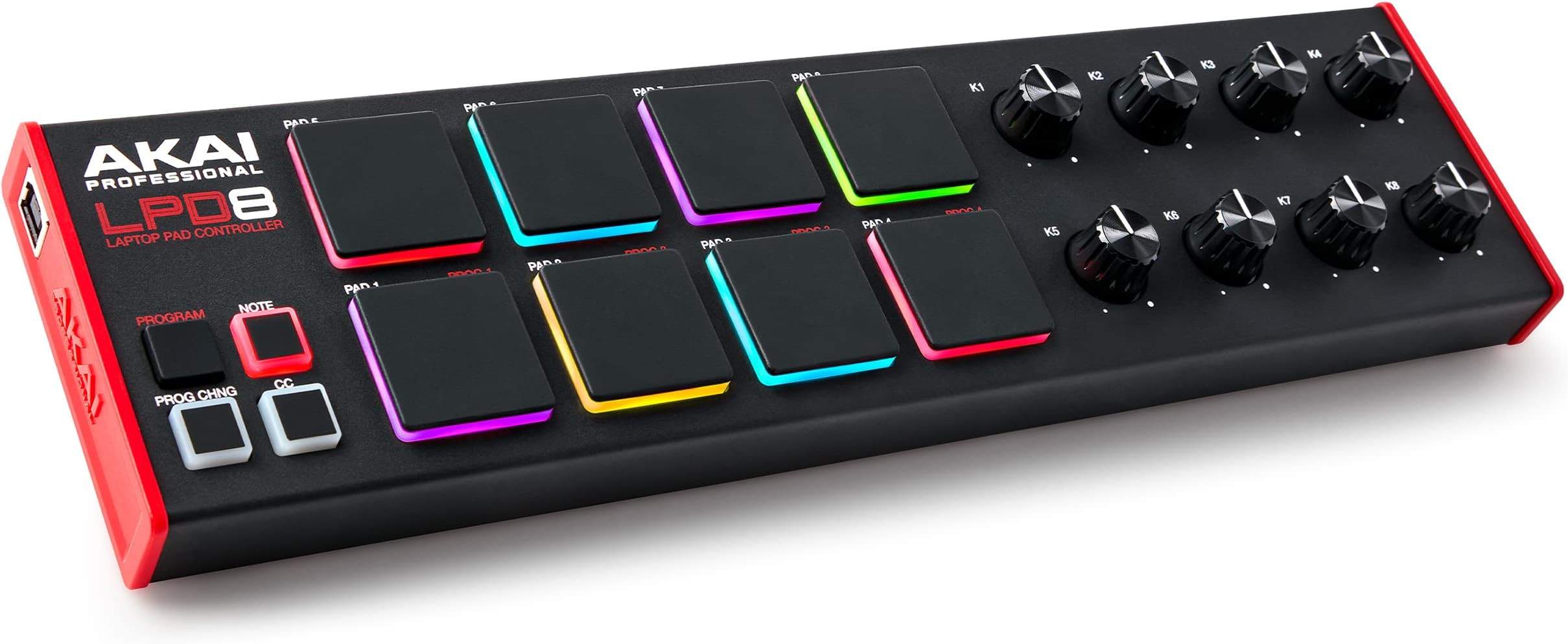
The Akai Professional LPD8 MK2 is a compact USB MIDI controller featuring 8 velocity-sensitive RGB MPC drum pads and 8 assignable Q-Link knobs, designed for seamless integration with all major DAWs on Mac and PC. Built with a robust, portable design inspired by standalone MPCs, it offers 4 programmable preset slots for instant recall of custom mappings. Perfect for producers, DJs, and musicians seeking tactile control and versatile beat-making on the go.


| ASIN | B0BF9MN8R2 |
| Additional Features | Backlit Drum Pad, Compact, Portable, Programmable, Touch Sensitive Pad |
| Best Sellers Rank | #1,424 in Musical Instruments ( See Top 100 in Musical Instruments ) #8 in Computer Recording MIDI Controllers |
| Brand | Akai Professional |
| Brand Name | Akai Professional |
| Color | Black |
| Compatible Devices | Laptop |
| Connectivity Technology | USB |
| Connector Type | USB |
| Control Method | Touch |
| Control Type | Drum Pad Controller |
| Customer Reviews | 4.4 out of 5 stars 7,028 Reviews |
| Global Trade Identification Number | 00694318025567 |
| Hardware Interface | USB |
| Hardware Platform | PC/Mac |
| Human Interface Input | Buttons, Dial |
| Included Components | LPD8 MK2, Quickstart Guide, USB Cable, Safety and Warranty Manual, Software download card |
| Instrument | Drum |
| Instrument Key | Any |
| Item Dimensions D x W x H | 3.24"D x 12.12"W x 1.32"H |
| Item Type Name | USB MIDI Controller with 8 Responsive MPC Drum Pads for Mac and PC, 8 Assignable Knobs and Music Production Software |
| Item Weight | 0.4 Kilograms |
| Manufacturer | inMusic Brands Inc. |
| Material Type | Metal, Plastic |
| Model Name | LPD8MK2 |
| Model Number | LPD8 MK2 |
| Model Year | 2022 |
| Number of Keys | 8 |
| Platform | Mac, Windows |
| Product Dimensions | 3.24"D x 12.12"W x 1.32"H |
| Product Style | Pad Controller Only |
| Size | Compact |
| Special Feature | Backlit Drum Pad, Compact, Portable, Programmable, Touch Sensitive Pad |
| Supported Software | Ableton Live |
| UPC | 694318025567 |
| Unit Count | 1.0 Count |
| Warranty Description | 1 year manufacturer. |
D**Y
In the right hands, this is a great MIDI controler!
I'll start off by saying that I'm a performing musician (woodwind and brass instruments) as well as a composer and arranger who works with music notation software. I bought this hoping it would help me in writing percussion parts. I have returned it. Having said that, however, I am very impressed with what it can do and recommend it for people who work mainly with Digital Audio Workstation (DAW) software. As a MIDI controller it has amazing capabilities and can work to control other MIDI devices such as synthesizers, modules, lighting and much much more. All of which make it a great tool for performers who work mainly in the rock/pop/rap/hip-hop/ska fields. It's compact, it responds nicely. The sensitivity of the pads can be adjusted only on a global scale, so either all the pads are very sensitive or not very sensitive according to how it's adjusted. I didn't use it enough to see how accurate the reviews which mention accidental double-strikes or accidentally triggering pads which aren't the ones being struck are, but I can imagine that if the sensitivity is set so that very little pressure is needed it would be possible to get responses from pads which aren't the ones being struck. The user should (as with all musical gear) spend a lot of time practicing with this device before trying to perform live with it. The price is a lot lower than many other drum pads so this is ideal for people just beginning to investigate the use of this sort of device. The sounds which come with it and the software that can be installed with it will be great for some but they left me less than impressed. But that didn't bother me and shouldn't bother anybody else because most people who will be using this will have their own preferred sound libraries to be working with. What this is NOT -- this is NOT a replacement for an electronic drum set. This is NOT an inexpensive device for learning to play the drums. What this IS -- it is a MIDI controller with which a person can create beats, with which a person can control other devices.
L**S
Great equipment but confusing to use
God this thing is so confusing and the program that it comes with isn't any easier. It ain't beginner friendly unless you got alot of time on your hands not suitable for fast sample style beats. Great machine non the less for the experience professional.
T**P
Great device
I have upgraded from the MPK Mini mk3. Wow... what an evolution. I'm using them in conjunction now
M**.
Nearly Perfect
This is a solid and useful piece of gear. Feet have a nice grip. Knobs and pads feel good. Size is perfect. My only real complaint is with the programability. The program editor and innate design holds back a lot of customization. I was using a NI Maschine and that could be setup to do just about anything, regardless if the controls are for buttons, pads, or knobs. AKAI's customization is very limited in its scope. For example, I would love to be able to have half the pads trigger keys and others control MIDI CC, but you can only choose one or the other. The worst, thing, I think, is the fact that the LPD8 can only store 4 presets. Really? I also have the AKAI MPK Mini Play Mk3 (which I love to death) and that can store 8 presets, one for each pad! Come on...the LPD8 has the same number of pads and so it COULD trigger 8 unique presets like the MPK Mini Play, if the software allowed it. Speaking of software, contrary to other reviews, I have had no issues using the LPD8 or the Program Editor app with my Mac mini, running Sonoma 14.2. Just make sure you're using the Program Editor for the mk2 version of the controller, if you bought the new model. On a side note, I bought my LPD8 from Amazon Warehouse. No obvious signs of previous use, so it was essentially brand new. However, it didn't come with the original box, or any box, if I remember correctly. Just the tray that the LPD8 sits in, along with the USB cable and paper literature. All this wrapped in plastic. No issues, though, since this was part of a larger box with other items. Overall, I am happy. I can work around my gripes. The ability to assign custom colors to the pads is pretty nice.
M**T
Electrical Tape is Your Friend
EDIT 7/14/2019: *There is 3/8" black cloth "pickup coil tape" on Stewmac.com. I use this for guitar work, so I had some on hand, but it just so happens it's the perfect width for this job. I also recommend the Double Stick tape, also available on Stewmac, and using this on the bottom of the black cloth tape. This ensures good adhesion to your rubber MPC pads. The black cloth tape seems to be more consistent than traditional electrical tape, and is easier to work with. Simply cut it into one inch strips and layer them together as needed, with double stick tape on the bottom. *I'm using 2 strips for most pads. Add more and see if you like the feel or not. Adjust accordingly. *I've found that setting these up is a balancing act. Every single screw makes a difference: installed/not installed, and how tightly installed, both on the circuit board itself and the red shell/cover that fits over the device. As for the tape: more tape can actually reduce the velocity range/sensitivity, which can be a good thing. Hyper-active pads that are triggering with too much velocity compared to the others may benefit from extra tape, not less. Balancing act. *Currently I'm using no screws on the circuit board at all. On the hard red plastic cover, I'm using only the 4 outside screws, and have them slightly backed off, about 1/4 turn. This seems to be enough to hold everything in place, and gives great sensitivity response with the least amount of accidental triggering. *I still get double triggering if I use the "Full Level" button, and I still get some accidental triggering of other pads, though they're usually at such a low velocity you can't hear it. My main problem was the Snare triggering the Closed Hi Hat pad(s), so when I'd do Snare and Open Hi Hat together, often the Open Hi Hat would be completely cancelled out by the Closed Hi Hat pad triggering. Setting up the pad as I've explained here fixed that. It may be that a lot of these pads are defective. But defective doesn't mean "not salvageable." It's a ton of work, and a major pain, yes -- but salvageable, and beyond that, transformable into a great pad controller. Now, back to my original review: I carefully disassembled the MPD218 and cut electrical tape to fit over the pads. This is a well-known trick online, and the simple idea is this: it reduces the force you need to strike the pads with in order to trigger them, and especially to trigger them fully. As others have mentioned, the other setup option is to very slightly back off on the screws that hold the circuit board down. You can even leave only the 4 outer screws attached and remove the 4 inner screws. Or remove all the screws on the circuit board completely. I've had the best luck so far by removing all of them completely, and only using the 4 outer screws on the hard red plastic back cover. Tape method: Step 1: Remove the screws holding the cover on. You're gonna want a magnetic holder or well-sealed plastic bag to keep the screws in as you remove them...trust me. Now take the cover off. Step 2: Now remove the smaller screws that are holding the circuit board in place. Then carefully lift the circuit board and place it out of harm's way. You'll see a thin plastic sheet underneath with squares on it. Remove the conductive plastic sheet once you get to it. Remember: it needs to go back on the right way, i.e. the conductive side facing the circuit board, or else it won't work when you plug it back in. Shiny side = insulated side. That goes down on top of the rubber pad. Make sure the conductive Matte finish side is facing up when you're all done. Step 3: Now you can easily remove the pads. It's literally just a floppy mass of rubber, all one piece, that you can just lift out. Take it out, and get some electrical tape and some scissors or an Xacto knife ready. Step 4: Cut the tape, similar to how I did it in the picture. On the MPD218, the LEDs are dead center. So if you cover them with tape, the LEDs will be obscured and your pads won't light up. You can customize it however you want. I'm using two layers of tape. You may like more. You may like less. Step 5: Reassemble. And you're done! Good job. Now test your MPD218 for responsiveness. Now I'm enjoying my newly set up MPD218 much more than before. Very, very light touches also seemed to trigger nothing before, whereas now they trigger exactly what I want: very light, soft sounds. Just be careful with the screws and the circuit board when dismantling and reassembling this thing, and you'll be fine. It's a very easy fix. Just a bit time consuming when it comes to dialing it in perfectly. Overall I'm very happy with this unit. It looks good, was very easy to work on, and with a couple tweaks, it's performing extremely well. It needs to be set up properly just like any other instrument. Which is always a pain. But it's to be expected. The only major issue is the "Full Level" button, which I simply don't use. Akai really needs to address whatever is going on with that.
M**S
Works great! But an important note if you have issues....
I use it to trigger MIDI drums but also as a keyboard. The layout inspires me to find patterns of notes that would not come naturally on a MIDI keyboard. I use it for synths, samplers, even microtonal stuff, using Microtone 5000 and Simple Microtoanal Sampler. With samples I don't use 4, 8, or 16 beat breaks, I sample individual hits (like of kitchen things) and make my own loops in an audio editing program (I use SoundForge but can be done in most DAWs) Though this AKAI works well with the included 16 samples in the (non-microtonal) "Pretty Good Sampler" (all of these are free) ONE IMPORTANT NOTE: if you're only using it for MIDI imputs, not to control your DAW's transport (start/stop/record/next track, etc), do NOT turn on Mackie Control in your DAW. You'll end up with this doing all sorts of things you want....opening files when you hit a note, and especially maddening, turning on automation, recording everything you do, then forcing your choices when you play back. I did not have to map this at all to use with common drum VSTs. Love it.
C**Y
Great Hardware with terrible software
The MPC studio is well built, looks great, and has good capabilities. The issue arises when you get to the software side. The MPC 2 software works for beat making and all that fine, but it lacks basic options that are on 99.9% of all PC programs including not being able to choose or change install locations and the location it puts samples( it doesn't even tell you where you need to find them). This wont be a problem for everyone but I have all of my music production stuff on a separate drive as my C drive's space is at a premium so when I want to install MPC 2 on my F drive only to learn that my only option is C drive to the point that if I try to use symbolic links to make the program think its on my C drive it just crashes hard. If you have a very big C drive and dont mind where the MPC 2 or its sound files go then the MPC studio is prob fine and id even recommend it.
B**E
Music equipment
Got this for a gift they absolutely love it. Great price easy to use.
Trustpilot
2 months ago
2 weeks ago