Buy anything from 5,000+ international stores. One checkout price. No surprise fees. Join 2M+ shoppers on Desertcart.
Desertcart purchases this item on your behalf and handles shipping, customs, and support to Greece.
🚀 Unlock your inner innovator with the ultimate Raspberry Pi starter kit!
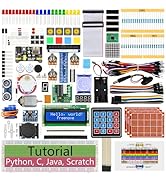
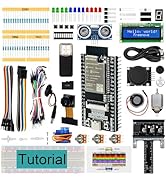
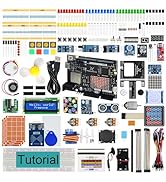
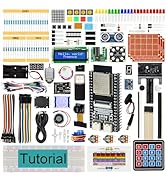
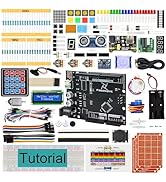
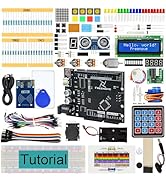
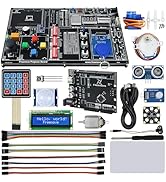
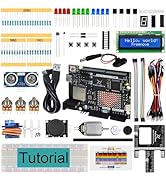
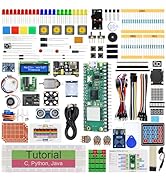
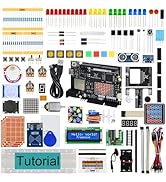
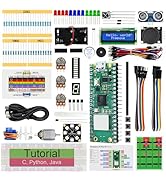
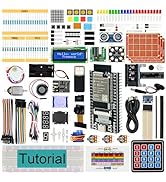
The Freenove Ultimate Starter Kit is a powerhouse learning bundle designed for Raspberry Pi enthusiasts. Featuring 223 electronic components, 128 projects, and a massive 962-page tutorial, it supports five programming languages and all major Raspberry Pi models. Perfect for professionals and hobbyists alike, it offers hands-on experience with comprehensive guidance and dedicated customer support.


| ASIN | B06W54L7B5 |
| Best Sellers Rank | #130 in Single Board Computers (Computers & Accessories) |
| Brand | FREENOVE |
| CPU Model | None |
| Compatible Devices | Raspberry Pi 5, 400, 4B, 3B+, 3B, 3A+, 2B, 1B+, 1A+, Zero W, |
| Connectivity Technology | Bluetooth, Ethernet, HDMI, USB, Wi-Fi |
| Customer Reviews | 4.6 out of 5 stars 4,299 Reviews |
| External Testing Certification | Não aplicável |
| Item Weight | 1.2 Pounds |
| Manufacturer | Freenove |
| Memory Storage Capacity | 4 GB |
| Mfr Part Number | FNK0020 |
| Model Name | Freenove FNK0020 |
| Model Number | FNK0020 |
| Operating System | Linux |
| Processor Brand | Freenove |
| Processor Count | 2 |
| RAM Memory Installed | 4 GB |
| RAM Memory Technology | LPDDR4 |
| Ram Memory Installed Size | 4 GB |
| Total Usb Ports | 4 |
| Unit Count | 1 Count |
| Warranty Description | 1 |
| Wireless Compability | 2.4 GHz Radio Frequency |
J**R
Very impressive Raspberry Pi learning kit
I don't normally write reviews however I wanted to let everyone know about the experience I've had with this Ultimate Starter Kit for learning about how to do electrical engineering tasks with the Raspberry Pi. I'll break it down into several areas: Overall kit, Easy of Use, and Support Experience. The overall kit is a treasure trove of jumpers, motors, resistors, infrared sensor, digital display and a lot more. I've never seen so many items packed into a single kit and at such a great price point. If you want to see what you can do with the kit I highly suggest going to Freenove's website and see about downloading the PDF of the tutorial. Really see what you can do with this kit. Everything seen in the kit fits nicely in the supplied container. The container itself is multi-functional. It can be subdivided into 6 compartments with the supplied plastic dividers in case you want to separate your resistors from your capacitors. So even if you graduate to a larger container you can still use this one for other supplies. This is the only time I've actually been able to put everything back in a container after unpacking. The easy of use of the Ultimate Starter Kit cannot be overstated. The 400+ page tutorial manual is great. It steps you through how to build circuits from simple LED lighting to more complex items. The English in some areas is a little hard to understand but they are able to get their point across. All the technical information is spot on. I've gone from having no understanding of resistors and reading circuit diagrams to being able to put together a circuit by its diagram alone within the tutorials in less then a few days. Now we come to Freenove's customer support. You can really tell how a company cares about their product by the customer support experience. I am currently a manager of a support organization and know how support can make or break a customer's experience. I contacted Freenove's customer support when I couldn't get a tutorial circuit to work as expected, it was the Thermistor tutorial if you are interested. No matter what I did I just couldn't get it to function as designed. I took some pictures of the circuit on the breadboard and emailed them to support. I asked if they had any ideas that would tell me why it wasn't working. I wasn't expecting a response for a few days and would be surprised if they could actually figure out what I had done from the pictures. So you can imagine my shock when I checked my email the next day and I had a response. Based off my pictures they could tell I had used a capacitor instead of the thermistor. If you've never seen these components let me just say they are small, really small. The fact that they were able to see them at all really surprised me. So not only are they there if you have questions or issues with components, they are there to help you through the tutorials that they provide for the kit. Overall a really great experience with Freenove and I would certainly purchase again. I highly suggest picking up the kit if you are new to Raspberry PI and want to get into building circuits and learning what it can do. Excellent job all around.
K**T
Lots of projects and lots of components learning can be fun
I was reluctant to purchase the kit. I hadn't programmed anything since we go rid of our VCR, 20 years ago. I had a Raspberry Pi 3B and I decided that the price of the Freenove Ultimate Starter Kit for the Raspberry Pi was worth it. The kit REQUIRES Internet Access, as you will have to download the documentation (Directions; Drawings, Programs for the various projects written in: Python, "C" and Java; and device documentation.) The kit teaches you a little about electronic components (resistors, capacitors, diodes, motors, transistors, switches, and more. The novice will learn how to read schematics, all while learning math, and science. The programs are "Canned" but they can be modified and saved. After wiring each project and running the various associated programs, I was able to make small changes to each program to see if I fully understood the lesson. By the time I was done with Python, I repeated the lessons using "C" programming, again making small changes throughout the programs to make sure I understood the material. This material requires a lot of reading and the ability to follow detailed instructions. Will you become an expert programmer after using this kit??? Not likely!!! But you probably could get enough knowledge to write small programs (that aren't too complex) without a programming book. I enjoyed this kit so much, I asked for an ESP32 Freenove Kit for Christmas. The difference is that the Raspberry Pi 3B is a single board computer and the ESP32 is a just a micro controller. I enjoyed the ESP32 Kit as well. I highly recommend this for teenagers and adults that are interested in programming, interactive projects, electronics, and yes an occasional challenge. Oh, I had 2 questions about 2 different projects, [email protected] responded in a satisfactory amount of time (2 days). The people at Freenove were polite and helpful. They do sell many kits and if you need assistance, you will need to provide the Operating System of your Computer( Windows, Mac, Linux) , the Name of the Kit you have, and a couple other details, Project #, Page, and what kind of trouble you are having. But before you embarrass yourself, double check that orientation of the electronics components. ;-)
M**.
Great for the beginner
Not the best quality items in the world, but good enough and affordable enough that it’s a good way to get started and then improve items once you know what you actually will use out of this
A**R
lots of good parts and instructions, but not necessarily good for an absolute beginner
I'll start by saying I have a degree in computer systems engineering (basically a half-assed EE degree combined with a half-assed CS degree), so in theory I sort of know what I'm doing. I bought this kit as a refresher and to get a quick look at the recommended path to connect a Raspberry Pi to various components. Overall I liked this kit, but I'm not sure if I would have been able to get very far if I didn't have some experience working with computers and hardware. Perhaps a highly motivated beginner could get this on their own, and I certainly thing someone with a knowledgable guide would do just fine, but I wouldn't expect to just pick this up and figure things out. I don't think this would be a great gift for a 14-year old who is vaguely interested in computers and electronics unless they have a parent or friend who is going to work on it with them. You can download the project instructions for free. If you're considering buying this, I recommend you do that first. The link is in the product description. This should give you an idea of what you're in for. The code is written using some high-level C and Python libraries. This may or may not be what you're looking for. They're nice because they make it really easy to get things up and running. The downside is that they obscure what's actually going on. If you want to dive more deeply into how things work, there are tutorials online. At some point a lot of the code looks the same, because a lot of it is doing the same thing, over and over again: turning digital signals on and off. Not a big deal, just know there's some repetition. The supporting documentation is obviously written by a non-native english speaker, but it's fine and you should have no trouble following along (unless you're some jingoist who gets personally offended when non-native speakers use the wrong verb tense or leave out an article, in which case maybe go back to reading the electronics repair articles on NewsMax). The descriptions of the parts are basic, but they should give you enough information to get you started. The descriptions of the code are sometimes a little lacking, but in general you should be able to follow along if you already know how to program. The projects have both traditional electrical diagrams, as well as physical diagrams that show you the breadboard and exactly where to place wires and components. The latter are especially useful on more complicated circuits. My one complaint here is that some of the physical diagrams show wire colors that aren't included in the kit, so you end up using different colors, which can make it difficult to debug your circuit if something goes wrong. The parts included in the kit are good. Plenty of resistors, a few capacitors, lots of wires, and some fun stuff like motors and an LCD screen and a thermometer. You can see the full list of parts in the product description. It doesn't come with a chip extractor, so you might want to pick one of those up to make sure you don't bend the leads when removing chips from the breadboard. The kit arrives with components on the breadboard, so one of the first things you do is take them off. Overall this is a good kit for folks who are motivated and/or kind of know what they're doing. It's easier that ordering a bunch of stuff individually and then hoping you can find a library that supports it. Once you're done working through the projects you should know enough to move on to bigger things.
H**S
This product is a very good value for the price. It is backed up by an excellent support group.
There are lots of things to do with this kit, and you'll be busy for some time after your purchase. Having all of the bits and pieces needed for a variety of projects is very convenient for a novice like myself. Its interesting and I found myself going back to it to tinker away at odd hours. For me, that was great. When I hit a snag, I emailed their support group - on a weekend - and I received a quick response. I emailed pics of circuits and descriptions in several email exchanges and each one was answered quickly and the questions posed by the very courteous support guy pointed me in the right direction to fix the problem - that I caused, no less. The kit provides a good guided tour into the wiringpi world, but you might want to supplement the manual with additional perspectives available online and in books. There is an awful lot of stuff going on and while you can just follow directions and set up the lessons, background reading helps. What you get out of it depends on your goals and priorities. Programming? Circuits? Both? And just how does the pi fit in? The kit gives you a chance to dip your toes into each of these topics at a speed you can handle. For instance, some of these circuits might be set up with a battery as a power source, independent of the pi. That type of circuit would be analyzable by a novice. With the pi as a power source, a lot more can be done, but the details of how the pi handles the circuitry are murky. At some point, a working knowledge of wiringpi, the software controlling the pi for these cool circuits in the kit and others out there, will become a necessity if you want to really get what's happening. The nice thing about the kit is that you can do this at your speed. The manual provides enough information to do what is required, but the English is sometimes confusing. I found myself needing more background, which is readily available online and in Simon Monk's most excellent Raspberry Pi Cookbook. You have to go the extra step for in-depth understanding. The strength of the kit is the breadth of the problem set, the fact that all the bits and pieces have been provided, and the excellent product support, all of which remove much of the learning angst.
P**K
Great value, nice documentation
This is a great value for the money, and I'm enjoying going through the labs. Hardware highlights are a header-to-breadboard interface, an assembled board to allow you to plug in an external 5V power supply, some ADC/DAC chips, a 16x2 character display, 3 pots, a joystick, a sonar range finder, 2 motors, and lots of LEDs and buttons. You get a 4-character LED display, an LED matrix, and LED bar graph. There's enough hardware here to build a little MIDI instrument, which is what I'm planning to do with it, as a way to learn Raspberry Pi. The tutorial document is almost 300 pages long, and takes you through the "greatest hits" of microcontroller circuit building, and the all pieces are right there in the kit for you to use. Even the resistors are 1% tolerance instead of the usual 5%. I'm not sure how this kit would look to a beginner. While I haven't touched C for a while, I've written a lot of C code in my day -- my first full-time coding job used C. And I've been using the Linux/UNIX command line for decades. I also have some previous microcontroller experience, having played around with Arduinos and Beaglebone. But, there's (barely) enough information in the tutorial where, if you follow the instructions, you can get the labs working. There's not a lot of theory or explanation, but there are places elsewhere on the internet for that. All in all, definitely worth the money!
M**T
Excellent Value teaching robotics
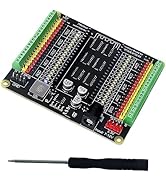
I ordered a number of these for my classroom to teach robotics and programming. The variety and quality of components is excellent. This include sensors, DC motor, stepper motor, and servo with arm hardware, large LCD, buttons, switches, and LEDs. There is fair number of resistors, capacitors, transistors, and wires. Customer support is excellent. The only problem that I have with this product is the tutorial. Tutorial provides a good description what you can do with this product, but has one big problem – it is inconsistent. On projects that require external power supply, GPIO extension board is on the right side of bread board, where it should be. On projects that do not require external power supply, GPIO extension board is on the left side of bread board, where power supply should be. Changing location of GPIO extension board for each project is not a good solution. End result – I am not using breadboard view from tutorial. This creates another problem – product is shipped with the GPIO extension board on the left side and power supply on the right. User need immediately switch them.
H**H
Great Addition to RaspberryPi
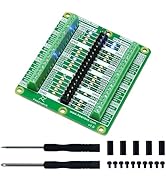
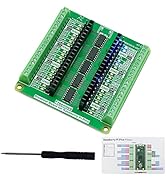
At first I thought I made a mistake ordering this since the tutorial kept referencing Arduino Uno. However, after looking through all the components, I realized the RaspberryPi GPIO extension allows running the each part of the tutorial while connected to the Pi. All it took was some tweaking of the example Arduino code into Python and I was off and running. Very cool setup and component kit. I do have two complaints though: 1.) The tutorial document has a lot of spelling and grammar errors. 2.) I wish the GPIO extender actually ported out the RaspberryPi GPIO pins one for one. The pins of the RaspberryPi GPIO are rearranged on the extender, and while it is labeled clearly, having an exact replica from one device to the next would be beneficial, especially to beginners who may end up following the RaspberryPi GPIO pin out versus this kits GPIO pin out. I have the Cana Kit Raspberry PI and that Cana enclosure allows the GPIO cable to be connected while the Pi is encased. So that is a huge benefit for cooling purposes. The only thing I would caution against is this is not necessarily a kit for beginners. There is at least a need for a basic understanding of electronics, and Python. That aside, I do recommend this kit.
Trustpilot
3 weeks ago
1 month ago