Desertcart purchases this item on your behalf and handles shipping, customs, and support to Greece.
🚪📲 Unlock the future of garage control—smart, secure, and always connected!
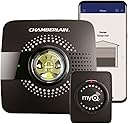
The Chamberlain MyQ Smart Garage Hub (Model MYQ-G0301) transforms your existing garage door opener into a Wi-Fi enabled smart device, allowing remote control and real-time notifications via smartphone. Compatible with most major brands post-1993, it supports secure guest access and integrates with Google Assistant and IFTTT. Easy wireless installation and 2.4 GHz Wi-Fi connectivity make it a seamless upgrade for modern smart homes.


| ASIN | B075H7Z5L8 |
| Best Sellers Rank | #392 in Bullet Surveillance Cameras |
| Brand | CHAMBERLAIN |
| Brand Name | CHAMBERLAIN |
| Customer Reviews | 4.3 out of 5 stars 41,124 Reviews |
| Global Trade Identification Number | 00012381184064 |
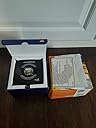
| Included Components | Door Sensor, Mounting Hardware, Power Adapter, Wi-Fi Hub |
| Item Dimensions | 4.5 x 1.5 x 4.5 inches |
| Item Type Name | Chamberlain Discontinued Item |
| Item Weight | 8 ounces |
| Item dimensions L x W x H | 4.5 x 1.5 x 4.5 inches |
| Manufacturer | Chamberlain |
| Material | Metal, Plastic |
| Material Type | Metal, Plastic |
| Measuring Range | Universal |
| Model | MYQ-G0301 |
| Mounting Type | Surface Mount |
| Number of Items | 1 |
| Output Type | Digital |
| Part Number | MYQ-G0301 |
| Sensing Distance | 30 meters |
| Style | Smart Garage Control (old) |
| Style Name | Smart Garage Control (old) |
| UPC | 012381184026 012381184064 |
| Unit Count | 1 Count |
| Warranty Description | One Year |
F**1
its great but every time open the app you have login which for security
MyQ Smart Garage Door Opener Chamberlain MYQ-G0301 work for me everything is great. Make sure its 2.4ghz wifi you don't need 5.4ghz to tell it open and close didn't try but I don't think it will work. straight to the point of my review is the main reason I got this is notification my garage door is open. Our garage door remote doesn't have a cover for the open and close button so it can accidentally press open by dropping it. Anything like stuff in the bag could press it if bag was move around. That what happen luckily our neighbor was outside notice Garage door was open and our dogs ran out around the into the street. Garage door was open for few minute people could have taken our garage stuff my tools our random garage stuff some valuable stuff. My face id Iphone sometime doesn't like me that would help you login quicker. You can set up when you get closer to the garage door when your driving your car. I personal have not try that yet I can see some situation problems with that me walking around the house doing gardening. Everything working for me Have try other features so that the my short review. This last part I don't think this apply to most haha I think my Garage Door Opener has dead light bulb need to be switch out. I think most garage door have a light buib. At night it can get pretty dark and I can not see a thing. I sometime I come home pretty late moving grocery from the outside and my light switch near the inside house door. I have walk in the dark garage that sometime can get messy from doing work. Just to get to my light switch which is not safe. Yes I know I have my phone flash light so I wish there was some way I can connect MyQ Smart Garage Door Opener Chamberlain MYQ-G0301 to my garage light. I think there is a way i look it up latter. I know I can open it up do modification my garage door opener with smart switch or get separate smart switch for my light making it into one operation. I do have a bit dent on garage door this happen before we got the house. The garage seem like drunk person tap their car on garage door so now it sometime doesn't close properly. playing with setting help fix it. Sometime it would reopen. I have to press it twice without changing a thing to close it. Maybe getting setting just right would fix it but I know for my family we shouldn't wireless open garage door without someone being home and have to watch the garage door close before leaving. it might hit ground and reopen. But that just be my damage garage door and not MyQ Garage devices. it would show you an error on MyQ Smart Garage Door Opener and you can't do anything to tell it try close again. I even try login again hoping give me another chance to close garage door nope same message. well sometime think it did. maybe there was an update not sure. The error it tell to use physical button that it was install with garage door. If I wasn't home there no way for me to do that if I did wireless open it for Delivery which I don't just an example to explain the problem. I will update if I discover anything new. Overall good working product.
A**Y
Very easy to install - some minor flaws
The installation of the myQ is extremely simple - you connect it to your Wifi network, pair the myQ to the door sensor attach the sensor to the garage door (with double-sided tape), pair the myQ with your garage door opener, and voila! I have seen other systems that require the sensor to be positioned in a specific place -- not the case here. There are step-by-step instructions in the App, as well as videos, making the installation process a breeze. In term of usage, the App is ok - you can open/close your garage door, as well as set schedules (open door from x to y) and notifications (when door is still open after e.g., 10pm). Other reviewers said that integration with IFTTT is not free but it was free for me, so Chamberlain might have changed their policy recently (which would make sense). There is no integration with Alexa but through IFTTT you can ask myQ to perform operations. The way I did it was to create an IFTTT command that closes the garage door based on an Alexa command (IF Alexa_command THEN close_the_door). By default, you need to insert the word "Trigger" in your Alexa command - for example "Alexa, Trigger Close the Garage Door", but you can create a routine in Alexa to send that command when you simply say "Alexa, Close the Garage Door". Please note that myQ allows commands to close the garage door but not to open it (for security reasons). With the IFTTT integration, you can also close the garage door based on your location. I also used IFTTT to switch on some lights when the garage door is opened. I rated it 5 stars but there are 2 improvement areas: 1) The sensor sometimes loses connectivity and the only option in that case is to use another mechanism to open/close the door (e.g. a remote). This happens occasionally but not frequently 2) When closing the door, the myQ beeps loudly before closing the door and after the door is closed (something like 30 seconds in total). This seems useless to me as garage doors are equipped with other protection mechanisms and the system only beeps when you close the garage door via myQ I have 2 garage doors. Theoretically you need 1 myQ and it can operate both doors with just 1 extra sensor (1 sensor per door) but the price of the sensor was higher than the price of the whole system when I purchased it, so I bought 2 full units). Overall I am very happy and would recommend this system. I hope I do not have to start paying for IFTTT integration as this would lower the value of this product.
P**L
good, but not perfect
Bought this because I wanted to be able to open my garage door if someone came by and I was away. I didn't care about the Amazon Key, but since the price was right, I got the garage door bundled with the camera. I read many reviews on different products and because of the price went with this model, knowing there were some limitations to use 3rd party apps, at least without a charge. (I do think this is a shame, but good marketing I suppose) To use with Apple HomeKit, you have to buy an additional expensive Home Bridge, which costs more than the door opener! I had read about installation issues, and I am glad I did. The instructions are not very intuitive to follow. I would have expected them written in the paper manual, but only basic setup is listed. The rest is done online. Read everything twice because it is easy to get ahead of yourself. I ended up mounting it sooner than I should have so had to keep going up on the ladder to press buttons. Also, I mounted the door sensor as the written instructions told me, without specifying where. In the app it tells you later on to mount it and where the best location is... too late! The syncing process was frustrating for me. I kept getting a server error throughout the process. Not 100% sure if this was Chamberlain or my ISP. It could have been either. Also, my Craftsman door has an orange color button. In the app, I chose orange. I stood there waiting and waiting until I got an error. After many tries and a lot of frustration, I remembered reading another review where someone called support and they told them to pick the purple button. So I went down the color list in the app and viola, it worked. I think the color selection in the app was green, even though my door button is orange. This was the most frustrating part for me, and I was close to returning it and say forget it. After all was installed and the door went up and down, the app told me the door was currently open, even though it was closed. I hit the sync button on the door sensor again and it changed to closed. This part spooked me a bit because if I program a schedule to close at night and the sensor thinks it is closed, will my door open? I decided to leave off the schedule function out of concern, which disappointed me a bit. Maybe in the future I will try and use this feature. All in all, it has been reliable and alerts me when the door is open for a period of time and I have not had any issues since installation day. My recommendation is do not install this on a 100 degree day when your patience is already short. 5 stars for the product working as advertised. Instructions, set up, and lack of free integration with other platforms earn a 1.
F**S
Update 2 - get the new version, not this one.
Another Update: I purchased and installed the new version, the white myQ, and it works perfectly. I highly recommend it. But don't buy the black myQ, even though it is less expensive; the white version is well worth the extra money. First update: Changing my review. Original review below update. I purchased this because I wanted to be notified if/when the garage door is left open. Sometimes it notifies me. Sometimes it doesn't. Sometimes it waits an hour to tell me that the garage door was left open (I have it set for 5 minute warning). And, sometimes it tells me the door is open when it's not open. So - kind of worthless. I can open and close the garage remotely, but even then one time out of 20 it won't open with the app. I'm impressed enough to spend ANOTHER $40 on the new version hoping that will fix all issues. -------Original Review: Two or three time a year I drive away from my house forgetting to close my garage door. Never again! This device will send a notice to my phone if the garage door is left open for more than (I picked 5) minutes. Then I can close the garage door from anywhere using my phone. That's all I wanted it to do, but having the ability to open the garage door remotely will come in handy. Taking a walk or run - don't need my keys. We can let a friend or family member into the house remotely. I can give houseguests their own garage door opener by sending them an invite from the app, then removing that access once they've left. Even if the batteries die on my existing remote, I've got a backup on my phone. Setup was very simple. Good idea to have your door opener instructions handy - the app told me to press the program button quickly, like you would a doorbell. Tried four times - five minutes per attempt - before digging up the instructions which told me I had to press and hold the program button for 3-5 seconds. Once I did that, it was paired within 20 seconds.
A**R
Works great - install app first and follow directions closely
Overall very happy with this device. I was able to get it installed and working within 15 minutes. In use, the system does exactly what I wanted it to do - I can check my phone to see if the door is open/closed, and can hit a button to close the door. I was able to easily setup a push alert so that if the door is left open for more than 10 minutes after a certain time at night, I will get alerted. No more getting up in the morning to find the door was left open all night! My one gripe is the annoying beeping when the app closes the door. This is included as a safety feature, but goes WAAAAAYYY overboard - the beeping goes on for 15 - 20 seconds AFTER the door has finished closing. I read a number of comments where people just yanked the speaker off the board, but I didn't want to alter the device in case it fails withing the return/warranty period. I did find a very helpful comment about using a very small screw/bolt to silence the speaker without damaging the unit. Find a screw that is just a tad bigger than the hole in the black plastic speaker housing, and screw it in just far enough to put pressure on the little disc inside. This will prevent it from making noise, and you can still take the screw out should you ever need to return the device. A tiny, fine threaded machine screw, with a flat tip would be best to avoid damaging anything. Installation notes: First off, don't do ANYTHING until you download the app onto your phone. The app does a fantastic job of detailing every step needed, and you can tell they have updated the app with common user problems. I read a lot of reviews on this product before purchase, and here is what I suspect people have had trouble with: 1- you have to have a fairly decent WiFi signal in your garage. If the signal is weak, add a repeater/extender before you bother trying to get this working. 2- follow the instructions in the app EXACTLY - don't try to put the hub on the wall by the door to your basement, or in a canoe in your back yard... put it on the ceiling, right by the garage door motor. 3- the instructions in the app tell you NOT to mount the hub to the ceiling at first. This was important in my installation. At first, I had the unit directly behind the garage door motor. The pairing process between the opener and the hub would time out and fail. After a few tries, I held the hub a little bit to the side of the opener, and it paired right away. It seems that the placement of the hub in relation to the opener, and also to the remote on the door, is very imporant - so don't screw the bracket into your ceiling until you have things working.
P**A
The next best thing to Alexa?
Let me say that I like and dislike this device for all of the same reasons. After watching a few Youtube videos, and reading the instructions, my first attempt at installation was successfully easy! I enjoy getting home to see potential snatch bandits could not get to my delivered goods because this device allows Amazon deliveries, to be placed inside my garage. However it is equally un-nerving to be home and see a strange truck pull into your drive way, and before you can investigate, the truck is pulling out and the driver just looks at you without speaking. Further investigation leads me to find a new package resting on the trunk lid of my car parked inside my garage. I never heard the garage door open, nor did the delivery person try ringing the bell first. So this device has its pluses and minuses. I can now allow friends or family access to the house or borrow things from me by placing them in the garage. I can operate the garage door remotely via the phone app, and the app tells me the current garage door status and approximately how long it has been since the last status change. Example: Door is Closed, for 11 hours. Now the minuses: The app doesn't tell me who, or how the door was opened or closed. Delivery persons now have access to place items into or take items out of my garage, car etc. The app doesn't say the door was opened at 10:20 am for 2 minutes then closed. With access to the garage, the door to the house from the garage is sometimes unlocked, but still protected by house alarm. Now I need to purchase and place camera's within the garage to monitor what gets placed into or removed from the garage. So although this device helps to solve some security concerns, it also introduces a few additional security concerns. I do not use Alexa so I don't honestly now how this device integrates with Alexa. Equally I am not sure if Alexa will alert me when the garage door is opened/closed or by whom. Now the App itself.. if you open the app to view the current status of your garage door. You may inadvertently open/close the garage door by just touching your phone screen, when you just wanted to check the status. There is no button within the app or clear-cut way to close the app without changing the door status. You have to either hit your back button twice, or tap your close all button to correctly close the app. However the phone App itself responds fast to open/close screen taps. Again, My likes of this device currently out weighs my dislikes of having the device. The device does what it was intended to do, it will beep and a light will blink to let people/pets near the garage door know that the door is about to close. A great product when used properly and as intended. The included instructions where well written and easy to follow.
P**A
utter garbage
TL;DR - Great concept, horrible execution, wait for a completely revised and updated version before taking the plunge. The Chamberlain MYQ-G0301 is a classic example of rushing a product to market without enough work and testing to make sure the product will meet the customer's end goals. The worse part is the Amazon drivers who think they've done something wrong and we need to intervene by manually closing or opening the garage for them, this crushing the workflow on their app and them being unable to recover from this without calling into Amazon for help. This happened 11/21/2020 most recently and another 6 or 7 times prior to that. Chamberlain support is actually very friendly and sympathetic when contacted, they even try to assist with instructions and step-by-step items for the owner to perform. The issue is that the product just isn't ready for prime time and their instructions either don't work or only allow it to work for a short period. Because of this, I have to rate the product a one-star, but I have faith Chamberlain will re-work the issues with this product and release something in the future to address its shortcomings. ***speculation zone**** I suspect the issue with the Chamberlain MYQ-G0301 is two-fold, first, it leverages BLE (Bluetooth low energy) to talk to the garage door sensor that detects the door state. This is fine as long as the device is within 50 ft under the best conditions. What seems to happen often is that the MYQ base either loses communication with the sensor or there is some sort of interference in and around our garage/house that is causing the receiver and sensor to disconnect from each other. When this happens, all hell breaks loose and human intervention is needed to restore order and get the MYQ back to a known state. Sometimes this is repeated resets and deleting the device from the app and walking through the whole setup from scratch. At this point, I have the process down to under 2mins from disconnect to reconnect. The second issue is that the base station has a very weak wifi antenna. It will lose connection with the home network constantly, this coupled with it not appreciating more advance networking equiopement such as WiFi 6, IPv6, Beamforming, WPA3, and DNS Caching. I also had to open up a specific UPnP to allow the device to properly get out to the internet and talk to that App. That was on the advice of Chamberlain support. I get it, this is a first-gen device and when I purchased it on sale for 35 USD I should have had low, very low, expectations. But, I'd gladly pay 60 for a device that works well out of the box and has world-class functionality. ***suggestions for Chamberlain*** In the next generation of this product, drop BLE in favor of WIFI 6 for the sensor, make the sensor and antenna larger with a replaceable set of AA Lithium-ion batteries. Use some basic ML to learn when the garage is used over the course of months, update regularly, and adjust sleep cycles accordingly. Setup a second schedule for Amazon Key. If a package is coming, you know the day, and approximate time, wake up more frequently for the window and drop after the Amazon Key event has taken place. Make the repeat base station less of a base station and more of a wifi repeater. You can put all the functionality on the garage door sensor. The base station is just a great opportunity to grab a wifi signal and get it back to the sesnor. Heck, I'd even propose, break the base station into two parts. One that lives indoors, and the other with the alarm and light that lives in the garage. Let those base stations talk to each other and the indoor one can enjoy the highly reliable WIFI connection. Use the app to inform the owner of the indoor and garage base station is too far apart. The app, ok, it's not bad, but it's not great. Even with the current first-generation MYQ, offer an option like Blink does for the sensor to order a new battery on Amazon when it is getting low. Or at least offer to add it to the shopping cart. Second, I don't know why the app is so incapable of providing a quicker refresh of status. I'll be on a cellular connection and just the act of logging into MYQ is an act of Congress. "Stop it. Get some help." Also, increase the price of the device and make Alexa integration free. It's 2020 (God help us) and Alexa integration shouldn't cost 10 dollars a year, and it should be so difficult to enable, especially when you're charging for it. Thank you and you're welcome.
S**E
What Chamberlain doesn’t tell you (and should!)
You’re looking for a solution to open your garage door from a remote location. Package deliveries, the housekeeper, your tool-hoarding neighbor. This is one of several products out there that will do the trick. If you’re a garage door tech, move along. You know this already. If your a DIY homeowner with grand plans, you must read on - This is what Chamberlain should tell you about their system but doesn’t. While generally easy to install, without an Introduction or Basic Principles of Operation as a preamble, you will likely have the same issues I did. Read on for the lessons I learned and tips that will save your hair. I will explain each of the major elements of the system and provide suggestions to improve your probability of a successful installation. The Door sensor: This sensor communicates with the smart hub using Bluetooth to indicate door operation and open/ closed condition. During installation it is paired to the smart hub which is best performed with the unit attached to a closed door between 3’ and 10’ from the smart hub. By design, Bluetooth distance is limited to 33’ but don’t count on consistent operation at this extreme end of the range. Consider this distance during installation and future operation. Your 2.4ghz cordless phones, baby monitors, etc., can cause Bluetooth interference. Get them out. If your wireless router has a setting for Bluetooth coexistence, enable it. Your Wireless (Wi-Fi) Network: The Chamberlain documentation says that 2 bars of 2.4ghz WiFi signal is enough for consistent operation. This can be checked by looking on your phone. I say, your mileage may vary. I installed a dedicated access point for the smart hub as I couldn’t get the system to work reliably. A wired connection is also supported. Configure the smart hub with a static IP Address on your wireless network. This will help ensure the Chamberlain service can reach the smart hub quickly and easily when you activate the door. The additional time for the router or server to lookup a dynamic IP Address and establish a connection could create timing issues. The Smart Hub: The smart hub includes a Bluetooth receiver for the door sensor, a 2.4 ghz radio to connect to your wireless home network for the system to communicate with Chamberlain’s servers on the internet, and a radio frequency (RF) transmitter to send HomeLink rolling codes to your garage door opener (on a channel in the 300-400mhz range depending on your garage door opener) - just like your remote clicker. I discovered that the RF transmitter in the smart hub is fairly weak. While your car can transmit a signal a half block away, the smart hub can't. The instructions make a recommendation for placement of the smart hub but will make an explicit statement here - install it within the 4-6’ “recommendation”. Consider this when planning your installation. Apparently, orientation is important for maximum reach. If it doesn’t work reliably, flip it 180 degrees on its mount. Finally, like other garage door remotes, if it loses power you might have to re-program the system with the garage door learn button. They don’t tell you this so I will. Finally, the smart hub needs to be located where it can communicate with; 1) the door sensor (Bluetooth), 2) the garage door opener (RF) and, 3) your wireless (WiFi) network to work consistently! Each has its own distance limitations so placement of the hub is critical. Your garage door opener: You obviously have one to which you are adding this system. Do your homework and make sure it’s compatible before you buy. If you’re not positive, call or email them with your make and model numbers in hand. Mine is a Craftsman (Chamberlain) made in 1999 with the door sensors so I was good to go. NOTE: Garage door openers have a limit to the number of remotes they can support. My Craftsman supports 4 remotes. With two HomeLink-connected cars, the remote door opener, and the smart hub I am now at the max allowed by my opener. As a result, I had to decommission my "clickers". Do your homework and factor this into your plans. The Phone App: A basic, functional, app with a few frills. It works well enough though some settings are best changed on the web site (that I didn’t know about). When installing the smart hub your phone will need to be on your 2.4ghz wireless network to complete the setup. After that, it doesn’t matter what your phone is connected to - your home network or a cell connection. The system can be setup entirely from your phone. I set up an open alert, a close alert and a 10pm door not closed reminder. The alerts can be sent to you via Text or email. The Chamberlain service: Does not support Alexa or IFTTT (without a fee) and that’s fine for me. I always have my phone handy and I don’t need the security concerns that come with IFTTT. Also, multi-user accounts are not (yet) supported. I just program the wife’s phone with the same username/ password and off we go. The system is fairly rudimentary and in my opinion could use some added intelligence. If the system components exchanged more status information it could probably avoid situations where the “door [is] not responding” or better error status information could be presented to the user. Sometimes I think it’s just that Chamberlain's servers are slow. LED & Florescent lights: I hear you asking “why is this important?”. Both can emit radio and electromagnetic interference that can mask the signal between the smart hub and your opener. If you experience unreliable operation - out they go. The last thing I did was remove an LED lamp from a motion sensor fixture nearby and replaced it with a standard incandescent. Since the light is only on for a few minutes I’m not worried about the power usage if it means the garage door will close when commanded. I give Chamberlain credit for trying to make the install easy. Considering the different operating environments and variables, it’s a challenge to cover all the bases. Unfortunately, a quick start guide simply isn’t enough in this case and the online instructions are no better. They have made some assumptions about what you need to know (or don't need to know). The above precautions should be spelled out to avoid customer frustration and reduce the number of calls to their help desk (and returned product). The good news for me is that after 2 months of trial and error and multiple calls and emails to their help desk, I think we may finally have all the issues cleared up. My fingers are crossed. Now you know everything Chamberlain should tell you but doesn't. Best of luck!
D**B
Funciona correctamente.
Accesorio bastante útil para dar acceso al conductor de Amazon o ML cuando no hay quien reciba las entregas personalmente. A diferencia del modelo de color blanco, este dispositivo es compatible con los motores que traen botón de aprendizaje color amarillo. La instalación fue sencilla y no me llevó mas de 30 minutos. El instructivo dice que el modulo se instale alejado de cosas metálicas, sin embargo lo instalé en la misma estructura que sostiene al motor y funcionó sin problemas. Por otro lado, el sensor de posición lo atornille en el panel superior del portón y la instalación fue sencilla. Una vez que el usuario principal configura su perfil en la aplicación, se pueden agregar accesos adicionales en forma de copropietarios (pareja, hijos) o usuarios temporales.
K**S
Worked perfectly1
Installed about a month ago, so far so good. No issues with connecting to the garage opener, had to switch to my IoT wireless network last week, was easy to change networks. The app works fine as it's very simple, like the logging of opening and closing ability. I was able to open for a courier last week so they could drop-off a package securely. I also have a camera in the garage, so I know what's happening and can see the delivery taking place. When the garage is closing, there's an audible beeping prior to the garage moving, good safety measure. All and all, I would recommend this product.
G**.
How to make an old Craftsman garage opener SMART
I was a bit reluctant to buy this, taking in consideration that I have an 20 year-old Craftsman 1/2 HP garage opener. I wasn't sure it would work. According to the specifications it should have, so I gave it a try. It was a breeze to install it. Following the app instructions, pairing took less than 30 seconds. The rest depends how fast you find the place to install it and screw some (4) screws :) I now have a smart garage opener, that I could easily open/close from anywhere via the MyQ app. Moreover I bought it on special so really worth the money. I highly recommend it. All the best
F**B
Funciona a la perfección, fácil de instalar y configurar.
Excelente producto, volvió "smart" el portón de la cochera. Ahora podemos saber a distancia si el portón esta abierto, cerrado y cuánto tiempo lleva cerrado. La instalación y configuración fue muy sencilla, tomar en cuenta que si se configurara con un dispositivo iOS las instrucciones son diferentes (venia incluido el instructivo). Cuando el portón se cierra por medio de la app el hub acciona por unos segundos una alarma sonora y visual para advertir del cierre.
C**N
Buen producto a secas
Compatible con motor Chamberlain PD220 del 2016 Mexicano tomen en cuenta que el sensor está diseñado para trabajar en portones tipo cortina de lo contrario tendran que realizar adaptaciónes para que funcione correctamente, contemplando el costo del control RF original es una exelente opcion para multiplicar los controles en usuarios o controlarlo a distancia.
Trustpilot
2 months ago
2 weeks ago