


⌨️ Elevate your Surface Pro game with the Pelican K8 — where innovation meets sleek design.
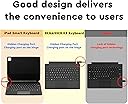
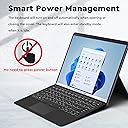
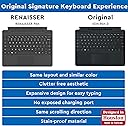
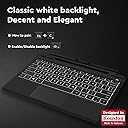
The RENAISSER Pelican K8 Keyboard is a Bluetooth-enabled, backlit keyboard designed exclusively for Surface Pro 9, 8, and X. Featuring a patent-pending hidden charging port, smart power management, and a dedicated pen slot for RENAISSER styluses, it offers a seamless typing experience with the original Surface Pro layout. Crafted with stainproof micro fabric and durable materials, it combines style, functionality, and long-lasting battery life to keep professionals productive on the go.




| ASIN | B0B5X198F2 |
| Additional Features | Hidden Charging Port, Pen Slot for RENAISSER Pens, Smart Power Management, Backlight |
| Antenna Location | Surface Pro 9, Surface Pro 8, Surface Pro X |
| Best Sellers Rank | #560 in Tablet Keyboards |
| Brand | RENAISSER |
| Built-In Media | USB Cable |
| Button Quantity | 78 |
| Color | Black |
| Compatible Devices | Microsoft Surface Pro 9, Microsoft Surface Pro 8, Microsoft Surface Pro X |
| Connectivity Technology | Bluetooth |
| Customer Reviews | 3.9 out of 5 stars 159 Reviews |
| Enclosure Material | Acrylonitrile Butadiene Styrene |
| Hand Orientation | Ambidextrous |
| Keyboard Backlighting Color Support | Single Color |
| Keyboard Description | Wireless, Seamless |
| Keyboard Layout | QWERTY |
| Manufacturer | RENAISSER |
| Model Name | Pelican K8 |
| Model Number | Pelican K8 |
| Number of Keys | 78 |
| Number of Sections | 4 |
| Power Source | Battery Powered |
| Recommended Uses For Product | Surface Pro 9, Surface Pro 8, Surface Pro X |
| Series Number | 8 |
| Special Feature | Hidden Charging Port, Pen Slot for RENAISSER Pens, Smart Power Management, Backlight |
| Style Name | Modern |
| Switch Type | Membrane/Scissor-Switch |
| Theme | Computing/Technology |
| Unit Count | 1.0 Count |
| Warranty Description | 1-year product replacement |
D**N
High Quality Bluetooth Keyboard for Surface Pro
Even if the Microsoft keyboard was the same price, I would have gone for this one. I have had the Microsoft Surface Pro 7 for several years and have had many a time where it would have helped to be able to use the keyboard when it was separated from the tablet. I am super impressed with the battery! I used it like a usual keyboard since I got it and after more than a week the charge dropped less than 50%. I definitely wanted a bluetooth keyboard that can be used while charging, which this one is. This way I can continue using it for the foreseeable future, even when the charge doesn't keep as well. A big bonus is being able to charge it from the tablet itself via usb-c. Unfortunately the hidden charge port makes it difficult to keep it connected to the bottom of the tablet while the charging cable it plugged in. It wasn't until I had this keyboard in my cart that I thought to check the stylus I bought 4 years ago. It just so happens to be a Renaisence 520 pen, which fits this keyboard. Nice! Pros: very strong magnets connecting the keyboard to the bottom of the tablet, everything with the touchpad works same as with the microsoft keyboard, battery lasts for weeks even with average keyboard use, can charge from tablet and be used while charging Cons: the left click on the touchpad is pretty stiff, the magnets that hold the keyboard angled and the ones that hold it up over the screen are pretty weak (they work but aren't sturdy), if I am putting pressure on the bottom right of the keyboard then the left click button on the touchpad sticks, the keyboard charge port gets blocked off when attached to tablet I'm super happy with this purchase!
H**.
Not bad for a dupe
I got this after the original that came with my computer broke. The magnet is nowhere near as strong as the name brand one and the edges have started to come apart and fray. Other than that, it functions really well, has great battery life and is a much cheaper option than replacing the original keyboard.
B**0
Good Keyboard for Surface Pro 9!
This keyboard paired right up with my Surface Pro 9 and has all the functions you will need with a keyboard! It has a separate charging cord than the Surface, but you can charge it straight from the surface or through any other way you feel like. The keys have a tactile feel to them and I have yet to experience any lag between input and what I see on my screen like I have seen in the past with other bluetooth keyboards. The keys are backlit and feel good to the touch. This keyboard is 1/4 the cost of the "Name brand" keyboard and I feel like it functions better with the exception of pulling power from the Surface itself. With that said, it can also be used when pulled away from the surface, which the "Name Brand" cannot.
D**A
Lacks after 2 years :/
I use to have the original keyboard for the surface proX, but like this product, it stops charging after a while. No i am not rough with my products and i’ve used them consistently for school. At first the product was great but after a year the keyboard ceases to automatically turn on when typing and i then needed to connect with bluetooth every time i wanted to type!!! (Fn+C) ~2+years later it’s finally not charging and for 74$$ i could’ve gotten at least 4 cheap keyboards for 4 years at least, maybe i just got a bad keyboard but was not worth it in the end. it was convenient for the year bcs it could attach to my tablet and hold my pen but since the pen charges separately, i’m thinking just getting a regular bluetooth keyboard to carry separately will be a better bargain next time
H**I
Best third-party keyboard for surface pro8
The overall production quality is very good. It can be said that it does not lose to the original keyboard, it is better to enter text, and the price is more affordable. The fly in the ointment is probably that the Bluetooth keyboard will not trigger the switch between PC and tablet modes, but this should be a windows problem. , in short, this is definitely the best choice for third-party keyboards!
T**M
Trash.
pros: + backlit + the keyboard feeling, as far as a tablet cover first and keyboard second, is about as good as can be, I think + the alternate f-key functions aren't default 🥳, which means when you put a better OS on your surface you don't have to get some insane workaround to get the correct keys back neutrals (read: negatives, but things that can't be fixed, I think) = some keys have to double up. insert, print screen, home, end, page up, page down are all alternate versions of other keys. = is bluetooth - but again, it's for a surface cons: - visible logo - weird seam on the end? as opposed to a straight line. Like when you have some cheap plastic crap and it gets cut out badly. only this is stitched and fabric, so it'll be a short time before it wears down, looks terrible, and broadcasts its cheapness to any observers within 100 ft -- the way it clicks is bizarre - it naturally wants you to just tap the touchpad to be a click. It *does* secretly, begrudgingly, have hidden buttons so you can left, middle, and right click. But when you left click, it insists on *holding* the left mouse until you do something else. Which means you're going to be furiously *double*clicking everything. making it a failure of a mouse. -- geometrically, it sucks. there's a stupid stylus channel. It's deep, and very rigid - you're supposed to buy the renaisser active stylus to go with this keypad. There's no magnets or anything in the channel, so I can only assume your expensive finger-proxy will fall out of it every time, just like mine. -- geometrically, it sucks (continued). it wants to prop itself up slightly, as is tradition for keyboard ergonomics. but it blocks the bottom edge of the screen. If you want to try and use it flat, to see the bottom bit of your screen, it doesn't quite rest flat. If you push it down, it'll push the whole tablet up, leaning it further and further away. --- geometrically, it sucks (part 3). Because of that stylus channel, when you fold it backward around the tablet, it *will* break its magnetic connection. which means you don't get your surface to be a 2-in-1 laptop (you know, the whole point of getting a tablet that begrudgingly provides full, real computer hardware) you have a less good keyboard that kinda sticks to it. but here's the big one. it doesn't have palmcheck. I can't get through a single sentence without cursing at it, noticing it clicked *somewhere* else, having to do some detective work to figure out what my keystrokes did in whatever window it brought up, then fix that, then continue typing. This is a good enough reason alone to throw this piece of junk in a fire, then salt the earth wherever its ashes are. And then buy a *real* keyboard.
A**A
Was an overall a good keyboard alternative
Update 19 months later: I recently ran into a serious flaw with this keyboard - It stopped taking a charge and ran out of power. I contacted the manufacturer's customer service and their assessment was that the battery has failed and it can't be repaired, no offer of any compensation for the failure (not sure I signed up for it anyway, but the max warranty is 12 months). I have only been lightly using this keyboard, often I go several days between using that Surface for a few hours at a time and I don't always use the keyboard when I do. There's no excuse for the keyboard to fail in about 1.5 years and can only indicate poor quality. Now I'm in a lurch since MS insisted on preventing earlier keyboard models from connecting to the new generations of the Surface. I'm hesitant to try another 3rd party model and view the MS keyboard as a better choice, but the MS one is SO expensive. The least the seller or manufacturer could do is offer a replacement, but they haven't. So, BUYER BEWARE. Original 4 Star Review: I feel like this keyboard looks and functions like the MS keyboards I've had. Some will definitely appreciate the bolder letters on the keys, and being able to use it separately via Bluetooth has its advantages as well. I like the ability to store a pen with the keyboard to have everything in one place. The lack of color selection (which MS has cut back on anyway), having to charge it once in a while, and a (possibly) weaker magnet connection to the Surface are minor inconveniences for me. Having to wake up the keyboard (tapping a single key works) after idol periods (such as scrolling/reading with just the touch screen for a while) is taking some getting used to, but I prefer that over having to remember a power switch. I noticed that it also goes to sleep if just the trackpad is being used, and then I have to tap a key to keep working. I also had to go into Settings to tell the Surface not to automatically produce the virtual keyboard anytime I click on a textbox,etc. A bigger problem that I don't see mentioned in the reviews up until this point is that the larger bump for the pen on the bottom of the keyboard can interfere with the ability of cases to close with the keyboard attached. The pen also does not fit flush in the keyboard slot, compounding the closing problem. To be fair, I don't have the new MS keyboard for comparison, so I can't say whether the case I chose would have the same problem with the (supposedly smaller) storage bump on that one. For now I've resorted to weighing down the Surface/keyboard in the case while not in use in hopes of eventually getting the cardboard base of the keyboard side of the case to conform to this keyboard. I do recommend having a solid case around your Surface - minor drops happen to all of us and so far cases have prevented damage to my other two Surfaces (something the keyboard alone won't do); I like to have the case protect the keyboard as well rather than storing that separately.
P**F
Works well with the Surface Pro X
We've had it 6 mos. Not quite as integrated as the MS keyboard but does the job at half the price. Things to keep in mind are you have to charge it separately (not via the tablet) and connection is via Bluetooth.
Trustpilot
2 months ago
1 week ago