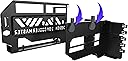
🚀 Elevate your GPU game with style and speed — no sag, all swag!
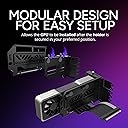
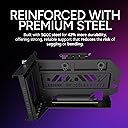
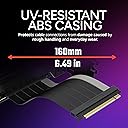
The Cooler Master MasterAccessory Vertical GPU Card Holder Kit V3 is a premium vertical mounting solution featuring a PCIe 4.0 x16 riser cable compatible with PCIe 3.0 and 5.0. It fits most ATX and Micro-ATX cases with an adjustable, tool-less bracket that moves up to 65mm forward and 30mm sideways, ensuring optimal GPU positioning and airflow. Designed to prevent GPU sag and enhance aesthetics, this kit offers a robust build and flexible installation for professional and enthusiast PC builders.


| ASIN | B0B72D88KL |
| Best Sellers Rank | #4,696 in Computer Accessories & Peripherals |
| Date First Available | July 19, 2022 |
| Global Trade Identification Number | 00884102099427 |
| Item Weight | 2.53 pounds |
| Item model number | MCAU000RKFVK03 |
| Manufacturer | Cooler Master |
| Product Dimensions | 9.8 x 5.83 x 5.58 inches |
| UPC | 884102099427 |
S**Y
A perfect vertical mount.
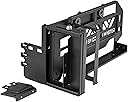
This is a very well made vertical mount. I have been keeping an eye to purchase for the past few years ever since I bought the 4090. I have my 4090 gaming oc on this mount. It did take a little time to figure out the steps in installing. I only have about one eigth of an inch going down on the right end of the mount. I mean for esthetics and better air flow is the main reason I did purchase it. It will also help with gpu sagging and buying a support bracket which I did back 2022, after knowing it was about five pounds. So is it worth it? In my use case scenarios it is , I went from an all black to rgb light. I even had the rgb lighting on the gpu off from 2022 but enough of that. I have this set up on a ANTEC PERFORMANCE 1 FT case and it fits really well. You can adjust the mount to move forward or backward, left and right. On the 3rd picture you will see a small section from the back that is about 2 slot for removing if you have a micro atx case, so it doesn't interfere with rear fan. That is also awesome for those that have that kind of pc case. If you have a dual cpu air cooler don't even think about it, as it will interfere with gpu mount kit. Almost a tool less design from Coolmaster. All you need is a regular phillips screwdriver for a screws to mount the first part just below the rear motherboard aio. The price was pretty fair for the vertical mount since it's release and the build quality is great. Edit: 7/26 The pcie 4.0 works great no regrets, and the diffrent color of gray could mean also pcie 5.0. I remember it used to be a purple color I still get the same fps as I did connected to the pcie slot. No issues with screen or games. Great job on both the support bracket and pcie cable.
M**S
Perfect Fit in My Corsair 4000D AF, Clean Look, and a Surprisingly Premium Riser Cable
I wasn’t sure this mount would fit inside my Corsair 4000D Airflow, but it slid in perfectly and lined up without a single issue. The bracket feels solid and well-engineered — no flex, no sag, and it holds my ASUS GPU rock-steady. What really impressed me was the included riser cable — it’s much higher quality than I expected. The shielding, connectors, and flexibility are top-notch; it bends smoothly for routing but doesn’t feel flimsy or like it’s going to snap. Cooler Master clearly didn’t cheap out here. The spacing is just right for airflow, and the black finish matches the case perfectly. It honestly looks factory-installed once everything’s mounted. If you’re planning a vertical GPU setup in a Corsair 4000D, this is the bracket to get — no compromises, no headaches, just clean results. Did do a small mod to the PCIE brackets to get DP cable in but you can also just buy a angled or low profile dp cable or you can somewhat maneuver a regular dp cable in but it is a little difficult atleast it was for me in my case specially so I opted to cut one of pcie brackets off instead.
H**F
It needs better instructions. In the end, a solid product.
The install isn't straightforward, and the manual doesn't help. First, separate the two large pieces by unscrewing the silver thumbscrew. Then, use the included screws to fasten the PCI-E slot onto the mount, there are 2 standoffs for that purpose. Screw down the graphics card's slot blend with 2 of the screws that came with the product. Now install the backplate that screws to the case, using two screws that came with your case. Those will fit better than what's included with this product. Now install your graphics card on the slot on the bracket, and then plug the PCI-E connector into your motherboard. Make absolutely certain that on both ends, the connectors fully engage and that the little peg and the end of each slot engages (the "lock" to ensure the card doesn't slide out.) Finalize the install. It's not a very difficult install but if you try to do this all in the case with the product fully assembled, you're going to have a hard time. After all is said and done, the bracket works very well. I am showing it in a Fractal North XL. Zero problems with the PCI-E extender, all benchmarks and tests work exactly as without. It's a very good product for the price but I am deducting a point for lack of better instructions.
J**Z
Me decidí por el cooler master en gpu vertical ya que agarre una rtx 4070 super es grande pero no venia con soporte En si el producto en bueno de buenos materiales facil instalación
A**A
حلو شكله و مايرفع حراره الكرت انصح في
K**A
MükemmeL
ま**ぁ
性能アップはしないので買うのを躊躇っていたが、流行りに乗ってポチリました。 見た目も変わり気分転換には良きです。 ブラケットは重く頑丈に出来ており、やや右上がり気味で設計されていますが GPUを載せてもゆがみや振動などないので素晴らしい商品です。 今まで使用していたGPUホルダーは不要になりました。 前後・左右に位置調整できるので素晴らしいですが、 DPケーブルがストレートだとコネクタが出口で当たるので、 GPUを前に出す方向に限界があります。 DPケーブルの角度変換アダプター使用であと3cmは前に出せると思います。 これはGPUにもよりますが、12VHPWRコネクタにも注意が必要です。 私の場合12VHPWRコネクタの180度変換アダプタを使っていましたが この製品のブラケットに接触してしまうので使えなくなりました。 90度変換ケーブルに変えてケーブルが見えないように後方に配線しています。 ライザーケーブルは灰/黒のPCIE4.0でした。 個人的感想は長さも程よく、他の購入者が言うほど固いとは思いませんでした。 経年劣化で不具合出るような記事が散見していますが 気長に経過観察していこうと思っています。 DPケーブル周りの処理が顧客任せなので★-1。 クーラーマスター最高!
T**K
Wenn man es richtig macht sieht es super aus!
Trustpilot
5 days ago
2 months ago