Desertcart purchases this item on your behalf and handles shipping, customs, and support to Greece.
๐ผ Upgrade your laptopโs storage gameโbecause your data deserves a VIP slot.
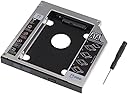
This Universal 12.7mm SATA Hard Drive Caddy Adapter Tray lets professionals effortlessly add a second 2.5" HDD or SSD to their laptopโs optical bay. Crafted from aluminum for durability and cooling, it supports up to 500GB of additional storage with a fast, plug-and-play SATA interface. Compatible with major laptop brands like DELL, HP, Lenovo, and ASUS, it enables dual boot setups and requires no extra cables or software, making it the perfect upgrade for multitasking millennials seeking efficient, sleek storage expansion.
| ASIN | B075846MD2 |
| Best Sellers Rank | #92 in Enclosures |
| Brand | SZYIKUER |
| Color | 12.7mm |
| Compatible Devices | Laptop |
| Connectivity Technology | SATA |
| Customer Reviews | 4.5 out of 5 stars 1,604 Reviews |
| Enclosure Material | Aluminum |
| Hard Disk Form Factor | 2.5 Inches |
| Hardware Interface | Solid State Drive |
| Hardware Platform | Laptop |
| Item Dimensions L x W x H | 5"L x 5"W x 0.37"H |
| Manufacturer | SZYIKUER |
| Material | Aluminum |
| Memory Storage Capacity | 500 GB |
| Model Number | 12.7mm Tray |
| Product Dimensions | 5"L x 5"W x 0.37"H |
| Supported Devices Quantity | 1 |
| UPC | 665668415810 |
| Unit Count | 1.0 Count |
F**T
Fits, works, and it was easy too
I picked this up to give an old laptop an extra SSD. Normally, I would be opposed to disabling an optical drive. But, I am repurposing this laptop as a server that will sit in a rack until it dies. I tried just removing one screw from the laptop in approximately the position I thought would be holding the optical drive. It actually worked. So, that's an awesome pro tip. The size was perfect for the laptop slot. The included screws fit my new SSD perfectly. I did have some trouble getting the front bezel to attach. But, I believe that isn't the fault of this tray. I was pleasantly surprised when I added the screw hole to the back of this tray and the two holes were already present. My laptop picked up the new SSD in the DVD drive slot just fine. The BIOS also has settings to boot from it. So, connectivity is just fine.
T**O
Tinkerdad Approved!
Worked great for what I needed it for and great value for the money. Tinkerdad approved!
C**R
It will work with some effort
I installed this in my MacBook Pro a1322 and it fit but only barely. The dimensions were slightly off but it did work. Build quality is okay but not the greatest. It will do the job and does securely hold the drive when it's installed. I would recommend using you're own screws though since the ones they give you are what you would see in a desktop computer case and not a laptop. Other than that, it's worth the money for what you get and will do the job you set out to do, adding a second drive to your older laptop and getting rid of the useless optical drive.
J**R
Works great and is super fast.
From the little testing I have done this HDD holder is crazy fast when copying files from your main internal drive. It is also well made, and easy enough to set up. What you need to know. For one you will need to remove your laptops optical drive, and remove the back bracket off the back, and the front factory cover/face off of the drive if you want it to blend in and look good. My issues. (No fault of the drive holder.) I was using an old drive I had installed ubuntu onto. Why was that an issue? Well Windows doesn't talk with ubuntu, so at fires it looked like the HDD caddy didn't work, but quickly figuring out what happened I formatted the drive and boom it worked perfectly. What I am running in the drive holder. I am running an old Samsung drive from a old laptop. It is a HDD with a 750GB capacity. My system is a 2018 HP laptop with a RYZEN3 2200U processor, with a 1TB HDD, and 16GB of ram installed. All that said the drive holder works great I this laptop, and even my back up Lenovo ideapad3 I forget the specs on that laptop though. Wrapping this up I will say this I give the product a 9/10 because it is easy to use and alright to install. I would however recommend having a brand new HDD or SSD just because it would be easier for you, but you can use a old drive no problem if your willing to possibly have to format it. If you need extra storage or want to upgrade to a SSD, and have an extra HDD for more storage I say go ahead and buy it..
J**S
Works perfect For an extra hard drive
Worked perfectly in my MacBook was able to put 2 TB drive in the DVD bay with no problems
M**Z
Excelente producto
Excelente producto, tengo mas de un aรฑo con el y sigue funcionando
D**L
Easy installation with a pleasant surprise!
I just finished installing this in my HP 15da0073 laptop, and I couldn't be happier. Mounting the HDD into the caddy couldn't be simpler. Slide the drive into place and install the four provided screws with the provided screwdriver. I thought I was going to have to completely disassemble my laptop, but I discovered that you only need to remove one screw to extract the optical drive. See the attached photo, it's the screw closest to the model number on the back of the laptop. After I pulled out the optical drive, I removed the little mounting tab from the back of the drive and transferred it to the caddy. Now, here's the part that was the pleasant surprise. The caddy comes with a simple black faceplate. I pulled that off to see what would be involved in mounting the trim from the original drive. I discovered that the caddy actually had mounting holes in all the right places to simply snap the HP trim into place. There are a few other mounting holes on the caddy, so hopefully it will be as easy for some other laptop makes as well. As shown in the attached photo, I was able to install the original trim onto the caddy, so the laptop looks just like it did before the upgrade. Slid the caddy into place, reinstalled the screw, and set up the new drive in Windows. Couldn't be happier with the installation, and it's nice to have the extra disk space on my laptop.
T**T
Note the height of your drive bay before you buy. This is a 12.5mm height caddy.
I bought the caddy on a whim, and found it was too large to fit my notebook. Rather than returning it, I modified the caddy to fit. The maker would probably say this is impossible and I'd agree, unless you are Technoid Mutant (I am), buy a 9.5mm caddy if that is what you need. That said, the thing works perfectly and gets killer throughput with both my new SSD and with my old 1TB internal hard disk (which is now removable via the caddy). If I'd bought the right size, I'd give this thing an A+ all round. As it is, I give it an A+++ for taking the abuse it took to get to fit (removed 3.5mm of material from entire unit).... Kudos to Mr. Manufacturer! P.S. Yes, while I was at it, I plugged the faceplate from my original HP cdrom onto the face of the caddy. So the installation is seamless. I DO wish it had a screwhole to secure the caddy, but I doubt they could make that work 'universally'. Best, Jeff
F**X
Utile et parfait
Fonctionne parfaitement pour de quโil devait accomplir. Le moins cher que jโai trouver. Cependant, bien vรฉrifier que le disque dur a un volume car il serait possible de penser quโil nโest pas dรฉtectรฉ alors que oui.
S**E
Fits perfect
Fits the slot perfectly. Tip: Remove the old beauty cover from your original CD drive and attach it to the new caddy. It fills the gap and makes the installation look factory.
J**U
Works as intended
The whole thing is cheaply made, the screw holes don't perfectly match and it arrived slightly dented due to thin sheet metal casing. But for the price I paid for it, I'm willing to look past these imperfections since the device still works perfectly fine, and none of these imperfections are visible once in use. I recommend this product over the more expensive ones for that reason
G**F
Nicely done.
Perfect upgrade for my wife's low profile PC with useless DVD. I managed to make the old DVD face plate for the DVD sit properly with a little cement to fasten it solidly.
G**E
Does what it was meant to be
This aluminium made carriage can accommodate a 2.5" hard drive in replacement of the CD/DVD bay. Easy install (see youtube videos if necessary) and works perfectly.
Trustpilot
2 weeks ago
4 days ago