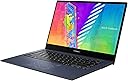
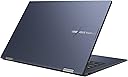
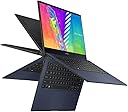
💼 Flip your workflow, flaunt your style with VivoBook Go 14 Flip!
The ASUS VivoBook Go 14 Flip is a stylish, lightweight 2-in-1 laptop featuring a 14-inch Full HD touchscreen with 360° hinge versatility. Powered by an Intel Celeron N4500 processor and 4GB RAM, it offers smooth everyday performance. Enhanced with a fingerprint sensor for security and ASUS Antibacterial Guard for hygiene, it’s designed for professionals who value portability, connectivity, and a clean, modern workspace.
| ASIN | B0B2RB6FNL |
| Audio Output Type | Speakers |
| Audio Recording | No |
| Audio features | Includes speakers |
| Automatic Backup Software Included | Windows 11 Home in S mode, Microsoft 365 Personal 1-Year |
| Battery Cell Type | Lithium Ion |
| Battery Life | 24 hours |
| Biometric Security Feature | Fingerprint Sensor |
| Bluetooth Version | 4.1 |
| Bluetooth support? | Yes |
| Brand | ASUS |
| Built-In Media | J1400KA-DS02T |
| CPU L1 Cache | 4 MB |
| CPU Model Generation | 10th Generation |
| CPU Model Number | Intel Celeron N4500 |
| CPU Model Speed Maximum | 2.8 GHz |
| CPU model | Celeron |
| Cache Memory Installed Size | 4 MB |
| Camera Description | Front |
| Chipset Type | Intel |
| Color | Quiet Blue |
| Colour | Quiet Blue |
| Compatible Devices | External displays, keyboards, mice, storage devices, printers, and other accessories that support USB, HDMI, Micro SD, Wi-Fi, or Bluetooth connections. |
| Compatible Flash Memory Type | microSD |
| Connectivity Technology | Bluetooth, HDMI, USB, Wi-Fi |
| Control Method | Touch |
| Customer Reviews | 3.5 out of 5 stars 109 Reviews |
| Display Maximum Resolution | 1920 x 1080 |
| Display Refresh Rate in Hertz | 60 |
| Display Resolution Maximum | 1920x1080 |
| Display Technology | LCD |
| Display Type | LCD |
| Form Factor | Convertible |
| Graphics Card Ram | 4 GB |
| Graphics Coprocessor | Intel UHD Graphics 620 |
| Graphics Description | Integrated |
| Graphics Ram Type | DDR4 SDRAM |
| Hard Disk Description | Emmc |
| Hard Disk Interface | USB 3.2 |
| Hard disk size | 64 GB |
| Hard-Drive Size | 64 GB |
| Hardware Interface | Bluetooth, HDMI, USB, USB 2.0 |
| Has Color Screen | Yes |
| Human-Interface Input | Numeric Keypad |
| Item Dimensions L x W x Thickness | 32.1L x 1.7W x 21.7Th centimeters |
| Item Weight | 1.5 kg |
| Keyboard Description | Full Size |
| Keyboard Layout | QWERTY |
| Lithium-Battery Energy Content | 39 Watt Hours |
| Manufacturer | ASUS |
| Memory Clock Speed | 2.8 GHz |
| Memory Slots Available | 1 |
| Memory Speed | 2400 MHz |
| Memory Storage Capacity | 4 GB |
| Mfr Part Number | J1400KA-DS02T |
| Model Name | ASUS VivoBook Go 14 |
| Model Number | J1400KA-DS02T |
| Model Series | VivoBook Go 14 Flip |
| Model Year | 2022 |
| Model name | ASUS VivoBook Go 14 |
| Native Resolution | 1920 x 1080 pixels |
| Notebook Pointing Device Description | Touchpad with NumberPad |
| Number Of Cells | 2 |
| Number of Items | 1 |
| Number of Packs | 1 |
| Number of Ports | 5 |
| Operating System | Windows 11 Home S |
| Operating System Family | Windows |
| Optical Storage Device | No Drive |
| Other Special Features of the Product | Memory Card Slot |
| Power Device | Internal rechargeable battery |
| Processor Brand | Intel |
| Processor Count | 2 |
| Processor Series | Celeron |
| Processor Speed | 1.1 GHz |
| RAM Memory Installed | 4 GB |
| RAM Memory Slot Total Count | 1 |
| RAM Memory Technology | DDR4 |
| RAM Size | 4 GB |
| RAM Type | DDR4 SDRAM |
| Ram Memory Maximum Size | 4 GB |
| Resolution | 1080p |
| Screen Finish | smooth or glossy |
| Screen Size | 14 Inches |
| Screen size | 14 Inches |
| Speaker Description | Built-in speakers |
| Specific Uses For Product | Business, Personal |
| Supported Monitor Maximum Quantity | 1 |
| Total Usb Ports | 1 |
| Touch Screen Type | Capacitive |
| Touchpad Feature | true |
| UPC | 195553632522 |
| Unit Count | 1.0 Count |
| Video Output | HDMI |
| Video Processor | Intel |
| Voltage | 19 Volts (DC) |
| Webcam Capability | Yes |
| Wi-Fi Generation | Wi-Fi 5 |
| Wireless Compability | Bluetooth |
| Wireless Technology | Bluetooth |
A**E
Perfect
Easy to use, compact and lightweight
T**R
Terrible, slow and clunky doing the simplest things
If you want to get anything done in any reasonable amount of time without frustration, DO NOT get this piece of junk laptop. Thing is seriously SO slow at opening anything or even web browsing can be laggy. Certain dont install very many things or download stuff cuz it will slow you down big time, also havjng any startup apps will DESTROY ur startup time. And sometimes the thing just takes ages just to even turn on. Absolutely GARBAGE for school work. The only thing this thing is good for is consuming video content and reading since it flips vertical. But look elsewhere definitely. Wishing i returned this thing but i waited too long holing it would run better after some updates. It only gets worse.
M**N
*Edit* This is NOT “Slower than Paint Drying”
Apologies for the previous poor review on this Vivobook. I actually like it enough to keep it. I’m not sure what’s going on in my house but the 5g wifi isn’t working so well - that is likely the reason for the slow Vivobook online. However, this isn’t the perfect laptop….but it suits my needs more than some others I’ve tried.
B**N
Win 11 SAFE MODE sux
I knocked off not one but two stars for the Win 11 SM version that was installed on these computers. SM stands for SAFE MODE which limits what you can do to the Microsoft store ONLY! I bought two of these for my young nieces so they could play Minecraft. Well, Win 11 SM will not allow you to install Minecraft, even though it is available on their store. The fast way to fix this is to opt out of Win 11 SM, the only problem is that you need an account to do that. Since these were to be gifts, I was not about to put my phone number or account info on these computers. The other way to fix this.... took me several painstaking hours of trial and error, and following along on various tutorials on YT, and changing the BIOS. (which can kill your computer if you mess up) It worked on the first computer, but for some reason it would not work on the second computer. Several times I had to try and re-install Win 11 from scratch, but I simply could not fix the issue. For two children, this isn't a horrible price or horrible computer, but their choice of OS install is absolute garbage. I would not recommend this to anyone that wants to do things outside of the controlled Microsoft world.
J**.
Good Laptop but needed a lot of updates
I just got my VIVOBOOK and so far it’s working great. My only complaint is that when I got it I had to update almost everything on it but it got done and it is running good. Love it so far.
Trustpilot
3 weeks ago
2 weeks ago