🚀 Tiny Tech, Massive Impact: Power your next big idea with CanaKit Pi Zero W!
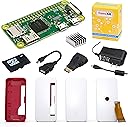
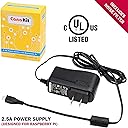
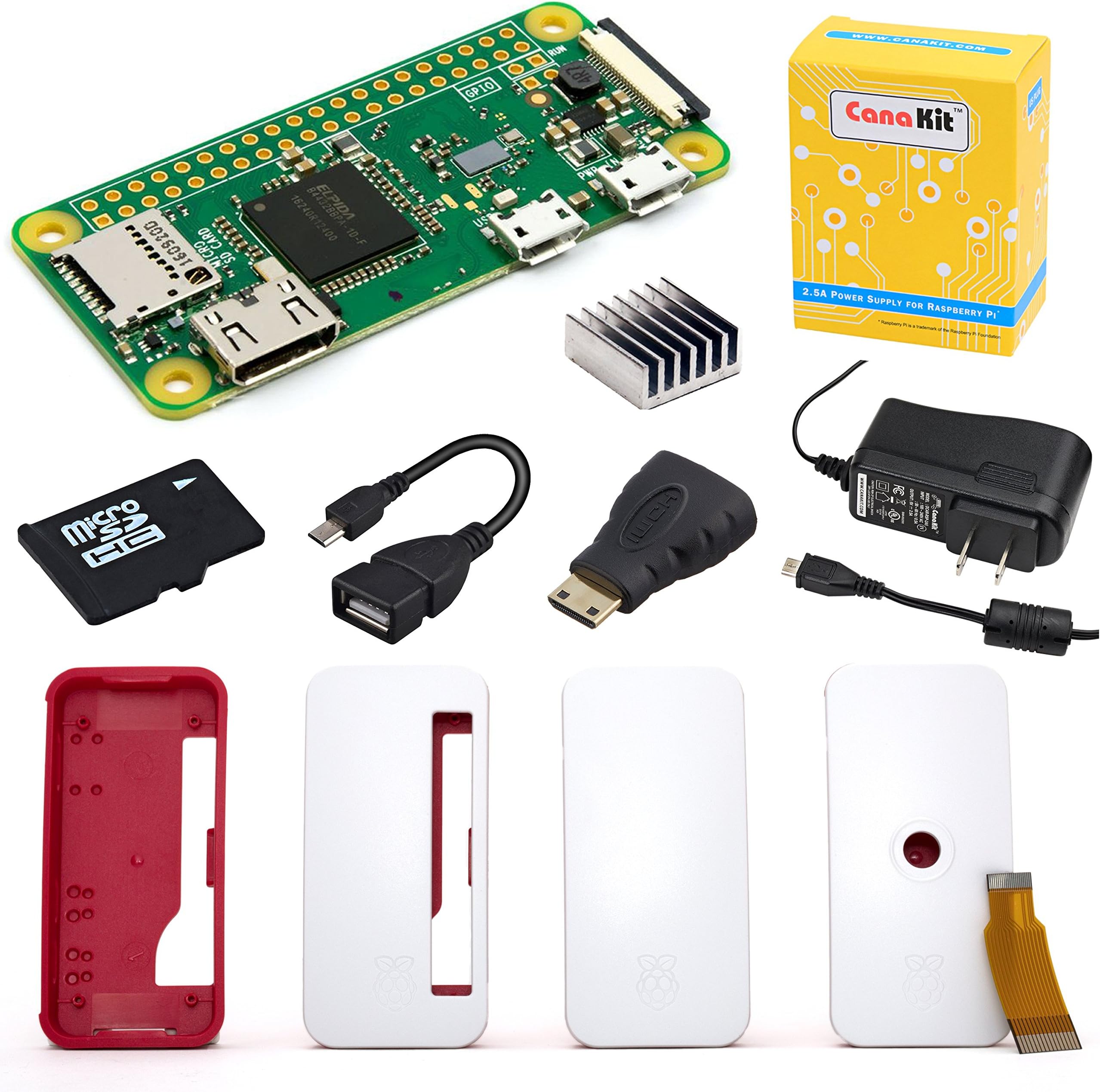
The CanaKit Pi Zero W Complete Starter Kit offers a compact Raspberry Pi Zero W board featuring built-in WiFi and Bluetooth, paired with a 16GB Class 10 MicroSD card preloaded with NOOBS for quick setup. It includes a protective case with three interchangeable lids, a noise-filtered 2.5A power supply, USB OTG cable, mini HDMI adapter, and heat sink—providing a ready-to-go, versatile platform ideal for wireless projects and compact computing solutions.
| ASIN | B072N3X39J |
| Best Sellers Rank | #13,880 in Single Board Computers (Computers & Accessories) |
| Brand | CanaKit |
| Built-In Media | Pi Zero W (Wireless) Board, Pi Zero Case with 3 Interchangeable Lids, SanDisk 16 GB MicroSD Card pre-loaded with NOOBS, CanaKit 2.5A Micro USB Power Supply with Noise Filter, USB OTG Cable, Mini HDMI Adapter, Heat Sink |
| CPU Model | None |
| Connectivity Technology | Wi-Fi |
| Customer Reviews | 4.7 out of 5 stars 1,198 Reviews |
| Item Dimensions L x W x H | 2.56"L x 1.18"W x 0.2"H |
| Manufacturer | CanaKit |
| Memory Storage Capacity | 16 GB |
| Mfr Part Number | 99187 |
| Model Name | Pi Zero W |
| Model Number | 4328435108 |
| Processor Brand | Broadcom |
| Processor Count | 1 |
| RAM Memory Installed | 16 GB |
| Ram Memory Installed Size | 16 GB |
| Total Usb Ports | 1 |
| UPC | 682710991870 |
| Wireless Compability | Bluetooth |
M**M
Nice little kit. The Zero is slow, so take heed of what you're looking to use it for.
The kit had everything I needed to get going ASAP, and you can be fully setup in only a few minutes. The biggest issue you might have out-of-box is the fact that there is only one USB port, so you might be stuck not being able to use the keyboard and mouse at the same time if you don't have a USB hub. Since this is a Pi Zero, you aren't really likely to be using this in a desktop configuration too much beyond setting things up, but you'll really want both the keyboard and mouse at once during that process. I kinda think having the full desktop Pi OS image on the SD card isn't the best idea here, since it's astonishingly slow on the Pi Zero, but it's fairly easy to just flash a minimal install image to the card with the official Raspberry Pi flashing tools and use raspi-config from the terminal to set things up after (and you don't need a mouse attached in the one USB port). Currently, the machine works pretty well for me as a headless system on my home network. The built-in wifi connection is quick enough and stable, much better vs using the plain non-W Pi Zero with a dongle, where I had all manner of connection stability issues (and it used up the USB port). I can use VNC to get to a desktop to make a few little management tasks easier, but it's VERY slow,. Most things should be done over SSH, which is plenty nimble. Overall, if you need a tiny machine that has wireless network access, this kit is great.
N**U
Perfect for the Price
I haven't used a pi since 1B, the experience has improved. I am very happy with the kit, noobs was ready to go on the SD card and super easy. I like the case, feels pretty well made. I'm using the Pi Zero W as wireless AP, I'm very happy with the connection quality and surprised by the range. I thought I'd get a few feet but I can get a signal through the floor and through walls. The maximum wireless speed I can get on 802.11n with the built in adapter is 30mbps, but it's stable so I'm happy. By default, Raspbian starts with the GUI. The Pi Zero does not do well with the GUI. Opening Chromium maxes the CPU. Luckily switching to boot to terminal is extremely easy from preferences. From terminal, I have no complaints about performance. I use less than 10% CPU with 1 wireless client connected. CPU temperature with the heatsink attached, inside the case is about 45c in about 21c ambient room, with a wireless client actively connected. Fun project, fun device. I'll be getting more for a wireless mesh.
L**N
Raspberry pi working with CanaKit absolutely cannot get it wrong!
As I've come to expect from Canakit and the Raspberry Pi project, another ideal set. The raspberry pi ZeroW is a great board and a perfect addition to the pi family. The small form-factor makes it ideal for many discrete projects, takes up very little room on my bench yet it still has the full functionality and versatility of its larger cousins. Canakit included an SD card with NOOBS and the installation was quick and easy. Setup for the wifi was intuitive, the drivers were already included and working from the get-go. Once I connected to my network and enabled remote access I relocated the pi to the furthest room in my house and was not disappointed. The wifi picks up at a strength that is equal to or better than any other device that I use wirelessly in that room. I will be making all my pi-board purchases from Canakit as, consistently, they have provided high-quality boards, parts, components and accessories with quality packaging, prompt shipping and just a great product for ideal prices.
A**R
Almost perfect
This is a great little device that gets rid of annoying commercials from almost every device on your network. Or, you can set it up only for certain devices if you'd like. Does not work for YouTube simply because they tend to often serve ads through their own servers, so if you are trying to end those good luck to you because they are smarter than most at making you watch ads. It does seem like there are fewer ads on YouTube, but there are still some that seem to come through. That's what really got me going to do this as I was being overwhelmed with YouTube ads! For everything else it seems to do the trick! So long to most ads!!! Commercials and ads are gone from almost every website and portal. Even the ads on the Roku home screen are gone. The only reason it's not a 5-star for me is that set up still requires a lot of work. Not for the faint of heart, as you need to know a little bit about networking and I needed to follow direction from several different websites in order to set it up correctly. If you are reading this review that means you probably have the patience to set it up yourself. This bundle is great though, as it includes everything you need except for a keyboard, mouse and monitor. It's pretty amazing that this cheap little device can run programs as well as it does. I highly recommend to anyone wanting to take the time to figure this out.
K**!
Paying for convenience - surprisingly useful little box
Yes, you're definitely paying for convenience with this little set, but it is worth it if you value time over a few dollars. Everything is ready to go and I was glad to see the NOOBS OS already on the microSD card. You can assemble everything in 5 minutes and be up and running in less than 10. All adapters are included - just connect everything, power it on, choose your OS, and.... walk away. This thing is SLOW if you're using to a modern computing device. After awhile, the installation process will complete and then it's time to play around. This is much slower than a Raspberry Pi 4 (or 3 for that matter) so perhaps a graphical OS wasn't the best choice... after playing around with it for a bit (and letting the kids see some of the games running in stop-motion), I installed Raspberry Pi OS Lite and installed PiHole to have a network-wide adblocker. For this, purpose the Zero W is perfect! It's small, efficient, and has plenty of power to run this task. The official case is annoying if you want to change microSD cards often, but since that's not the situation here, it's not a problem. Again, this is a great solution for a cheap, reliable device that can work some magic in terms of adblocking on your home network. There are tons of other fun projects of course, but that's why I need a second one!
S**S
Great TV Computer
I determined that the Raspberry Pi Zero was going to be the best option to add a computer to my TV. At first, I was going to order from another company to get just the Raspberry Pi and the parts I needed as add ons, because it looked cheeper. And then I realized that shipping was going to be $10. All together, the price with shipping was about the same price as this kit. So I opted for this kit because I'd get it a lot faster with prime shipping. I'm glad I did, as I hadn't realized I'd need a micro SD card loaded with an OS. I have neither a micro SD card or a micro SD card reader to put an OS on a micro SD card. Anyway, it came today. It took me 5 minutes to set up the hardware and right now, I'm waiting for the Raspberry Pi OS to download. The only other component I needed for my project was the Mini i24T mini wireless keyboard mouse combo. Update: I've had it running for a few days now. I can't do much on it, but it comes preloaded with a lot of little python games, and I've added some more. I may need to get a larger keyboard so that I can try some coding on it. I can code using the small keyboard, but I can't type super quickly.
G**E
This is a great little computer and kit. It's pretty slow when compared to the Pi 3 B+, but it is loads of fun.
Granted, it's quite a bit slower and "weaker" than the Pi 3 B+, but it's still pretty fun, and it's pretty darn inexpensive. I'm not as adventurous as some when it comes to the many projects that people use these for, but it's still pretty fun to have such a teeny, tiny little thing work for a gaming system for older games or even as a somewhat limited computer for going online. You aren't going to be finding the newest Mersenne Prime with this little computer, but it's still a bundle of fun. The WiFi and Bluetooth work very well. And, though others have mentioned that the mini HDMI to HDMI adapter is a bit touchy, which it is, it works well enough for me. If I end up using it in a way in which it will be subject to a lot of movement I'll get a better adapter. Overall, I couldn't be happier. A lot of fun for a little dough. And, lets be real... it's just plain neat.
B**T
Perfect kit for pi-hole!
Great! This set came with everything I needed to set up a pi-hole at home. Very easy to put together, just slotted the circuit board into the little case, put the heat sink on it, then plugged a keyboard and HDMI into it using the provided adapters. I didn’t bother putting a mouse on it, as everything I needed to do on it had keyboard shortcuts: installing raspbian, installing updates, then launching terminal to enable SSH. Once I enabled SSH I was able to shut it down and put it into place and handle the rest of the pi-hole setup through SSH. Worked beautifully. If I can come up with more uses, I’ll totally buy more kits from Cana. If I have any regrets it’s that I waited this long to buy one of these and set up pi-hole.
T**Y
Works great however
It works great, however it is worth noting that it doesn’t have a header connector soldered onto the pcb so before I can use it properly I need to find someone with a soldering iron and buy a header strip which is disappointing, hence the lower score for easy to assemble and overall score.
Trustpilot
2 weeks ago
1 month ago