โก Power up your smart home with effortless control and safety!
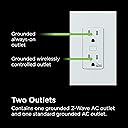
The Enbrighten Z-Wave Plus Smart Receptacle is a tamper-resistant, in-wall smart outlet featuring one Z-Wave controlled outlet and one always-on outlet. Compatible with major Z-Wave hubs and voice assistants like Alexa and Google Assistant, it offers a 150ft wireless range for reliable home automation. Designed for safety and convenience, it supports scheduling, remote control, and manual operation, making it ideal for managing lamps and small appliances securely and smartly.


| ASIN | B07361JZ2H |
| Amperage | 15 Amps |
| Best Sellers Rank | #562,140 in Tools & Home Improvement ( See Top 100 in Tools & Home Improvement ) #674 in Electrical Outlet Switches |
| Brand | Enbrighten |
| Brand Name | Enbrighten |
| Color | White |
| Compatible Devices | All |
| Connectivity Technology | Z-Wave |
| Connector Type | Plug-In |
| Customer Reviews | 4.4 out of 5 stars 843 Reviews |
| External Testing Certification | Works with Alexa |
| Global Trade Identification Number | 00030878142885, 00030878552561 |
| Included Components | 1 Receptacle Outlet |
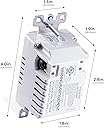
| Item Dimensions L x W | 4"L x 1.8"W |
| Item Type Name | Z-Wave |
| Item Weight | 5.6 ounces |
| Manufacturer | Jasco Products Company, LLC |
| Material | Plastic |
| Material Type | Plastic |
| Model | 55256 |
| Part Number | 55256 |
| Power Plug Type | Type B - 3 pin (North American) |
| Product Dimensions | 4"L x 1.8"W |
| Smart Home Compatibility | Smart Home Compatible |
| Total Power Outlets | 2 |
| UPC | 030878552561 030878142885 |
| Unit Count | 1.0 Count |
| Voltage | 120 Volts (AC) |
F**L
Install was easy. Pairing with Wink Hub would have been easier if Outlet & Hub were closer together
I installed the outlet and it worked. Top outlet worked as always-on. Lower outlet worked with manual button push. When I tried to pair the outlet with Wink Hub using Inclusion mode approach (see other reviews for specific steps), they could not connect. I finally figured out that they too far apart. So I moved the hub to be about 35 feet away from the outlet and the pairing worked. Originally, my Wink hub was in the upstairs network closet (front of house) and the outlet was downstairs near back of house. I was able to move the hub closer because I already have a wifi-extender with a network port on it downstairs. The Wink Hub requires a network cable connection. Now everything works perfectly i.e. scheduled automated on-offs, manual on-offs from iPhone Wink app.
C**Y
Eazy to program in Home Assistant
A quality product that works will with Home Assistant.
B**L
Works Perfect!
I bought this because I wanted to be able to turn off my daughter's television from my bedroom upstairs and schedule it to turn off at 10:30 so she doesn't stay up late watching TV. I believe there's an indicator light that you can turn off from an app or in SmartThings mine is turned off cuz I don't want her to know you can turn off and on the switch from the plug itself. One thing I was not aware of is that only one of the outlets is smart the other one stays on all the time of course I did not tell her this and as of right now her TV turns off at 10:30 every night all is well! The installation is super straightforward and easy you do need a white neutral wire which I'm not sure every Outlet will have maybe you should check before you buy it. SmartThings found it on the second try it's worked perfect ever since no complaints.
F**M
Less is More
This review is for the Z-Wave Plus in-wall outlet only. Other Jasco/GE product perform differently. Gotta hand it to Jasco (formerly GE, formerly Edison General Electric) less really is more. It has 1 programmable parameter to change the way the indicator LED works (On-On, On-Off, Always Off). It has clamp style terminals (hot, neutral, ground) that will hold 2 wires each (12 awg solid tested). Top outlet is always on; bottom is z-wave controlled. Button in the middle with a blue LED behind it sends program signal and changes state On-Off. Press 10 times quickly and it changes the way the LED works. It has a factory reset with that button as well. This is about as simple as a z-wave device can get. The Jasco products are simple by comparison to other z-wave devices I own, but you don't have to learn Machine Language to figure out how to program and use them (like I did trying to get devices (Aeotec) to work with HomeSeer that said I was too stupid to use their products). The instructions are a little lacking as to explaining how to wire the outlet. It took searching on the multi-language instruction sheet for me to determine how to get it to respond to the add node (hardware). A simple put controller in Add Node-Device-Hardware mode and press button once would have sufficed. Less is More did not help on this point. It is terribly expensive for what you get. Other wireless protocol outlets are much less expensive. Given a typical TR Decora outlet costs 2 dollars (or less) and it will likely die in about 2-3 years from failure of the electrolytic capacitors it is pretty pricey. But, professional automation is tremendously costly (you have to pay them to come out and fix anything or add any programming); so go with what you feel works best. You could use a relay that fits in the box, but those are limited to 10A or less. Be careful.... Make sure you know how to wire that outlet correctly when (notice I didn't say if) your computer controlled automation fails so you get back that other outlet. Make sure you have good surge protection or kiss it goodbye.... Overall, so far works as advertised. Stupid simple to add to Domoticz (v4.970). Works fine with a 1.2w LED lamp. Will update if it dies sooner than expected or causes my network to go nuts. Update Jul 2020: The Outlet has stopped working once or twice since installed. It appeared to lose communication with the controller. I Turned it On and Off with the front mounted switch and it resumed working as normal within a few minutes. This could be the nature of Z-Wave, device error, controller error, or control program error. If it happens to you there is an option to explore.
D**Y
Reliable and just what you'd expect
Unlike some cheaper Z-wave devices, this one stays solidly on the network. It has enough switching capacity to control my espresso machine, and the integrated button makes it easy to control locally when necessary. I like that the button doubles as an indicator to show when the outlet is energized. Do note that only one outlet is controlled - the other outlet is on all the time just like a regular outlet. One thing that would have been awesome is the ability to select whether both outlets are controlled or if only one outlet is controlled. There are times where I would have loved to plug two devices in to be controlled without having to clutter things with a power strip.
J**P
Works great with Nortek GoControl HUSBZB-1 with Home Assistant (ZWave-JS)
I installed this for use with Home Assistant and it has been working great. It installed without any issue. As indicated in the product description, the top socket in the outlet is just an ordinary always-on socket, and the other is controllable via Z-Wave. In my particular application, it was crucial that device be absolutely 100% reliable and responsive. This has met my expectations.
D**N
Extremely irritating design... and a fire hazard in two distinct ways
This outlet is a revision of an earlier GE Z-Wave outlet. I've purchased and installed maybe a dozen of those earlier outlets without a hitch - they're all working perfectly fine. I wanted to expand my Z-Wave network, so I bought two of these. After wrestling with them for three hours, I'm shipping them back. These outlets have three problems: 1) The bolts that hold in the wires are loose - the only way to extend them fully is to hold the outlet upside-down. If you tilt the outlet so the bolts are facing downward, they retract into the hole. And they don't extend very far, so the only way to couple a wire with the nut is to hold the outlet with that bolt facing upward. The bolts are also positioned on the left, right, and bottom sides. As a result, you've got to twist and turn this outlet to get each of the wires in. The alternative is to wire in pigtails to all three bolts and then couple the pigtails with the wires in the wall, which is a lot of extra work for no good reason. 2) The bolts are positioned very close to the housing - such that trying to get a wire of any reasonable gauge to fit around the actual shaft of the bolt is extremely difficult for no good reason. Also, the bolts are slightly beveled, such that half the time you try to tighten down one of the nuts, the bolt squeezes out the wire which comes loose. This is not just extremely irritating - it is a little fire hazard, if the line happens to come detached! 3) After struggling to wire up this outlet, I flipped the breaker and tested it with an outlet tester, which read: "Neutral line reversed." I confirmed that the polarity was correct going into the outlet (black = live, white = neutral = 0V) and that they were attached to the right bolts (black bolt = live; white bolt = neutral), and reconnected. Nope, same thing. I don't know whether this outlet was wired incorrectly or what, but again, it's a fire hazard. I have no idea how GE could've screwed up so badly with something as simple as an outlet. Again, the old GE outlets worked perfectly fine. I'm now returning these POS outlets and looking to buy some of the old ones.
M**N
Added flexibility to control power for plug-in devices
Of the two outlets, one is always hot, the second outlet (near the ZWave logo) is what can be controlled remotely. I integrated this w/ the Samsung Smart Things. Placed one for controlling the Christmas Tree lights and the other above the kitchen cabinets to control a light strip. Went with an electrician to install, he had not expressed any issues with the installation. Pairing with Samsung Smart Things took about 2min. There is a button on the outlet that can be used to manually turn the second outlet on/off as well as pressing it in a pattern can reset the outlet to for pairing.
D**Y
Works as expected
I initially tried to pair it with my Wink 2 hub as a GE receptacle but that turned out to be the wrong way. I had to do it as a generic z-wave binary switch. Once that's done it has been working flawlessly and reliably. I installed it in the basement of my 2,100 sq ft home and my hub is on the ground floor. It is on a preset schedule and no issue found so far.
J**E
SI CUMPLE CON LA ESPECIFICACION EXCELENTE
LO UNICO MALO ES QUE LO DETECTA COMO SI FUERA UN APAGADOR DE LUZ NO COMO CONTACTO
D**Y
.
Installation simple et facilement associรฉ ร mon Hubitat.
R**R
Easy & quick installation
There is no motion detection this is a wall outlet. Quick, easy to install and run, excellent. Expensive device. For my application, want the dual outlets. 1 standard with no controls, one connecting to the Samsung Smart Hub.
P**A
Works well
Not so easy to set up on my wink hub but works good
Trustpilot
4 days ago
5 days ago