

🔥 Keep Your Cool, Game On!
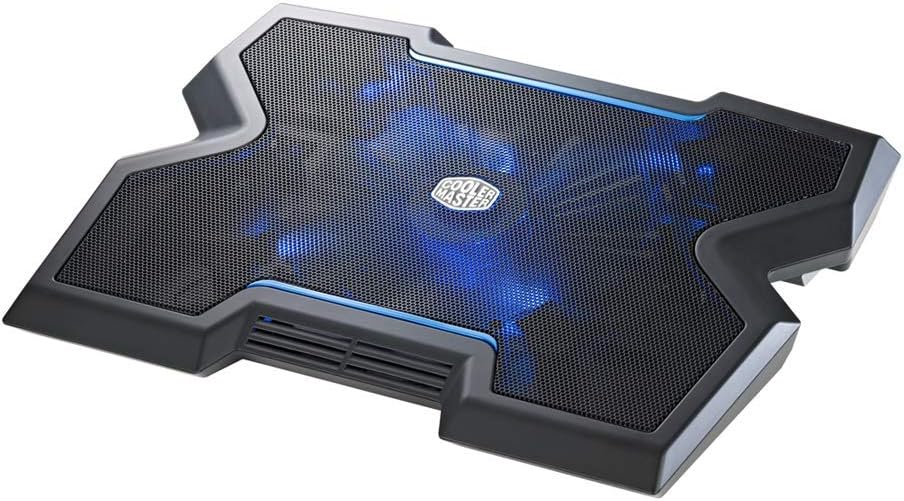
The Cooler Master NotePal X3 is a high-performance laptop cooling pad designed for gamers and professionals alike. Featuring a powerful 200mm fan with blue LED lighting, it effectively dissipates heat while providing a sturdy base for laptops ranging from 15 to 17 inches. With adjustable height settings and a built-in fan speed controller, it ensures optimal comfort and performance during extended use.


| ASIN | B0079T2KHG |
| Best Sellers Rank | #237,883 in Electronics ( See Top 100 in Electronics ) #277 in Laptop Cooling Pads |
| Brand | Cooler Master |
| Color | Notepal X3 |
| Cooling Method | Air |
| Customer Reviews | 4.1 out of 5 stars 2,208 Reviews |
| Enclosure Material | Metal |
| Global Trade Identification Number | 00360701894408, 00884102014765 |
| Item Part Number | R9-NBC-NPX3-GP |
| Item Weight | 1.98 Pounds |
| Manufacturer | Coolermaster |
| Material | Metal |
| Mfr Part Number | R9-NBC-NPX3-GP |
| Model Number | R9-NBC-NPX3-GP |
| Number of Fans | 1 |
| UPC | 031112766522 078667291529 012951631929 021112374759 079531796737 012951691602 168141537301 080000404213 600005023068 014444728338 072090535854 211131850765 745449844135 884102014765 112040013534 012301991833 115970728585 151902932613 360701894408 021112252224 719040107289 041113894285 191120103525 071030575974 |
| Unit Count | 1.0 Count |
| Warranty Description | 2 year manufacturer |
J**Y
More powerful than the 5/6 fan setups, pay attention to CFM ratings!
I intially ordered a 6 fan laptop cooler that had way more reviews than this one, many more positive reviews as well, for my HP Spectre Folio (3 years old, horrible overheating issues, already tried cleaning). I then came to realize that many of the reviews appeared to be fake. When I received that product, one of the fans started making a grinding sound after about 1 hour and one of the red LEDs stopped working. So, yeah, I returned that piece of junk. I then spent more time than is healthy trying to find a laptop fan that wasn't just "cool" looking and would actually make a difference. So, I started scouring the internet for this important measurement: CFM. The rated CFM for this fan from the manufacturers website is 76.5 maximum (has variable speed knob). That CFM rating is one of the highest I could find in this price range after all my research, though there were laptop fans released 7/8+ years ago that were higher. Another reason why I settled on this one is b/c I've owned the CoolerMaster X-Slim for about 4/5 years now and the fan on it still works flawlessly, even after I would purposefully abuse it sometimes (force stopping the fan, etc.). That models CFM rating is 70 CFM and I don't like how the USB plug is built-in to it. The wire on mine started to short, so the fan was becoming unreliable unless I jiggled the wire quite a bit. Back to the product I'm actually reviewing... Pros: 1.) High CFM for price (76.5) 2.) Doesn't have an annoying built-in cord, meaning I can swap out cords as they become old, then just plug them in like any other USB device 3.) Variable speed knob 4.) The LED light is cool, though I don't use it. 5.) Extra USB slot for another device 6.) IMPORTANT: I've watched countless review videos of people holding paper over their fan to see if the airflow would move it. This one's airflow DOES lift paper, so it will actually have a use beyond just being a cool looking paperweight with an LED. I tested this with notebook paper, toilet paper, and a paper towel. All three were lifted by the airflow. Cons: 1.) The front fan vent that "keeps your hands dry" is more for looks than anything. When I place paper over it, it actually seems like it's pulling air in, not blowing it out. It's a non-issue for me, and I guess that technically, any air movement would keep one's hands dry. 2.) Would be amazing if they added a 2nd open USB slot to add two additional devices 3.) I would have preferred USB-C instead of micro-USB. Again, not much of an issue me for me. I hope this review was helpful for everyone frustrated over the junk and marketing for most of these laptop "cooling" fans, most of which do absolutely nothing at all, or breakdown prematurely.
T**5
so far, so good
It's only been a few days since I received my Cooler Master NotePal X3 but it's been great so far. It cools my laptop down significantly. It was getting to the point where whenever I had my laptop on for more than an hour, it was burning up. Using the cooler master, I don't feel much heat at all. I do sometimes re-position the laptop so that it directly over the Cooler Master fan. The fan is directly in the center of the board, which is good, but my computer gets the hottest on the left side. It's no biggie - I may run it slightly askew for a few minutes and it's back to normal. I'm not really sure why they chose to go with the X shape - if it's just a visual thing, then I wish they hadn't done that. If it were rectangular, it would cover the whole computer and I probably wouldn't have to do the askew thing every once in awhile. (It cuts in about 2.5 inches in line with the tab key placement if you use an HP Pavilion dv6.) The case design is decent. It's plastic, but it seems solid enough for its purpose and the edges are smooth. I have made sure to only run it on a hard surface so that the blades don't get damaged. For the price, I want to keep this in good condition for as long as possible. This is designed to be run on a desktop - if you want to use it on your lap, just put a separate board or a lapdesk on your lap first (that's what I've done). The rubber feet hold firm so that there is no slippage. The front opening is nice that it blows cooler air up underneath the trackpad. Not cold air - just cool enough to feel good on your wrists. I keep the blue LED light off. It doesn't really serve a purpose. When it is in use, the computer completely blocks it, so what's the point? The only reason that I can see is that it does make it stand out from other cooling pads that you see when you're scanning down the list on Amazon. If that's the reason, then it certainly serves its purpose. The speed is adjustable on the fan, but I always keep it at full blast. You can turn it completely off if you want, but I don't know why you'd want to do that. The noise is barely noticeable.I guess it's convenient that you can do that, but if you wanted to use it without having the fan running, you could just unplug it. So far, I really like it and I wish I had gotten it sooner. I'm glad I have it now, though. ------ Unrelated to the product functionality, I really like the package that it came in. (I appreciate good packaging design.) It could also be useful if you wanted to travel with it - there is a handle. I'll probably keep it just in case, (heh), I have need to use it.
R**L
Pretty, but does not noticeably reduce temps on my gaming laptop.
I have a 2015 Razer Blade 14" gaming laptop. I bought the NotePal X3 in hopes it would reduce temps a little bit and maybe even reduce fan noise from my laptop. I have stress tested my system using the Intel XTU software, closely monitoring cpu and gpu temps - both with, and without the NotePal X3 cooling the laptop. It made virtually no noticeable difference in cpu/gpu temps whatsoever (MAYBE 1 - 2 degrees C...insignificant at ~90C on an Intel Core i7 4720HQ processor at max utilization). I also monitored idle temperatures for a period of about 30 minutes, again both with and without the NotePal X3 fan spinning, and at best was able to see only about a 1 - 2 degree C difference in temps (at an average CPU idle temp of 40 degrees C). Having said that, it is a sturdy, well crafted and attractive laptop cooler. The fan on the NotePal X3 is relatively quiet on the highest speed setting...but not completely silent. The tone of the fan is not at all annoying, just kind of a low, consistent hum. It has power buttons for the light and fan and a fan speed controller. I really could not see or notice the blue light at all, even in a dark room, when a laptop is on it (mine is a 14"). It is quite thick; I was not pleased with the added height when using it with my lap desk. It is relatively light for a piece of hardware of it's size. It is powered by a USB connection to your laptop (the included USB cable is about 12" long, with a mini-usb plug on the cooling pad end, and a standard usb on the laptop end - there are little brackets on the underside of the cooling pad to wrap any excess wire around if you want to be particularly tidy). I really cannot fault the build, quality or construction of the device - it's quite good. I think it's more likely that the laptop cooling pad in general is just kind of an ineffective concept. These are just my personal experiences and observations - your mileage may very.
G**.
Cold, not Powerful.
I've had a Logitech n200 cooling pad for at least 3 years now, and it has been cooling a handful of different laptops I've used since then. Despite that it's been used constantly since its purchase, it still looks and runs brand new. However, I started looking for a more effective and permanent solution to external cooling than a lap fan, so I researched and pulled the Amazon trigger on this CoolerMaster Notepal X3. Although the products isn't entirely what I had expected. I'm very satisfied with it and would like to offer my quick overview of this cooling solution. First and foremost, this really isn't a "portable" cooling pad; it's too bulky & thick to carry around a college campus, but light enough that it can be moved around the house or to an occasional LAN party. The base has 2 different wrapping points for wires, as well as cable channels. Wire management is a breeze, and, although I don't use the included (and branded!) USB to Micro USB cable, it's made fairly well and should last a few years of use. The bottom also sports 2 thick feet, which elevate the back far end of the pad. The manual recommends that these are always out to allow more air to enter the fan base. The micro USB (power in) and USB (power/hub out) are on the front left corner of the unit, as is the fan speed knob, and the 2 buttons which power the 4 blue LEDs surrounding the fan as the fan motor itself. The too of the unit is black steel mesh (as pictured) and is surprisingly well finished. My laptop rarely slides on the surface, but keep in mind that when a laptop is on the base, no hint of the LEDs are visible. It's best to keep them off when anything is using the fan; they draw a noticeable amount of power from the source. I personally don't plug the fan into my laptop as a power source, I use a 4-port USB wall-powered hub. I see no difference in fan speed when plugged into either a 2.4 ampere or 1 amp outlet, but a significant decrease when powered by my laptop. As mentioned, the fan is also a bit slower when the blue LEDs are on. As the product was shipping, I didn't even know that it was a "silent" unit; it produces a solid flow of chilled air across the base and into the intakes of your PC, while maintaining a relatively low speed and making nearly no noise at all. It can only be heard when your laptop is off and there is no other source of sound in the room. The Logitech cooling pad was much louder and, while the speed of the air it pumped felt greater, it was at room temperature and was very noisy. What's more is that due to the size of this fan, you don't need to position your computer over it so that more air is directed to your PCs intake. The front of the unit also has a few slats which exhaust cool air over where your wrists would be if you were typing on your laptop's keyboard, a nice added touch. PROS: -Inaudibly quiet -Pumps truly "cooled" air -Massive fan diameter -High airflow -USB out hub -LEDs & Fan activated separately -Sturdy Base -Easy wire management -Large enough for 17' laptops CONS: -It really isn't that portable -I think that the fan could be faster -LEDs take noticeable amount of power -Fan speed control changes close to nothing -Sharp angles on front and tall, if you plan to use your laptop's integrated keyboard & touchpad -included USB cable is short Overall, if your laptop is just a little too warm for your liking or comfort, or if you are a gamer who has a laptop with a dedicated setup (desk, keyboard, mouse or trackball), I would totally reccomend this cooling base for you. It may not be as "powerful" as you think it would be, but it will bathe your PC with the cold air it needs to run over it's proccessors and drives.
D**L
Excellent "passive" cooling-pad
I purchased this cooler for my 15-inch Macbook Pro. If you're not a macbook owner, then you should know they get extremely hot due to a lack of a proper cooling feature. Performance: I figured the NotePal X3 would be the best cooler out there for my Mac. The fan is huge and hits the entire bottom of my Mac evenly to somewhat cooldown the surface temp. (My computer relies on it's aluminum casing to "wick" heat.) Put simply, heat wicking alone doesn't work at high performance levels. The X3 helps as much as it possibly could considering my laptop's poor design. The fan can only speed up to 850 rpm +/- 15%. The breeze you get definitely isn't akin to a leaf blower...but I figure it's okay. All in all, this would work much better with a laptop that has a cooling design of pulling IN air through bottom vents and OUT the back. Build Quality: The X3 is constructed of lightweight, sorta "cheap" feeling plastic. Seems durable enough though. Just don't drop it. The top is a metal mesh that's perfectly flat. It relies on your computer's rubber feet to sit it up off the cooler and let the heat get out and/or...blow it into the computer's intake vents. (no rubber supports on the X3 itself) Since my mac's "feet" only sit it millimeters up off the surface, the former doesn't work too well either. (no intake vents on mac) The X3 also features sturdy rubber feet to keep it steady on whatever (flat) surface you put it on. These are on the flip-up feet to prop it at an angle as well. Once again, seems sturdy enough. Says it fits up to 17" laptops. I put my mom's 17" computer on it and it only went over both edges of the X3 by a half inch or so. Therefore, it would seem like it's suitable for cooling a wider area such as that. Go any larger with your laptop though and it'll look like you're trying to balance a book on a baseball. Noise: At top speed, the fan gives off 23 db (according to box). It's not exactly white noise...it's a little different. There's a lower "rumble" to it. At first I thought something was wrong, but things seem fine. I suppose it's the large blades whipping the air. That's good right? Other features: Lights...okay cool feature. I don't ever really see them unless I'm gaming in near darkness. It's really just an "ooo" factor for your friends. USB Port: Yes it has a low power USB on the side by the fan speed dial labeled "USB Out". It powers my wireless mouse. Given that the Macbook only has 2 USB ports, this was a win for me. It won't power anything like a webcam though...stuff like that requires more juice. All in all, I give it 5 stars if I were using it with a PC laptop with proper cooling design. However, for my use, It'll have to suffice for 4 stars. But that's not it's fault. Go Cooler Master.
L**3
Designed to sell, not work well
Pros Moves a good amount of air. My temps have come down across the board while playing games like Rift, Saints Row 3 and GTA 4 which is notorious for overheating not just laptops but also desktops. With this running it doesn't just lower temps overall it also keeps my laptop from getting too hot in general. The speed control is not only really nice it works well too. The one thing that I don't like is that at max speed it has some vibration to it which you can feel through the laptop. Considering the size of the fan this isn't surprising. The plastic itself is a bare finish that scuffs up very easily but at least it's not painted so you don't have to worry about it flaking everywhere on you. Cons Design is terrible. It is super uncomfortable not only for on your lap but also in general. The edges are sharp and awkward. When I say sharp I mean pointy plastic that jab into your hand and wrist if you don't have it at the right angle. There is no padding or cushioning anywhere aside for 4 small pads on the bottom for when you have it on a desk. This does absolutely nothing for you if plan to use it on your lap. Also my laptop trackpad is further left than most laptops which are more centered in comparison to the screen and I can see that being even more uncomfortable. No laptop grip. I used to use a Targus Chill Mat which held the laptop in place extremely well (but didn't move much air). This is the complete opposite. You shouldn't have to add your own grip to a laptop pad. You should be able to have confidence that the thing you put your laptop on will at least have a little grab to it if you bump it, tilt it a little bit to one side or even just move the two together. Hand vent is gimmicky. I have a 17.3" Acer Aspire and to have the hand vent accessible I have to push the laptop back to the very edge of the pad. Normally this wouldn't be a big deal but as you just read about the lack of grip on the pad itself it is an issue to not have the laptop completely centered on the pad. On top of that there is very very little air that is pushed through it. It would have been nicer to have the edge follow all the way through for support instead of having the space for the almost useless hand vent. Four little pads. The four tiny rubber pads on the bottom are not permanently attached and actually cause you issues if you try to move the fan on a hard surface like a desk or table or a soft one like a bed, pillow, carpet or sofa cushion. They immediately pop off when they encounter resistance of any kind and the real issue with that is that the top of the pad offers zero grip for your laptop. I can see where someone could easily get it snagged, have a grip pop off, go under the pad and then have the laptop slide off while all of this is going on. USB and LED. The USB/micro cable that comes with the pad to too short to plug in anywhere other than the left side of your laptop. The LED is also gimmicky and isn't visible unless you are in a completely dark room (no TV on or street lights shining in). Final thoughts If you asked me to recommend you a laptop pad I would say for the price it works well strictly as far as moving air goes but that's it and if you can wait for a newer better functioning model I would do that. The problem right now with pads that you are facing is that there are ones like this one which isn't exactly expensive and works well enough but could be improved upon in so many ways. Then there are the "higher end" pads which approach triple digits in price and not a lot of people, myself included, are willing to spend that much on a laptop pad when most of them don't get great reviews either. Grade If you asked me for a letter grade I would give it a D. Giving it a F would be too harsh for how well it works to move air but anything higher than a D might give people the illusion that it is a well designed pad, which it is not. If you look at my pros two of then have small cons to them so my grade would be more like a D minus minus but you get the point. To not rush to judgement I have used the pad for 45 days before I wrote this review. I hope my 2 cents helps you make your decision one way or the other.
C**H
Works Great
I would have given this product a 5 star rating if it wasn't for the fact that I had to take the thing apart and fix a problem with the item. When I plugged the product into my laptop and turned the fan on it starting making an ungodly racket and it was quite obvious that the fan was striking something on the inside of the product as it rotated (very loud knocking/grinding noise) so I quickly turned off the product and decided to open/fix the product myself rather than go through the hassle of returning and waiting for a new one. Product was very easy to open (10) screws (4 located under the removable feet) and then it simply came apart. Once it was open the problem was easily solved as a wire had come loose from its holder and the fan was striking it as it spun. Once I secured the loose wire and put the item back together it now runs perfectly... They just need to have better quality control as there is no way this unit was tested. I love the unit now its doing a great job keeping my laptop cool, but if your not the tech type and don't want to risk having this type of problem then you might want to go with another companies product. I've ordered a 2nd unit for another laptop I have, we will see if it comes with any problems. I'll update the review and let people know if the 2nd unit was any better or if same type of problem was encountered. 2nd one arrived and it worked perfectly right out of the box, so the 1st one was just either not tested properly or wire came loose during shipping. Either way I'm very pleased with the products and once I fixed the 1st one they are both working perfectly and it's bee a few weeks now. My 15" and 17" laptops are running cool as a fridge.
E**S
"Design inspired by jetplanes." ~ Fan works as advertised
I purchased this for my wife to use with her Dell 17" studio series notebook computer. The computer's fan has been working on overdrive for the past several months, and despite my removing as many start-up programs as possible, I couldn't get it to cool down sufficiently. I searched on Google for the best notebook/laptop fans and this one was on the list. The construction is very sturdy and it's extremely easy to set up. There are 2 height adjustment levels, so it's easy to find the correct setting to enable the best typing position. As far as performance goes, it does reduce the internal temperature of the computer by a significant amount, so much so that I no longer hear the fan operating at high speed. There's a button to turn the fan on and off, as well as a wheel to adjust the speed. There's also a button for the blue LED lights, so they can be turned off if not to your liking. The cooling fan is powered from a USB port on your computer. Since there's also a port on the fan itself, you won't end up losing any USB ports at all. The instruction guide is written in 21 languages, so this is an item that is obviously used around he world. The bottom line is that this cooling fan operates as advertised and does so with a minimum amount of noise. It's extremely easy to set up and is built to very high standards.
I**O
Buena base para gaming / streaming
Una buena base, me ha durado bastante, enfria muy bien, el ruido no es mucho incluso cuando esta al maximo, cuando juego o hago streams no se escucha el ruido en el microfono (y eso que el microfono lo tengo con tripode a un lado de la computadora) lo unico que se me hizo raro fue de que tenga luces, se me hizo algo estupido porque la computadora tapa la luz asi que... Lo bueno es que puedes poner a enfriar tus kawasakis para que queden bien heloides mientras pones las luces en la peda
R**K
Very cool and quiet
Beefy and works well.
J**N
A gem of a cooling pad !!!
I dont know about people saying that cooling pads are not that necessary and your laptop’s thermal design is sufficient to get rid of all the heat but not every laptop has a dual fan and a very good heat dissipation setup. So if you have an entry level entertainment laptop or even a gaming laptop which is thermal throttling while gaming or even reaching that 60-70 degree mark on idling. This cooling pad is a must have. The design is incredible. Fan is silent. And cooling is fantastic. Gaming is hastle free now as i can play games without placing my laptop near a fan or an ac. My pc used to underclock before i used this while gaming because of too much heat. Its pretty much portable as well. I’m able to get it in my laptop bag along with my laptop and charger. A job well done by cooler master.
P**Y
Zu hoher Anstellwinkel
Auf den ersten Blick ein super Laptopständer. Perfekt verarbeitet, sehr kompakt und gut zu transportieren. Leider ist selbst die niedrigste Stufe schon ein viel zu steiler Winkel um noch bequem auf dem Laptop tippen zu können. Sollte man mit einer extra Tastatur arbeiten ist das jedoch kein Problem.
K**N
Worth the money
My order came earlier than estimated and the product works as listed. It has successfully eliminated the overheating issues that I suffered in the past and made me very happy.
Trustpilot
5 days ago
1 month ago