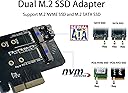
🚀 Elevate Your Storage Game!
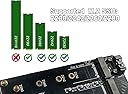
The Valuegist Dual M.2 PCIE Adapter is a versatile expansion card that allows you to connect both NVME and SATA M.2 SSDs to your PCI-E 4X motherboard. With support for various SSD sizes and easy installation, it’s the perfect solution for enhancing your storage capabilities.


| ASIN | B08M3VTY6D |
| Best Sellers Rank | 99,927 in Computers & Accessories ( See Top 100 in Computers & Accessories ) 233 in Computer Memory Card Adapters |
| Brand | Valuegist |
| Brand Name | Valuegist |
| Compatible Devices | Personal Computer |
| Compatible devices | Personal Computer |
| Customer Reviews | 4.2 out of 5 stars 345 Reviews |
| Hardware Interface | PCIE x 4 |
| Hardware interface | PCIE x 4 |
| Item Dimensions L x W x H | 10.9L x 6.6W x 0.8H centimetres |
| Item Weight | 25 Grams |
| Item weight | 25 Grams |
| Manufacturer | Valuegist |
| Manufacturer Part Number | Valuegist |
| Model Number | Valuegist |
| Number of Items | 1 |
| Operating System | Linux, Windows |
| Product dimensions | 10.9L x 6.6W x 0.8H centimetres |
| Style | modern |
| Style Name | modern |
S**N
Pcie adapter
Item works great with no issues, I used this to add a ssd slot to my pc as I maxed out my motherboard slots.
O**G
PCIE M.2 Riser/Extender
Bought two of these for adding in extra M.2's via PCIE lanes. Yet to test them as they were more of a side project. Brilliant build quality and sturdy too. Not expensive either. One M key and one B Key so one m.2 is straight PCIE then the other is handled by SATA.
R**N
Dual NVMe PCIe slot adapter
Although dual, it takes diffident types on NVE M2 units. B and M slots. The B slot uses the internal SATA on the motherboard where as the M slot uses the PCIe slot. Fine if you have both types but would prefer two new style slots for V4 slot options.p But I have both so no great problem for me.
M**N
PCI card,
Excellent
P**G
Simple to install
Works out of the box. Simple upgrade for older PCs to get the most out of M.2 SSDs, significantly increasing speed vs. on board M.2 slots. Worked out of the box and includes all necessary screws (except the optional backplate screw, which your case should already have).
M**I
Avoid - a cheap card
I would avoid this product. I have bought several different PCIe cards beffore and this one looks and feels cheap. It is not gold-plated, like the pictures lead you to believe, so it will have reduced performance. I was unable to install an NVME drive into the item because the little brass mounts are too think for my cards to fit into.
F**Z
You need superglue for the standoffs!
Great, I thought. Two interfaces, and a SATA interface in a PCIe card. There is absolutely no way to attach the standoffs without superglue as there isn't the correct fixings. Also the maximum speed on the M2 interface is 3,500. It works fine, but expect some DIY to actually use it.
J**E
Great way to expand your storage
This is a good way to add performance and extended your storage needs, straight forward to install. Check to ensure your NVME / M2 suds storage device are supported, ie , length…
B**S
DIY Storage Hero or Tiny Computer Chaos? A bit of both, but solidly working! :D
If your PC's storage situation is starting to feel like a hoarder’s closet, this little adapter steps in like a minimalist with a screwdriver. It supports both NVMe and SATA M.2 drives, meaning it doesn’t judge your SSD's past, just plugs it in and gets to work. The card feels solid, not like some flimsy piece of tech you expect to snap in half mid-install. Bonus points for including a SATA cable, because we all know those things mysteriously vanish when you need them. Installing it isn’t rocket science, unless your case has the cable management of a spaghetti dinner. Slide the card in the PCIe slot, attach the drive, maybe fumble a bit with the screws like a mortal human, and you’re good to go. No drivers, no drama, just straight-to-the-point storage expansion. That said, if you’re expecting blazing fast NVMe speeds from a SATA drive, welcome to a very polite reality check. Speed is also dependent on your system setup, motherboard and speed of your drives in the first place. It supports a variety of M.2 lengths, so unless your SSD is shaped like a baguette, you’re probably covered. The LEDs are subtle and won’t turn your case into a nightclub. It's basically a humble little workhorse that adds solid versatility without setting anything on fire... which is a low bar, but hey, tech has surprised us before. The only hiccup is airflow. Sandwiching an NVMe drive into this card without a heatsink is asking for thermal drama, especially if your case runs hot. And while it says it supports PCIe 4.0, your mileage may vary depending on your motherboard and how many fingers you crossed during installation. Still, it’s a great little add-on for breathing life into old SSDs. So bring your own heatsinks for the drives! :D 👍 Good Things: Supports both NVMe and SATA M.2 drives Comes with a SATA cable (because of course you lost yours) Handles various drive lengths like a pro No drivers or complicated setup 👎 Bad Things: Can run hot with no included heatsink PCIe 4.0 performance depends on your setup Cable management could turn into an emotional journey Not ideal for super compact cases
T**B
Good purch
Works perfectly with one misconception you can use both at once ! The description sounds like one kind of sad or the other but it's wrong am using big in truenas for cache / log drives
V**6
Excellent
Livraison rapide. Objet en tout point conforme à la description qualité et fonctionnement au rendez-vous . Vendeur à recommander !
P**I
Funzionalità
Super, sono rimasto molto soddisfatto, dovevo recuperare dati, da un ssd M2 PCIe, pensavo di non farcela, con questo dispositivo, é stato tutto molto semplice, non ho installato nessun drive, ho semplicemente montato ssd M2, e infilato nello slot PCIe del mio PC Desktop, ha funzionato alla grande, con una piccola spesa ho ottenuto dei grossi vantaggi, consigliatissimo.
A**N
Fungerar bra
Har testat den med två diskar samtidigt och det fungerade bra. Var lite bekymrad över att det stod "NVMe eller SATA III" i rubriken, utgick från att det skulle var "NVMe och SATA III" och så var fallet. Använder NVMe disken som C (system disk) och SATA III som D (data disk).
Trustpilot
2 months ago
1 week ago