Desertcart purchases this item on your behalf and handles shipping, customs, and support to Greece.
🖨️ Print smarter, save longer, and stay effortlessly connected.
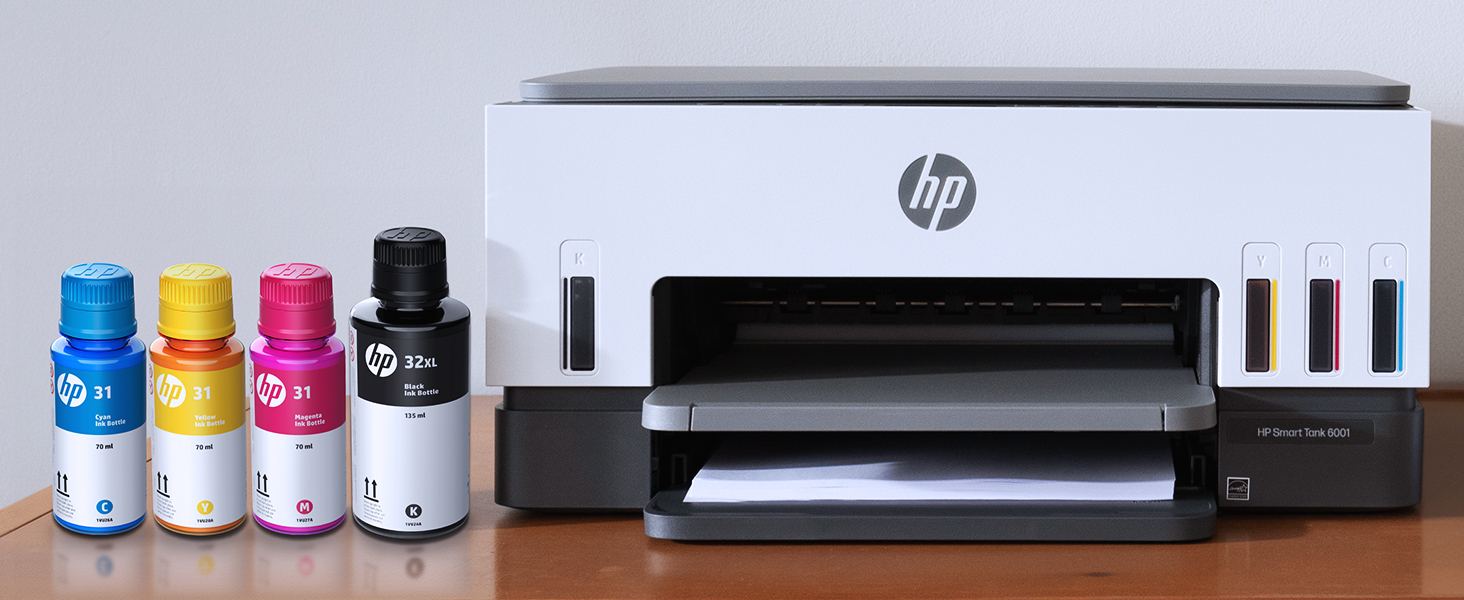
The HP Smart Tank 6001 is a high-capacity, cartridge-free ink tank printer designed for home and home office use. It delivers sharp, vibrant prints with up to 1200x1200 dpi in black and 4800x1200 dpi in color, powered by AI to optimize print layouts and reduce waste. Included are 2 years of original HP ink, enabling thousands of pages of low-cost, high-volume printing. Wireless and wired connectivity options provide flexible device compatibility, while features like auto-duplex, borderless printing, and easy mess-free ink refills make it a reliable, eco-conscious choice for professionals seeking quality and savings.


| ASIN | B09TPZ3HLZ |
| Additional Printer Functions | Copy, Scan |
| B&W Pages per Minute | 12 ppm |
| Best Sellers Rank | #3,604 in Office Products ( See Top 100 in Office Products ) #10 in Ink Tank Printers |
| Brand | HP |
| Built-In Media | HP Smart Tank 6001 All-in-One Printer; HP 32XL Black Original Ink Bottle; HP 31 Cyan Original Ink Bottle; HP 31 Magenta Original Ink Bottle; HP 31 Yellow Original Ink Bottle; Ink caution flyer; Setup guide; Reference guide; Regulatory flyer; Power cord |
| Color | Gray |
| Color Depth | 24 Bits |
| Color Pages per Minute | 7 ppm |
| Compatible Cartridge | HP 32XL 135-ml Black bottle (~6000 pages), HP 31 70-ml Cyan bottle (~8000 pages), HP 31 70-ml Magenta bottle (~8000 pages), HP 31 70-ml Yellow bottle (~8000 pages) |
| Compatible Devices | Laptops, PC, Smartphones, Tablets |
| Connectivity Technology | wired, wireless |
| Control Method | App, Touch |
| Controller Type | HP Smart app, Apple Airprint |
| Customer Reviews | 3.7 out of 5 stars 3,080 Reviews |
| Display Type | LCD |
| Dual-sided printing | Yes |
| Duplex | Automatic |
| EU Spare Part Availability Duration | 2 Years |
| Hardware Interface | USB 2.0 |
| Initial Page Print Time | A4 Black 15 sec; A4 Color 18 sec Seconds |
| Ink Color | Black; Magenta; Cyan; Yellow |
| Item Dimensions D x W x H | 14.33"D x 16.83"W x 7.82"H |
| Item Type Name | Inkjet Printer |
| Item Weight | 14.07 Pounds |
| Manufacturer | HP |
| Maximum Copies Per Run | Up to 99 copies |
| Maximum Copy Resolution Black and White | 600 dpi |
| Maximum Copy Resolution Color | Up to 600 dpi |
| Maximum Copy Speed Black and White | 11 ppm |
| Maximum Media Size | 8.5 x 14 |
| Maximum Print Resolution Black and White | 1200 x 1200 Dots Per Inch |
| Maximum Sheet Capacity | 150 |
| Maximum print Resolution Color | 4800 x 1200 Dots Per Inch |
| Model Name | Smart Tank 6001 |
| Model Number | 2H0B9A#B1H |
| Model Series | Smart Tank 6001 |
| Number of Trays | 2 |
| Other Special Features of the Product | Auto-Duplex, Borderless Printing, Network-Ready, Refillable Ink Tank |
| Output sheet capacity | 100 |
| Paper Size | 3.5 x 5 to 8.5 x 14 Inches |
| Power Consumption | 2 Watts |
| Print media | Envelopes, Glossy film, Glossy photo paper, High-resolution paper, Paper (plain) |
| Printer Connectivity Type | wired, wireless |
| Printer Output Type | Color |
| Printer Type | HP Thermal Inkjet |
| Printing Technology | HP Thermal Inkjet |
| Processor Count | 1 |
| Resolution | Black 1200 x 1200 rendered dpi; Color 4800 x 1200 optimized dpi color (When printing from a computer and 1200 input dpi) |
| Scanner Type | Flatbed |
| Series Number | 6001 |
| Special Feature | Auto-Duplex , Borderless Printing , Network-Ready, Refillable Ink Tank |
| Specific Uses For Product | Home and home office |
| Total Usb Ports | 1 |
| UPC | 196188310359 |
| Unit Count | 1.0 Count |
| Warranty Description | One year limited hardware warranty from the date of purchase; user replaceable parts have separate warranty periods |
| Warranty Type | Limited |
| Wattage | 2 watts |
M**E
Best printer I've owned!
I bought this printer after wanting to decrease my ink cost from a laser printer. I expect my print quality to be high, and I figured I wouldn't be able to find a quality printer. Boy was I wrong! After trying a few other brands with liquid ink, I bought this one and it did not disappoint. The ink is super easy to install, and the quality is near laser, but it's difficult to know the difference! I bought this so I could print my own cards for birthdays, anniversaries and anything else. Now I'm printing quality cards that I make myself, and I couldn't be happier! Once my husband found out I wasn't worried about ink consumption and how cheap the refills were, he's printed hundreds of pages of color for his classes, and they come out just beautiful! He wasn't too sure about me wanting to upgrade to a color printer, but now he loves it as much as I do! I have only used the scanner a few times because I have a document scanner that does more. However, the scanner works fine for larger or book scans. If you don't have another scanner, you will like at least having the option to scan. I especially like this printer over its larger models because the paper is SUPER easy to load! The larger ones need you to remove the entire front of the tray before putting paper in. This one you just take a stack of paper and slip it into the front of the paper tray. I can load it very easily from my chair without removing any parts. The printer connected to the wireless network pretty easy, and adding it to our phones and other computers was a breeze! I do notice every once in a while when the network is having trouble, it will scan for wireless networks and disconnect & reconnect. That usually isn't a problem, just something for you to know. After owning the printer a few weeks now and printing about 400 sheets of color AND about 50 greeting cards, the ink still reads full. I'm really looking forward to saving money on ink. I use the IP address to connect to the printers' interface, and I love that more than its software. Both work fine and similar. I highly recommend this HP SmartTank Printer for anyone who wants to save on money and have quality printed products.
B**G
Horrendous setup: should be called "PLUG & PAIN"
Bottom line: the print quality is very good IF YOU CAN EVER GET IT TO PRINT. Setup took weeks. HP was totally unhelpful. It will now print test pages from Windows, but can't get it to print a simple pdf document. HP was my favorite tech company decades ago, but this printer is so horrible on software that I will NEVER buy an HP computer product again. Another update in the migraine journey of making this piece of junk work: Beware the cost cutting tragedies of this product: 1) No bottom on the printer. I spent 2 days debugging an error caused by the power cord slipping under the printer and jamming it. This would not have been that bad except for: 2) No decent LCD display, so everything is in very cryptic indecipherable symbols because nothing can be in a real language. This, combined with horrendous lack of documentation means that it is a major effort to try to figure out error messages, or even how to reload the paper for duplex printing. Initial input: This is my initial review before I print anything. The reason for this review is that the HP software to set up the printer is far below what I expected. It does not work at all, and offers no reasonable path to resolve the issues. It can't find the printer on the network, and has no instructions to determine whether it is on the network or which network it is on. The printer display is horribly unhelpful. The wi-fi button is flashing, but what does that mean (since there is no help in the quick setup)? Windows gives me an option to enter the printer IP address, but no info on how to determine that. Does the person who put this setup page together know anything about how to do the job, or is he just good at translating jibberish from one language to several others? Update: I called in an expert and got the printer to recognize the network, and my Windows 11 computer to be able to see the printer on the network. Unfortunately, the HP software leans heavily towards running every document through the HP server, which I am NOT willing to do because HP has no reason to have any access to my private documents and once I give them the documents, there is no way to restrict how they use that private information which may include IDs and passwords. So, when trying to print without going through the HP server, the laptop recognizes the printer on the network, but I can't even get the test page to print since the print queue can't find the printer. And I can't get Windows to load any drivers onto my computer which will work. Also, my cell phone cannot connect to the printer at all, saying that no air printer exists on the network. HP's demonic insistence that I run every document through their server is making this printer a return item unless I can resolve the problem tomorrow. Setup update: I processed the return paperwork to get one more week to resolve this setup. HP Support has been totally unhelpful. My son has spent hours trying to find information online. It turns out that HP decided not to provide drivers for Windows operating systems. Instead, they want me to log in to their server every time I want to print, or I can load a hard to find ap on my computers and phone in order to use the printer. That is not totally safe, but marginally acceptable, so I have decided to keep this printer based on other reviews and it now seems to be printing properly through the ap which is more cumbersome than a good printer driver, but works. The test pages printed with excellent clarity. I will need to get a couple months printing done before making a final assessment, but in any case, the horrible setup problems which HP has created will still leave this printer with no more than a 2 out of 5 rating from me. If they want to decide to redefine computer to printer connections with their own contorted system, then they need to at least hire competent English thinking engineers to develop clear instructions for implementing their contorted creations. Instructions which assume specific system parameters which are not universal, or that leave out half the steps assuming that they will be added back in by an extensively trained installer are not acceptable instructions at all. We will see if this horrible software is able to print from all
S**Y
Set up is super easy!
I purchased this item a few months ago but put off setting it up because I am not technically adept at setting stuff like this up. So I finally decided to bite the bullet and set it up. I highly recommend downloading the HP app, it goes step by step with pictures. And since I am a visual person, this was great! It was so easy! As long as you follow the instructions in the order it tells you, you won't have any issues. So far the printing has been great. I'm glad I finally got my new printer set up.
C**E
well made
Works very well. Sometimes it's difficult to connect from other other computers or devices, but I'm catching on. Doesn't seem to use much ink. I'm happy.
D**W
9-months in and Product Already Paid for Itself
After evaluating cost of print cartridges on our HP DeskJet printer over the past two years, we realize we were spending almost J$100k per year. This HP Smart Tank printer promises two years on initial ink supply. 9 months in and the black cartridge is a shade less than half way, while the color cartridges are three quarter full. Based on the results thus far, this printer has already more than paid for itself. Just have one or two occasions when you have to unplug to reset the device, but other than that...it is a great buy.
M**E
I hate this printer!!
I am a homeschool mom who essentially prints out basic worksheets or recipes from online. Occasionally I want to print a photo from a vacation. My needs aren't crazy. This printer has been a booger from day one. To start, there isn't ANYTHING you can do with the information on the screen. It's useless. The only function that you can do from the printer itself is make a copy, either color or B&W, IF the button decides to work. If the printer is asleep or offline (I never understand how that's even a thing), it won't copy. I have to turn it off...but then I can't turn it back on with the same button. I have to unplug it and plug it back in. Then I can make a basic copy. If you hit the wrong button, or do the wrong button order trying to figure something out, all of the buttons start to flash. Again, unplug and plug back in to fix it. The HP app is the only way you can scan...and the program will either do a great job, or crash after a page, or make you start over for some reason, or...forget that it's supposed to be scanning and will just freeze. Again, unplug and plug back in to reset. Edited to add: as a photo printer, it's abysmal. I tried every way I could think of to print a few 4x6 pictures. It recognized the photo paper size, but it cut off the top of the picture once, created a 1/2" border on the top the second try...the colors were completely different on both. I tried a different picture, using a different program, and got the same issues. So no two pictures printed were the same, even though the settings for the printer were. Sad. Are you seeing a theme? This is the most un-user-friendly printer I've ever owned. I now miss my old Epson that I had before this that was about 10 years old. At least on that, I could manage things on its display screen. On a plus, this HP does seem to sip the ink, so I like the bottles instead of having to buy cartridges. It's also only lost wifi connection once. Buuuuttt, good luck making things easy if you want to switch networks. THAT was ridiculously convoluted (my situation was simply connecting to an extender that was closer to the printer). Would I buy this printer again? Heck no. I am no longer going to have a printer that relies solely on app programming. I want to be able to use a display screen. Would I recommend this to someone? Only if I wanted them to suffer with technology. This was absolutely not worth the ~$250 I paid for it. Boo.
M**Y
Beat printer for you money
This is the best printer I have ever used. I used to have to buy a couple cartridges of ink per month with my old printer. This one is phenomenal. It will pay for itself. I've had about 4 months and still using the initial ink I put in, and the ink is much cheaper than the cartridges.
C**B
Great printer deal
This is a returned item that I purchased. I read it was mint. IMO, I think someone ordered it and decided they either wanted something different or just didn't want it. Everything was there and it looked like it never had been used. I'm very satisfied and the set up was easy since I already had the HP app.
S**D
Huge upgrade from an Epson ET-2850
In 2017 I bought an Epson ET-2850, because for years before that Epson never let me down and I was off of HP at the time. Anyway, things have really changed and that printer was a nonstop source of frustration. Fast forward 6 years and I had just had enough. Settled on the HP Eco Tank 6001, and it's just so much better in every way. Prints much, much faster. It can do two sided printing. The WiFi connection is actually usable without jumping though hoops. Photo printing quality is on par but takes less than a quarter of the time. I can say setup wasn't exactly a breeze and was a bit frustrating, but that's a one time thing. Printer had to be online for the setup to complete. My printer's IP is now blocked by my firewall. It will never speak to anything on the internet again. This ensures no unwanted firmware updates that disable functionality, which is apparently an issue some people have faced. The printer didn't come with a USB cable but I had one lying around. It's the old square type. When you set the printer up, you're forced to "choose between USB and WIFI" and it disables whatever option you don't choose. I was able to reenable the USB right after however, and both work fine side by side. This made my life a lot easier because printing from PCs is a pain over WiFi (can't cross LAN segments) and printing over USB is nearly impossible for mobile devices. I can't speak for ink costs as I'm not a heavy user, but once you've used an eco tank type printer, the idea of having to pay for cartridges every few months is just a bad memory. You are saving HUNDREDS of dollars. One of my main gripes with my old printer was trying to clean the print heads when nozzles clogged. At first it was possible, but it got to a point where nothing I did worked. If that ever happens with this printer, the print heads are replaceable, easily.
M**K
Good value and performance
Love this printer. Great price point and solid performance after a really easy set up. Great colour output and print speed. Trays are a bit flimsy but acceptable at this price point. Now I want to see how long the ink lasts - if it lasts two years I’ll be happy but it’s easy to see HP makes their money when you buy their toner.
A**M
Great Printer, But Be Prepared for Slow Speeds and Occasional Jams
The HP Smart Tank 6001 is a solid all-in-one printer with a lot of great features, but there are a few things to keep in mind before buying. First, the good stuff—the print quality is excellent, and having up to two years of ink included is a huge bonus. Once set up, it works flawlessly for everyday printing, scanning, and copying. The cartridge-free ink system is efficient, and refilling is mess-free compared to traditional cartridges. Wireless printing from my phone or laptop has been smooth, and I love not having to deal with constant ink replacements. Now, the downsides—the printing speed is incredibly slow. If you’re in a hurry, this might not be the best choice, especially for large documents. Additionally, paper jams happen occasionally, which can be frustrating, though they’re not a constant issue. The initial setup was also a pain, taking longer than expected to get everything connected and working properly. That said, once the setup is done, it’s a hassle-free printer that does exactly what it’s supposed to do. If you can deal with slow speeds and the occasional jam, this is a great long-term printer with excellent ink efficiency.
D**E
Printhead Failure
Printhead failures constantly continue HP does this support/reset every time and they get it working but it fails the next time I go to print. So I go through it again and again and they won't do anything to resolve the real issue. This is not how this product should work. When it does print the print quality is excellent. Very disappointed with the service from HP they actually closed my support case without resolving the issue. Not cool for such large company. They have seen the issue by accessing the camera on my phone during the support call and still not getting the issue resolved is very frustrating. Very frustrating to have to unplug and leave it unplugged for 1 minute then take out the printheads and reinstall everytime I want to print. If the product is clearly defective then replace it! Call centre in India certainly doesn't help. I wish these things were disclosed upfront before purchasing a product so the consumer can make an informed decision. I have asked for everything to be in English and they continue to send every email in French I feel this is very disrespectful.
H**R
Bluetooth setup with mobile device
I had trouble with Wi-Fi/Bluetooth setup, but today it went well. I don't know what I did wrong, but is working fine now. I use the printer frequently mostly personal. I also do things for others like helping them with income tax and always make copies. My biggest project is a memoir and will need to print numerous pages sometime. Since the printer hasn't been here but a few days it hasn't been tested. I used the scan feature, and copy and want to learn some of the shortcuts. Once I have time to do more I am sure I will be satisfied. Thanks
Trustpilot
2 weeks ago
3 weeks ago