๐ Elevate your workspace with WiFi 6E power โ donโt get left behind!
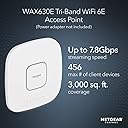
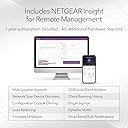
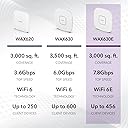
The NETGEAR WAX630E is a cutting-edge WiFi 6E tri-band access point delivering up to 7.8Gbps speeds and supporting 456 clients over 3,000 sq.ft. Designed for enterprise environments, it features advanced security protocols, multi-gig Ethernet ports, and cloud-based remote management via NETGEAR Insight. Ideal for modern offices demanding ultra-fast, reliable, and secure wireless connectivity.


| ASIN | B09S8QDB4B |
| Antenna Location | Business |
| Antenna Type | Fixed |
| Best Sellers Rank | #42 in Computer Networking Wireless Access Points |
| Brand | NETGEAR |
| Built-In Media | Installation guide, Warranty/support information card, WiFi 6E AXE7800 Tri-Band Access Point (WAX630EP), Power Adapter |
| Compatible Devices | Personal Computer, Smartphone |
| Connectivity Protocol | Wi-Fi, Ethernet |
| Connectivity Range | 2750 Square Feet |
| Connectivity Technology | Ethernet, Wi-Fi |
| Control Method | App |
| Controller Type | Switch |
| Coverage | 2,750 sq. ft. |
| Customer Reviews | 3.8 out of 5 stars 66 Reviews |
| Data Transfer Rate | 7800 Megabits Per Second |
| Frequency | 6 GHz |
| Frequency Band Class | Tri-Band |
| Has Internet Connectivity | Yes |
| Has Security Updates | Yes |
| Is Electric | No |
| Is Modem Compatible | No |
| LAN Port Bandwidth | 5 ghz |
| Manufacturer | Netgear |
| Maximum Upstream Data Transfer Rate | 7800 Megabits Per Second |
| Mfr Part Number | WAX630EP-100NAS |
| Model Name | WAX630EP-100NAS |
| Model Number | WAX630EP-100NAS |
| Number of Antennas | 4 |
| Number of Ports | 2 |
| Operating System | Proprietary Networking OS |
| Other Special Features of the Product | Remote Access |
| Router Network Type | router |
| Security Protocol | WPA2/WPA3 |
| Smart Home Compatibility | Not Smart Home Compatible |
| Special Feature | Remote Access |
| UPC | 606449159639 |
| Warranty Description | 5 year limited warranty |
| Wi-Fi Generation | WiFi 6 |
| Wireless Communication Standard | 802.11ax |
| Wireless Compability | 802.11ax |
B**E
Works great!
Works perfectly for my home lab setup and running several SSIDs on different VLANs. My only gripe is that the web interface isnt very fast and router restarts can take a couple minutes. I'm running this AP with a Netgear MS510TXM and a Beelink EQ12Pro running OPNsense for my router and firewall. It's a great setup for a home lab as long as you have a strong understanding of network technologies.
T**N
If you know what you're doing, this is a great access point.
I needed to update an access point in my home network. This model has all 3 bands: 2.5g, 5g and the new 6g bands. My house has 6 neighboring houses and 2 more houses across a street in front of it. That makes 9 households that could all be using wifi. I wanted to be able to use some wifi channels that everybody else were not already using. Can you say wifi 6E? Not many people even know that the 6ghz band even exists yet. Perfect for me! My new phone and laptop are both 6E devices. I still have a bunch of older devices that are at wifi 5 (802.11ac) and even wifi 4 (892.11an) level. They are slower and can use the very crowded 2.4g or less crowded 5g bands. I started to use the Netgear insight program to try setup my replacement access point. I did not like the settings that it wanted to use. I quickly aborted that process and had to call customer support to get my device removed from their cloud management system. (The insight system wanted to try to create a mesh system. I just use multiple access points to eliminate weak signal areas. My devices don't move around. Some may be portable, but they don't move when they are being used.) After I got my device released from the cloud setup was easy for me. I implemented my security so that unknown devices cannot join my network and now I have wifi 6E in 2/3 of my house. This access point looks good and it works good what more is there to be said? Oh, and I control my own settings instead of Netgear controlling my network for me.
S**โ
Very Buggy Web Interface, Does Not Work With HomeKit
UPDATE May 23, 2024: I bought a Cat 8 ethernet patch cable and swapped out the Cat 6 and the WAX630E AP was finally able to connect at 2.5 Gbps on the NETGEAR MS108EUP switch. After playing around with the mDNS settings, I was able to get most of my HomeKit/IoT devices working. It also involved downgrading the firmware to the previous version just before the latest release, which is V10.7.0.11. Enabling mDNS and creating an "Apple Net Assistant" policy pointing to the HomePods IP addresses on my network seems to resolve the HomeKit issues. It was not clear which "Shared Service" I needed to use to get HomeKit, (_hap._tcp.), to work. A very long process of trial and error help me find the "Shared Service" that would work. There should be more clear and more detailed documentation about the mDNS and policy configuration. Enabling mDNS created another problem; I am no longer able to manage the access point from the web interface if I am connected wirelessly to it, unlike before enabling it. I would have to wirelessly connect to another AP or physically plug in a network cable, on the same network as the access point, to manage it. I figured, hey at least now everything is somewhat working now and I donโt mind the trade-off of having to physically plug-in to the network or connect to different AP to manage NETGEAR WAX630E APโฆ BUTโฆ the throughput started to degrade severely. Iโm using a MacBook Pro M1 Max, iPhone 13 Pro Max, iPhone 12 Pro Max, iPad Air, Lenovo Yoga. All of these devices hav WiFi 6 radios installed. After the WAX630E was up and running for about an hour or two, the throughput to all of these devices degraded. Before, I would connect with download and upload speeds of over 840 Mbps, and now I can barely crack 150 Mbps. My Connection speed remains at a Tx Rate of 1,200 Mbps and PHY Mode: 802.11ax but I still get these super slow speeds. If I connect to my old Apple AirPort Extreme, I will get download and upload speeds of just about over 600 Mbps with a Tx Rate of 866 Mbps and PHY Mode: 802.11ac. I contacted net gear support, but they have yet to respond back to my ticket update that I sent in on 19 May 2024. This AP will be returned. Dear fellow consumers listen to the other critical reviews that say to stay far away from this device. It is less than half-baked. ============ Original Review ============= I bought the to replace my aging AirPort Extreme and Meraki AP, The specs were everything I needed. Given the price point and its claim to be business oriented, I expected everything to work without any issues, also the fact that this AP has been out for about a year or two. Backward compatibility with older devices and HomeKit compatibility were the dealbreakers. I could not get HomeKit devices to work properly. HomeKit devices haver error that says "no response." Devices include Wemo smart plugs, Wemo Dimmer Switches, Ecobee Thermostat. I configured inter-VLAN routing on my Firewalla Gold firewall. There is a VLAN for IoT and a VLAN for other devices which include HomePods and Apple TVs. I created an SSID for IoT and an SSID for the other devices. Updated firmware on WAX630E, enabled mDNS reflector on Access Point and Firewalla Gold firewall, Configured IoT SSID frequency for 2.5 GHz Only, configured channel to the least used, configured only 802.11ng. This resulted in intermittent connections with the IoT devices, would connect and then drop. I monitored this with Tildesoft.com's Discovery tool _hap._tcp. When I switched back to my old Apple AirPort Extreme or my Cisco Meraki AP, HomeKit/IoT devices communicate and work fine. When connected to any SSID produced by the WAX630E AP, browsing to IP address to access the management Web interface is very slow and buggy. I get frequent timeouts and disconnects. Managing the AP from a wired connection that is on the same network is much stable or being connected to a different AP wirelessly I was using Safari an Firefox on macOS. The managing the AP while connected to it was much more stable and faster on the older firmware, V10.2.0.17, it shipped with out of the box. When I upgraded to firmware V10.8.6.3, the instability was very pronounced. I did not try managing the AP from NETGEAR Insight (Cloud/Remote) as I do not have many APs and I do not want to pay for another subscription. This AP has been out for a while, and these issues should've been resolved by now. If Netgear could get their act together fix this AP with a firmware update, this would be an excellent/near perfect product.
T**N
Very good access point
This Netgear Access Point (AP) works as expected and the web based gui for managing the AP is excellent. This Netgear access point was sold as "new" by IPC-Store. However, it had previously been configured and registered with Netgear by a previous owner. I had to do a factory reset to configure the access point for my network. IPC-Store should be more honest about the condition of items for sale. UPDATE: IPC-Store contacted me and acknowledged their error in selling a used item as new. They offered me a replacement or partial refund, my choice. IPC-Store customer support is first rate. I wouldn't hesitate to purchase from them again.
L**Y
Best I've Ever Used
I've used many wireless routers and access points over the years. I've used Linksys, ASUS, and others. We all had their pros and cons , but I haven't found any faults with this. The signal strength throughout my home is incredible. The Wi-Fi 6E speed is impressive. The configuration flexibility provide lots of options without being complex. The cloud management through Netgear, called insight, is incredibly easy to use. It costs $10/year per device to manage them through the cloud. It's worth it though. I bought two for opposite ends of my home and they work together perfectly. Devices transition easily and I now have no dead spots in my house. Was previous models, I found myself continually tweaking and tuning them. These have been pretty set and forget.
P**E
Powerful access point
I upgraded to this from an Orbi Pro. My main reasons for upgrading were: 1) I wanted Wi-Fi 6 to reduce congestion for video calls 2) I wanted to segregate traffic into multiple VLANs (mainly to keep cheap Chinese IoT stuff away from my main network) This unit has delivered in all ways I could have wanted. Far more robust than Orbi Pro. Performance has been very good, and my video calls are perfect now. Also, performance on 5GHz and 6GHz is good. I can easily maximize my 600 Mbps ISP connection.
J**N
Overpriced, Mediocre range
Been using for a month with 5 x SSIDs and VLANs. Itโs been reliable, but the range is relatively poor and the maximum speeds are not achievable without manual tweaks to the configurations. Itโs billed as though youโll see those 1x Gbps out of the box but it takes fiddling and some constraints on how close you are to it to see those speeds. Itโs a bit frustrating for the price you pay.
A**R
Future proof product for now
very good product very easy to setup high speed and so far no problems very happy really recommended
Trustpilot
2 days ago
2 weeks ago