Buy anything from 5,000+ international stores. One checkout price. No surprise fees. Join 2M+ shoppers on Desertcart.
Desertcart purchases this item on your behalf and handles shipping, customs, and support to Greece.
🎨 Draw your future with precision and portability!
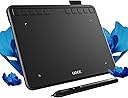
The UGEE S640 is a lightweight, ultra-thin 6.2x4 inch drawing tablet featuring 8192 levels of pressure sensitivity and ±60° tilt support. Equipped with 10 customizable shortcut keys and a fast Type-C connection, it offers seamless compatibility across Windows, Mac, Linux, Android, and Chrome OS. Designed for artists, students, and professionals, it delivers a natural drawing experience with a battery-free stylus, making it the perfect portable creative companion.


| ASIN | B09MLR8BC6 |
| Active Surface Area | 6.2 X 4 inches |
| Best Sellers Rank | 10,027 in Computers & Accessories ( See Top 100 in Computers & Accessories ) 31 in Graphic Tablets |
| Box Contents | Battery-free 8192 Passive stylus, Type-C cable |
| Brand | Ugee |
| Brand Name | Ugee |
| Colour | Black |
| Compatible Devices | Desktop, Laptop, Smartphone, Tablet |
| Connectivity technology | USB |
| Country of Origin | China |
| Customer Reviews | 4.4 out of 5 stars 1,787 Reviews |
| Display Type | LCD |
| EU Spare Part Availability Duration | 5 Years |
| External Testing Certification | Não aplicável |
| Item Dimensions L x W | 16.2L x 21.5W centimetres |
| Item Weight | 280 Grams |
| Manufacturer | UGEE |
| Manufacturer Part Number | S640 |
| Model Name | S640 |
| Model Number | S640 |
| Model name | S640 |
| Native Resolution | 1600x1200 |
| Network Connectivity Technology | USB |
| Operating System | Multiple Operating Systems (Windows 7/8/10, Mac OS X 10.10 or higher, Android 6.0 Chrome 88 Linux) |
| Operating system | Multiple Operating Systems (Windows 7/8/10, Mac OS X 10.10 or higher, Android 6.0 Chrome 88 Linux) |
| Pressure Sensitivity | 8192 Levels |
| Pressure sensitivity | 8192 Levels |
| Product Features | 60° tilt stand |
| Screen Size | 6 Inches |
| Special feature | 60° tilt stand |
| Specific Uses For Product | Drawing, Design, Painting, Teaching, Online Education, Editing, 3d Modelling, E-signature, Writing |
| Target Audience | Student, Teacher |
E**R
Great
Great product
P**I
its a little small but an okay size
this item is AMAZING works well with my laptop
B**M
Should I buy this?!
I really want to buy it! But is it a good size? I dont know… Please write more reviews as I would find it helpful to clarify if I should buy this product. Pictures look great though! Is it worth 20 pounds? Please write more reviews. THANK YOU!
H**H
Great Value, Plentiful Customisation
This is one of a few drawing tablets I have used and it arrived neatly package and was very easy to set up. I've used it on my Windows 10 laptop as well as android tablet. You could simply "plug and play" but it's so much more customisable with the software and driver provided by their website, labelled on the bottom of the box. There are 2 user guides, one is for PC/Laptop, second for mobile devices. There are 2 port adaptors included, converting the USB-A cable provided to either Mirco-USB or USB-C. The cable is 1.5m long, more than long enough for my needs. The keys at the top can be customised with the software and it's quick and simple to re-programme them so I can easily change depending on what sort of stuff I'm doing and streamline its process. The tablet only picks up the stylus so no issues resting my hand on it and I've found it suitable for left-handed users - my sibling had no issues either. The stylus is the perfect size and weight and feels comfortable when using for long periods of time. You also get a metal ring device, used for replacing the 9 spare nibs included too. I have used it for 2 weeks since receiving it and have not had any scratches on the tablet nor any issues with any of the buttons both on the tablet and on the stylus. Being so slim and lightweight, very easy to slip it in with my office laptop in its pouch and not even notice the weight difference. Overall I have really enjoyed using it both for drawing as well as for work. Definitely would recommend for those seeking great value on a budget or a spare to travel with.
C**T
Lightweight and good value
I purchased this drawing tablet for use in my work, primarily for creating Inkscape designs. It was very good value, and I have already got considerable use out of it! It is lightweight yet still a good size, which is really important for me, as I need to be able to carry it around easily. I would highly recommend it to anyone thinking of trying a graphics tablet.
J**E
Easy to install
Nice product,very friendly and cooperative
M**E
A Poor Investment
Very poor instructions. The written instructions are inadequate ( shows power button that does not exist) and does not label the short-cut keys. The set-up and operating windows seem to assume that the user understands how to use the pen and a generic tablet. This makes it hard to set up and link with a draw/paint application. Using the pen to select the draw/paint app functions is tricky as the cursor pointer is so small. The bottom-line is I have abandoned trying to use this - have spent several days trying to make this work and have now timed-out on returning it to Amazon. Grrrrr
T**N
Drawing tablet
V.nice.. good quality.. tried on several different operating systems.. plug n play- works straight away... Nice length of cable & pen sits in hand nicely too ... Using for Inkscape graphical package.. Thanks
C**E
Bon fonctionnement, pas de lag
L'appareil fonctionne bien et il ne semble pas y avoir de lag. Bon appareil peu cher
P**R
easy to download program
SHE LOVES THIS. SHE WOULD LOVE TO BE A GRAFIC ARTIST
G**Y
en attente de réponse
après avoir vérifié la compatibilité Chromebook, impossible de trouver le logiciel compatible. j'attends des infos du constructeur. pour le moment elle ne me sert à rien
A**R
Great, budget, drawing tablet with a learning curve.
I received my Ugee 15.4 drawing tablet today and was impressed with the size for the price. I wanted to use this with my Samsung Fold 3 and it connected perfectly and flawlessly with DEX. The fold even becomes a track pad for gesture, pinch enlarging and repositioning of an image. Through Dex, the tablet displays a beautiful desktop interface with access to everything that is on the phone. You must buy an additional usb-c gen 2 4k cable in order for the phone mirroring to happen. The fold 3 is fast and capable but I was having pen lag, especially in several apps. I work In Sketchbook but the stylus didn't work well in the app. I went through 5 drawing apps until I found Concepts in the app store. It must all come down to software performance because there is no pen lag or other issues with this app. The screen is a matte finish with beautiful color depth for a tablet in this price range. The size is awesome because I am an aging artist with little sight issues emerging every year. It does come with a partial glove, stylus, nibs, and interface cord. It does not come with an adjustable stand which makes it very flat and hard on the neck after hours of use. A stand will be my next buy. I really like it now that I got through the trail and error phase. It states clearly that this is not a stand alone tablet so keep that in mind. You have to have a Microsoft based computer, a Mac, or an Android phone with DEX. You can also mirror most apps that support stylus input. This screen responds to the stylus only and not to your touch. In this way your hand can't smear or add damaging lines or marks to a drawing. If you are not techbically inclined you will have problems getting it setup. If you are patient, its so worth the trouble. For the price and quality, I highly recommend it!
D**Y
しっかりした作りで使いやすいです。
仕事で大型のtabletを使用してきましたが、自宅での趣味用に購入しました。しっかりとした作りで使いやすい。WINDOWS10上でPhotoshopで使用していますが、反応速度、分解能も問題ない。充分に使えます。付属のマニュアルは極く簡単なものですが、それなりのものがダウンロードできます。その先は、tabletを使用したことのある方なら、特に問題なく使用できると思います。推奨できる機種です。
Trustpilot
2 weeks ago
2 weeks ago