

Desert Online General Trading LLC
Dubai, United Arab Emirates
Desert Online General Trading LLC
Dubai, United Arab Emirates


🚀 Elevate Your Build with ASUS Power!
The ASUS PRIME B250M-C/CSM is a robust mATX motherboard designed for high-performance computing. It features dual M.2 slots for enhanced storage options, advanced cooling technology with FanXpert 2, and premium audio capabilities, making it an ideal choice for gamers and professionals alike. With its 5X Protection III hardware safeguards, this motherboard ensures reliability and longevity, all while fitting perfectly into compact spaces.
| Processor | core_i5 |
| RAM | DDR4 |
| Memory Speed | 2400 MHz |
| Number of USB 2.0 Ports | 2 |
| Brand | ASUS |
| Series | ASUS COMPUTER INTL |
| Item model number | PRIME B250M-C/CSM |
| Item Weight | 1.28 pounds |
| Product Dimensions | 10.24 x 2.03 x 10.63 inches |
| Item Dimensions LxWxH | 10.24 x 2.03 x 10.63 inches |
| Manufacturer | ASUS Computer International Direct |
| ASIN | B01N9FC8O7 |
| Is Discontinued By Manufacturer | No |
| Date First Available | December 9, 2016 |
A**R
Works as advertised
Great board per cost, booted first time, no memory issues and all works great. I've had problems with higher end boards and feed up with compatibly issues with memory, ssd's m2 and other driver issues. This board is very simple but works great.
M**O
A nice and great motherboard for the essentials.
A great simple motherboard for those needing to get a system up and running with the essentials. UEFI is clean and easy to navigate, features are great for the price. Has some simple orange lighting on the motherboard which can be set to breathe or remain steadily lit. 6 SATA III ports give it plenty of storage options and 2 M.2 slots are a nice to have too. 4 slots of DDR4 memory give it plenty of room to upgrade later down the road. However do note that if you do use a SATA M.2 SSD in place, the first SATA port will be disabled. So do not panic.
B**M
Seems like a good board but tough to install windows 7 on it.
Bought this to replace a mobo that died in my Mom's computer. She just browses the net, emails, word prosessing and watches dvd's on it so I didn't need anything to fancy and this seemed to fit the bill because she's used to Win 7 and and the documentation said I could install that on this board.The install of the board wasn't to hard, but like some have said the documentation they send is minimal. Used a online pic of the board to help and also the pdf files on their site with the pin locations. Figured it all out and last thing I was connecting were the psu. Put in the 24 atx connector and then took my 8 pin connector from the psu and looked for it's home on the board. THERE IS NO 8 PIN SLOT ON MOBO. There is only a 4 pin slot for atx on the board. Searched the web and finally fiqured out that you can put the 8 pin in the 4 pin slot and let it overhang and it will work. But the way I put it in the first time didn't work. PC wouldn't turn on. Flipped it around 180 degress, plugged it in and it powered up. Just bringing it up incase someone else runs into that.On to trying to install win7. That took me longer than the build. There are certain requirements, including hardware. You can only use 6 gen cpu's and no higher 2133MHz DDR4 memory. It's in the specs under OS's. Plus you needa copy of win7 either cd or usb and the mobo driver dvd and you have to boot with them both in at the same time because it needs to load the drivers to be able to install win7. I have a win7 install disk so I bought a ODD as they suggest and had a sata dvd drive in the case. They give 3 ways to do it and this is their first choice, with two dvd players hooked up. It took me about 3 hours to finally get things to load right and in the proper order before it would finally load 7. Kind of a pain but the sequence is in pdf on their website for this board under win7 install but it didn't go as smooth as the pdf suggests. If anyone's got a question I'll try and answer it. I wish I had someone to ask. :}So I hope the board stands the test of time. Seems from the reviews, it should. I'll update this post in a while with my findings.Update 3/2/19 Board is running flawlessy. No issues. I like the software that comes with the board. It monitors it and you can keep an eye and adjust things from the window gui. It also makes downloading the latest bios as easy as point and click.
C**S
Recommended general use Kaby Lake board
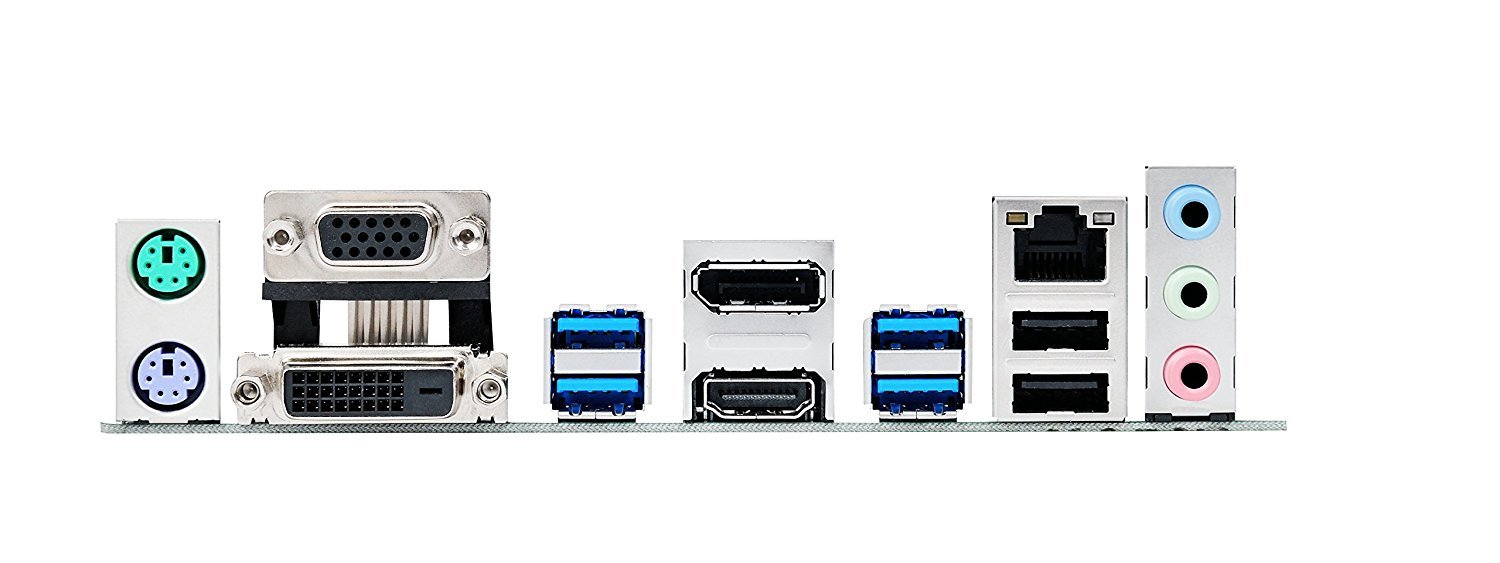
It's difficult to choose your desired motherboard solely based on reviews. There always seems to be 10-15% of reviewers giving 1 star for DOA's or dead memory slots and I always wonder if these things are due to user error or not.It seems appropriate to give 5 stars for the opposite experience: a board that works on the first power up and survives a 48hr burn-in period. This is one of those boards. I have not tested with a PCIe video card since the on-chip Intel HD610 graphics drive my 3 monitors at 1080p and rather quickly. I chose this board because it has the 3 video outputs: VGA, DVI-d and HDMI and I need 3. I have not tested the M.2 slots or optane. EDIT: I now have installed a 275gb M.2 drive from Crucial and it works no problem, not sure it's any faster than the Samsung SSD but it runs about 10 degrees F cooler given it's close proximity to the CPU fan. here is the link for the M.2:https://www.amazon.com/gp/product/B01IAGSDJ0/ref=oh_aui_detailpage_o04_s00?ie=UTF8&psc=1I'm not a gamer, so my board is sparse. It was easy to install the CPU/fan, memory, power supply connections, and sata cables of which 2 were included. The cap over the the CPU socket protecting the pins was in place when I opened the box and I can assure you there's no way that cap could ever come loose or fall off during shipping, just not possible. I always run with the case open so I did not test/use the I/O shield.I have tested the USB 2 and 3 ports (not the USB-C), the sound, and 2 of the sata ports, all is well so far and the pulsing red on the board does not bother me, it's somewhat comforting in that it shows a working board, although be aware it continues as long as the power supply is on, whether the machine is in sleep mode or shut down, this can be changed in the BIOS setup.memory that I can verify works on this board is here:https://www.amazon.com/gp/product/B01BIWLFGQ/ref=od_aui_detailpages00?ie=UTF8&psc=1I have 2 of those installed and no problem.The g4560 processor that I can verify works with it is here:https://www.amazon.com/gp/product/B01NCE8T92/ref=oh_aui_detailpage_o01_s00?ie=UTF8&psc=1It is a dual core but hardware monitors and Win10 device manager will show 4, due to the threading.The BIOS setup is very easy to use although I don't need too much of it since I gave up overclocking anything years ago.I've had good experiences with Asus boards as well as Gigabyte, BioStar and MSI.The board runs cool as does the processor, maybe 10-15deg F above ambient.Edit: added a picture of the HDMI port since someone said it doesn't have one, yes. it. does.
D**N
When your old and can not see as well quit building computers
Loved the board until all usb ports quit working. Sent it back to Asus for warranty repair but when it arrived at service center they said cpu pins were bent and not covered by warranty. I guess I should have lived with the usb pcie card I installed to make it work, however I had invested money in ram and M.2 ssd for the motherboard, so I bit the bullet and bought another board just like it. Hope this one doesn't fail in 4 months like the first.
Trustpilot
2 weeks ago
1 week ago