
Desertcart purchases this item on your behalf and handles shipping, customs, and support to Greece.
🔋 Stay powered, stay ahead – never miss a moment!
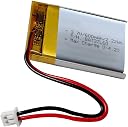
The AOLIKES 3.7V 503040 600mAh LiPo battery is a compact, rechargeable power source designed for seamless replacement in devices like the SkyBell HD video doorbell, Cozmo Vector Robot, and various Bluetooth-enabled gadgets. Featuring a built-in protection circuit for enhanced safety and a genuine JST 2-pin connector, it delivers reliable 2.22Wh energy in a sleek 40x30x4.8mm form factor.

| ASIN | B07V22WWRJ |
| Best Sellers Rank | #106,999 in Mobile Phones & Communication Products ( See Top 100 in Mobile Phones & Communication Products ) #501 in RC Batteries #133,454 in Mobile Phone Accessories |
| Item model number | LP 503040 |
| Manufacturer | XINLANTECH |
| Product Dimensions | 4 x 3 x 0.5 cm; 12 g |
J**S
Terrific replacement battery for Anki Cozmo robot
This battery doubles the play time/capacity of the Anki Cozmo robot to about 80 minutes from about 30 minutes max on the original 320 maH battery in the Cozmo robot when it is new. The fit is snug because the battery area has a maximum length in the enclosure of exactly 40 mm. The specific model number of this battery (503040) means the battery is 5.0 mm thick, 30 mm wide, and 40 mm long. The original battery is 503230. Many Anki Cozmo robots were manufactured in 2017, and LiPo batteries of this type often start to fail after about 3 years - especially if they have been used and recharged multiple times. Failure is usually apparent with inability to connect (or stay connected) to WiFi, or sudden shutdown after only several minutes. The beauty of this battery is that it already comes with a ready connector, so you have the option of soldering in a two-wire (+/-) female connector onto the battery connector board (easily obtained from RC supplies stores, ebay or Amazon), or just snipping the wires to fit, feeding them through the circuit board to the correct areas, and soldering them on to the board. There are excellent videos on YouTube that instruct how to do this (for people who don't mind DIY). For $20 you can completely renew and upgrade your Cozmo and not have the wait time of sourcing direct to China through a site such as AliExpress - which may take 1-2 months.
B**S
Just what Vector needed
Was for Vector Robot, fitted and worked well.
M**A
Passt in einen Cozmo Roboter
Passt gut in einen Cozmo Roboter
S**R
Bon article
Utiliser pour upgrader un cozmo, cette batterie ne m’a pas fait défaut et offre uns plus grande autonomie au robot. Le logement est un peu juste cependant mais en forçant un peu ça rentre
T**E
This fixed my Skybell HD - How to install battery
My Skybell HD was behaving very erratically - the LED was always flashing different colors, or was off altogether. Seldom was in a solid green (normal). It turns out that the internal battery was swollen and no longer able to hold a charge, so the Skybell HD was repeatedly shutting itself down (no LED color) and then rebooting (solid yellow LED) in an endless cycle. There was no error code generated because the old battery was still reading the correct voltage, despite being unable to hold virtually any charge. Now, after replacing the battery with the AOLIKES 3.7v 503040 600mAh Lipo Battery, everything is working perfectly again. After booting itself up and resyncing with WiFi, the Skybell HD now shows a steady green LED, just like new. TIP FOR GETTING THIS BATTERY TO FIT: The bottom corners of the foil wrap on the battery that I received were not folded down properly. Thus, I could not get the replacement battery to fit. The corners were sticking out like two spikes on the bottom of the battery (the opposite end from where the circuit board and the wire connection are located) making the battery a millimeter or two too long. The foil wrap should be folded onto the bottom, just like when wrapping a package. The fix is simple: holding the bottom corner of the battery at a slight angle against your table top, push down firmly to bend the protruding foil wrap flat against the bottom, then do the same for the other bottom corner. Make sure the bottom is now nice and flat, and the battery will now fit - snugly, but it will fit - in the compartment. Make sure that the polarity of the wires correctly matches the old battery (mine did), connect the new battery to the circuit board, and reassemble. This is also a good time to clean the doorbell wire contacts with isopropyl alcohol, and apply a new gasket if needed. Be sure to properly dispose of the old battery at a recycling center. Good luck.
Trustpilot
1 month ago
5 days ago