Desertcart purchases this item on your behalf and handles shipping, customs, and support to Greece.
⌨️ Elevate your desk game with the ultimate ultra-thin RGB powerhouse!
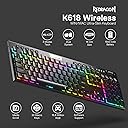
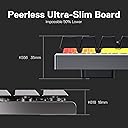
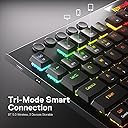
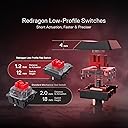
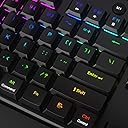
The Redragon K618 PRO is a versatile low-profile mechanical keyboard featuring innovative 3-mode connectivity (Bluetooth 3.0/5.0, 2.4Ghz wireless, and USB-C wired), ultra-thin design with 40g linear red switches, and full RGB customization. It includes dedicated media controls, a volume roller, hot-swappable switches, and robust aluminum construction, making it ideal for professionals and gamers seeking seamless multi-device use and personalized performance.


| ASIN | B098785CL3 |
| Additional Features | 3-Mode Wireless, Hotkeys and Media Keys, Low-Profile Key, Volume Roller |
| Antenna Location | Business, Gaming |
| Best Sellers Rank | #1,518 in Video Games ( See Top 100 in Video Games ) #150 in PC Gaming Keyboards |
| Brand | Redragon |
| Built-In Media | Keycap/Switch Puller, Spare Switches, USB Cable |
| Button Quantity | 104 |
| Color | Red Switch |
| Compatible Devices | Gaming Console, Laptop, PC |
| Compatible Operating System Family | Linux, MacOS, Windows |
| Compatible Tablet Computer Models | AAUB P30 |
| Connectivity Technology | BT, 2.4Ghz , USB-C |
| Customer Reviews | 4.1 out of 5 stars 2,585 Reviews |
| Enclosure Material | Aluminum |
| Generation | 1 |
| Hand Orientation | Ambidextrous |
| Is Electric | Yes |
| Item Dimensions L x W x H | 17.32"L x 7.48"W x 1.26"H |
| Item Weight | 1 Kilograms |
| Keyboard Backlighting Color Support | RGB |
| Keyboard Description | Mechanical, Gaming, Macro |
| Keyboard Layout | QWERTY |
| Manufacturer | Redragon |
| Mechanical Keyboard Switch Model | Redragon Linear Red |
| Mfr Part Number | 31279866 |
| Minimum Required Operating System Version | Linux Mint 17, Windows 10 |
| Model Name | Horus |
| Model Number | K618 |
| Number of Keys | 104 |
| Number of Sections | 3 |
| Power Source | Corded Electric |
| Processor Count | 1 |
| Recommended Uses For Product | Business, Gaming |
| Series Number | 618 |
| Special Feature | 3-Mode Wireless, Hotkeys and Media Keys , Low-Profile Key, Volume Roller |
| Style Name | Contemporary |
| Switch Type | Linear |
| Theme | Gaming |
| Unit Count | 1.0 Count |
A**A
A Very Nice Keyboard, Better Than Anticipated From Redragon
I have sensitive hands after my car wreck back in 1996 and must have a bvoard that is easy to use and soft tot he touch. I prefer chocolate or chicklet keys, but they are hard to maintain. Thsi board took some geting used to and I had to put the rubber dampers under the keycaps, but it is really not all that bad. The keys are soft and smooth and I can type for a good while without pain. I learned very quickly that Redragon has some hidden features in their higher end boards that they don't include in the manual ((I don't care to have to find out stuff like that with no included instructions *Batteries not included) kind of thing)).. like holding Fn+W causes the WASD to change over to the arrow keys or back.. kind of did that by accident. It is really nice to have an on KB function key for the calculator again, I've missed that. I have had a few other Redragon products over the years and have been far less satisfied than I am with this board. FYI folks... Be sure the product says that it uses the "Pro Software" as their regular soft is annoying and lacks essential features, including firmware updates. The pro soft is no bother at all and is not even necessary to run after you program this board. Bluetooth connects just fine, but I have not tested the Wi-fi dongle. Some folks have questioned the metal top... It's a bit thinner than some, but is still sturdy and I have no complaints. I have tested the key puller and used the cap puller to put on the keyboard dampers. The actual key puller is a bit tricky and I am considering buying a better one for future use, but it works... just take care to not scratch the surface fo the board and be patient.. The key wiiiiiil come out.. it's just in there rather tightly. It is an A+++++ mention that they send tbothy pullers and 5.. count it FIVE replacement keys with this model.. I didn't like the cheap cord they sent with it.. REALLY cheap and short, so I got a nice one, at least it was a right angle cord at the KB side. The box presentation is very nice and smooth and sleek in design... I really appreciated the aesthetics, and the inner packing was quality.. The price point is also, most excellent.. You just can't beat $41.99 for a keyboard this decent with genuine Cherry MX keys and all the accessories.. You can easily find additional replacement keys online from aliexpress, just look fro REDRAGON SMD RGB MX Low Profile 5.5 switch. One last thing.. When you go to the website to DL the soft be sure to get the "Cherry MX" model of the soft or it won't see the Keyboard.. In conclusion.. This is a good keyboard and I can logically satisfactorily recommend it. Take care fo ti and it will last you a long time. Namaste.
A**R
Amazing Quality and Features and an Amazing Price!
Best Overall Amazon Experience Product and Value! -Amazing Keyboard! -Value!! -High End Feel, Features, and More! -Great typing experience! -2.4Ghz USB Wireless Adapter Included -Hotswapable Switches Adds More Value/Customization! -Amazon Warehouse Purchase(additional added) Great Value! This Redragon K618 PRO Red Switch Keyboard is the first time I've bought an Redragon product. This also the first time buying an Amazon Warehouse item. I cant say it enough how happy I am with the quality of this keyboard! Especially happy compared to the higher end more expensive keyboards Ive owned in the past. I've gamed for years, and use a PC daily. I've owned Corsair, Logitech, HyperX, and Razer keyboards, and i'd rate this Redragon K618 PRO at least as good, or even better than some of those high end brands that can cost 3x 4x more than the cost of this keyboard. This keyboard has hot-swappable switches !! Being able to change 1 or ALL switches is a great option to have! Typing and Gaming with the Red Switch version feels good. The longer i've used the keyboard the better it feels overall. The keys sound and feel good. I mostly use the wired, and 2.4Ghz wireless modes and have had no issue with either of the modes. I like that the backlighting turns off after a short time when the keyboard in not in use while on battery power. This helps save battery, which i appreciate. The backlighting stays on all the time when keyboard is in wired mode. Amazon Warehouse item experience deal only added to the value of this purchase! 5 star for Redragon Keyboard and 5 Star for Amazon Warehouse. Redragon K618 PRO Red Switch Keyboard is phenomonal quality and feature set for the price! The build quality feels good, and typing feels great!!
J**N
Great Keyboard With One Noticeable Flaw
I've only been using the keyboard for a couple days, but I'm very impressed so far. It has some weight to it and it seems like it's pretty high quality. It's mostly plastic, but it feels a lot heavier to me than other, cheaper keyboards I've used in the past. The ability to switch between Bluetooth and the 2.4gHz dongle is a game-changer for me. I can seamlessly switch between my personal PC (it has the dongle) and my work laptop (via Bluetooth) with a quick flip of a switch. Both methods work flawlessly. I haven't experienced any of the phantom key presses or double presses I saw mentioned in some other reviews. As other reviewers have said, the keyboard goes to sleep quickly to save battery. However, waking it up isn't a problem. I just have to hit a key and the key I hit to wake it up does register on my screen as a key press, so I haven't experienced the problem others have had with having to wake it up with one key press and then have to start typing after that for the key strokes to register. It simply start typing right away. The brown switches are very responsive and offer a pleasant semi-clicky sound that I really enjoy. Typing has been perfect outside of my normal typos that certainly aren't the keyboard's fault. I haven't done any gaming on it as I usually use a controller for gaming. The LED lights are quite attractive and look very nice with my setup. Pretty much every key can be customized, but with all of the different presets I don't expect to use the software much to do any further customization. The only drawback I've found so far is related to the macros. They're pretty much useless. For some reason, the software does not allow you to assign macros to the dedicated macro keys. That makes zero sense and it cost a star in my review. The dedicated macro keys can only be assigned to a macro by recording it on the keyboard itself and that works very poorly. I have a system that I use for work that requires me to have 9 different sessions of it open and I have to sign in to it 9 times every day. I figured I could create a macro so I don't have to type in my login information 9 times every morning. It simply doesn't work. Recording the macro on the keyboard didn't work very well. The recording kept timing out before I was done typing my login and password info (and I type pretty fast). You can record the macro using the software, but you can't assign it to any of the dedicated macro keys. That's a pretty bad flaw if you plan to use macros a lot. Hopefully that's something they can fix with a firmware update. Despite that one flaw, I do love this keyboard and I feel comfortable recommending it.
P**T
Best keyboard I’ve purchased and used!
This keyboard is great! I’ve had various Logitech, razer, etc keyboards and this Redragon one is awesome! I’ve had it for about 2 years and it has held up and performed well. The keys feel really nice without being too clacky, and the size profile and weight isn’t so much that I couldn’t use it for travel. The construction would probably hold up well for travel as the material doesn’t feel cheap at all. Definitely recommend!
S**R
Mediocre for office/work use -- may be great for gaming?
I'm not a gamer -- I am using this keyboard for work-at-home -- so I'm mostly typing on it. Sometimes I play music in the background while i work. I also never completely learned touch typing and have somewhat limited vision, so I appreciate being able to see the key characters clearly. This may be a super keyboard for some, but it's meh for me, so please understand the context of my review. Pros: * The keyboard appears well made, with lots of features, most of which I will never use. * The wireless feature works well; however, I'm using it wired so I don't have to worry about the battery running down. I could have bought the wired-only version and saved money. * I appreciate the media control keys and especially the volume roller. * They keyboard comes with extra key switches and a key cap puller. Nice touch! Cons: * The keyboard lighting is not bright enough, and the keys change color for a couple of seconds after they are pressed -- an effect I haven't been able to turn off. These combine to make it hard for me to see the keys, especially when the room is lit. Why not work in the dark? Occasionally, I need to read paper books or notes. Also, I just prefer to work with some light. * The tops of the keycaps are large, which makes it easy to press two keys at once. I can compensate with careful typing, but it slows me down a bit. * The Caps Lock indicator is a small red LED located on the opposite side of the keyboard from the key, and it is aimed straight up (not angled at my eye). It's hard to see in the dark and almost impossible to see when the lights are on. * The keyboard is advertised as "low profile", and the chassis is pretty low. However, the keys are full height; so the keyboard is only a little lower than a standard keyboard. * The USB connector is on the side of the keyboard instead of the back, and it sometimes gets in the way. I'm replacing a mechanical keyboard from HaveIt, model HV-KB395L. This was an ideal keyboard for me, but the "1" key has failed after about 5-6 years of daily use, and HaveIt no longer carries this model or a similar one. It was fairly expensive -- over $100 if I recall correctly -- but I'd buy another one if I could. I want a mechanical keyboard because of the key feel and better backlighting compared to membrane keyboards. Not sure where I will go from here. Maybe I'll try to get a replacement switch for my HaveIt.
T**D
Excellent Keyboard. Comes with Free Dog Override Feature.
I wanted a clean, low-profile mechanical keyboard that made me feel like I was “seriously working” instead of just aggressively refreshing emails and pretending I’m productive. First impression: sleek. Quiet. Satisfyingly clicky in that way that makes you type random nonsense just to hear it. The backlights is great, modifiable, it’s fill sized but not invasive, and the price was great. Then my dog got involved. Now, I don’t know what it is about this keyboard, but my dog has decided it is: 1. A heated bed 2. A judgment-free nap zone 3. Personally engineered for maximum belly support Every time I sit down, he appears like a silent roommate who pays no rent but controls the thermostat. He’ll climb up, spin in a circle like he’s calibrating satellite alignment, and fully pass out on the keys. Which would be cute… if he wasn’t also a chaos goblin. Because here’s the problem: this keyboard is sensitive. Not “oops I hit caps lock” sensitive. More like “your dog shifted 2 inches and just typed an email to your boss that says ‘ffffffffff’” sensitive. I’ve left my PC unlocked exactly once while stepping away to grab coffee. I came back to: * A browser full of random tabs * A half-written document titled “asdfasdfasdfasdf” * My cursor mysteriously highlighted over something important enough that I immediately felt fear without knowing why Lesson learned. Now I either: * lock my screen like I’m protecting state secrets * or physically relocate the dog like I’m moving a priceless artifact Keyboard itself? Solid. Feels great. Wireless modes are smooth, wired is stable, RGB is aggressively confident without being a nightclub. But buyer beware: if you have a pet, this becomes less of a keyboard and more of a shared emotional support workstation. Would recommend. Just don’t trust your dog with administrative privileges.
S**N
It's okay
Update: The company reached out first offering a full refund. I said that I didn't have the packaging materials. The next four nights they messaged and ended giving me a $15.00 dollar credit for my input. This basically made it a still little more than the discounted price today. I did tell them I would not change my review because the other issues were still there. During this exchange I did inform them I purchased a Logitech G915 keyboard which should arrive tomorrow. I think things would have been different had they just stuck with offering a full refund. I probably won't use this keyboard much after I receive the new one. Original review below. I had a Logitech G613 previously that was giving me issues with double typing so I decided to replace since methods of fixing it did not work. So I ordered this one as a replacement. Here is a list of things I like/don't like. Don't Like 1. Rechargeable battery... I was worried that this used a sealed rechargeable battery in it. I get that they do to keep low profile but it just means there will come a day this will be a wired keyboard. Plus the life between charges is really bad.....I might get a couple of days in between and have to charge...and there is not much play when it indicates to when you need to charge it....you get the red light and you need to plug it in. I now have to have a power brick close by to plug it in. Plus if they were going to be USB-C it would have been nice to have a port on either side since I use this in my chair and the cable would be better placed on the left instead of right. I really liked the Logitech using AA batteries and it lasted a long time. 2. Ergonomics It is really awkward to use. There is no bottom part of the keyboard to rest your wrists and when you grab it from somewhere it is hard to just pick up... I usually have to grab it with the edges in my whole hand and I still hit a button when I am doing it. I usually sit it next to me until I need it. 3. Responsiveness I am not sure if it because of the ergonomics or something else. I use it wirelessly and it just seems like it doesn't either type something I press or I have to backspace and correct. It does not do double typing like the Logitech did but I am still having to correct my typing. Maybe it having a little more surface area would make it better. 4. Extra buttons The optional buttons I have found to be pretty worthless for me and I don't use any of them. Like 1.Interface choices I like that it is Bluetooth, Wired, or Wireless. All seem to integrate fairly well. 2. LED Control I like that it can turn off....I am not one that cares about RGB too much. I like the backlighting as that has been handy. 3. LED Indicators I like the light feedback when the CAPS LOCK, SCROLL LOCK, or NUM LOCK is enabled. It is handy to know what it is. 4. Overall weight It is really lightweight. From grabbing my beast of a keyboard (Logitech G619) this is fairly lightweight. I would be okay with a little more weight if it had more real estate to hand placement (grabbing area) and replaceable battery. Overall I am not sure how long I will deal with this keyboard. It has been too long to get a refund so I really want to at least get some use out of it. This has been a first outside of Logitech because their quality has kind of diminished lately. I know there are more expensive ones out there and might end up that way. I just hate to think with the unreplaceable batteries how much e waste that will generate when it really doesn't need it.
A**O
Great Keyboard until you need to replace the battery
I have a Redragon K618 (red switches), purchased January 2024. With daily use (~5 hours/day), the battery has degraded to the point where it only lasts about 1–2 hours and effectively must remain plugged in to function. Normally this wouldn’t be a major issue, batteries wear out, but in this case, finding a proper replacement is unnecessarily difficult. There is no official replacement battery available, and even community discussion confirms that Redragon does not provide one and instead pushes users toward buying a new keyboard. The core issue is not just availability, but spec ambiguity. The battery inside the K618 is a large, thin LiPo pouch (~118 × 51 × ~6mm) with a 3-wire (thermistor) connector. While it is easy to find batteries that match the physical dimensions, nearly all of them are 2-wire (2-pin), which makes them electrically incompatible without modification. Conversely, batteries that match the 3-wire configuration are typically much smaller or thicker and do not fit the internal cavity safely. This creates a situation where: Correct size does not equal correct wiring Correct wiring does not equal correct size This is not just an inconvenience, it has safety implications. Using a battery that is too small can allow movement inside the case, increasing puncture risk. Using one that is too thick can create pressure on the pouch, also increasing failure risk. These are not acceptable compromises for a lithium polymer battery. This design also raises broader concerns around right-to-repair and consumer ownership. The battery is technically replaceable, but the lack of standardized parts, clear specifications, or official replacements creates a barrier that most users cannot reasonably overcome. In practice, this makes a consumable component effectively non-serviceable. From a consumer standpoint, this shifts the burden from repair to replacement. A fully functional keyboard is rendered unusable due to a single worn component, with the most accessible solution being to purchase a new unit. That is difficult to justify when the failure mode is both predictable and preventable with better part standardization or support. At a time when right-to-repair is gaining traction, products like this highlight the gap between “technically repairable” and “practically repairable.” Without access to compatible replacement parts or clear documentation, users are left with limited options: modify hardware themselves, accept reduced functionality, or discard the product entirely. For a device less than two years old, this approach effectively treats it as disposable, which is both environmentally wasteful and avoidable with better design and support.
J**R
Excelente teclado mecánico para gaming y uso diario
⭐⭐⭐⭐⭐ Excelente teclado mecánico para gaming y uso diario Estoy muy satisfecho con el Redragon K619 Horus RGB. Desde que lo saqué de la caja se nota la buena calidad de construcción y el diseño elegante de perfil bajo. Las teclas son cómodas, responden muy bien y hacen que escribir o jugar sea una experiencia muy agradable. La iluminación RGB se ve excelente y cuenta con varios efectos que permiten personalizarlo a gusto. Además, el teclado es compacto, ocupa poco espacio en el escritorio y mantiene todas las funciones importantes. Lo he usado tanto para juegos como para trabajo y ha funcionado perfectamente. La conexión es estable, las teclas se sienten precisas y el rendimiento general es excelente por el precio. Sin duda, una compra muy recomendable para quienes buscan un teclado mecánico de calidad.
H**R
منتجات ردراجون لا يعلي عليها
اشتري يباشا وانت مطمن كيبورد تحفة وفيه كزا موود لل ار جي بي وميكانيكال تحفه تستمتع وانت بتستخدمها وبييجي معاها قطع تقدر تنضف بيها الكيبورد وتشيل الزراير وفيه زراير احتياطي
S**Z
Perfect Perfect Perfect
For all those guys who think that the k618 is like logitech g915, it is not. It's like Razer Dealthstalker v2 without Razer's nonsense software. k618 works well on it's own and it doesn't need to use their software. Brown switches are good, there is a force needed to activate them, not too loose. You can use custom keycaps. Also it is hot swapable which is another plus. It would be even more awesome if we could use a custom QMK firmware (like keychron keyboards do)
N**A
Its qwerty .. beware
I wanted qwerty and this low profile is very good .. though my second keyboard from RD .. it surpasses my surara
P**R
Fungerar inte
Gick inte att köra trådlöst, varken via BT eller wifi
Trustpilot
2 days ago
3 weeks ago