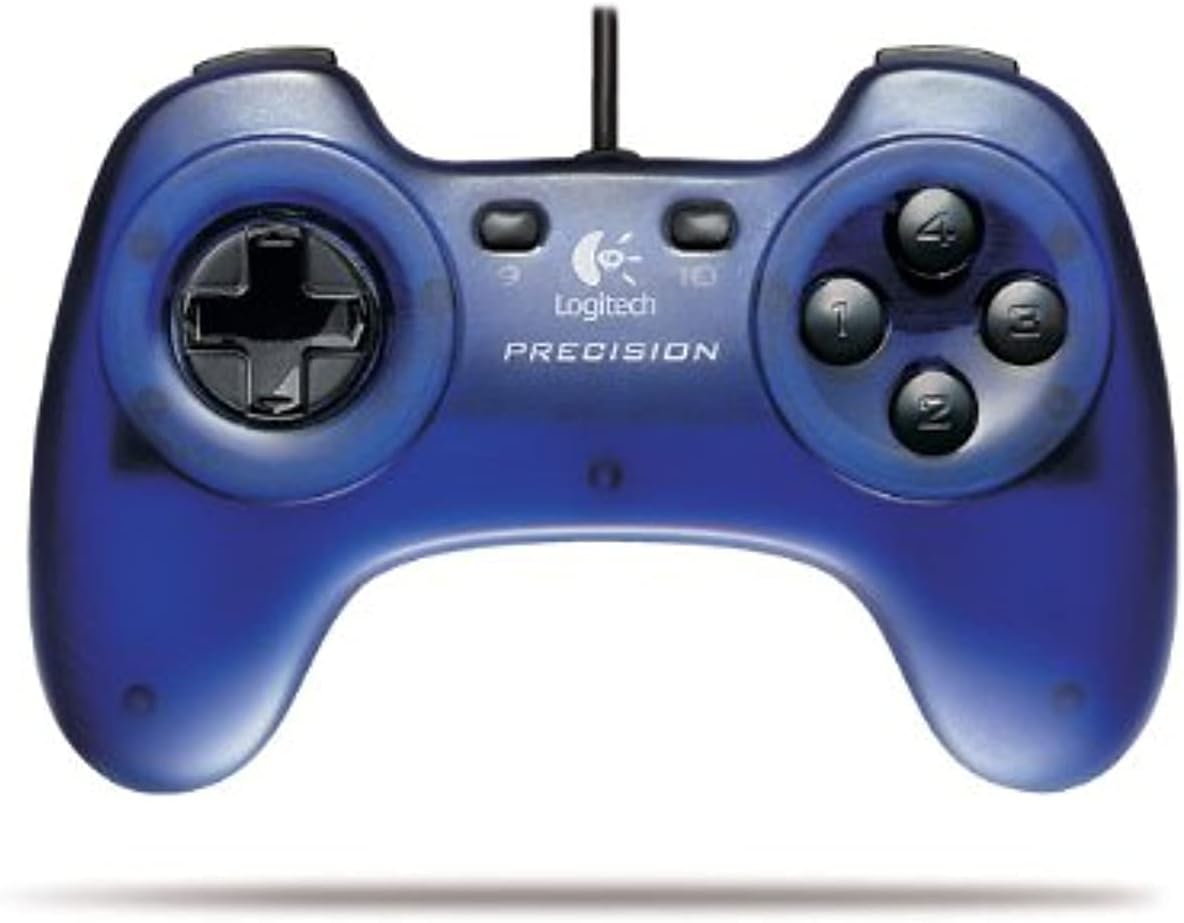

Logitech Precision Gamepad
Product ID: 334880922
Details
- BrandLogitech
- ColourBlue
- Compatible devicesMac
- Connectivity technologyUSB
- Special featuresErgonomic
Play sports, action, adventure, role-playing, driving and other games with ease Comfortable design with familiar button layout Precise 8-way D-pad, four thumb buttons and four triggers designed for fast action Six programmable buttons Convenient plug and play USB interface on your PC or Mac Review: A solid gamepad for emulator use! - Not since the 1992 Gravis Gamepad have I used such a solid controller. As in one that actually works without any extra frills. The Logitech Precision has many more buttons and a USB interface. So, in addition to the D-pad on the left and the four-button cluster on the right there are also two buttons in the middle that can be configured as "select" and "start" buttons. Above the D-pad and the button cluster are two extra buttons on top for extra options. They're like the extra buttons on a SNES gamepad but there are more of them. The only problem is remember what to use the buttons for. But, since this is a fully digital controller, all buttons can be programmed for whatever you like. It all depends on the game support. When compared to Micro$quish's budget SideWinder controller this one is by far superior and doesn't suffer from the design drawback of rotating the D-pad where if you press down your on-screen character does move down and not diagonal. The price is very good as well. For oldskool gaming, such as NES and Doom gaming, it gets the job done. Highly recommended! Review: Great - Exactly what I wanted -- a D-pad to play SNES games with. It works perfectly for that purpose, and has a couple extra buttons to use for whatever. Rapid fire? Macros? Up to you. Anyway, it was what I wanted, and performs well.
| ASIN | B00030AX3Q |
| Additional Features | Ergonomic |
| Brand | Logitech |
| Brand Name | Logitech |
| Button Quantity | 8 |
| Color | Blue |
| Colour | Blue |
| Compatible Devices | Mac |
| Compatible devices | Mac |
| Connectivity Technology | USB |
| Connectivity technology | USB |
| Customer Reviews | 4.0 out of 5 stars 124 Reviews |
| Global Trade Identification Number | 00097855025647 |
| Hardware Platform | PC |
| Item Dimensions | 14 x 19.1 x 6.4 centimeters |
| Item Weight | 227 g |
| Manufacturer | Logitech G |
| Manufacturer Part Number | 963335-0403 |
| Model Number | 963335-0403 |
| Number of buttons | 8 |
| Package Quantity | 1 |
| Special features | Ergonomic |
| UPC | 097855025647 683728151188 |
M**.
A solid gamepad for emulator use!
Not since the 1992 Gravis Gamepad have I used such a solid controller. As in one that actually works without any extra frills. The Logitech Precision has many more buttons and a USB interface. So, in addition to the D-pad on the left and the four-button cluster on the right there are also two buttons in the middle that can be configured as "select" and "start" buttons. Above the D-pad and the button cluster are two extra buttons on top for extra options. They're like the extra buttons on a SNES gamepad but there are more of them. The only problem is remember what to use the buttons for. But, since this is a fully digital controller, all buttons can be programmed for whatever you like. It all depends on the game support. When compared to Micro$quish's budget SideWinder controller this one is by far superior and doesn't suffer from the design drawback of rotating the D-pad where if you press down your on-screen character does move down and not diagonal. The price is very good as well. For oldskool gaming, such as NES and Doom gaming, it gets the job done. Highly recommended!
J**O
Great
Exactly what I wanted -- a D-pad to play SNES games with. It works perfectly for that purpose, and has a couple extra buttons to use for whatever. Rapid fire? Macros? Up to you. Anyway, it was what I wanted, and performs well.
S**A
Total Waste of Money - Broke After 4 Days
Worked for about 4 days, then broke. Won't work anymore. Contacted Logitech, since I'd registered the thing there. No help from them. So if you buy this, you're screwed. Waste of money.
B**E
Excellent for the price, saved me from buying a game console!
We do not own a game console (xbox, wii or such) as we find that the kids already spend enough time on the computer. However, my son had recently gotten into role playing games like Titan Quest and Eragon. Using the keys to move was frustrating him. These work perfectly. In fact the 10 year old "installed" them himself and was playing both games with his 8 year old sister minutes later. They are quite well built for the price and seem to be comfortable for the kids and my husband as well. He has programmed some of the buttons for different functions and said it was quite simple. Now we can put off buying a "real" game console for a bit longer.
M**I
Decent for the price
Bought this thing long time ago when it was cheap. I was a heavy user as a gamer, therefore the thing was a good gamepad for a short term purpose. However, about a year after I started using it I have problem with my D-pad (specifically when I tried to press the Up direction). So I was forced to buy another gamepad.
Trustpilot
3 weeks ago
4 days ago