Desertcart purchases this item on your behalf and handles shipping, customs, and support to Greece.
❄️ Stay Cool, Look Cooler — The Ultimate Laptop Chill Mate
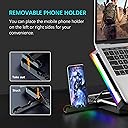
The TopMate C11 Laptop Cooling Pad features six high-speed, quiet fans combined with 7 RGB lighting modes to keep laptops between 11-17.3 inches cool and stylish. Its ergonomic 5-level height adjustment and built-in phone holder enhance comfort and productivity, while reinforced USB ports and durable thermosetting plastic construction ensure lasting reliability for professional and gaming setups alike.


| Asin | B08CZBH7FV |
| Best Sellers Rank | #539 in Computers (See Top 100 in Computers) #1 in Laptop Cooling Pads |
| Brand | TopMate |
| Color | Blue |
| Cooling Method | Air |
| Customer Reviews | 4.3 4.3 out of 5 stars (5,596) 4.3 out of 5 stars |
| Enclosure Material | Plastic |
| Item Dimensions L X W X H | 41L x 29.6W x 4.3H centimeters |
| Item Highlight | Adjustable Height with 6 Quiet Fans and Phone Holder, Computer Chill Mat, for 15.6-17.3 Inch Laptops - Blue LED Light |
| Item Weight | 1.1 Kilograms |
| Manufacturer | TopMate |
| Mfr Part Number | C11-CA |
| Model Number | C11-CA |
| Number Of Fans | 6 |
| Number Of Items | 1 |
User
Absoulutely amazing!
TopMate C11 Laptop Cooling Pad – ReviewThis cooling pad is absolutely amazing! The fans are super quiet, and the airflow keeps my laptop nice and cool. The RGB lighting works perfectly, but since I’m not a big fan of RGB in general, I just turned it off - easy and no problem at all.The overall build quality is excellent, especially at this price point. It feels sturdy, works exactly as advertised, and gives that satisfying feeling of making the right choice.No regrets here - I 100% recommend it!
User
Effective, Efficient, Quiet Laptop Cooling Pad
I’ve been using this cooling pad for the last three days and the performance is very good. The fans are quiet but effective, and my laptop temperature is noticeably lower during long work and gaming sessions. The adjustable height is comfortable, and the RGB lights are a nice bonus without being distracting. Build quality feels solid for the price. Overall, a great value and I would recommend it for anyone using a 15.6–17 inch laptop.
User
As expected, no issues, works fine
No issues, good stand. it would be great to have an option to switch off the lights but that is a small thing
User
Very good
It looks nice, working silenceRecommended to buy
User
Great value for money
Very Nice
User
Decent item with odd packaging
Item seems ok but packing is pretty ordinary. Not in a sealed manner. Just open box with shipping sticker. We returned the item for our previous order but the replacement was also in same condition.
User
Topmate cooling pad
Good cooling pad, it’s not AMAZING but it does the job
User
Perfect
Excellent product, works very well, is very good for laptop gaming helps with overheating and has large variety of rgb lights.Suitable for big laptops.Recommend using an external keyboard if gaming.
User
Great for Gaming!
I had been looking for a good cooling pad for my laptop that wouldn’t break the bank and came across this one. I did see there are some mixed reviews but decided to take the chance and I LOVE IT!First, the light is really cool and easy feature. If I really don’t want them on, I can simply press the button and they shut off. You can also cycle between different colors and patterns. My boyfriend and I were playing with it for a good while after opening.One of the biggest things on reviews for cooling pads is the sound and cooling aspect. Personally, I didn’t care too much if the pad had loud fans simply because I can just turn up my games sound to cover it or wear headphones. I did want good fans that would be able to cool my laptop nicely while I play. And it does. Obviously, you need to provide adequate air flow in order for the hot air to escape and you do this by adjusting the stand. You can also choose what level you want to set the fan to (how hard they work). Either way, my laptop stayed nice and cool while I gamed for hours. The sound wasn’t bad either. It was lent whisper quiet (since I mainly had it on its highest setting) but it wasn’t freakishly loud either. Just enough to wear I can hear it work.All in all, im so glad i found this laptop. I love it and recommend it to anyone who wants a really good pad without costing an arm and a leg.
User
not bad but not great
ok so a few things i can pick at, i know its pandemic time, things are slow all round. but im not impressed by the lateness of receiving this item, it took 14 days just for the processing of the order, then took another 3 weeks to deliver. ive ordered other items from overseas during rona, and they never took this long. 0 stars for shipping. i know this has nothing to do with the product, but it does with this seller. lets move onon the whole it pretty good. the display im not really a fan, it fels like an old cheap lcd watch from the 80s that you have to view at a perfect 90 degree top-down angle just to see whats on the screen.the rgb is alright, would have been 100% awesome if it was able to sync with all the major brands that have rgb software, eg: razer, aorus, aura sync etc. the buttons are pretty firm to turn on and change settings, i get why they might be that way so as to avoid accidental presses, a touch screen would have been a welcomed feature instead.build is fairly solid, but it would nicer if the underside edges where smoothed over, they have a real sharp edge that will catch you off guard when sliding the top-side of your fingers underneath itlast thing is the fan speed, or the thrust/wind/force, whatever you wanna call it, the 4 small fans fell fairly strong for the max output, but the 2 larger fans feel a bit less then what the smaller fans push out.it still cools ok, but i feel the it could do better if the fans where either a better quality, or a stronger blade angle to really push more air. the fan noise is ok, again there are some pc fans that can run nearly full tilt and still be whisper quiet.oh as for the phone holder arm, i use my laptop on my bedside alot, and having an arm sticking out of the side would probably get hooked on a cable or my hand while fiddling around with cables or looking through draws. plus i have chunky case on my phone, so i never used it. but i do like the idea.all in all, its not bad but not the greatest "be all, end all" cooler.
User
Cumple su principal objetivo pero puede mejorar
El producto representa un buen compromiso en el aspecto de calidad-precio. Tengo una base Cooler Master la cual cuenta con dos ventiladores, realizando una comparación haciendo uso del software MSI Afterburner, el cual indica el valor de la temperatura del GPU, la base TopMate C11 siempre obtuvo temperaturas menores y/o un avance menor en el incremento de las mismas. Por lo que puedo decir que el objetivo principal que buscaba (mantener lo más bajo posible la temperatura de mi equipo) se cumplió.Respecto a las características adicionales que tiene, considero que en cada una de ellas puede mejorar:- Manual, realmente carece de un manual con las instrucciones mínimas. Puede parecer que al ser una base de enfriamiento no se requieren muchos pasos, sin embargo me costó varios minutos el encontrar la base para el celular, para descubrir que está insertada a lo largo de la base principal, una pequeña imagen hubiera ayudado bastante. La página web que aparece en el mini panfleto de agradecimiento por haber comprado el producto me llevó a una página genérica de la empresa pero no me aparecía la TopMate C11.- Base para el celular. Me parece un muy buen instrumento y, sobretodo, el poder colocarla en cualquiera de los costados, desafortunadamente mi celular (posiblemente por su grosor) queda en una posición muy vertical y es incómodo interactuar con el celular dentro de la base así que se debe estar retirando a cada rato. Sugeriría que el celular pudiera quedar con un ángulo mayor. En mi celular tengo todavía configurado el navegar con los botones virtuales en la parte inferior, aún cuando la base del celular tiene un espacio para poder ver dichos botones, es complicado interactuar con ellos por la altura.- Calidad/dureza de los botones. Los botones son muy duros de presionar, puede ser para evitar presionarlos por error, sin embargo me preocupa la cantidad de fuerza necesaria para activarlos ya que puede llevar a un desgaste prematuro.- Control de iluminación. Realmente no me interesa mucho la parte de iluminación en la base, prefiero tener desactivados las luces o un efecto de luz fija, desafortunadamente cuando apago el nobreak o el regulador (con la finalidad de ahorrar luz) la configuración de la base se pierde así que al volver a encender las luces comienzan encendidas y con el efecto de movimiento. Esto me lleva a tener que interactuar con los botones cada que voy a trabajar, lo cual llega a ser cansado.- Estabilidad de la base. Creo que este es el punto más débil. Yo trabajo con la altura de la base recorrida una posición, y se tienen disponibles 4 posiciones adicionales para aumentar la altura. Aún cuando yo solo estoy haciendo uso de la primer altura, en mi laptop de 15 pulgadas, se siente movimiento al momento de teclear, no es mucho pero si es algo que se nota de inmediato. En la laptop de 17 pulgadas el efecto es todavía mayor. Afortunadamente no pienso ocupar otra altura porque para mí sería ya muy incómodo pero en otros niveles el efecto de movimiento al teclear aumenta considerablemente.- Conexiones USB. A parte de recibir la energía por un puerto USB, tiene otro adicional para hacer uso, sin embargo la alimentación de energía es muy pobre así que solo he logrado que memorias USB (no discos duros) funcionen de manera confiable. Tengo un pequeño ventilador que funciona mediante USB, al conectarlo al puerto que tiene la base de enfriamiento la velocidad a la cual funciona es al rededor 3/4 de la velocidad que tiene si se conecta directamente a un puerto de la laptop, del monitor, o del disco duro externo (un Seagate con hub USB integrado).Pueden parecer mucho puntos negativos pero en realidad son cuestiones adicionales que uno puede sobrellevar o no impactan demasiado en la experiencia final, sin embargo espero que en un futuro producto mejoren estas características.Si solo buscan la base para enfriar lo mejor posible su laptop, este es un producto muy bueno. Si les gustan los efectos de luz para su laptop "gamer", esta también es una buena opción.Solo recomiendo probar su uso para que la inestabilidad no sea algo que afecte, ya sea al escribir o al estar jugando.
User
جميلة
قوة دفع هواء ممتازةعملية ومفيدة للاستخدام الطويل
User
Works Amazingly, But Handle With Care!
I'd gotten this cooling pad on sale during the Prime Sale that just passed. I've been using it every day for 3 weeks, so I think i can leave an educated review. I'll start with a Pro/Cons list, A summary, and include suggestions for additional products you can buy on Amazon to help this pad work at its best!Pros:-It moves a lot of air- You can safely elevate the back, to an extent. an elevated laptop is a happy laptop!- All controls are in the front via buttons and a digital screen. The only time I've had to reach behind it was to plug it into my USB port.-BRIGHT RGB lighting on the side. If I turn on the lights at night, it looks super cool.-You can choose to run all the fans, or just throw two big back ones or the front 4 individually.-It keeps my laptop cooler then any other cooling pads I've tried, most likely because the two big fans are directly bellow the two fan intakes on my laptop.-Two nubs that flip up in the front that keep my laptop in place. It's a heavy gaming laptop, so color me impressed!-RGB lighting gives you better FPS.Cons:- Low quality stand. It can remain firm on the first two elevation knotches. Any higher and it WILL slip and collapse.- The stand is wear and tear. Set it up once, and don't mess with it, because I can easily see the rod wearing out. Same goes for the nubs.Conclusion: Is it cheaply made and requires you to handle it with extreme care? Yes. BUT, once you set it up, the cooling is very significant. I have a hefty Asus Tuf F15 gaming laptop, and if I'm only browsing, it can go as low as 29C.If I'm running my editing programs, or doing moderately demanding tasks, it top out at 55 to 60C during a CPU heavy task, an cools back down to 40c immediately afterwards.If I'm Gaming, it makes a difference. It will do its best to circulate the hot air away, and you can aid that by pointing a fan blowing cold air towards the space underneath it. At games where I was running at 80+, I'm now topping out at 75. Keep in mind that this is with an rtx 3070 running on boost. The Fans are so strong that they'll pull cool air from my air conditioner in the other room both into/around the laptop, and at me! Ah, refreshing. AND, immediately after I close the game, it cools the laptop back down to 40C within a minute.At the end of the day, it's not a miracle worker, and I wouldn't recommend putting a 17 inch laptop on it. But it makes a very appreciable difference in keeping my laptop cool. If you have a fan blowing cold air towards it, it will give it more cool air to work with. If you're in a room with AC, you're golden.If you're okay with setting it up once and leaving it put to avoid wear and tear, this is one of the best coolers out there, hands down.Other products on Amazon that can help it work even better:-A window fan to cool down the room at night. (extemely helpful)- a fan to blow the hot air away from it so it doesn't recirculate it into your laptop.- an air conditioner to keep the room temperature low.Cooling: 8/10Studiness: 5/10RGB lighting for higher FPS: 10/10.Overall: 7/10
Trustpilot
1 month ago
2 weeks ago