



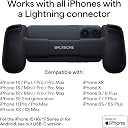


BACKBONE One Mobile Gaming Controller for iPhone 14, Lightning, 1st Gen
Product ID: 319890267
⚡Lightning connector for instant play
🎮8 responsive buttons
🕹️Ultra-wide analog triggers & precision thumbsticks
🎯 Elevate your mobile gaming — don’t just play, dominate!
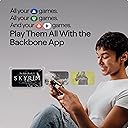
The BACKBONE One 2nd Gen is a sleek, ergonomic mobile gaming controller designed for iPhones with Lightning connectors (iPhone 14 & older). It offers precision controls with ultra-wide analog triggers, high-precision thumbsticks, and 8 responsive buttons, enabling seamless play of App Store hits, Xbox, PlayStation, and PC games via streaming or Remote Play. The controller supports an in-app emulator for retro gaming and includes magnetic adapters for case compatibility. It comes with 3 months of Apple Arcade access and optional Backbone+ subscription for enhanced features, making it the ultimate portable gaming upgrade for iOS users.

| ASIN | B08RL7VLKY |
| Additional Features | Ergonomic, Wireless |
| Best Sellers Rank | #208,309 in Cell Phones & Accessories ( See Top 100 in Cell Phones & Accessories ) #354 in Cell Phone Gaming Controllers |
| Brand Name | BACKBONE |
| Button Quantity | 13 |
| Color | Black |
| Compatible Devices | iOS, Xbox, PlayStation, Apple Arcade |
| Compatible Video Game Console Models | Microsoft Xbox One, Microsoft Xbox One S, Microsoft Xbox One X |
| Connectivity Technology | lightning |
| Controller Type | Gamepad |
| Customer Reviews | 4.5 4.5 out of 5 stars (18,054) |
| Hardware Platform | iOS |
| Item Dimensions | 6.9 x 1.28 x 3.5 inches |
| Item Highlight | For iPhone 14 & Older, Play Xbox, PlayStation, PC, App Games & More |
| Item Weight | 138 g |
| Manufacturer | Backbone |
| Manufacturer Part Number | BB-02-B-R |
| Model Name | 1st Gen |
| Model Number | BB-02-B-R |
| Package Quantity | 1 |
| Power Source | Corded Electric |
| UPC | 860003568217 |
J**Y
Great for Gaming in Bed
This is one of the best purchases I’ve ever made as someone who loves to game in bed. I use it to play both PlayStation and Steam games! You don’t even need to use the app it comes with, just the PS Remote and Steam Remote apps! You do need to take your phone’s case off while using it, but you can still have your phone charging by plugging your charger into the controller while your phone is in it. I highly recommend this product!
D**M
Super cool iPhone attachment!
Controller fits perfectly onto the iPhone, if you have a 13 pro/pro max they offer a rubber fitting (mine included this fitting already but the packaging says you may need to request it) that allows it to hold the phone properly. It connects via the lightning port which reduces latency tremendously (virtually no lag between the controller and the phone) and also allows you to charge your phone while attached thru the lightning port on the right handle of controller, on the left handle is a headphone port. When attached it has a similar appearance to the Nintendo Switch. The hardware quality is really good. I have not had any issues with it. The Backbone can also be used on Macs and iPads although it is required to be plugged in via USB or Lightning to lightning and the latter will require an additional purchase. Included with the purchase was a free month of Xbox Game Pass which is what ultimately sold me on it, and functionally it works really well. Your mileage may vary depending on your data connection. Beyond your free trial of Game Pass, if you choose to not renew, the backbone works with a variety of other apps. There is a Backbone app which acts as a hub on your phone, it requires a subscription but you also get a free trial upon purchase. This app acts as a game hub showing you some recommendations for apps and games which support controller input. I haven’t found much use from this hub, but your experience may differ from mine. Without any subscriptions this controller works incredibly well for: iPhone games that support controller input XBOX app console streaming & PS4/PS5 Remote Play app. Although these require a decent internet connection to stream, and the PS app requires you to also be connected to WiFi to play and does not work on cellular data. The XBOX app may also require WiFi to play on your phone but I have not tested that. All in all I am very impressed with the Backbone controller. I’ve gotten a lot more use out of it than I thought I would. Switch had been my primary console due to the convenience of portability but this controller has offered me a similar play style with my home consoles.
N**L
The Good mobile game controller!
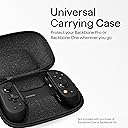
The Backbone One is the best gaming controllers out there for iPhone gaming,with WEPIGEEK Backbone one case click here supporting a vast array of top mobile titles while offering first-class Xbox cloud gaming integration. It's compatible with every modern iPhone out there, maintaining a high standard across all facets of the experience that justifies the $99 asking price. It's the only option that checks all the boxes for the average user, making this the recommended choice for iOS. While we'd hope to see an Android version in the future,Mobile game controllers are now more compelling than ever, with increasingly powerful devices and viable cloud streaming services entering the market. While dedicated handheld devices like the Nintendo Switch are better suited for gaming exclusively, I can't deny the convenience that comes with a $99 accessory. I still find myself playing titles with the Backbone One for extensive periods, which is something I never experienced with other mobile gamepads in the past. The first product from Backbone isn't perfect, You need a strong carrying case to carry it and with its strict requirements around cases making the setup more cumbersome than ideal. But the final product, both hardware and software, and nothing short of astounding. That's coming from someone who wasn't on the compromises of a smaller smartphone display, especially for console games. What sold me on Backbone is the same reason I've been migrating to Apple devices in recent months, a consistent user experience that just ultimately feels great to use. Whether for mobile gaming or, for me, finally using cloud gaming regularly, you won't get better than Backbone. The Good 1,Familiar, comfortable controls. 2,Great build quality and fit across different phones. 3,Strong software support. 4,Overall polish unmatched by alternatives. The Bad 1,Poor support for cases and other accessories 2,Need a carrying case to carry it.
J**L
Flawed, but still good!
I was really curious about iPhone gaming/streaming so I picked up this and the Razor Kishi for comparison. Between the two, this one really fits my needs best, hands-down. I have used it over the last few months and am generally pleased. Most of my evaluation comes after playing a ton of Genshin Impact on my phone. I have an iPhone 13 Pro, which requires an adapter to fit with this device. You can find files to 3D print your own online, or you can request a free one from Backbone directly via the app. It's a little cumbersome but it works. I like how tightly this fits with the phone and it really feels like a solid gaming device. It's pretty comfortable and all the buttons are easy to reach, yet they avoid accidental pressing. I haven't really used Backbone's app or software but it at least looks nice and seems like a good gaming "homepage" like you'd see in a console. My biggest issues: 1. You can't use this with a phone case on, which is really annoying. Obviously there are design issues with trying to accommodate different phone cases but it's really a pain (and a risk) to keep having to put on and take off my phone case every night. 2. The face buttons, in all honesty, suck. ABXY have a very hard and clicky feel and it takes too much pressure to push them in. They also make a very audible and distinct clicking sound when pushed in, making it hard to play in quiet spaces (it'll be so annoying for other people to hear). In addition, I've noticed some unresponsiveness in the shoulder buttons-sometimes I have to click L1/2 R1/2 in twice for it to detect. I'd love to see Backbone release a 2.0 version that addresses the above. For now, this one gets the job done!
F**R
As a dad who loves video games, I can't recommend this enough
Having gone from someone who enjoyed PC gaming to becoming a "casual" who plays from a couch on an Xbox, to suddenly not being able to play as much because my children are always hogging up the TV, I was desperate to find an option that allowed me to utilize the Xbox remote play feature on my phone with as little input latency as possible. The Xbox controller on Bluetooth simply does not work well. By having this attached to the lighting port, the latency is completely gone. It took me a while to get used to the feel of the controller. It's definitely more ergonomic than a Switch, but everything is going to feel cramped if you are used to an Xbox remote. The bumpers are probably the worst offenders, their position just doesn't feel right to me. I wouldn't recommend this if you are looking to play any kind of twitch reaction-type games or any first-person shooters. But for other types of games, it's perfect. I was also surprised by how well it fits with my iPhone 14 Plus. My only complaint is that because of the size of the phone if I hold only one side of the controller, sometimes the connection would be a bit finicky. Not sure if it's because of the lightning port moving around as the controller flexes or if there's something else happening, but the connection is usually restored almost immediately. All of the extra Backbone+ features are basically useless in my opinion, and I definitely don't need another subscription. But for the price, and for the options for play that this opens up, I highly recommend it.
J**S
A "Game Changer" for iPhones
I've never been big into gaming on my iPhone. Sure, there's some great ports (I'm looking at you, Chrono Trigger) but for the most part on screen controls have always turned me off to it. While connecting a controller via bluetooth does work, the awkwardness of trying to position the phone correctly makes it more effort then it is worth. With the backbone, it essentially turns your phone into a Nintendo switch, but with the convenience of not having to carry around an additional device. It works great for playing games on the go, and if you have a Ps5 or Xbox you can even stream games to it. In my case, owning a Ps5, I was skeptical about using remote play to stream games, as in the past the latency was too much to enjoyably play anything. Even using remote play on my MacBook Pro or iPad with a DualSense controller connected was unplayable, but for whatever reason it works like a charm with the backbone, even if you are not on your home WiFi network (internet speeds matter, so make sure your Ps5 is hardwired or on a fast connection). The backbone app is fantastic as well, allowing for a seamless UI and switching between games or streaming. Since it connects to your phone via the lightning port, it's nice that it offers passthrough charging, so you can continue playing when your phone is low on charge. Also included is a 3.5mm audio port and buttons that allow for screen capturing and recording. For me these have little use, but I'm sure for some these add value. For the price, this is definitely worth it weather you are an avid or occasional gamer, I could not recommend it more.
R**Z
Good but fell short of expectations (returned)
Let me start off by saying this is not inherently a bad product. Despite my criticisms you’ll see in the following paragraphs I do think this is at least a decent product for a lot of people who are less picky than me. Probably the more casual crowd will like this more than I do. I was looking for a nice game pad for my recently purchased IPhone 13 Pro so I can really take advantage of the immense power that is in this phone. For anyone who doesn’t already know, due to the 13 Pros larger camera module that is both larger and protrudes more than the previous generation 12 Pro, the backbone requires a special adapter in order to mount your 13 Pro comfortably into the device. I anticipated liking this product so I went ahead and ordered it from their website (free, you just pay shipping) but I did not arrive in time for me to use the adapter. Be warned, without the adapter it’s a very tight fit and the “backbone” really rubs against the camera lens of the phone. I don’t consider this a con quite as much as I normally would because the company took it upon themselves to release a solution very quickly. I saw someone mention in their review that the game pad had the tactile feel and functionality of an actual dedicated console controller. I’d have to agree! It does! But it feels like a 3DS or a Switch. Perhaps that’s not a big deal especially since we’re talking about playing games on your phone. It has PlayStation reminiscent triggers and bumpers but the rest feels very Nintendo-ish. I’ve been spoiled from using a Xbox Elite Series 2 controller for the past year and I’ve grown accustomed to this excellent button presses and joystick manipulation. Joysticks, that’s where my main gripe is. They’re probably great for most people playing casually but the issue is they’re small and lack the same manipulation that the Xbox joystick has. It feels very difficult to make small incremental adjustments unless I take my focus off the game and then take the focus to actually manipulating the joystick. I think you could make the argument that this is a muscle memory issue and can be remedied by getting used to these joysticks. Maybe, but maybe not. The hours I spent trying to play cod mobile and then Minecraft just felt clunky with constantly having to adjust sensitivity settings until I realized that the real issue is just the lack of ability to make those fine small adjustments on these joysticks. Is it better than using your fingers? Absolutely. It’s more comfortable by a long run but I often times felt I could generally be a faster and more accurate player using my fingers for aiming then I could using the joysticks which is natural yes, but the gap was so large I found it to be unacceptable. Moving onto the ergonomics. This is a mixed bag, one the one hand the ergonomics feel pretty good and I’d say that’s exactly what they are but the button placement feels every so slightly awkward in terms of spacing that I find myself making slight adjustments with my hand I order to comfortably click ABXY buttons and mostly the D pad under the left joystick. When your holding it normally and don’t need to use that D pad it’s fine but when you do need to use it (at least for me) I had to adjust my hand each time. The handles on each side are also a little too small for my hands but that wasn’t a huge deal for me. Another con for me is that the “backbone” and the way the device is designed prohibits the use of both a case and MagSafe accessories. It’s incredibly annoying to have to take off the case each time you want to use the backbone. But even without a case the backbone covers the magsafe area so you cannot use a magsafe charger while playing. Some people may wonder why this is a big deal, honestly it’s not but here’s my thinking. I have one charger, an apple 20 watt charger with the apple magsafe hockey puck attached to it. I don’t use the lighting cable so in order to use the backbones built in lighting bypass to charge the phone while I’m playing would require I disconnect my magsafe charger each time and revert back to lighting for my charging needs. I don’t want to do that. But hey, it has a headphone jack!!! Too bad I bought AirPods with literally the same order the backbone came in though. Last con and probably the most nitpicky thing The plastic material of the type that absorbs the oils from your hand and wears it like a badge of honor. It’s honestly kinda yucky to look at because it looks oily and stained and it’s actually kind of hard to clean if you don’t have alcohol. Not a functional con but it still bothers me. You can see this in my picture that I attached. Onto the pros It feels generally well constructed despite my criticisms. The buttons have a very clicky feel which is always satisfying. The backbone app software (despite my limited use) genuinely looks and feels pretty cool. It’s a seamless experience once you plug your phone into the built in lighting connector and it honestly feels like something that apple would have made themselves as a first party accessory once you get it up and running. The backbone app feels like something actually built around gaming, whether that be mobile games or your streaming Xbox on Xcloud. Unfortunately the awkward ergonomics and sub par joysticks could not make the product live up the expectations I had for it.
J**S
Easy to Use, but Not for Large Hands!
I really like the compatibility and ease of use of the Backbone. It comes with an excellent case and works well with a huge variety of games, including PS5 and Xbox X remote play apps. I've even tried it with some Netflix games and got it to work. The sticks are tight, the buttons have good tactile response, the spring is well-made and overall the unit feels well-made. Now for the bad news: It is small. I had to put some cloth tape on the handles to make sure that it doesn't slip for my larger adult hands. In addition, you'll probably have to take your phone protection case off to use it. That's not a big deal. Backbone recently saw that I had a new iPhone 14 and shipped out a replacement adapter to make my phone fit better for free without my having to ask which shows you their level of commitment to customer service. Even with those two issues, I still love my Backbone. Highly Recommended!
M**S
Das Beste, was für iOS Geräte verfügbar ist.
Ich habe mir den Controller bestellt um zum einen während dem Pendeln zur Arbeit und zu Hause während der Fernseher „besetzt“ ist, ebenfalls meine Xbox (Cloud) Spiele und die Apple Arcade Spiele mit einer komfortablen Lösung spielen zu können. Und ich muss sagen, die Qualität des Controllers und der zugehörigen (optionalen) App ist beeindruckend. Die Verarbeitung des Controllers ist perfekt. Das Gewicht ist optimal, es rattert nichts und die Knöpfe und Joysticks haben einen für meinen Geschmack sehr guten Druckpunkt. Die Spiele lassen sich dementsprechend präzise so steuern wie auf der Xbox. Das Sahnehäubchen ist aber tatsächlich die backbone+ App. Damit wird das iPhone zu einer Mini-Konsole. Die App erzeugt ein Interface bei der man alle seine Spiele in einer sehr guten Übersicht hat, man kann mehrere Dienste hinzufügen z.B. Arcade, Stadia, Xcloud, … und hat alle Spiele dann an einem Ort. Wirklich beeindruckend, kostet aber nach kostenlosen 12 Monaten auch 50€/Jahr. Alles in allem wird hier einem auf jeden Fall ein Gesamtpaket geboten, dass es in sich hat und den Preis in meinen Augen rechtfertigt.
L**N
Magnifique
Après plus d’1 ans d’utilisation elle fonctionne comme au premier jours. Je n’est pas besoin d’en dire plus que dans les pubs car clairement il disent vrais elle est incroyable. Vous avez accès à votre console de votre téléphone et bien plus pour un prix raisonnable. 👍
L**A
good
its good
C**S
Worth the money
My son has been playing this since it was delivered and it has been working well and it's comfortable. There are some games that don't seen to work but that's more with the games itself. Overall great product.
名**し
iPhoneで正常に動作
xboxリモートプレイ及びクラウドゲーミングで正常に動作した。 接続時にバックボーンのアプリインストールを促されるが、特に起動しなくて問題なし。Bluetooth接続ではないのでセットアップが楽。充電が不要な点も⭕️ 気になる点は1点。Aボタンと右スティックの位置が近いので押しづらい。この感じSwitchのコントローラーに近いかも。プレイに影響するほどでもないので⭐️を下げるほどではない。
Trustpilot
2 months ago
2 days ago