
DOWNLOAD THE APP


Customer Services
Copyright © 2025 Desertcart Holdings Limited
DOWNLOAD THE APP
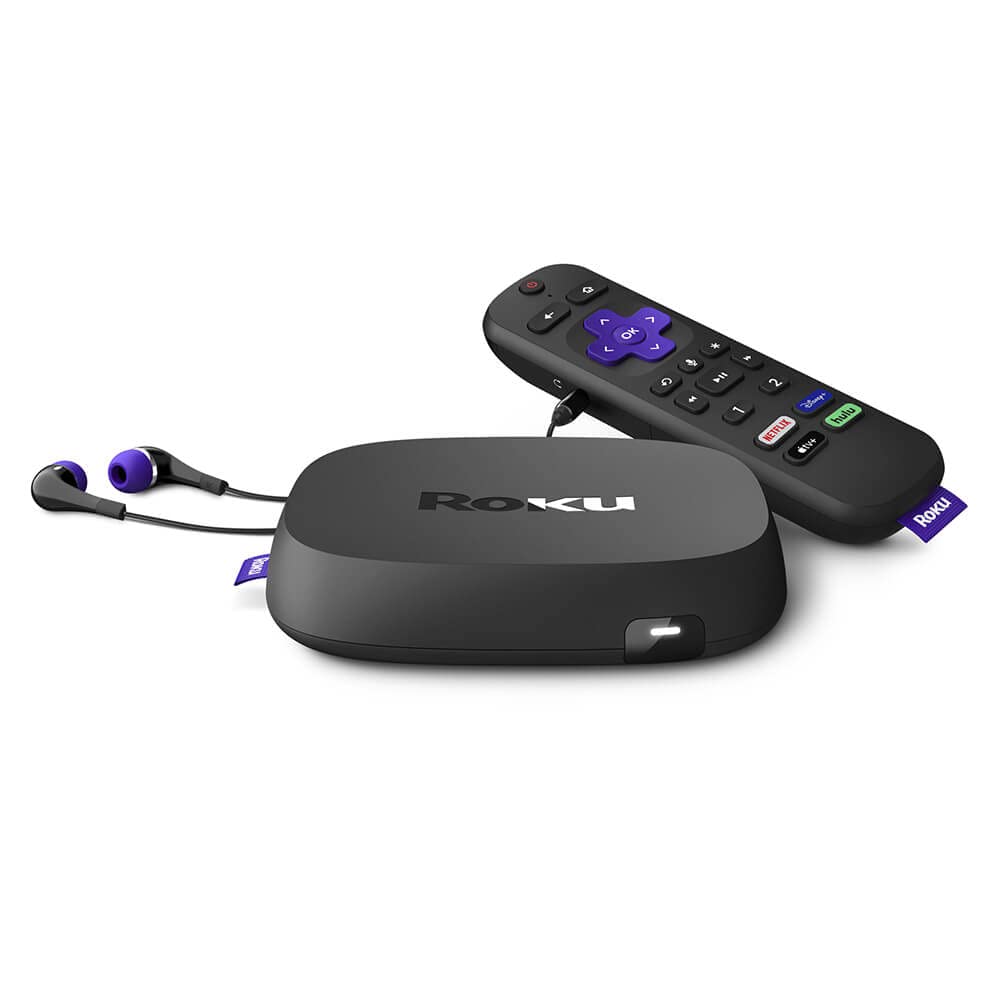
This pre-owned or refurbished product has been professionally inspected and tested to work and look like new. How a product becomes part of Renewed, your destination for pre-owned, refurbished products: A customer buys a new product and returns it or trades it in for a newer or different model. That product is inspected and tested to work and look like new by -qualified suppliers. Then, the product is sold as an Renewed product on . If not satisfied with the purchase, renewed products are eligible for replacement or refund under the Renewed Guarantee.
| Brand Name | Roku |
| Item Weight | 7.9 ounces |
| Product Dimensions | 4.9 x 4.9 x 0.8 inches |
| Item model number | TFQF-175 |
| Color Name | Black |
| Special Features | Wireless |
J**R
Works just like it's supposed to, great for cutting the cord
Started with the most basic Roku model to see if we could handle streaming only. Satellite TV is insanely expensive (we were up to $120+/month and no pay channels!), and I decided to try cutting the cord. Our adult children encouraged us to try Roku, and it went so well that we decided to move the basic device into the guest room and upgrade our living room TV to the Ultra Roku. Found this reconditioned unit at a much lower price than brand new, decided to take a chance. It installed without any problems, and as soon as I connected it to my phone, all my Roku settings from the old device were transferred to this one. It did freeze up on me on day two, and I had to completely shut off, unplug and reset the unit, but since then, I haven't had any more problems (about 3 months of steady use now).I don't really notice any huge improvement in picture quality, but we tend to watch older shows on the Roku and maybe they don't have the high quality pictures. TV is a smart TV, so we watch Prime and Netflix through that, rather than using the Roku. I really wanted to streamline everything through one device, but here's the thing they don't tell you: Roku does NOT work with a soundbar! The only way to adjust the volume is through the Sonos app on my phone. Not only that, once I watch anything on Roku, then if I go to one of my other streaming apps, I still can't control the volume with my TV remote. We have to switch over to network (over-the-air) TV, then go to a different streaming app and the TV remote volume control will work again. VERY annoying! I don't have any problems with Roku volume on the guest room TV, because it is only using the TV speakers. I also can control the volume on Roku if I'm using the headphones with the remote, again, because it's not using the soundbar. For some reason Roku will not work with a soundbar, and once you get into the detailed instructions, it will tell you that straight, but it doesn't tell you in advertisements or sale listing that this will be a problem. We have work-arounds, but come on, Roku, get it together and fix this! TV's like this are practically packaged together with these soundbars. It's bad enough that we have to use 2 remotes (one for the Roku and another for everything else), but to have to also use my phone to adjust volume? That's ridiculous!Only other issue I have with the Roku is the limited time to pause a TV show. I very often pause my show to step away, go to the bathroom, get a drink, change laundry, take a phone call, etc. I haven't figured out the exact time yet, but it's not long (maybe 10 minutes?) before the thing completely times out and shuts off the TV. Not a big deal, but really annoying to come back from whatever pulled me away and find that the TV is off and I now have to go through 5 screens to find what I was watching again. The worst one was the time it did it to me with less than 5 minutes left in the show, and when I went back to that episode, my only option was to watch from the beginning, so I had to fast-forward through almost the entire show to get to the last 5 minutes and see what I missed (which turned out to be 1 minute of nothing important and then closing credits, but still....). I have searched all my settings to see if there is a way to extend this time-out option, but I can't find anything. The old Roku Express never did this, just the new Ultra.
M**E
Gift for my mom, she loves it.
Gift for my mom. She loves it.
D**.
Es el único con codificador Dolby Plus
Lo tuve que devolver porque cambié de televisor. El tv antiguo solo soportaba Dolby Digital y estaba conectado con el Roku Premiere, y cuando activaba el Dolby Digital Plus en Roku, las películas de las plataformas salían sin sonido. Investigando pude encontrar que era porque mi Roku y mi TV no soportaban Dolby Digital Plus, y también encontré que esta versión de Roku (4800) al igual que la otra más reciente (4802) tienen un decodificador de Dolby integrado. La versión Lite o LT 4801 no lo soporta para que lo tengan presente.Con este Roku al tener un decodificador integrado ya pueden disfrutar de Dolby Digital Plus si el tv no lo soporta, pero eso sí, garanticen que el hdmi sea de buena calidad.
J**R
No surprises.
It Was exactly what I ordered. Well pleased.
A**E
I'm familiar with the workings of Roku
My friend got a Roku TV for a gift and let me use her Roku box. I used it for 2 years and decided to buy my own recently. I knew it was refurbished and I took my chances with this. Seems to work But there's times that the screen goes haywire so I just restart it. When it was loading up the animated Roku screen was totally screwed up it was greenish and all kinds of weird. The other night I tried to shut it down to go to bed. It wouldn't shut off and even my regular TV remote wouldn't shut the TV off. Finally I cut the powerplug off, unplugged the Roku box and 10 to 15 minutes later plugged it back in. It seemed to do the trick cuz the animated Roku screen was perfect but it wouldn't turn the TV off. So just went to settings and paired up the Roku remote to the TV again. So far so good.Like I mentioned I have good knowledge of how to use the Roku device so when y'all buy a Roku device make sure you go through ALL of the settings first after your Roku main screen is up. I usually as a rule start from the top and go through every single setting for the devices. If you want the Roku remote have control of (volume and turn it on/off) your TV make sure you set it up for that function (which I already did B4 my device problem) . It doesn't get very hot, it's functional for me, I have it tweaked out for my wants and needs (which I'm very technical savy when it comes to electronics from 30 years or so of dinking around with it loads of electronics), Get the home screen set up with wallpaper, apps that You watch/want, delete the apps ya don't want, move the apps in the order you find significant to your needs/likes. I can make my own personal. screensaver using my own stuff using a app called Roku photo streams or Photoview that uses the Google Photos app from your own devices. And here's a big must-do, make sure your Roku device updates daily (do this from settings area). Just wanted to tell ya some tips and tricks for your Roku device so it's working for you.So IF y'all have problems (and I hope y'all don't) just pull the Roku power plug, walk away for a few minutes and plug it back in. It should clear things up for y'all, if not repeat this procedure.(You can use it wireless or hooked directly to your WiFi/Internet modem (which I prefer to do the direct connection myself).For the price it fine, it works, 90 day return, sounds good (but I'm hooked up my amplifier), functional, remote works with TV functions, basically easy to setup don't know what else to tell y'all except for the most important thing: Settings, Settings, Settings the very 1st thing b4 usage you'll be glad you did it. (Speaking from experience). Not everyone will do this then they just complain the Roku Unit doesn't work properly (just common sense) it's not a plug and play so to speak. Remember the Roku is like a child, you need to tell Roku what You want it to do then afterwards y'all can sit back and enjoy.💯😉
L**1
Impressive Roku device, remote failed quickly.
Even though we are elderly, we decided to go to streaming only for our entertainment. But eventually electronic devices begin to fail. Our original Roku streaming player bought years ago began to fail, so I bought this one. Everything about the Roku Ultra 2020 is better than our original Roku 2. Originally we enjoyed the features of the remote which quickly failed. Fortunately, we have multiple Roku remotes to use instead, we have purchased many Roku devices over the years. We changed from fiber optic internet to a different technology. An over-the-air internet provider, which can be weak at times. The Roku Ultra does give us better results with our new provider, T-Mobile. It also has the advantage of being much less expensive than the latest Roku streaming player, too!
W**S
Love this
The Mrs and I love this for the bedroom.. when one is sleep... the other can enjoy watching TV without disturbing the other
Trustpilot
2 months ago
1 week ago