Desertcart purchases this item on your behalf and handles shipping, customs, and support to Greece.
🌈 See Tomorrow Today with AcuRite’s Colorful Precision!
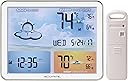
The AcuRite 02081M Weather Forecaster combines a vibrant jumbo color LCD with atomic clock technology and a patented self-calibrating sensor to deliver ultra-accurate, hyper-local 12 to 24-hour weather forecasts. Designed for desktop or shelf placement at eye-level or below, it features easy-to-read large digits, automatic daylight saving time updates, and indoor/outdoor temperature readings with ±2°F accuracy. Powered primarily by AC with battery backup, this weather station ensures you stay ahead of the day with reliable, real-time environmental data.


| ASIN | B01HDW58I6 |
| Additional Features | Strong |
| Best Sellers Rank | #113,477 in Patio, Lawn & Garden ( See Top 100 in Patio, Lawn & Garden ) #176 in Weather Stations |
| Brand | AcuRite |
| Brand Name | AcuRite |
| Color | Full Color AC-Powered Display |
| Connectivity Technology | Wireless (proprietary frequency) |
| Customer Reviews | 3.9 out of 5 stars 1,999 Reviews |
| Display Type | LCD |
| Frequency | 0.06 hertz |
| Global Trade Identification Number | 00072397020817 |
| Included Components | Pack of 1 AcuRite 02081M Weather Station with Jumbo Display and Atomic Clock |
| Is Used Where | Indoor, Outdoor |
| Item Dimensions D x W x H | 0.9"D x 4.8"W x 1.6"H |
| Item Highlight | Get a personalized 12-hour future forecast, indoor/outdoor temp with highs/lows, and atomic time on this color weather clock. |
| Item Type Name | AcuRite 02081M Weather Station with Jumbo Display and Atomic Clock |
| Item Weight | 1.6 pounds |
| Manufacturer | Chaney Instruments |
| Material | Plastic |
| Material Type | Plastic |
| Model | 02081M |
| Number of Batteries | 2 AA batteries required. |
| Number of Items | 1 |
| Part Number | 02081M |
| Power Source | Corded Electric |
| Recommended Uses For Product | Time and Date |
| Sensor Technology | Wireless |
| Shape | Rectangular |
| Special Feature | Strong |
| Specific Uses For Product | Temperature |
| Style Name | Full Color AC-Powered Display |
| Temperature Accuracy | +/- 2 degrees Fahrenheit |
| Temperature Reading Accuracy | plus_minus_2_degrees_fahrenheit |
| UPC | 072397020817 |
| Upper Temperature Range | 158 °F |
H**U
Put it nearby, AT or BELOW eye-level. You CAN switch backlight TOTALLY off. SIX-feet power cord.
PREFATORY NOTE: I recently noticed some (evidently well-meaning) customers provided their own (evidently casual) VIDEOS and/or PHOTOS that, alas, make this weather station's backlit display appear excessively DARK. I don't know if said customers were simply hastily filming and/or if they hadn't set the weather station display's brightness level (via its own pertinent buttons) to its normal "100%" level. Anyway, prospective purchasers should frankly consider the (evidently Acurite-provided) much brighter photos near the top of Amazon's main product page (together with the evidently Acurite-provided INTRODUCTORY video) to be at least considerably more indicative of the altogether satisfying brightness level that I myself (admittedly no shutterbug) readily achieved with my own installed specimen of this product. * * * I recently bought this colorfully alluring AcuRite 02081M weather station, after having chosen it with some trepidation, considering that some customer reviews had cited not only the limitations of its display when viewed from certain angles and distances but also the general unsuitability of the display for WALL mounting. [More on those matters below, in this review’s final, “Bottom Line” section.] As I began installing the main unit on the rough side of my house's fully underground basement (in the "home gym" at the west end of the house), I inserted three AA alkaline batteries (for “backup” purposes) and then connected the AC power cord, whereupon the main unit received (seemingly instantly and effortlessly) the compatible, correct broadcast signal from my long ago installed AcuRite remote in the garage on the (fairly distant) east-end wall of the house. Moreover, it likewise automatically proceeded to successfully receive the “atomic clock” time-and-calendar signal information (broadcast from Fort Collins, Colorado). [Afterwards, I pressed-and-held the rear “SET” button (to enter manual-setup mode) and merely changed the “time zone” setting to MY location. (Doing so immediately corrected the displayed hourly time to conform to MY time zone.)] Of course, DST (daylight-saving time) biannual resetting (of the hourly time) will henceforth be handled automatically by this main unit, not me. Sweet! [Of course, you always have the option of switching “DST” off (via manual “SETUP” mode).] This main unit's built-in (indoor) thermometer is indeed accurate (matches the temperature readings of several of my highest quality "benchmark" thermometers that I'd temporarily placed adjacently). After several hours, the display's weather-forecast icon is already starting to (more or less) match the analogous icons of several of my other AcuRite weather stations installed throughout the house; so, its built-in barometer does appear normally responsive. [However, the displayed weather forecast likely won’t settle down and become fully decently accurate till somewhat after the completion of the initial “14-day Learning Mode” phase.] Interestingly, although I'd read certain other customers' claims that their specimens came with AC power adapter cords that were approximately FOUR or FIVE feet long, the one that came with MINE is approximately SIX feet long (thank goodness). Also, certain customers' claims regarding the backlight conveyed the notion that it's impossible to simply switch it completely off. But I soon found that this is absolutely untrue. For, after a brief bit of experimentation with not only the “UP” button’s but also the “DOWN” button's respective “brightness-level-toggling” sequences, I discovered it’s possible to use the “UP” button as a “BACKLIGHT ON” switch, and use the “DOWN” button as a “BACKLIGHT OFF” switch. [Just initially set this up by repeatedly pressing-and-releasing the “UP” button till the backlight shines at its normal “100%” level, and then repeatedly pressing-and-releasing the “DOWN” button till the backlight shuts COMPLETELY OFF. Thereafter (henceforth), you’ll always be able to just tap the “UP” button once to switch on the backlight, and likewise just tap the “DOWN” button once to switch off the backlight.] [NOTE: Curiously, the ability to switch the backlight COMPLETELY OFF isn’t even mentioned in AcuRite’s “Instruction Manual” for this model.] Moreover, having set up the backlighting mode (via exactly the steps explained in my prior paragraph), during the ensuing days and nights I noticed that AcuRite’s “AUTO DIM mode” (likewise available on various other of their weather station models) was similarly in effect with THIS model, as follows. During “daytime” hours, the backlight shines at its normal “100%” level; but during “nighttime” hours, the backlight shines at its lowest, “15%” level. [NOTE: Curiously, “AUTO DIM mode” isn’t even mentioned in AcuRite’s “Instruction Manual” for this model.] In my opinion (ranting frankly as an AVID hobbyist/collector of such "basic" weather station products, including MANY other models by not only Acurite but also by La Crosse Technology and Baldr), Acurite's obviously INEXCUSABLE lack of ANY included instructional information regarding not only the unavoidably confusing/frustrating “AUTO DIM mode” feature but also the unavoidably confusing/frustrating "backlight ON/OFF" feature of THIS model evinces a pathetic attitude of casual [corporate?] indifference that should have gotten the responsible employee(s) terminated. [Incidentally, I feel much the same way about the frustrating ABSENCE of not only the "day-of-the-week display" feature but also the "atomic clock" feature on MOST of Acurite's OTHER models of basic weather stations (but, thank goodness, the model discussed in THIS review shines as a noteworthy, happy EXCEPTION in both of THOSE particular respects)!] BOTTOM LINE: FIRST, know that IF you install this weather station’s display even slightly HIGHER than eye level, you will absolutely NOT be able to satisfactorily (if at all) discern the display’s information. Therefore, place the display either AT eye level or LOWER than eye level. SECONDLY – and equally importantly – know that you absolutely won't be able to FULLY sharply discern the display information IF the DISTANCE between you and the display is MORE than about 4 [or, better still, 3] feet. Consequently, you will surely NOT be fully pleased with this particular model unless you're able to view it from not only precisely the right ANGLE but also precisely the right DISTANCE. Regarding WALL INSTALLATION of the display: All of the control buttons – including the “UP” and “DOWN” ones, which are used to control the backlight – are on the BACK of the display. Therefore, I absolutely DON'T deem this model ideally suited for WALL mounting, especially considering its essentially “required” AC-power adapter’s cord would be dangling conspicuously from the display’s lower-right corner. [NOTE: Despite the buttons being on the unit's rear, it's very easy to operate them while facing the front of my below-eye-level, shelf-top-mounted unit. With my right-hand thumb tip placed lightly in front of the bezel, I simply move my right-hand index fingertip onto the easily felt "UP" button and/or the "DOWN" button, etc.] Thus I would argue that (for the vast majority of users) this model 02081M [unlike AcuRite’s related model 75077A3M, which is a strictly battery-powered, “no-backlight” version whose particular MONOCHROME display does, however, require BRIGHT ambient lighting (e.g., from a very nearby lamp)] is best used ONLY when installed upon a sufficiently low DESKTOP, SHELF, COUNTERTOP or TABLE, with its rear STAND pulled outward fully (or perhaps “not quite 100%” fully, such that you could adjust its viewing angle – albeit only very slightly – to somewhat tweak the display’s viewability from your vantage point). Therefore, IF – and I do mean "if" – you can luckily find or fashion an IDEAL installation location whose height AND distance are BOTH within this display's fairly limited range of “vertical vantage point viewability" for your purposes, you'll PROBABLY end up being altogether pleased with AcuRite’s model 02081M. [I say "probably" because, unsurprisingly, you'll also need to factor AMBIENT LIGHTING into the placement equation; for example, I myself wouldn't want to install this display in an unusually bright (e.g., sunny) area.] In fact, I'm now delighted that I bought this model 02081M. Although I did initially need a little time to figure out and fashion precisely the correct installation location for its display to look ideal, I now deem that colorful display’s tastefully subdued art beautiful, and all of its dark alphanumeric characters and weather-forecast icons actually look quite distinctly sharp.
M**N
Easy on the eyes
Weather station was easy to install and came up immediately. The forecast image window took time to read, and is more a source of amusement than information, but balances out the display nicely. Provides all the vital information most will need or use. The external gauge is sturdy, battery replacement is easy and appears well built. I live in the PNW and look forward to many years of use.
H**)
Good weather station on your desk. But could be issues on the wall.
I bought this and 2 of the AcuRite 00611A3 wireless indoor/outdoor The clock's receiver syncs up to the National time standard and it seems to detect the Daylight Savings Time change automatically The rolling weather forecast is nice. It is "one step" above looking out the window. Amazingly, the wireless sensor on all three were able to figure out which base unit they were paired to when I first plugged in the batteries. I was worried about this. But, it was "magic" and it "just worked" The color background / back lighting is nice. If you use this on a desk, it will be beautiful and sharp. The base is powered by a wall transformer with 3 AA batteries in the base unit for "backup". The wall transformer's cord is about 4' long. But, there is one annoying problem with the display: When it is mounted on the wall, and I am sitting at my office desk, the LCD numbers / text fades out and cannot be seen. The back light is at 100%, but the text is almost completely unreadable. The only options are backlight brightness (100%, 50% & 10%) and I've tried them all. There is no option to change viewing angle. The base is mounted about 5' off the floor, and my eyes are about 2' below the unit and about 8' distance. At that angle, I cannot see the LCD text - it is faded to a shadow of a ghost. If I am horizontal or above the unit (like standing or walking), the LCD is super sharp and easy to read. I get the impression that the base unit is optimize to be a desktop unit. On a desk, the short power cord (4') and the viewpoint limitation would not be big issues.
R**T
Updated review to negative
Would be perfect if backlight were dimmer and characters were brighter so viewing angle doesn't become critical. I set it up on a side table (30") and it was "almost" perfect. Then I moved it to the top of my media cabinet (62") and the characters disappeared. At that height if I tip it forward 15° from vertical it's perfect, but how am I going to keep it tipped forward?! AND why should I have too?! Set up was easy, readings are accurate, build quality is commensurate with price, but display brightness/contrast is abysmal. I tried all the brightness settings and the same problems exist. I'll keep moving it around until I find the sweet spot, I'm not returning it. Well 24 hours later it's going back. Outside temperature started fluctuating all over the place. It never oficially got above 60° yesterday, but the display was saying it was 72° even though the sensor was completely shaded and finally climbed to 77° which by then it was dark outside and a completely unrealistic reading. The display viewing angle is just ridiculous. Very disappointed, I really wanted to like this weather station.
R**E
I like it but ......
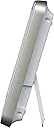
I like it however it is does have a few short comings. I bought this thinking that it was battery powered on both ends. However if you want it to light up on the display end you will need to plug it into the wall. Something I had not counted on and this led to some installation issues. It looks like a color LCD display buy it is not and if you read carefully it does say "Illuminated display requires power adapter (included) for optimal viewing". What you have is a very nice back lit picture with the numbers being in the LCD that is placed over the top of the picture. I can get by that since it does look quite nice. But the biggest problem is that the LCD numbers are sensitive to line of sight and can almost completely disappear depending on your sight line. We mounted it flat to the wall and the numbers were visible when it was below eye level and disappeared as you moved up the wall. The remote temperature sensor appears to work quite well displaying a strong signal level through four walls and 100 feet of distance. The jury is still out on the Atomic Clock. It does say in the instructions that it may take several hours for the signal to correct the clock. I purposely set the clock five minutes slow so I would know when of if it updated. Batteries - It does not come with batteries, they are AA type. Three are in the display (used to backup the clock) and two are in the remote sensor. Instructions are fairly good and setup is relatively simple. The unit does have a slotted hole in the rear for mounting over a screw head and it also has a fold out stand for sitting on a table top. The AC adaptor must have six feet or so of cable. An update on the Atomic Clock The Atomic Clock function was the only part that did not go smoothly. To understand the issue here you need to know that the signal for setting the clock comes from a single station (four the entire US) located in the middle of Colorado. It is a low frequency signal (60 Khz) but receiving it can be problematic since we have a metal roof on our house and we are located in the Pacific Northwest. Making matters worse was the switch in the rear of the display that allows it to search for the signal was a bit flakey. Finally after repeatedly pressing the switch it began to scan (bars will begin to strobe near the little Antenna icon). It still would not pickup the signal so I waited until after dark when the signal was stronger and repeatedly hit the button until until it began searching for the correct frequency. I moved the display near a window on the side of the house facing the source in Colorado. It took several minutes and then the signal locked on, the time reset and was correct. Once it had locked on to the signal I was able to move the display back to it's original location and it still indicated that it had a strong signal. The reason the unit needed to scan for the correct frequency is that there are other sites in Europe, England, and in other areas that operate on different frequencies. I hope this helps :-)
M**R
Trusted brand
Nice screen and bright. Have had two years no issues. Has been accurate and consistent.
M**N
Overall this appears to be an okay product. The ...
Overall this appears to be an okay product. The biggest flaw, so far, is the inaccuracy of the indoor temperature, which makes me suspicious about the accuracy of the outdoor temperature. Hanging on a wall only 6 feet away from this instrument is a large digital clock which also features an indoor temperature gauge. While the AcuRite reads 80 degrees, the clock reads 74 degrees--a six degree discrepancy. Based upon my comfort level in this room, I'll go with the 74 degree reading--which I think is perhaps a bit high as well. I'm still thinking about returning it, but will await some feedback from this posting. Following the advice of the manufacturer rep, I relocated the unit on the same wall, and directly below a digital clock that also displays indoor temperature. In a few minutes, my AcuRite displayed the same exact temperature as the wall clock, proving to that it is, in fact, an accurate instrument. Therefore I increased my rating to 5 stars. Lesson here is to read and follow instructions carefully. These are sensitive devices and something as simple as moving them from one wall to another can either increase or decrease readings.
T**S
Disappointing. Not Accurate in any way.
This product is junk. I bought it based on it's fine colors and look. It appears to be an iPad-like tablet. I knew it wasn't, and didn't expect it to be, I'm just saying it has the aesthetics of an iPad. The problems are numerous: 1: You have look at it from above, otherwise the images wash out. That means if it's on a coffee table, it is easily readable. If it's on a high counter or mounted on a wall, you can't read it from a distance of even 5 feet away. 2: The unit claims to sync time with national time stations, however this won't work for 2-3 days after powering on. Consider the situation where you don't have batteries in it, and you are using the AC plug. If you lose power, when it comes back on the time will be wrong, and you have to manually set it. What is the point of this technology if you get this behavior? 3: The remote thermometers are rarely accurate. I have mine mounted in as the instructions suggest, 5 feet up with plenty of air flow around it. In fact I have it mounted in permanent shade, yet the temperature readings are always 5-8 degrees higher that they should be. I'm basing this on comparison to another home weather station, along with iPhone weather app, and weather.com. This station will read 81 F in the shade, where the other 3 I'm comparing it to will read 75 F. That's the difference between shorts and long pants! 4: The weather prediction panel is often incorrect with respect to cloudy forecasts when it's raining, and sunny forecasts when it's mostly cloudy. Disappointing. I'm still looking for a colorful replacement to this product.
D**D
Buena calidad
Practico, buena calidad
A**I
The product does not perform accordingly instruction manual resulting in the product not working.
Did not get to test that because the product did not work properly
R**M
Excellent product. Display is bright (adjustable)
Excellent product. Display is bright (adjustable), and digits are large and easy to read. AC adapter included so batteries are for backup only in case of a power failure. Overall, nice looking unit. Just what I was looking for!
J**.
Buen servicio
Todo ok
K**Y
Works Just Fine
Be patient … takes two weeks to calibrate necessary for solid forecasting. Great for “in-a-glance” capture of time, date and indoor temperature along with the weather.
Trustpilot
2 weeks ago
2 weeks ago