Desertcart purchases this item on your behalf and handles shipping, customs, and support to Greece.
🎬 Elevate your video presence—because your image deserves the spotlight!
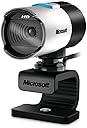
The Microsoft LifeCam Studio is a professional-grade webcam featuring 1080p Full HD video with a 16:9 widescreen sensor, advanced auto focus with high-precision glass optics, and TrueColor Technology for vivid, natural colors in any lighting. It includes a high-fidelity microphone for crystal-clear audio and a 3x digital zoom to customize your framing. Compatible with USB 2.0, it’s ideal for video conferencing, live streaming, and content creation, delivering sharp, detailed visuals and sound that keep you looking and sounding your best.


| ASIN | B0042X8NT6 |
| Antenna Location | video conferencing, live streaming, recording videos |
| Are Batteries Included | No |
| Best Sellers Rank | #70,070 in Computers ( See Top 100 in Computers ) #397 in Webcams |
| Brand | Microsoft |
| Built-In Media | Microsoft LifeCam Studio - webcams |
| Camcorder Type | Webcam |
| Color | Silver |
| Compatible Devices | Personal Computer |
| Connectivity Technology | HDMI |
| Customer Reviews | 4.2 out of 5 stars 674 Reviews |
| Digital Zoom | 3 x |
| Display Resolution Maximum | FHD |
| Effective Still Resolution | 5 MP |
| Effective Video Resolution | 1080 Pixels |
| Exposure Control Type | Automatic |
| Features | Low Light |
| File Format | AVI, MOV, MP4 |
| Flash Memory Type | SD |
| Flash Memory Video Speed Class | V10 o superior |
| Flash memory type | SD |
| Focus Type | Auto Focus |
| Form Factor | Standalone |
| Global Trade Identification Number | 00885370139808 |
| Has Image Stabilization | No |
| Image Aspect Ratio | 16:9 |
| Image Capture Speed | 30 fps |
| Image stabilization | false |
| Item Dimensions D x W x H | 19.1D x 6.8W x 20.3H centimeters |
| Item Weight | 127 g |
| Lens Type | Telephoto |
| Log Gamma Curve | [POSSIBLE] |
| Manufacturer | Microsoft |
| Maximum Aperture | 1.8 f |
| Maximum Focal Length | 1920 Millimeters |
| Maximum aperture | 1.8 f |
| Maximum focal length | 1920 Millimeters |
| Minimum Aperture | 1.8 f |
| Minimum Focal Length | 1080 Millimeters |
| Model Name | LifeCam Studio |
| Model Number | Q2F-00001 |
| Photo sensor technology | CMOS |
| Screen Size | 3.5 |
| Sensor Type | CMOS |
| Shooting Modes | Automatic |
| Style Name | Retail |
| Supported Audio Format | WMA |
| Supported Image Format | JPEG |
| UPC | 999996731916 885370139808 |
| Unit Count | 1.0 Count |
| Video Capture Format | MP4 |
| Video Resolution | 1080p |
| Video capture resolution | 1080p |
| Warranty Description | 1 YEAR LIMITED MANUFACTURER WARRANTY |
| Water Resistance Level | Not Water Resistant |
| White Balance Settings | Auto |
| Zoom | Digital |
S**R
Works fine with Windows 10, settings can be adjusted via Skype!
This review is for the "Microsoft LifeCam Studio 1080p HD Webcam - Gray" in case you find it under another product. I was looking for a new webcam for the frequent Zoom meetings I attend. The main requirement was the camera's viewing angle had to be narrower than the wide-angle view provided by nearly every other less-expensive webcam. This can only be obtained via optical zoom (preferable but unavailable at this price point) or some form of digital zoom effect. The reason this is important for online conferencing via Zoom and related systems is that the normal wide-angle view makes your face too unimposingly tiny, especially in "gallery" view. Imagine my surprise when I found a whole slew of camera controls in the Skype settings menu (ridiculously, they aren't even available via the Windows 10 camera app.) Among the controls that are adjustable is a digital-zoom setting -- exactly what I was looking for! How to take advantage of this in Zoom: Open Skype, adjust the settings for the camera using the Skype Audio and Video settings controls. Remember to hit the "Apply" button on both settings windows. Exit Skype and start Zoom and the camera settings will have been preserved between the two applications! Using this procedure and sitting about a foot from the camera, I was able to get my face to fill at least 3/4 of the screen height, the exact effect I was after. I've only tested this with Zoom so I don't know if it works with other conferencing or picture/video software. But it's good enough for my purposes, especially since I bought this model back in 2012, way before there ever was Zoom. BTW, this camera's image quality from the start has been extremely good and it is still competitive today.
C**E
Excelente camara
Ya tenía una cámara como estás, y la volví a comprar, excelen, muy buena imagen, plug and play, todo muy bien, súper recomendada, y al vendedor también, recomendado
U**1
Below expectations
Received not sealed, without catalog and defected (Autofocus is not working)
注**屋
MicroSoft 自身の Web 情報に虚偽がある
MicroSoft 自身の商品説明の段階では、ズーム8倍、ただし公式データ・シートでは3倍、事実は後者なので、いざ争いをするならあちらに有利でしょう。が、MicroSoft 商法?の一端が見えたようです。 商品にはソフトの添付がない、一切の説明がない - 客が調べてダウンロードしなければ機械も使えない。 もし、これが MicroSoft 自身のやり方なら 「いつもの通り」。一方、私に届いたパッケージがそういう バルク製品だったとしたら、業者が詐欺に近いことをやっていると言えます。 お値段がこの程度なので、法的に争うメリットがありません。どうであれ、そういう価格帯で そういう売り方をするのは、一種のサギ、ペテンです。
J**C
Bon achat
Je l'aime bien!
Trustpilot
1 day ago
2 weeks ago