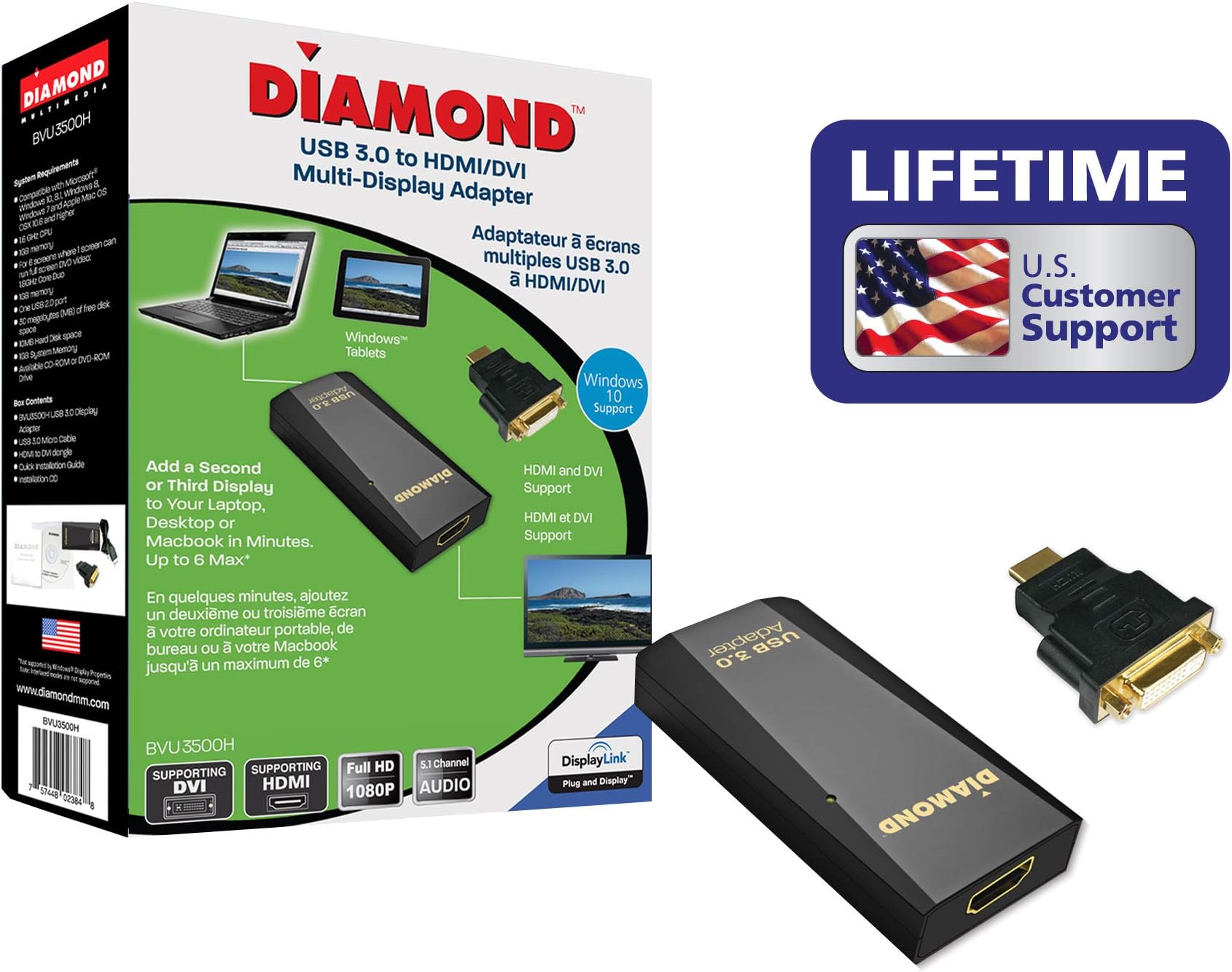




Diamond Multimedia BVU3500H USB/USB-C/TB3 to DVI/HDMI Video Graphics Adapter, Windows 11, 10, 8.1, 8, 7, XP, MAC OS and Android 5.0+
Product ID: 2913891
⚡80% less power usage
🔌USB 3.0 connection
🖥️Max resolution 2560x1600
🚀 Elevate Your Workspace with Effortless Connectivity!
The Diamond Multimedia BVU3500H USB/USB-C/TB3 to DVI/HDMI Video Graphics Adapter allows you to connect multiple displays to your computer with ease. It supports a maximum screen resolution of 2560 x 1600 and is compatible with a wide range of operating systems, including Windows, Mac, Linux, and Android. This adapter is designed for efficiency, using 80% less power than traditional graphics cards, making it an eco-friendly choice for professionals looking to enhance their productivity.
| ASIN | B00K85XURC |
| Best Sellers Rank | #1,716 in DVI-HDMI Adapters |
| Brand | Diamond Multimedia |
| Built-In Media | Usb 3.0/2.0 To Hdmi/dvi Adapter |
| Color | black |
| Compatible Devices | PC |
| Connector Type | DVI, HDMI |
| Current Rating | 1 Amps |
| Customer Reviews | 4.3 out of 5 stars 148 Reviews |
| Finish | Chrome |
| Global Trade Identification Number | 00757448023848 |
| Item Dimensions | 3.2 x 1 x 1.9 inches |
| Item Weight | 1.6 ounces |
| Item dimensions L x W x H | 3.2 x 1 x 1.9 inches |
| Manufacturer | Diamond Multimedia |
| Mfr Part Number | BVU3500H |
| Model Number | BVU3500H |
| Nominal Power | 3 Watts |
| Number of Ports | 2 |
| Package Quantity | 1 |
| Power Plug Type | No Plug |
| Smart Home Compatibility | Not Smart Home Compatible |
| Specific Uses For Product | PC |
| UPC | 512959850877 803983108264 898029679204 757448023848 011411360799 745734228190 863190087837 767887431906 670001392000 846829954069 780320055453 |
| Warranty Description | 1 year |
| Warranty Type | Limited |
T**R
Works for Projector w/ Audio
This BVU 3500H device works as advertised. I plugged it in to an HP Envy 23 computer on a USB 3.0 port to connect it via HDMI to my Onkyo stereo receiver (which passes the HDMI video to my projector). I needed this adaptor since the E23's HDMI port is only HDMI in, not HDMI out. DO NOT get other Diamond devices which only adapt to HDMI video if you have a set-up like mine: you need the native HDMI support to pass audio through (others will only pass video). The box come with a HDMI to DVI adaptor which I didn't use. It includes a short cable to go from a standard computer USB A to one of those odd extra-wide Micro-B USB 3.0 ports on the BVU3500H. The other end of the BVU3500H has a standard female HDMI port. It also came with an installation disk and a marginally helpful instruction booklet. Since I have Windows 10, it turns out I didn't need to install anything (it was plug and play -- Windows immediately recognized a secondary monitor). The instruction booklet only covered earlier versions of Windows and Mac instructions (it would have saved me a little time if it had said "don't bother reading this if you have Win10"). My little guy and I watched a movie on it last night and it worked great. I can't speak to device longevity at this time, but it has an attractive, small case and looks like a quality build.
D**.
Works, but...
I purchased this to connect my Google Pixel Pro 8 to my TV, and it does work. However, my primary intention was to use it with my YouTube TV subscription, but that was a failure. I'm not sure if that is because YouTube TV is somehow blocking it, or what?
T**.
Yes, it supports 2560x1440
This adapter is a perfect solution for my needs. I recently upgraded the monitor for my desktop that has a dual monitor setup which only has 1 VGA and 1 Display port. The display port supports the resolution of 2560x1440, but the VGA supports only up to 1920x1080. I need 2560x1440 for of my monitors and this USB 3.0 to HDMI adapter is a perfect solution. The installation was very simple. Just plug in the USB cable that came in the package to the computer and then to the adapter, then the HDMI cable of the monitor. The Windows 10 picked it up in a few seconds and you have the display over USB 3.0. I did have to change the display resolution.
A**P
Works perfectly on Windows 10, using HDMI ports from both monitors and USB 3 port and HDMI from PC.
Love this little device. I have the USB 3.0 DVI/HDMI (BVU3500H) version. The device is 4" long, almost 2" wide, and almost 1/2" in depth. It comes with a 3 foot long USB 3.0 cable (also usable for USB 2.0 ports). It also comes with the DVI to HDMI adapter. The DVI is female and the HDMI is male. I am using an Alienware Alpha R1 with Windows 10. Install was quick and easy. 1) Start PC and monitor 1, download and install the latest software from the support website or use the provided CD. Software will let you know when to connect the device. 2) Connect the 2nd monitor to the Diamond Multimedia device, and then connect the USB from the device to your PC. Turn on monitor 2. 3) Install should autodetect and complete the install. You can choose to extend the display or duplicate the display, or use Display 1 only or Display 2 only. Here's my setup: Alienware Alpha R1 computer, HDMI cable from Alienware (AW) to my 1st Dell monitor. And then USB 3.0 cable (included cable) from AW to the Diamond Multimedia device and from the device goes an HDMI cable to my 2nd Dell monitor. Works perfectly, screen extended to both monitors, with a resolution of 1920 x 1080 on each monitor (providing a total area of 3840 pixel width x 1080 pixel height).
T**T
Work with Pixel 6 Pro (mostly)
The reason why I purchased this device was because the Google Pixel 6 Pro doesn't have HDMI over USB C like Samsung devices. With this device it is possible but with some drawbacks. The quality is good and it allows for the Pixel 6 to use a wired video/Audio connection to a monitor/TV. The drawbacks are not bad as long as you are expecting them. So with that here we go: 1. There is no way to switch resolution via the app or device, so unless you use another app the picture will not be "fullscreen". 2. Digital RIght Managed (DRM) media will not show on screen, there is audio though. The media itself won't show but the you'll be able to see things like the back button. 3. For mobile devices you will need a USBC male to USBC female/USBA Female splitter or USBC hub otherwise the device may not work or will drain battery very quickly. 4. The DisplayLink app is required, there are no permissions needed though.
J**L
Unreliable
Picture cuts out randomly. When it does, Windows 10 reads it as the USB adapter as being unplugged and plugged back in and causes some programs to close. I use this to have 2 extended monitors with my ASUS K501UX laptop - one with HDMI and one with the Diamond USB 3.0 to HDMI adapter. When the picture cuts out, both screens are affected not just the screen connected using the Diamond adapter. It does the job but is really unreliable, would look elsewhere if you need an uninterrupted connection like for PC gaming.
A**S
This is a really neat device
This is an awesome converter. I have a mid 2012 macbook pro 13" and this small little gadget does a great job. Thanks to this device I am able to use a dual monitor setup and it looks SUPER!! For a mac user you need to download the drivers from their website. Details are all provided in the package. If there is a downside to this is its price $$$. I am not sure about similar devices in the market and their prices.
A**R
video through USB hub makes neat docking station
Gets me the full 1920x1200 resolution my monitor allows, from just a USB port. I've also used the junior member of this product line, the BVU165, with success, but not at 1920x1200. Why not five stars? The often reported problem with this product line, of recurring temporary screen blackouts, increased dramatically as I went from three to four screens, while they claim I should be able to run up to sixteen. I gave up on having the fourth screen driven by the same computer. A promising feature I have yet to try is the HDMI audio on a 1080P device. I'll update this review after I do.
V**A
I'm supper happy :) :) :)
I had a surprise today when I received the package from Amazon because I only expect on 25 March these adapters. Wow is supper good that I received it 9 days before! Excellent work to prepare and dispatcher 5 Stars guaranteed. About the product as you can see in the pictures works as expected. I bought one extra piece, but it's OK, in this way I can think to add one more display ;) Thanks, Diamond for developer this excellent peace and faster delivery. Thanks to Amazon (USA) too, for free delivery with Prime conditions. I'm happy that's is all. My configuration. Laptop Latitude 5511 Intel i7 - 2.7GHz 32GB RAM 1TB SSD Windows 10 64-Bit Laptop
A**R
works for 2nd monitor on MacBook 2012 w/USB 2
I wanted a 2nd external monitor using extended display for my MacBook mid 2012, which has thunderbolt, and USB 2. Tried at least five other adapters and could not get the 2nd monitor to work through the USB. Downloaded latest driver from DisplayLink for Mac, and THIS PRODUCT works great. Only thing is at first it didn't work. I got a message saying I needed the latest driver, which I had. Went into the DisplayLink folder and double clicked the DisplayLink Manager and the monitor came on. IMPORTANT: After double clicking DISPLAY LINK, there is a small icon at the top to the screen for DISPLAY LINK. I attached a photo with 2 arrows. Make sure to check "Lauch app. after logging in" Otherwise, you will have to double click DISPLAY LINK every time to get the monitor to start. No problems with this product, and monitor is clear, and I have extended display. Totally happy. Also, I was told by a couple of technicians that USB 2 could not power a 2nd monitor. Not true.
D**F
Stable connection
Just ensure you install the driver and everything works seamlessly.
J**S
Great with DisplayLink Drivers
Diamond products work extremely well with DisplayLink drivers and it's quite likely that this is precisely what you need.
V**L
Buen Producto
Buen Producto
Trustpilot
3 days ago
2 days ago