Buy anything from 5,000+ international stores. One checkout price. No surprise fees. Join 2M+ shoppers on Desertcart.
Desertcart purchases this item on your behalf and handles shipping, customs, and support to Greece.
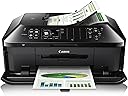
🖨️ Elevate your office game with Canon MX922 — where speed meets smart, wireless versatility!
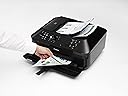
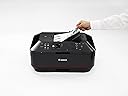
The Canon PIXMA MX922 is a versatile all-in-one inkjet printer designed for busy professionals and home offices. It features wireless and mobile printing, a 35-sheet duplex auto document feeder, and ultra-high 9600 x 2400 dpi color resolution for crisp photos and documents. With automatic double-sided printing, fast print speeds (15 ppm B&W, 10 ppm color), and seamless integration with AirPrint and Google Cloud Print, it streamlines workflows while reducing paper waste. Its instant-on technology and built-in CD/DVD printing add convenience and creative flexibility, making it a powerhouse multifunction device trusted by professionals seeking efficiency and quality.


| ASIN | B00AVWKUJS |
| Additional Printer Functions | All In One |
| B&W Pages per Minute | 15 ppm |
| Best Sellers Rank | #156,796 in Office Products ( See Top 100 in Office Products ) #115 in Ink Tank Printers |
| Brand | Canon |
| Built-In Media | Canon Office and Business MX922 All-In-One Printer, Wireless and mobile printing |
| Color | Black/sienna |
| Color Depth | 24 bpp |
| Color Pages per Minute | 100 ppm |
| Compatible Devices | Printer |
| Control Method | App |
| Controller Type | iOS |
| Customer Reviews | 3.8 3.8 out of 5 stars (15,228) |
| Display Type | LCD |
| Dual-sided printing | Yes |
| Duplex | Automatic |
| Global Trade Identification Number | 00806791924941 |
| Hardware Interface | USB 2.0 |
| Ink Color | Black |
| Item Dimensions D x W x H | 9.1"D x 19.4"W x 15.6"H |
| Item Type Name | Multifunction Printer |
| Item Weight | 25.7 Pounds |
| Manufacturer | Canon USA Inc. |
| Maximum Copy Resolution Black and White | 2400 dpi |
| Maximum Copy Resolution Color | 2400 dpi |
| Maximum Copy Speed Black and White | 15 ppm |
| Maximum Media Size | 8.5 x 14 inch |
| Maximum Print Resolution Black and White | 2400 dpi |
| Maximum Sheet Capacity | 35 |
| Maximum print Resolution Color | 9600 x 2400 dpi |
| Model Name | MX922 |
| Model Number | MX922 |
| Model Series | PIXMA |
| Number of Trays | 1 |
| Other Special Features of the Product | Auto Document Feeder |
| Output sheet capacity | 35 |
| Paper Size | 8.5 inch x 11 |
| Print media | Paper (plain) |
| Printer Connectivity Type | Wi-Fi |
| Printer Output Type | Color |
| Printer Type | Inkjet |
| Processor Count | 1 |
| Resolution | FHD 1080p |
| Scanner Type | Photos/Documents |
| Specific Uses For Product | Office, business |
| Total Usb Ports | 1 |
| UPC | 806791924941 640206587754 809099071034 012302195360 172302783599 823019537509 707785294081 638084577936 634972186235 053786295436 611102342013 803982791115 800011166722 809199904089 013803161847 809392576953 729224783802 641438726133 021111434157 898029653754 806300084173 800187847593 069060169201 801593123639 132017769516 164409596868 804993386635 163120853328 115971158183 748587915576 6421252133… |
| Warranty Description | 1 year limited warranty with instantexchange program plus 1 year toll-free tech support |
| Warranty Type | limited warranty |
H**7
This is an exceptional piece of technology. Canon has been my first choice for years.
That said, I don't try different brands so I can compare them, so I may be biased. My camera equipment is Canon (for many years) and so my last printer was a Canon IP6000, purchased in 2006, for printing 4x6 photos (and documents). It worked great until recently when it suddenly slowed way down, which is what prompted me to go shopping. Naturally I read the reviews for Canon printers (and some other brands) and it appeared that this one was the newest technology and already had favorable reviews, including from people with home businesses. Now, let's switch gears. My printing needs have diminished over the years as I have become increasingly more digital in document storage, online financial transactions, etc. Basically, if I can do it digitally, then that is the route I take. This includes my photo collection which is stored on my iPad for showing off. :-) I also bought a CanoScan 8600F (flatbed scanner) in 2006, which is still in use. So, imagine my very pleasant surprise when I discovered the awesome speed and stream-lined functionality of the multi-sheet scanning feature! If one sets up a directory (in the accompanying software utilities) ahead of time, then it's as simple as loading your documents, hitting either start button (black or color) and very quickly a pdf file shows up in the pre-set directory. Did I mention it has an ethernet port and is quickly (and painlessly) recognized on the network once the drivers are installed? I don't like Wi-Fi for home networking, I prefer ethernet (gigabit speed) when ever I can get it, so this port was a big plus for me. All of my computers see and work with the Fax driver, Printer driver and Scanning driver. Now, let's mention some little things that make this machine great. I never turn it off as it has a low-power state (automatic after a few minutes of inactivity) where everything powers down with only one small, blue light glowing. If I send something to the printer it immediately comes to life, takes a few moments to warm up and (this is cool) the paper output tray *automatically* opens and the extension support flips out! It's the little things that make me smile. :-) Also, if I place one or more documents in the scanner slot (while in low power mode) then it instantly springs to life and takes a few moments to warm up. Having stated that I print less and less these days, I must say I was impressed with the ink cartridges. They all have small, red LED lights that confirm they are plugged in correctly and in working order! Another smile. :-) Now I don't FAX much these days, but it's nice to know that it is hooked into the "clone" line through my PhonePower VOIP adapter (2 ports) and therefore is available upon demand. Oh, btw, the top lifts up like a flatbed scanner also, so I guess I will be donating the CanoScan 8600F soon. Final analysis: This machine's capabilities pleasantly exceeded my expectations, even after reading the specs and reviews. It has proven to be fairly equal in functionality to the Xerox multi-function machine at work, but at a fraction of the cost. The only thing it can't do is print 11x17, but that isn't an issue at this time. I will try to get back in a year to report on it's longevity prospects. UPDATE: I have knocked the rating down to 4 stars because there is no secondary sheet feeder. (My rating for this is actually 4.5 but that choice isn't available). Occasionally I have need to print on 8.5 x 14 (legal). With this unit one must remove the regular paper from the lower (main) paper tray, extend it out (at least they did build that into the unit) and load the 8.5 x 14 paper. I suppose I have been spoiled by top (secondary) sheet feeders on previous printers, so this is a small let-down. I guess I assumed the scanning feeder could be used as a secondary sheet feeder (for printing) but due to the design of the machine it cannot. UPDATE, 11-24-13: I had occasion to send my sister a letter today (she hates email) so I typed one up and hit the print button. I have not printed anything for several months, and the print cartridges are now 7 months old. My letterhead includes a small photo of a sunset over a local river at the bottom. After hitting the print button the machine woke up, flipped out the print tray, spent a minute doing a self-diagnostics, then printed out my one page in about 7 seconds. Apart from a slight smudge at the top (probably due to inactivity for several months) the letter printed out flawlessly, including the photo. I reprinted the letter and there were no smudges or flaws. Since I have not needed "legal" size paper anymore, I am changing my rating to 5 stars since this machine is doing everything I need it to do. UPDATE, 05-25-14: I lost my mother on Feb. 1 and inherited her estate. I was forced to move temporarily from WA to KY to liquidate the estate. My first priority was to set up my office so I could deal with the legal, financial and medical accounts and issues. I am also Trustee so there were many Will disbursements to deal with. I did not bring my MX922 from WA, instead I bought a new one once here. After 4 months of scanning, copying, and printing, I can now say I have given this machine a workout, including the printing function. It has performed most excellent. I also needed to buy more ink cartridges and discovered an alternate source (here on Amazon) for cartridges that are: (a) a fraction of the cost of Canon cartridges, (b) still have the same red LED's on them that communicate with the printer and (c) are relatively CLEAR, so one can see how much ink is left. I still cannot comment on photo printing as I am all digital these days when it comes to photography. But I can give this unit 5 stars for being a workhorse in all other areas! I can also say that if one schedules their need for printing envelopes in batches, this unit does that professionally as well. UPDATE, 08-24-15: Earlier in the year I decided to start creating my own greeting cards (using CorelDraw) and printing out 5x7 photos for b-day gifts to relatives and friends (from PhotoShop). Both machines are still working great, and they produce exceptional photos. There are settings within the Canon print drivers that one can play with to improve the photo quality as well. I can also endorse the much cheaper ink cartridges that I buy from Blake Printing Supply on Amazon. I have gone through 2 sets (10 cartridges in a set) and they work great as well. For those wanting to find them, do a search on Amazon for "MX922 compatible ink cartridges" and look for Blake Printing Supply.
J**H
This is one of the best bang for your buck electronics you can buy! JUST BUY IT!
I originally bought this printer just so I had a way to occasionally print color accented documents (flyers, signs, etc.). My primary printer is an HP laser printer but that just prints in black. This Canon printer is AMAZING for the price! It uses four small ink cartridges (cyan, magenta, yellow, and black) and one large black ink cartridge (the larger black cartridge is used when you are just printing regular documents that don't need color). The cartridges that come with the printer say "SETUP" on them so I suspect they are not quite as full of ink as the replacements you buy. As is always the case with inkjet printers the ink is fairly expensive and doesn't last nearly as long as a toner cartridge in a laser printer would, but I find them to be acceptable. I was able to print 30 or so full page color flyers/photos at the highest setting before one of the initial cartridges needed to be replaced. As I'm sure you've already read the printer can do both black and white and color copies. I've used this quite a bit as it's a very handy feature if you just need a copy every now and then (don't use it for high volume or you'll go bankrupt on ink!). The copy speed is fast even for color copies. I have the printer sitting across the room from my computer desk on it's own little table. The nice thing about it being wireless is that you literally just plug in the power cord and you're done. It will work from anywhere in your house without additional cables from your router or computer. The only other cable you may need to connect is a telephone line if you plan on using the fax features. Since I rarely use the fax portion I just plug in a long telephone cable whenever I need to send a fax and then unplug the telephone cable when I'm done. The printer has two trays on the front. The lower tray holds regular sized paper and can just be left full with plain paper. If you want to print a large sheet of photo paper you can just sit it on top of the plain paper so it gets fed into the printer next. For smaller pieces of paper such as 4x6" photo paper you can use the top tray. There is also a CD tray that allows you to print labels directly on CDs or DVDs that have a printable surface. Another neat thing with this printer is that the front paper output tray can be left closed when not in use. This way dust isn't settling on the tray or getting inside the printer. As soon as you go to print something the tray will automatically flip down so there is a place for the paper to go after it has been printed. THE BEST FEATURE: I've saved the best for last. THE SCANNER! This printer is worth the price even if you never print anything from it! I would buy it for the scanner alone! Since it's wireless you don't need to attach it to your computer. Just lift the lid, place whatever you want to scan inside, and then connect to the scanner from your computer. This is a very nice convenience as I was used to having to plug a USB scanner into my laptop every time I wanted to scan something. Now I don't have to mess with any wires or move the scanner or laptop to be near each other. When you place multiple photos or other documents on the scanner at the same time the scanner will automatically recognize the borders of each document and scan them to separate files. This is a very nice time-saving feature when you are scanning large amounts of old photos. Just place as many photos as you can fit at a time on the scanner and they will all become separate image files with one pass of the scanner! The feature that has spoiled me the most is the sheet feeder. In the past I would have to individually scan pages of a document if I wanted to create a PDF. Many times I would be scanning 10-20 page contracts and would have to insert each page, wait for the scanner to scan, click a button on the screen, then insert the next page, and so on until the entire document was scanned. With this Canon scanner you simply place the ENTIRE document in the sheet feeder on top and with one click it scans all the pages and creates a PDF file (and very quickly at that!). This has saved me so much time and frustration! This printer is a STEAL for the price! I look at it as a great scanner that just happens to come with a free printer and fax machine!
E**H
El equipo es un poco más grande y pesado de lo que me hubiera gustado. La instalación fue sumamente sencilla. La he probado con moviles, tablet y desktop; con todas ha funcionado bien. El ADF de escáner es de gran ayuda. El software que se incluye para manejo de imágenes funciona a pesar de que la interfaz no es muy limpia. Te avisa siempre que sólo lo puedes usar si le pones cartucho originales a la máquina. Como no lo pienso hacer tal vez actualice la reseña una vez que le ponga cartuchos nuevos genéricos. Finalmente, la calidad de impresión no es excelente y algunas veces presenta lineas por la mala alineación del cabezal. No es algo que me preocupe mayormente ya que no imprimo cosas que necesiten más calidad de la que da esta máquina.
B**E
I am really happy with this printer. By comparison, I bought both 3 HP inkjet printers when my two children when off to college (one each for them and one for me). All 3 of them died early in the 2nd year. I replaced with the MX822 version and the printer is still working fine. The scanner on it started giving 'wobbly' scans and so I replaced with this unit. I use inexpensive ink from ebay and expect it to last another 5 years +. Note that we do use the unit pretty heavily. My wife is a primary school teacher and prints tons of stuff.
D**A
Hey People, please don't buy this printer. It's an international product. There is no installation or warranty. I have bought it 2 months ago and struggling to install it.The dealer refused to take the printer back and am stuck with a printer that can't be used.. Unfortunately, I did not see any bad review's when I purchased this printer in April 2018. I am stuck with this printer, as I was unaware that this product is not available in India and will not cover warranty. Amazon did not specify on their portal that it is a US make. I struggled for more than a 2 weeks requesting Canon / Amazon to send a technician to install the drivers. Only after several calls, mails did Canon identify that the serial number does not match with the products available in India and they will not be able to support us in anyway. I tried returning the printer to Amazon but they did not accept at it had past the 1 week return period. I did put a claim as well to no avail. As Canon or Amazon did not support me, I requested an IT person to install the printer for which we had to pay additional charges, it worked for some time, and now the printer has stopped working. I have sent it to one of the Canon dealer for repairs and they are unable to support me. PEOPLE PLEASE BE AWARE AND NOT BUY THIS PRINTER. I HAVE GONE THROUGH A LOT OF TRAUMA DUE TO THIS AS THIS WAS PURCHASED FOR THE OFFICE AND DUE TO THE WRONG CHOICE I HAVE GOT INTO DEEP TROUBLE WITH MY SUPERIORS. - A FRIENDLY ADVISE - A BIG NO TO CANON PRINTERS
G**O
Buena impression, pero los cartuchos de tinta son caros y se cosumen rapidamente. velocidad media, versatlilidad media. muy voluminosa, poco ruido.
D**S
As advertised. Perfect!!!!
Trustpilot
1 week ago
2 weeks ago