
DOWNLOAD THE APP


Customer Services
Copyright © 2025 Desertcart Holdings Limited
DOWNLOAD THE APP


🚀 Elevate your perspective—fly faster, see clearer, capture bolder.
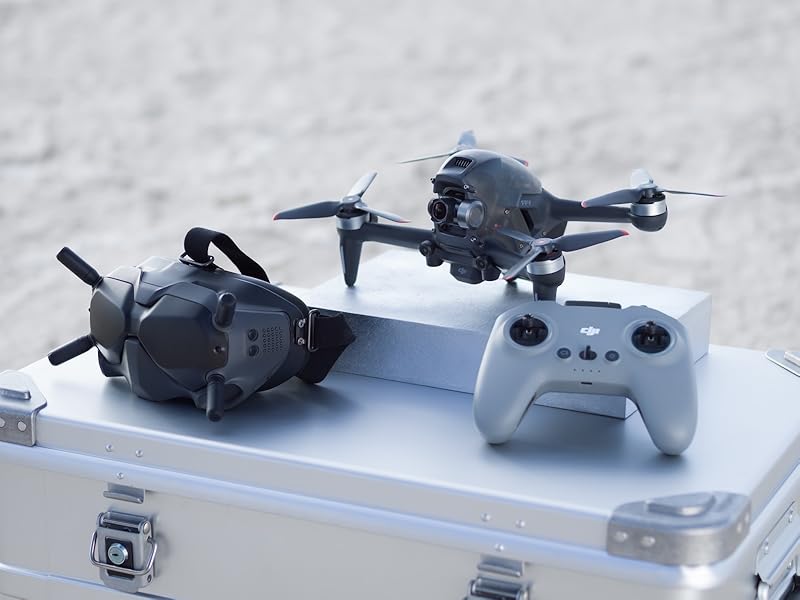
The DJI FPV Combo redefines drone flight with immersive 150° FOV goggles, crystal-clear 4K/60fps video capture, and ultra-responsive HD low-latency transmission. Designed for both beginners and pros, it features multiple flight modes including a hybrid S mode, advanced safety sensors, and FAA Remote ID compliance. Modular parts and the DJI Virtual Flight app make training and maintenance seamless, while Audience Mode lets you share the thrill. Perfect for millennial professionals craving next-level aerial storytelling and adrenaline-fueled creativity.





| ASIN | B08NQD4FBW |
| Age Range (Description) | Adult |
| Age Range Description | Adult |
| Are batteries included? | Yes |
| Battery Cell Composition | Lithium Polymer |
| Best Sellers Rank | #354,802 in Toys & Games ( See Top 100 in Toys & Games ) #1,366 in Hobby RC Quadcopters & Multirotors |
| Brand | DJI |
| Brand Name | DJI |
| Color | Gray |
| Connectivity Technology | USB, Wi-Fi |
| Control Type | Remote Control |
| Customer Reviews | 4.4 out of 5 stars 2,209 Reviews |
| Effective Still Resolution | 12 |
| Included Components | DJI FPV Drone x 1 DJI FPV Intelligent Flight Battery x 1 DJI FPV Propellers (Pair) x 4 DJI FPV Gimbal Protector x 1 DJI FPV Top Shell x 1 DJI FPV Remote Controller 2 x 1 DJI Spare Control Sticks (Pair) DJI FPV Goggles V2 x 1 DJI FPV Goggles Antenna (Dual Band) x 1 DJI FPV Goggles Battery x 1 DJI FPV Goggles Power Cable (USB-C) x 1 DJI FPV Goggles Headband x 1 DJI FPV Goggles Foam Padding x 1 DJI F… |
| Includes Rechargeable Battery | Yes |
| Includes Remote? | Yes |
| Item Dimensions L x W x H | 12.3"L x 10"W x 5"H |
| Item Weight | 295 Grams |
| Manufacturer | DJI |
| Maximum Range | 10 Meters |
| Media Type | USB |
| Model Name | DJI FPV |
| Operating Temperature | 40 Degrees Celsius |
| Optical Sensor Technology | CMOS |
| Remote Control Technology | Wi-Fi |
| Skill Level | All |
| Special Feature | First Person View |
| Special Features | First Person View |
| Supported Image Format | DNG, JPEG |
| UPC | 190021029507 190021029491 190021029545 |
| Video Capture Format | 4K |
| Video Capture Resolution | 4K FHD |
| Warranty Description | DJI Warranty Applies |
| Wireless Communication Technology | Wi-Fi |
M**.
DJI FPV Drone 1st Flight! "Don't let your Ego write checks that your A** can't cash!"
First Flight impressions from a long time Phantom and Mavic pilot of the FPV drone. I've been flying a Phantom since getting a Phantom 2 back in 2014. I've flown extreme environments on the open ocean and from over 10,000 feet at the caldron of a volcano. I've become quite comfortable with using those DJI drones. I've gained trust in the DJI flight software and capabilities of the drones. Because of that, I've been able to capture some beautiful moments in my travels that I could never have imagined without drone photography. I learned to fly manual on toy drones in the beginning, but, quickly adapted to DJI's GPS technology. After 3 batteries today I find the FPV to be a familiar performing DJI drone, however, it demands respect. Extremely fast even in "Normal" mode, the FPV is very responsive compared to any Phantom or Mavic. Care should be taken, if like myself, you've never used Goggles and losing sight of the drone before takeoff is a little disconcerting. Your seeing everything through the Goggles that the drone see's, a'la, First Person View. The Goggles transmission is so crystal clear it's like your using your own eyes and suddenly your wondering why you can't move your head to see the drone? In the air it shoots to 62 mph in "Sport" in a thought. No buildup or lag, it's a Ferrari compared to Phantoms and Mavics. Be respectful of that acceleration and speed. I would recommend getting it a 100 feet or more above the tallest thing you might hit and fly it around. Bank it, dive and climb. The Goggles are so crystal clear you literally feel like a bird in the sky. It's so good some banks and turns gave me a twinge of motion sickness. The illusion of flight is real! Flight time was about 12 minutes for me with each of 3 batteries. Of course, I was flying in "Sport" as fast as it would go untill the battery level got low. There is no 30% warning default like a Phantom or Mavic of low battery. Keep a close eye on your battery before the FPV goes RTH on you for low battery. Good news is that my 1st battery was fully charged in 30 minutes from 20% and ready to use after my third battery was used up. Goggles are very impressive! WoW! So clear and immersive. The Ocusync 3.0 is really good. No interference or latency at over 6000 feet from my position. Really impressive range in any direction. This drone is not a marathon runner like a Mavic Pro or Phantom 4 Pro 2.0, but, it's not because it would lose connection. At all times the transmission of video from the drone to the Goggles was perfect! I saw a buzzard in the air riding the current and I got close, it seemed like it was really next to me. I'm blown away by these FPV Goggles! I also got to see the the ADS system in operation as it alerted me a aircraft was approaching. It's frightening when you 1st see it in your Goggles! I stopped the drone, never saw the aircraft and kept the FPV low. I'm not sure how far away a aircraft has to be before it's triggered but I never saw or heard a plane. The system definitely works, just don't panic when it happens and put your FPV in "Normal" mode and keep your altitude low. I know that FPV drone flight is like a art form for FPV pilots. It takes hours and months of practice and flying to become competent and only a few can fly like Tom Cruise in Top Gun. However, that's the trap you must avoid if like myself, you've only flown Phantoms and Mavics. The DJI FPV drone is familiar in alot of ways, just don't start thinking it's the same. It's not. It's very quick and fast with extremely responsive movement. I know I'm going to be using the DJI Fpv simulator for some time before I begin entertaining thoughts of putting my FPV in manual mode. And when I do, I'm hoping to fly above a field of marshmallows. Finally, my first day flying the DJI FPV drone was Epic! I haven't felt this excited about a drone or as anxious about what would happen since the first time I flew my Phantom 2. It's capabilities as a video centric camera is limited only by the pilots imagination and skill. Just remember the immortal words of the Instructor to Maverick in Top Gun, "Don't let your Ego write checks that your A** can't cash!" (and if you do, I hope you got Care Refresh)
K**A
Outstanding drone for a beginner
I purchased this drone a couple of weeks ago. No issues with shipment. Great little drone for a beginner. I must emphasize that I am a complete beginner and so these are just my thoughts. It's so easy to use I had my kids flying it within 30 minutes. Tips/recommendations 1. Charge all your batteries prior to usage. 2. Firmware updates for Drone and Batteries. Try to do this at home prior to going out and flying cause this could cost you time and battery power. I initially tried to update the firmware and the update kept crashing on me. I had to reboot my iphone a couple of times to get the firmware properly loaded on the drone. It took approximately an hour to download an update. I found the process to be extremely frustrating. Also the intelligent batteries that you purchase will require firmware updates. It only took a minute to do it. 2. I'd recommend buying at least 2 more batteries. Flight time during cold temperatures (35 F and below) goes down to about 10 minutes flight time. Also once the batteries hit 30% it goes into RTH (Return To Home) Mode which I do not like. The drone will ascend and then you have to click on the Cancel option to cancel and fly back which is a little bit annoying. During warmer temperatures (75 F) flight time can go up to approximately 15 minutes. I wish they'd come up with a battery for this drone that would last about 30 minutes that would be awesome. 3. Training Download the DJI Virtual Flight app from the App store (Iphone). I thought the DJI Virtual Flight app was half way decent. It takes you through the motion of connecting the Goggles, Remote Controller and Iphone. You'll need an Iphone "Lightning to USB" Cable to connect the goggles to the Iphone. Managed to connect it to an Iphone 12. I started my flight training in "Normal" mode and there were a couple of things I had to get use to. Namely the angles at which you're flying at. Make sure you keep your head straight while flying otherwise your head will start spinning. I had to really focus on this while training. Train, train, train before you physically fly the drone. Once you're ready to physically fly pick a big open space and just fly the drone without the goggles, just to get use your surroundings. I had my kids fly it this way prior to putting the goggles on. Do some flight pattern training flying in a rectangle, square, S, circle etc and you should be good to go. I wish the DJI Virtual Flight app had some more training tips like how to fly around obstacles and more flight challenges etc. 4. Get a good case for storage. It becomes a bit of a pain to transport. I've been using a card board box. 5. Get micro SD cards for the goggles and the drone. 6. I also purchased DJI care refresh which cost about $212 with tax. So will see if I need it. 7. Incoming Aircraft Sensor - This works great. There were times I did'n't even see the aircraft and the sensor picked it up quite impressive.
R**N
Good drone
Works very well. I was very surprised how fast it is and how good of quality the camera is. Easy to use
M**T
Highly Highly Recommend
I have flown a DJI Phantom 4 many years ago. DJI is by far the best company when it comes to consumer drones. I have been flying other brands lately and was never satisfied. I sat on the fence about the FPV model mostly because of price. I have had a lot of my quads flyaway and took several hundred dollars with it. But I bit the bullet and bought the DJI FPV model a couple of days ago. I cannot tell you how much joy this thing has brought me. I live on a small farm in a larger farming community so there is plenty of room to explore. The signal penetration that this thing has is un·be·liev·a·ble. I can sit in a swing on my back porch, fly around my house and down the back fields with perfect picture in the goggles, no lag or breakup. I fly through the tree's, 3ft off the ground, slolam style. Still, perfect signal. I flew, this morning, through our fields and the neighbors fields, a little over a mile away. Picture perfect video. I only regret not buying this a year ago. 2 modes I recommend, for a beginner, is Normal and Sport. Normal is very beginner friendly. I zip through the trees great with that. Sport will get you to your destination quickly, at around 63mph. If you get close to something, like a limb you see at the last second, just let go of the controls and it will come to a dead stop, i.e. air brakes. A plus imo is the battery charge time. A battery lasts about 15-20 min, and charges in about 20 min. Thats the fastest I have ever seen. I do recommend getting the fly more kit as well. I will be ordering one this weekend, which basically is 2 extra batteries and a charging strip where you can charge 3 in turn. With this you can fly almost non stop. The goggles are digital and they are crystal clear. My first thought was it was like I am sitting in a movie theater. I never recommend much but if you are wanting to get into this sport then bite the bullet and do it. You can thank me later.
G**�
Spent hours trying to fly
It won't even let me take off after spending so many hours trying to get this thing to work. I was expecting to have fun on my birthday but now it's completely ruined while I try to get this thing in the air after all the problems I been going through it says the country code is not updated. Spent so much time charging, updating, and now the error won't let me take off and there doesn't seem to be a fix. After getting it in the air after lots of trouble it had gone through many issues. The headset no longer works properly and one of the button has somehow been pushed in with no way to fix unless you have the special tool to open it up. Purchased care refresh. Basically completely useless as it doesn't cover what I need. It only covers the drone and nothing else. It doesn't even record anymore. It said it has slow transfer speeds yet on my PC I been transferring rates over 100 mb/s. The goggles don't turn on anymore. Only sometimes. Complete disappointment with DJI. Flying in my area is a pain in the ass. Gotta make sure phone is connected and go through many steps to unlock the geo zone. The drone flies fast but that's probably the only good thing about it. Everything else sucks. Noisy and when it takes off its not as stable as the mavic mini. Like I feel like it's about to crash when it lifts off the ground. All I want is for this drone to work but right now it's basically trash. Nothing works the way it should and the updates are so annoying too and basically don't fix anything. Now I'm at a loss of over a grand with a piece of trash that was definitely not worth it at all. I never though I'd hate DJI this much but looks like they just want your money. The goggles sucks too. Nothing compared to a VR headset like Oculus. The latency was fast though compared to other drones and nice video feed for the most part except sometimes the sides of the screen glitches out.
G**.
Entry Level FPV Drone
This UAS is amazing. With 21 satellites the Return to Home (RTH) feature is phenomenal. I have had at minimum 21 satellites in range and from the position the drone launched and where it landed, using the RTH system, it deviated maybe 100mm. I only tested it 3x now. I've only flown a small drone pre-programmed using a Raspberry Pi, so I'm not an expert in manually flying drones, nor do I intend to be an FPV enthusiast. However, out of the box the DJI FPV is extremely user friendly. This is definitely not a "toy." It's designed for those who commit to safety guidelines, FAA regulations, and utilize an attention to detail to prevent operational failures. Please adhere to safety regulations based on your location. Based on the specs this thing should be registered with the FAA and it's your responsibility to get a TRUST certification to pilot this vehicle. These requirements are only for recreational use, so it gets more complicated when you intend to use this for other purposes. The DJI FPV drone is more than capable to perform tasks well beyond what it's expected from your average drone. With a spotter, the range I was able to achieve was 1800 meters at a vertical height of 320 meters from the point of origin. This is not a toy. If you're serious about piloting a drone or training to be a professional in the field, this product is something I'm starting with. The safety features are remarkable. They are definitely not flawless, so don't rely on the tech, you need to do your homework. The engineers, on the other hand, are geniuses. DJI is a quality manufacturer, the product arrived in excellent condition, and the condition of the drone is brand new. Amazon driver was professional and confirmed the delivery by instructing me to provide the security code. Before this Amazon order, I've never spent this amount of money on a product that I ordered, so I was a bit nervous. I'm not so concerned now, since everything worked out as planned. Amazing product and amazing service. The Amazon delivery people do not get enough credit. I wish I knew this person's name, because I would give him 10 stars out of 5. DJI is the way to go.
E**F
Setting up
Was a hassle to set up. I recommend forgetting about the DJI Fly app to update and just use your computer with a direct link (usb C cable) to each device to update. Update before using the DJI VirtualFlight app or else the pairing process most likely won’t work for you. The DJI VirtualFlight app also keeps crashing once you do eventually manage to pair everything so, I’d advise you to run the app without the devices paired and once you open a flight stage begin the pairing process. Before purchasing the drone, download the DJI Fly app to study your area. If you live in a RED restricted zone you cannot fly your drone what so ever, I live right in the corner of one so I have to travel out. Apart from ALL of that, the drone seems durable, one charge lasts ~15min. So if you plan to fly a lot I’d get the extra batteries. The video output from the drone is really clear in the goggles. The controller is comfortable.
C**R
Love it!
The only problem I have is that the software is so finicky on all of the connected devices, including the battery, that there's a reasonable chance for a false-negative when it comes to the drone deciding that the battery is a "non-DJI product" when it definitely is. Of course, it was a battery issue and so I just returned the extra battery and got another. No big deal, but it can happen pretty easily. Always have at least 3 batteries. Also if you own 3 batteries, the only charger that will work for 3 simultaneously is stupid-expensive, meaning you have to charge them one at a time. Some of the setup process brings up instructions in Chinese, which I don't read, but once you get past all of that and you register and get all of the boring stuff out of the way, it's a breeze!
Trustpilot
3 days ago
1 month ago