Buy anything from 5,000+ international stores. One checkout price. No surprise fees. Join 2M+ shoppers on Desertcart.
Desertcart purchases this item on your behalf and handles shipping, customs, and support to Greece.
🎧 Elevate your Xbox audio game—because every sound counts!
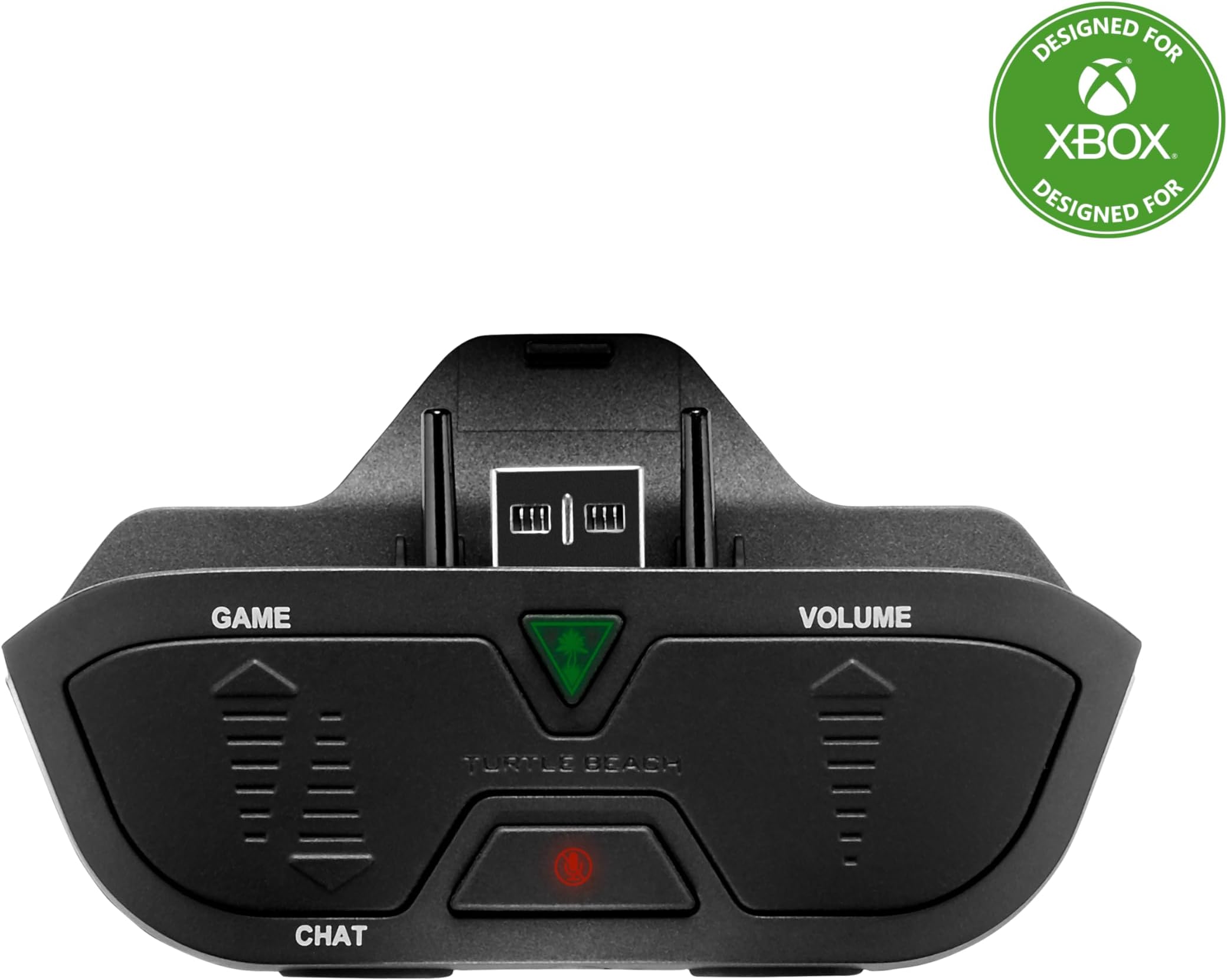
The Turtle Beach Headset Audio Controller Plus is a compact, wired audio accessory designed for Xbox One and Series X|S controllers. It features a 3.5mm headset jack compatible with all official Xbox controllers, including first-generation models. Key highlights include a dedicated Superhuman Hearing mode to amplify subtle in-game sounds, customizable game and mic audio presets, and intuitive volume and mic controls directly on the controller. Lightweight and easy to use, it delivers a competitive edge and enhanced communication for serious gamers.


| ASIN | B00PWRYKDE |
| Additional Features | Wireless |
| Age Range Description | 12 years and up |
| Audio Driver Type | Balanced Armature Driver |
| Best Sellers Rank | #9,899 in Videogames ( See Top 100 in Videogames ) #21 in Xbox One Gaming Headsets |
| Brand | Turtle Beach |
| Built-In Media | Audio Controller |
| Cable Features | Tangle Free |
| Color | Black |
| Compatible Devices | Xbox One |
| Connectivity Technology | Wired |
| Control Method | Touch |
| Control Type | Call Control |
| Customer Reviews | 4.4 4.4 out of 5 stars (15,665) |
| Earpiece Shape | Circumaural |
| Enclosure Material | Plastic, Rubber |
| Global Trade Identification Number | 00731855002856 |
| Headphone Folding Features | Over Ear |
| Headphone Jack | 3.5 mm Jack |
| Headphones Ear Placement | Over Ear |
| Item Weight | 0.06 Pounds |
| Manufacturer | Turtle Beach |
| Model Name | Headset Audio Controller Plus |
| Model Number | TBS-0285-01 |
| Noise Control | None |
| Number of Items | 1 |
| Specific Uses For Product | Gaming |
| Style Name | Single |
| Theme | No Theme |
| UPC | 731855002856 |
| Water Resistance Level | Water Resistant |
M**X
Worth to buy
Better than Xbox official headset audio control
س**.
جميله شغاله
T**S
This little device was the best $50 I have spent recently. The superhuman hearing feature is insane. Adds such an amazing level of depth to the games. Even works when watching YouTube videos. Allows me to have the tv muted while I play which is great as my girlfriend is currently working from home so I can game on my days off and she doesn’t get distracted. Just a fantastic little gadget.
C**O
Es un muy buen producto para los controles que no traían el auxiliar 3.5 o bien si te llega a fallar la entrada. Es súper sencillo de instalar, vale la pena revisar todos los modos de sonido que tiene y escoger el que más se adapta a tu experiencia de juego. Honestamente yo lo deje en el modo normal, ya que al tener instalada la aplicación de Dolby Atmos no necesito más. Lo que si note es que te ayuda a que el volumen de tus audífonos sea más fuerte (ojo no de mayor calidad a la que tienen). El botón para "superhuman hearing" en mi caso lo único que provoca es que el sonido sea bastante malo, no mejora nada. Y sustituye como mixer de party y audio para controlarlo desde ahí mismo, de deshabilita el control de la party de tu Xbox. En general es buen producto, la marca lo dice todo. Sin embargo se me hace caro para lo que realmente hace.
D**R
Simply put, if you want to get the most out of your headset, Turtle Beach or not this is the adaptor you need. Many customisation options provide settings available for different environments whether it be noisy or quiet. You have your standard chat mixer which is the same as the official Microsoft Stereo Adaptor providing different levels of volume and the level of in-game volume vs party chat volume along with your mute button. All works well and the audible beeps help knowing when your at one extreme or the other. However where this product comes into it’s own for me is two particular features which the Microsoft adaptor is lacking - Microphone Monitoring and Microphone Cancelling. I game in a room where my family are often watching TV or talking etc. As headsets these days provide great noise isolation from the outside world for environments like I described above it has become more and more difficult to actually hear what you are saying, something which when we talk is natural to hear. It can be really strange not hearing what you’re saying and generally you will get louder and even shout down your mic so you can hear yourself annoying others around you in the process. Yet the Turtle Beach adaptor has three levels of Mic Monitoring, feeding back what you say in to your headset. It’s crystal clear and is far superior to the in-build Mic Montoring if you was to plug your headset directly in to your controller. To change the settings keep hold of the mute button and you’ll hear the audible beeps from 1 to 3 for different levels of feedback you require. Secondly if your gaming in a noisy environment the standard Microsoft adaptor will easily pick up on external noise regardless if your headset has a noise cancelling microphone. My friends often mentioned they can hear the TV programme my Wife was watching in the background. Now with the Turtle Beach adaptor you can again change the setting to three different levels, 1 being generally the same as the Microsoft adaptor which I never use. 2 being the best all rounder, cuts out the majority of background noise and will only pick up on high pitched noise such as sneezes, alarms etc and 3 where it will practically cuts out 95% of all background noise. I’ll only use that setting when it’s particular noisy in the room for whatever reason as sometimes it cancels noise that well it’ll miss the very beginning of my sentence if I’m too quiet. One plus over other headset adaptor is the ability to have different game modes for the level of sound too. Extra bass, extra treble or both. Whilst it’s great to have the option there the difference isn’t massively different although you can tell. For FPS games the extra bass setting does give deeper and more dramatic explosions and to be honest I leave it in that setting. Another feature the Turtle Beach headset adaptor provides is ‘Super Human Hearing’ which in essence is there to provide greater accuracy in critical in game moments where you really need to hear the direction of an enemy coming towards you for example. To me it’s a bit of a gimmick and all it does is cut bass and increase treble which is quite uncomfortable after a few minutes. I’m still undecided if it does give you any advantage and I rarely use it. Overall for £25 it’s head and shoulders above the standard Microsoft adaptor and provides more features than the only other alternative in the Astro MixAmp. Without a doubt I’d recommend it.
M**N
TL;DR: It's good stuff, works with the XSX just fine, and absolutely worth the money. If you're looking for a headset controller, I recommend this one. I've been using it for a bit over a month now and am completely satisfied. More details: I got tired of sifting through multiple menus to adjust chat balance and volume so I decided to pick up one of these. I was cautiously optimistic since even though the product description and Turtle Beach's web site say it works with the Xbox Series X, there were reports that it doesn't work with the Xbox Series X controller. As it turns out, I didn't need to worry about it. It works flawlessly with both my Xbox One S and Xbox Series X controllers on the Series X. First, I'll say I really had zero interest in the "Superhuman Hearing" feature but I tried it out anyway. It's really just an EQ to boost mid to upper-mid range frequencies (from what I can tell). That kind of thing doesn't really help much for what I play so I haven't used it past the initial test. Similarly, the other EQ presets don't do much for me. The headset I'm using with it is pretty good already so doing things with an EQ isn't really necessary. For what it's worth, they don't sound bad. I just don't need them. Now, the killer app here is the mic monitoring and background noise filters. My headset is a completely over-the-ear thing and lets in very little outside noise so having the mic monitoring helps a lot with talking at the right volume, and it's very clean sounding. There aren't many downsides to this but there could be a couple of small improvements: It can sometimes be hard to adjust the chat / game mix and volume without looking down at the controller due to the stiffness of the buttons and how you have to press in relatively specific locations to activate them. This is really only a tiny nitpick and it's still worlds better than digging through menus on-screen. I also expect that with time, the buttons will soften up a little and muscle memory will kick in, making it easier. The other thing is I wish the mute button light stayed on solid. As it is, when you activate the mute button, its red light slowly fades in and out. A couple of times I've muted myself and forgot about it because when I looked down to pick up the controller, the light was off. Again, this is a really tiny thing and not enough to dock points for.
Trustpilot
2 weeks ago
3 weeks ago