❄️ Build Bold, Cool Confidently.
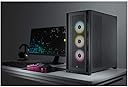
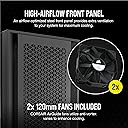
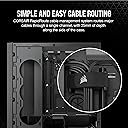
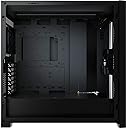
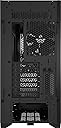
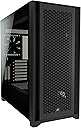
The Corsair 5000D Airflow is a premium mid-tower ATX PC case designed for enthusiasts who demand superior cooling and immaculate cable management. Featuring a high-airflow steel front panel, RapidRoute cable system, and versatile fan/radiator mounting options, it combines functionality with sleek tempered glass aesthetics to elevate any build.


| ASIN | B08M49WW51 |
| Antenna Location | Home Needs |
| Best Sellers Rank | #618 in Computer Cases |
| Brand | Corsair |
| Built-In Media | 2021-01-14T00:00:00.000Z |
| Case Type | Mid Tower |
| Color | Black |
| Compatible Devices | ATX motherboards, ATX power supplies, 3.5" and 2.5" storage drives, PCIe expansion cards, and air or liquid cooling systems with compatible sizes. |
| Cooling Method | Fan/Liquid Cooler |
| Customer Reviews | 4.8 out of 5 stars 5,852 Reviews |
| Enclosure Material | Tempered Glass |
| Fan Size | 12 centimeters |
| Global Trade Identification Number | 00840006627470 |
| Hard Disk Form Factor | 3.5 inches |
| Internal Bays Quantity | 6 |
| Item Dimensions D x W x H | 20.47"D x 9.65"W x 20.47"H |
| Item Type Name | Corsair |
| Item Weight | 10.5 kg |
| Light Color | black |
| Manufacturer | Corsair |
| Material | Tempered Glass |
| Mfr Part Number | CC-9011210-WW |
| Model Name | 5000D Airflow Computer Case |
| Model Number | 5000D Airflow |
| Motherboard Compatability | ATX |
| Number of Fans | 2 |
| Number of Items | 1 |
| Other Special Features of the Product | Corsair RapidRoute Cable Management System |
| Power Supply Mounting Type | Bottom Mount |
| Recommended Uses For Product | Home Needs |
| Supported Motherboard | ATX |
| Total Expansion Slots Quantity | 7 |
| Total USB 2.0 Ports | 2 |
| Total USB 3.0 Ports | 2 |
| Total Usb Ports | 1 |
| UPC | 840006627470 |
| Unit Count | 1 Count |
| Warranty Description | 2 year manufacturer |
P**Y
A perfect BEAST.
Airflow is the word here. It's obviously the focus of this very capable case. If you want maximum fresh air - this is the case. Six intake fans. Four exhaust. The readings speak for themselves. I have a Ryzen 9 5900x that is supposed to stay below 90C. I have yet to see it go above 65. I have a great CPU cooler in the Noctua NH-D15 as well. That is the bottom line. You can keep reading about this build, and what I put in it and why, but you don't need that info to know this is a quality, SOLID case with many options, and lots of attention to detail. Go online and watch ANY review of this case and you can see the accolades from people who evaluate this stuff all day, every day. This is a popular case for a reason. It's a good one. You'll read below about my inexperience with this kind of case and build, yet I had no issues just putting the whole thing together intuitively. The cable management compartment is real nice. You can be neat as you want to, wires showing are wires showing. This case makes it real.easy to hide everything. The single drawback to this case? (If you 2ant to call it that...) It's HUGE. It's just.... Big as hell, and I can't find a piece of furniture made for PC cases that will fit it. It's sitting on the desk right now, while I decide how to deal with this. Make sure you want all this case. It's BIG. 20"X20"X9.5". The rest of this beast is centered around an EVGA RTX 3080 FTW3 10GB, and 64GB 3600MHz, and a Samsung M.2 980 Pro Gen4. The whole package smokes. There are a couple monitors hooked to it now, and I'll buy a proper gaming monitor soon. It will also be used for VR stuff. This is my first gaming rig build. I am an audio guy. I've built many high powered PCs in the past (though it's been a couple years since I have built one for my own house, from scratch,) but nothing like this. The biggest concern I've ever had for graphics is being able to run dual monitors for recording studio software. Memory, processing power and tons of storage is the name of the game in audio PCs. The audio gear that interfaces with those is all outboard, and typically can move from one PC to an upgraded one no problem. The case made this easy. A whole bunch of modern parts I'd never used or installed wasn't an issue or hard. No crazy compromising or going without something I wanted. The case is huge and fits a LOT. This is a whole different thing. I've never built a PC with a case window, lights, or this many fans. I've never had such an insane CPU cooler, or one of these 'second cpu' Graphics Card monstrosities. And I've never had my own machine with an M.2 drive. Oh. And this isn't REALLY for me. It's for my 13 year old son. He is into animation and gaming in these (sandbox?), Minecraft / Roblox user created worlds and characters. The rig he was using was an i3 with a 4GB GPU. Worthless. He is now blown away and I can't keep him off it.. I got the white case and some other white elements, like the side intake fans have white LED rings, and the MOBO has some white and silver elements. I also did one "mod." (Picture/ Video) I put in two chunky, round, white led lights in the case and wired them to the power and HDD LED connections on the MOBO. It's a cool effect. There's lots of room for lights or any other stuff you want to put in for decor.
K**N
A case with plenty of space for any modern gaming build
Didn't add a photo as it's late at night when writing this review and honestly, the pictures that showcase the product to a good job at showing the most important aspects to it. To make this the easiest to digest, I'll make a pros and cons list really quickly & expand more at the bottom if needed. Pros : This case is EXTREMELY spacious compared to its little brother the 4000D. Prior to getting this case when I was cross-checking specs for GPU clearance among other things, the 5000D just made the most sense when you consider how massive partner cards are getting & the multitude of ways a person can set their airflow up. Having not only the front panel, but also the side panel directly next to it for a total of 6 intake fans if you're wild enough, with plenty of room at the top of the case for either a radiator or rear exhaust to compliment the back exhaust fan. Plenty of cable ties, so many I'd be shocked if any person in the world uses the amount Corsair supplies, but better to have them and not need them than need them & not have them. A PSU end-panel shroud & side panel shroud (side panel shroud in the case you're not planning on having fans mounted to the side panel) to make things look very well cable managed & hides any not-so-great cable management as well. Easy to remove hard drive bays for more PSU cable space. Included 90 degree USB 3 header which was an unexpected but very much appreciated inclusion. Ease of access to every panel & dust filter throughout the entirety of the case. Overall a very good for future proofing case (although we don't like to say future proof in the tech world, this case seems to be a safe bet). All in all, if you install some really high quality fans in here, you're basically guaranteed some very acceptable temperatures from your hardware as this case when setup up accordingly MOVES AIR. Cons - The rubber grommets that you use to manage your cables through one side of the case to the other are not the best quality. If you're planning of forcing that 24 pin mobo connector through the rubber grommet, keep this in mind. If gentle and not too forceful (unlike I was) then you'll have no issues. I on the other hand, managed to someone apply enough for the outright remove whatever adhesive was keeping the grommet bonded to the metal case. Now I have to be extra careful in the future when re-cable managing, but I'll take that as a my fault for being to rough I suppose. Just assumed in a $150+ case that important areas like that would be a bit stronger given how stiff PSU cables are from any given PSU supplier. Another con I feel the need to mention, albeit a small one, was completely mis-aligned magnets on the cases top dust filter. The magnets on one side are purposely offset as to allow radiator fan clearance among other great reasons, but mine for whatever reason was already peeling off and crooked... had to fix & make sure the adhesive re-stuck itself. Size may be a con to some, as this case is a big boy... definitely a full size ATX in every sense of the word. Last con I feel is worth mentioning as this may make or break what color a person chooses for their build (white or black case), keep in mind the black case does in fact come with a SMOKED glass side panel, unlike the white version of this case. It's not horrendously dark, if you have components with RGB on them you're 100% be able to see them, but nevertheless the side panel is for sure a darker, more smoked look when compared to the white version. All in all I see this case lasting me many years to come, & with many different builds as time goes along. I highly recommend if you're looking for a standard ATX case that's capable of push tons & tons of airflow, while still having adequate space and dust filters. 8.5/10 rating.
T**E
Quality case
First and foremost, the airflow design lives up to its name, providing excellent ventilation for your components. The inclusion of three high-quality AirGuide fans and the option for additional cooling solutions ensures that your system remains cool even during intense gaming sessions or demanding tasks. The case's build quality is impressive, with a sturdy steel construction that not only provides durability but also minimizes vibrations and noise. The tool-free design makes installation a breeze, and the spacious interior offers plenty of room for large graphics cards, multiple storage drives, and effective cable management. One of the standout features is the attention to detail in cable management. The 5000D Airflow comes with a generous amount of tie-down points and ample space behind the motherboard tray, allowing for a clean and organized build. This not only enhances the aesthetics but also improves overall airflow.
E**L
Excellent Case
A great case with lots of room and configuration options. The only issues I have is that it only comes with two fans. That's less money wasted on fans when you swap them out for some nice LED fans, but why include any at all? I doubt many people will use this case with the two stock fans. Another issue is the lack of room around the power supply. If you use the hard drive cage you will have to plug the cables into the power supply before mounting it and then squeeze the HDD cage in. The cage locks into the floor of the case and uses two screws to secure it, but with the power supply and cables in place, you will never reach the one in back. Luckily one is enough. The only other thing I can think of is the clips that hold the side panels on. When the case is empty it is kind of hard to pull the side panels off all at once. Usually you end up popping one clip, then the other, which puts a slight twist on the panel. With the tempered glass on the one side, this makes me a bit nervous, especially with so many complaints about broken glass panels. Once it's built and there is weight in the case, it's not so bad as the case will sit still while you pull evenly on the panel to pop it loose. It would be better if the sides were hinged, but you would have to step up to the 7000D, and I really don't need that much room as I am not doing a custom loop. Other than those issues, it's a great case. Plenty of airflow, lots of options and it's a solid, well built case. It just feels quality. All the air vents have filters except for the rear and if you run the full 10 fans this case is capable of, you can get a nice, quiet, positive pressure system. I added 7 White Corsair ML120 RGB Elite fans and run the 6 in the front at a lower speed to keep them quieter while the one in the back and the 3 in the Corsair iCUE H150i Elite Capellix AIO run a little faster. Seems to do the trick for a quiet case that cools very well unless I am testing and pushing the system to the maximum. But overall I highly recommend this case.
E**Z
Am absolute beauty & easy to build in
I'll start off with the little nit-picky stuff. First off, removing the side intake cover is a bit ridiculous. You have to remove the entire side intake mount which is a process in itself, then unscrew more screws that are holding the cover in place, slide up, & pull out. Do this BEFORE you place anything inside if you plan on removing it. If you have a bigger GPU (mine's a 1080TI & ik newer ones are way bigger) then you're gonna have a hard time either removing or replacing it while the GPU is mounted. Might wanna consider removing the side cover anyway to plug in the 24 pin MOBO cable as the cover sort of obstructs the grommet from which that cable will pass through. Easier to connect it then put the cover back on than it is to try & shimmy the cable through the thin slot. Now onto the good. AIRFLOW. Seriously. This is not a new build for me. Same parts from a different case, I just transfered everything into this one & not only is it WAY prettier than my old case (Corsair 760T), but my Temps have dropped 10°C with a lower fan curve. My old case was not a jet engine by any means, but it was audible. This? Whisper quiet. Literally nothing obstructing any airflow. Aside from the finicky side intake cover, everything else is super easy. Got your PSU shroud to stuff cables, a ton of cable velcro straps, cable rails to better manage them, & adequate storage for SSDs & any extra controllers you may have. I have 2 corsair commanders in the back along with 2 SSDs & also sleeve extensions & even with all that extra stuff, I wasn't fighting to get the side panel closed. I cannot think of a single reason not to buy this. Extremely happy with this purchase & was definitely worth every penny.
C**M
Not Perfect, but Very Good
This is my experience setting up an air-cooled system... Pros: - Great build quality. No scratches or manufacture defects to speak of. Steel parts feel super solid and well made. - A box that looks good! It's a simple design but details such as the triangle slotted grills and indented front and top sections are enough to make this more than a box. - Corsair's cable straps are genius. No nonsense and super easy to use. - Smart cable management out of the box. Other than having to move a fan cable around, everything else is well placed. - Added fan controller. A 6-slot PWM fan controller is included and connects to one of your motherboard's fan inputs. Cons: - Glass panel tint is very dark. I can't make out any details with the glass panel on. If I was running RGB I might feel different. - More clearance needed around the metal cable shroud. I ended up removing it after noticing how much stress it was putting on the 24-pin ATX connector. A cut-out in the panel or inclusion of a right-angle adapter would have been nice. - Moving the HDD caddy and corresponding plastic shroud is a pain. The screws are only accessible from the inside of the case. Other parts of the case get in the way of using a traditional screwdriver. So I had to make a quick run to the store to get some right angle tools. The move would have been to make them accessible from the outside bottom. - Only 2 fans included. This is barely passable with how hot today's CPUs run. Wasn't personally a big deal for me because I always swap out the stock fans and add more. But someone who's on a budget will find this annoying. - Not a-lot of clearance between the cable cover door and motherboard tray. You have to be on-top of your cable management to get everything to fit for that door to shut. It's not a part I see so I removed it, without it you got plenty of space to work with. Overall I really do like this case. Just wish it was a little easier to work in and a little roomier for cabling.
D**X
Cable space is slightly limiting
I overall like the case. It's the first modern design case I've installed in. My previous case was a Thermaltake Core X9 -- An absolutely oversized monster of a case. I hated messing with it, it was too wide for me to carry through a doorway without theatrics. Enter this case. I can move my foldout table/desk a bit and slide this out to get to my workbench in the other room. I'll go into like/dislike now. followed by my overall thoughts. Like: The glass side really gives a good look into what is going on in my box. I'm fully RGB kitted, but I pretty much run everything in red right now, I just like options. I have that Corsair Elite RGB 360 setup on my CPU, I was running a big honking Noctua block on it. I also like to sleep and a disco bedroom is not conducive to that. The airflow is great. There are filters all over the box even though it may not be apparent in the pictures. The front panel is pretty modern, but is designed for midranged boards that may not have two usb 3 internal headers, hence no front panel 4 usb, although I'm glad they didn't put usb 2 in the front panel because a lot of interal peripherals use usb2.0 headers: My power supply (Thermaltake iRGB) and the case itself (fan/rgb hub) use the USB 2.0 slots on my board and that is every last one of them. Dislike: The cable routing in the back is actually decent. The problem is that they did not give enough room (likely measured in mm) for the power supply cables to be routed without undue stress on them or their plugs. This is a massive no in my book and can lead to your power supply cables making a "shearing" contact to your main power bus. That increases the power needed to get to achieve a given wattage and will eat up your power supply's life. I bought some extensions that alleviated this issue on my build and I highly suggest you do the same if this is the case you just have to have. I also had issues with pressing my power supply into the case. The cables didn't want to go in without undue stress. That was fixed with cable extenders, but you should expect strain if you don't buy extenders, I don't recommend that and it means moar $$$. I had to remove the back "door" on the case because of power supply cables. Why even add that? It's not visible and adds nothing that I can see. Overall: Very happy with the case. I had the resources and the know-how to make it work for me. Take my recommendations in mind and it will work for you too. I would have gotten the 7000D if I had the space but my computer is on the floor under a wire rack and there is no more vertical space for it.
F**A
You won't waste your money.
One of the standout features of the Corsair 5000D is its exceptional airflow design. The front panel features a large mesh surface that allows for unrestricted airflow, keeping my components cool even during intensive gaming sessions. With ample room for additional fans or liquid cooling options, this case excels in thermal performance. The black variant of this case exudes elegance and sophistication. The tempered glass side panel showcases the internal components beautifully, allowing for a clean and organized build. The cable management system is well thought out, keeping the interior clutter-free and enhancing the overall aesthetics. The mid-tower design strikes a perfect balance between size and versatility. It offers ample space for high-end components, including large graphics cards and multiple storage drives. I appreciate the tool-free drive installation, which makes setup a breeze. Additionally, the modular design of the case allows for customization and reconfiguration to suit different build requirements. Corsair has clearly put thought into the assembly process. The case comes with clear and concise instructions, making it easy for both beginners and experienced builders. The well-placed cable routing holes and ample space behind the motherboard tray make cable management a straightforward task. Despite its impressive airflow, the Corsair 5000D also offers a degree of noise reduction. The included high-density sound-dampening material on the side panels helps to muffle internal sound, providing a quieter computing experience. Very good tower, perfect for your computer. I highly recommend it.
A**S
Almost the perfect case.
The 5000D Airflow. I don't think I've ever worked with such a great case in all my years. Honestly this case is full of good ideas and good execution, from dust filters to fan mounting to rad support. I squeezed a thicc 360 Corsair XR7 into the front a 240 XR5 up top and this thing runs cool as ice even when my 3080 is pushing 400W and my 10600K is flying high at 125W. Excellent cable runs in behind and plenty of depth behind the panel make this a dream for cable management. Lots of room to expand, even vertical GPU mounting is possible. If I had to have a gripe or two.... Maybe a fan splitter would be a nice addition, and some more space up top. I really wanted to mount another 360 rad up top, but I just couldn't squeeze it in. If the top was maybe a half inch higher and the case a half inch longer it would fit two XR7s. Also the included Corsair fans are garbage like usual. I swapped them out for some grey Noctuas up top and Cooler Master RGB Sickleflows in the front. Otherwise this case is brilliant. The glass is gorgeous, the paint is good quality, the plastics are slick. Good job Corsair, you earned my money this time.
A**Z
Tour incroyable
Le boîtier est magnifique classe et bien ventilé
S**N
best airflow cabinet ever
good for high end setup, big size, colourful, everything is perfect.
G**.
Great Airflow Case
The appearance is okay. With good RGB you can make it work. What makes this case great is the amount of air it can allow you to push into and out of the PC. My CPU temps sit at 31-32 when idle with light browsing. 50 max when playing Death Stranding at top settings. The GPU also maxes out at around 50 degrees. The noise levels are also low because of that. The fans rarely need to hit max; in fact, I’ve seen my GPU fans dead most of the time. The whole case feels cold to touch. So if you are getting it at around 11-12k, and you want a cool rig, go for it.
W**D
رائع
منتج رائع
Trustpilot
3 days ago
1 week ago