Buy anything from 5,000+ international stores. One checkout price. No surprise fees. Join 2M+ shoppers on Desertcart.
Desertcart purchases this item on your behalf and handles shipping, customs, and support to Greece.
๐ Dock to the Future: Elevate Your Surface Experience!
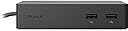
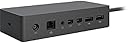
The Microsoft Surface Dock (Pd9-00003) is a versatile docking station designed for Surface devices, featuring multiple connectivity options including 2 Mini Display Ports, 4 USB 3.0 ports, and a Gigabit Ethernet port. It allows users to transform their Surface into a desktop PC effortlessly, ensuring high-speed data transfer and reliable network access.


| ASIN | B0163HP38W |
| Best Sellers Rank | #75,042 in Computers ( See Top 100 in Computers ) #435 in Laptop Docking Stations |
| Brand | Microsoft |
| Color | Black |
| Compatible Devices | Microsoft Surface Pro 3 |
| Customer Reviews | 4.5 4.5 out of 5 stars (4,278) |
| Global Trade Identification Number | 00885370996340 |
| Hardware Interface | Ethernet |
| Item Dimensions L x W x H | 13L x 3W x 6H centimeters |
| Item Weight | 2.64 Pounds |
| Manufacturer | Microsoft |
| Mfr Part Number | PD9-00003 |
| Model Number | PD9-00003 |
| Number of Ports | 4 |
| Smart Home Compatibility | Not Smart Home Compatible |
| Total Number of HDMI Ports | 2 |
| Total Usb Ports | 4 |
| UPC | 885370996340 |
| Unit Count | 1 Count |
K**D
Works perfectly! no need for a bulky computer taking up desk space, nice weight to it so in the event of an office riot would make an excellent defensive weapon
D**S
The Surface Dock is awesome. I use a desktop with 4 monitors as my main computer so when I travel with my Microsoft Surface on a project that requires me to run multiple applications I ask the production company for extra monitors. In the past I would use different cables and adapters to drive them but end up with a mess of cables and adapters. The Surface Dock eliminates the adapters and makes it so easy to reconnect every day when returning to the venue. The dock has itโs own power supply so that allows you to keep your Surface power supply packed up in your bag in case you need it back at your hotel. I would prefer if it was lighter as it is quite heavy to make it not slide around on your desk. While the price is high it will work with the newest Surface computers so hopefully will continue to be useful for many years.
A**H
Llego en tiempo y forma
M**G
First off, whew! I was so wary of getting the dock because of all the issues but I'm happy to say its working superbly and has improved by workflow. VGA monitor users? Read on! My setup: Surface Pro 4 connected to 2 Dell (kinda really oldish) monitors via miniDP to VGA. That's right, VGA (outstanding un-retina display of 1440x900) :) . I'm not aware of any "active" miniDP to VGA connectors so I am assuming my cables are passive, plus I got them dirt cheap anyway. I think I could also connect to a 3rd monitor via the Surface (or via WIDI) but that's an adventure for another day. I'm able to connect without issues, takes at most 2 seconds to recognize the two external monitors. Coming from sleep isn't an issue as well. The Ethernet is ok, as is all the ports (I have a mouse connected, as well as headset, and another cable that goes through the monitors (I forgot what its called but it powers up the monitor's USB so now I have so many free USB ports, almost a dozen!). I'm now able to move my surface around my desk (cos I write a lot via OneNote and Plumbago) and do tablet-y things, while still retaining my desktop workflow. Only issue I've encountered so far is that Windows 10 sometimes jumbles my apps around the screens after resuming from lock ex it puts my mail app in the 3rd screen, whereas I had it set to show on the 2nd screen. Very minor and more of an OS issue. Design wise I am wondering my the dock's cable connector is on its left side since the Surface Pro's power connector is on the right. That means the cable would need to cross over especially if you've got the dock right in the center of your two monitor setup. Weird. Thought about flipping the dock upside down so the cable is on the right side but only the bottom part has the grip (and protective matting). Also the cable from the dock to the surface is too short for my taste. I'd like to be able to move around my surface pro a bit further away from the dock, maybe a good 4-5 feet away, but understandably that might be asking for too much. The video that goes along with the review shows 3 videos simultaneously playing without a hitch (2 monitors + 1 Surface). Only thing is I had to play each video via different players (VLC, Windows Media and Movies & TV). :) Also note that in the video I had one of the cables connected to the surface itself as I was too excited to notice, but rest assured the dock outputs perfectly fine in 2 monitors. No refresh rate issues at all.
I**U
ใใใใใช็ฉใใใใญใณใฐๅบๆฅ้ๅฎใใใ
Trustpilot
3 weeks ago
1 week ago