Desertcart purchases this item on your behalf and handles shipping, customs, and support to Greece.
🚀 Elevate your workspace with wireless freedom that keeps you ahead of the curve!
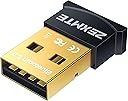
The ZEXMTE USB Bluetooth Adapter 6.0 is a cutting-edge, plug-and-play dongle designed for Windows PCs, delivering ultra-low latency, enhanced data rates, and a robust 30-meter wireless range. Compatible with multiple Bluetooth devices simultaneously, its compact design ensures seamless integration without blocking USB ports, making it an essential upgrade for professionals seeking reliable, high-performance wireless connectivity.
| Asin | B0775YF36R |
| Best Sellers Rank | 137,952 in Computers & Accessories (See Top 100 in Computers & Accessories) 543 in Bluetooth Network Adapters |
| Brand Name | ZEXMTE |
| Color | black |
| Compatible Devices | Most Bluetooth-enabled devices |
| Compatible Operating System Family | Windows |
| Country Of Origin | China |
| Customer Reviews | 4.2 4.2 out of 5 stars (18,261) 4.2 out of 5 stars |
| Data Link Protocol | Bluetooth |
| Data Transfer Rate | 3 Megabits Per Second |
| Hardware Interface | USB |
| Item Dimensions L X W X H | 15.2L x 6.1W x 15.2H centimetres |
| Manufacturer | ZEXMTE |
| Manufacturer Part Number | 0054 |
| Minimum Required Operating System Version | Windows 7 |
| Model Number | 0054 |
| Number Of Items | 1 |
| Number Of Packs | 1 |
| Unit Count | 1.0 count |
| Upc | 785004244130 633322767254 |
User
Easy just plug and play with Windows 10.
OK after seeing the mixed reviews of pretty much all of the USB Bluetooth receivers I happen to look at the recommended ones of 2021 and this was 2nd on the list.Right I am running windows 10 x64 Pro and I plugged the receiver in and windows instantly recognised it..... But when I tried to add a device my PC reset itself, not a good start I thought to myself. Anyway I tried again and went to add a device, namely a dualsense controller and it connected instantly with no PC reset.I have been playing for about an hour and I have had no problems, the response time is very good and other than the reset issue I have no complaints at all.
User
Plug and play, easy peasy.
Was a bit worried with the reviews here but I've been very impressed both with Amazon logistics (same day delivery), cheap price and works perfectly for a tiny little thing that hardly takes up any space. Just plugged it in and hey presto, my desktop now has bluetooth capabilities. Typing via my bluetooth mechanical keyboard which I'm using right now and there is no lag whatsoever. Was really easy to set up, didn't have to download any drivers, took less than 10 seconds to set up. I am a Windows 10 user, which is what I imagine the vast majority of people are.
User
Ok
Ok
User
Bluetooth Adapter
A little sceptical at first ordering reading some conflicting reviews but do you know what??? It really does what it says on the tin... Ive a windows 11 pc tower and so far the dongle has helped with headphones and gaming controllers with ease... The range seems very good as well, I can leave the living room and go somewhere else on the house and still not loose signal on my headphones.......... If this is what your looking for grab one you'll not be sorry!
User
This will likely crash your laptop
All around bad experience. Search results recommend this USB Bluetooth adaptor yet from beginning to end this product is very low quality.Installation took 30 minutes. This because it doesn't state a step by step guide on either the package or installation disk. After final installation, it detected none of my Bluetooth devices. The website help page effectively states that if it doesn't work then it's down to your computer. After restarting the laptop, the is a very long delay during the boot process and you risk crashing your computer. I can say as an experienced computer user - DON'T BUY THIS DEVICE!
User
Perfect price
Works well did the job I needed
User
It works
It is very good. It works. A great value for price also. If you want to get 1 get it. You wont be sorry
User
Problem likely as not Microsoft
Got this specifically for my old Windows 7 computer. Liked that it came with a mini-CD for the Win 7 driver which precluded the quicksand of trying find the right download. And it did install and achieve semi-functionality - by which I mean I managed to transfer some photos from my phone, but with a lack of any indication that the transfer was happening until a discreet little massage appeared bottom right of screen telling me it was all done. Then tried to pair with bluetooth mouse - which showed up in Device Manager but didn't work, then disappeared entirely. Decided to try uninstalling the driver and re-installing. This time it refused to install, and carried on refusing till I gave up. It probably works fine on Windows 10. And there is Microsoft mention on the net of this sort of problem with bluetooth and Windows 7. They say there's a fix but it 'may' need more testing - i.e. it might work but it'll screw up eight other things on your computer. Can't understand why people aren't walking round in teeshirts emblazoned with things 'Just Stop Microsoft' and 'Say No to Windows 11'. Anyway, I probably won't return this, as little firms like ZEXMTE are as much Microsoft's stool pigeons as we are.
User
Funciona
Funciona incluso después de 3 años con uso ocasional....
User
Good product
Quick connection ,but price is high .
User
Compatibile con Linux Mint 20
Perfettamente compatibile con Linux Mint 20, una volta avviato il sistema basta inserire la chiavetta e da menu (l’equivalente dello start in Windows) basta cercare Bluetooth. Una volta fatto, in basso a destra compare l’icona del bluetooth e, dal prossimo avvio, il bluetooth si avvierà automaticamente.
User
Super dongle mais...
Acheter pour remplacer le récepteur Bluetooth de ma carte mère Asus b550 qui captais très mal, déconnexion de manette, enceinte ect ect...Avec ce dongle, tout fonctionne parfaitement et de concert sans déconnexion ni grésillement. Néanmoins un peu difficile a installer, heureusement qu'un autre acheteur explique comment faire...- il faut désactiver manuellement dans le gestionnaire de périphérique tout autre récepteur Bluetooth (mon ordi a un Bluetooth 4 intégré), sans quoi les pilotes ne s'installeront pasUn fois ceci fait, redémarré votre ordi et tous fonctionne.Enjoy
User
Simple Way to Add Bluetooth to an Older PC
I purchased this USB Bluetooth adapter because I needed to add Bluetooth capability to a desktop computer that didn’t have it built in. Rather than replacing hardware or opening up the computer to install an internal card, this little USB dongle was a much easier solution.Setup was straightforward on my Windows computer. Once connected and recognized, I was able to pair Bluetooth devices without much trouble. I’ve used it for things like a wireless mouse, keyboard, headphones, and speakers, and the connections have been reliable for normal everyday use.I especially like how small the adapter is. It barely sticks out of the USB port, so I can leave it connected without it getting in the way. For a laptop, that also means you don’t have a large adapter hanging off the side when moving it around.Connection range and performance have been good for my needs, although, like any Bluetooth device, walls, distance, and interference can affect performance. For devices being used in the same room as the computer, I’ve had good results.Overall, this is an inexpensive and convenient way to add Bluetooth connectivity to a compatible Windows PC. It’s compact, easy to use, and saved me from making a more complicated hardware upgrade. I’ve been pleased with it and would purchase it again.
Trustpilot
3 weeks ago
3 weeks ago